
소개
The Pure Siesta S6 is a sophisticated DAB/DAB+ and FM alarm clock radio designed to enhance your bedside experience. It features a large, ultra-clear CrystalVue display, impressive audio quality via Bluetooth, and a convenient USB port for charging your devices. This manual provides comprehensive instructions for setting up, operating, and maintaining your Siesta S6.
주요 특징
- 무선 오디오 스트리밍: Use Siesta S6 as a wireless speaker to stream audio content from your smartphone, laptop, or tablet via Bluetooth.
- CrystalVue+ Display: Large, ultra-clear display for optimal readability, with adaptive brightness.
- Siesta Timer: Program a short nap with a single button press.
- Integrated USB Power Port: Keep your phone, tablet, or other devices fully charged by connecting them to the built-in USB port.
- DAB/DAB+ 및 FM 라디오: 다양한 디지털 및 아날로그 라디오 방송국을 청취할 수 있습니다.
- 다중 알람: Set up to three independent alarms with customizable days, sources (tone, last station, preset), and volume.
설치 가이드
Follow these steps to set up your Pure Siesta S6 for the first time.
- 장치 포장 풀기: Carefully remove the Siesta S6 from its packaging.
- 전원 연결: Insert the supplied mains adapter into the DC IN port on the back of the unit. Plug the adapter into a wall outlet.
- 안테나 위치: Uncoil the wire antenna fully for optimal DAB/DAB+ and FM reception. Position it away from other electronic devices.
- 초기 스캔: Upon first power-up, the Siesta S6 will automatically scan for available DAB/DAB+ radio stations and set the clock. This process may take a few minutes.
- Adjust Display Brightness (Optional): The display brightness adjusts automatically. If desired, you can manually adjust this setting via the "Menu" section.

이미지: 후면 view of the Siesta S6, highlighting the USB charging port and the power input.

이미지: 각진 앞면 view of the Pure Siesta S6, displaying the time and alarm indicators.
작동 지침
This section details the various functions and controls of your Siesta S6.
컨트롤 오버view
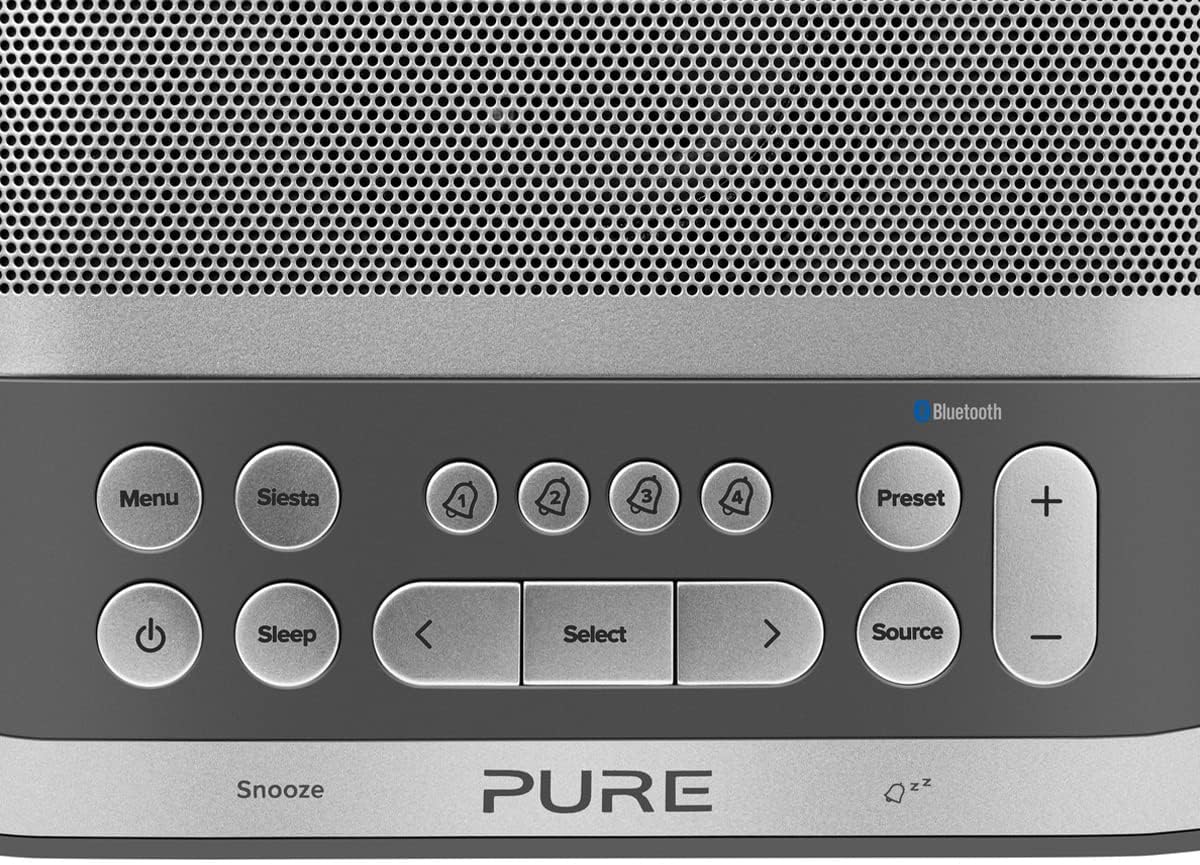
Image: Close-up of the top panel buttons, including Menu, Siesta, Alarm 1-4, Preset, Volume, Power, Sleep, Source, and Navigation buttons.
- 전원 버튼 (●): 기기를 켜거나 끄려면 누르세요.
- 메뉴 버튼: 시스템 설정 및 옵션에 액세스하세요.
- Siesta Button: Activates the Siesta timer for short naps.
- Alarm Buttons (1, 2, 3, 4): Press to activate/deactivate or configure individual alarms.
- 사전 설정 버튼: Save and recall your favorite radio stations.
- 볼륨(+/-) 버튼: 오디오 볼륨을 조절합니다.
- 수면 버튼: Set a sleep timer for the radio to turn off automatically.
- 소스 버튼 : DAB, FM, 블루투스 모드를 전환합니다.
- 탐색 버튼(< Select >): 메뉴를 탐색하고 옵션을 선택하세요.
- Snooze Bar: Press to temporarily silence an active alarm.
Radio Operation (DAB/DAB+ and FM)
- 모드 선택: 를 누르세요 원천 button to cycle between DAB and FM radio modes.
- 튜닝 스테이션:
- 소량: DAB 모드에서는 다음을 사용하십시오. < 그리고 > buttons to browse available stations. Press 선택하다 방송국에 맞추다.
- FM: FM 모드에서 선택하다 to auto-scan for the next available station. Use < 그리고 > 미세 조정을 위해서.
- 사전 설정 저장: 방송국을 저장하려면 버튼을 길게 누르세요. 사전 설정 단추. 사용하다 < 그리고 > to choose a preset number, then press 선택하다 확인합니다.
- 프리셋 불러오기: 짧게 누르세요 사전 설정 단추. 사용하다 < 그리고 > to select a preset, then press 선택하다.
Bluetooth Pairing and Streaming
- 블루투스 모드 진입: 를 누르세요 원천 button until "Bluetooth" is displayed. The Siesta S6 will enter pairing mode, indicated by a flashing Bluetooth icon.
- 장치를 페어링하십시오: On your smartphone, tablet, or computer, enable Bluetooth and search for "Pure Siesta S6" in the list of available devices. Select it to pair.
- 스트리밍 시작: Once paired, you can play audio from your device, and it will stream wirelessly to the Siesta S6.
알람 설정

Image: A hand interacting with the top controls of the Siesta S6, demonstrating alarm setting.
- 알람 선택: 다음 중 하나를 누릅니다. Alarm (1, 2, 3, or 4) buttons to select an alarm to configure.
- 설정 구성: 사용하세요 < 그리고 > buttons to adjust the time, alarm source (DAB, FM, Tone, Last Station), volume, and days of the week (Everyday, Weekdays, Weekends, Once). Press 선택하다 각 설정을 확인합니다.
- 활성화/비활성화: 해당 버튼을 짧게 누르세요 경보 button to toggle the alarm on or off. An active alarm will show its indicator on the display.
- 다시 알림 : 알람이 울리면 누르세요 선잠 bar to temporarily silence it. The alarm will sound again after the snooze period.
- 알람 중지: To turn off a sounding alarm completely, press the 힘 단추.
Using the Siesta Timer
The Siesta timer allows you to set a short nap timer.
- 활성화: 를 누르세요 낮잠 단추.
- 기간 설정: 사용하세요 < 그리고 > 원하는 낮잠 시간을 설정하는 버튼(예: 5분, 10분, 15분).
- 확인하다: 누르다 선택하다 to start the Siesta timer. The display will show the countdown.
USB 충전
The USB port on the back of the Siesta S6 can be used to charge your mobile devices.
- Connect your device's USB charging cable to the USB port on the Siesta S6.
- Ensure the Siesta S6 is powered on and connected to mains electricity.
- 자동으로 충전이 시작됩니다.
유지
Proper care will ensure the longevity of your Siesta S6.
- 청소: Wipe the unit with a soft, dry, lint-free cloth. Do not use abrasive cleaners, waxes, or solvents.
- 놓기: Avoid placing the unit in direct sunlight, near heat sources, or in environments with high humidity or dust.
- 통풍: 과열을 방지하기 위해 장치 주변에 충분한 환기를 유지하세요. 환기구를 막지 마세요.
문제 해결
If you encounter issues with your Siesta S6, refer to the following common problems and solutions.
| 문제 | 해결책 |
|---|---|
| 전원이 없습니다 | 전원 어댑터가 본체와 작동하는 벽면 콘센트에 제대로 연결되어 있는지 확인하십시오. |
| 열악한 라디오 수신 | Fully extend and reposition the wire antenna. Try moving the unit to a different location, away from other electronic devices that may cause interference. Perform a full scan for DAB stations. |
| 블루투스가 연결되지 않음 | Ensure the Siesta S6 is in Bluetooth pairing mode (flashing icon). Make sure Bluetooth is enabled on your device and it is within range. Try unpairing and re-pairing the device. |
| 알람이 울리지 않음 | Verify that the alarm is activated (indicator on display). Check the alarm volume setting. Ensure the alarm time is correctly set. |
| 화면이 너무 어둡거나 밝습니다 | Access the Menu settings to adjust the display brightness or toggle the automatic brightness feature. |
명세서
| 특징 | 세부 사항 |
|---|---|
| 상표 | 순수한 |
| 모델 번호 | 피149584 |
| 색상 | 느와르(검정) |
| 제품 유형 | 디지털 알람 시계 라디오 |
| 디스플레이 크기 | 3.9 인치 |
| 연결성 | 블루투스 |
| 특별 기능 | Alarm, Siesta Timer, USB Charging Port |
| 호환 장치 | 휴대폰, 태블릿 |
| 전원 | 전원 공급 |
| 제품 치수 | 가로 14.6cm x 세로 7cm |
보증 및 지원
Pure products are designed and manufactured to the highest standards. For warranty information and technical support, please refer to the warranty card included with your product or visit the official Pure web사이트. 보증 청구를 위해 구매 증빙 자료를 보관하세요.
For further assistance, you may also contact Pure customer service through their official channels.