
소개
The Mercusys MW150US N150 Wireless Nano USB Adapter is a compact and convenient device designed to provide wireless internet connectivity to your desktop or laptop computer. With wireless speeds of up to 150 Mbps, it is suitable for essential internet activities such as web browsing, email, and stable online communication. Its miniature design allows it to remain connected to a USB port without obstruction.
This adapter also features a Soft AP function, enabling your computer to act as a Wi-Fi hotspot, sharing its wired internet connection with other wireless devices like smartphones and tablets.
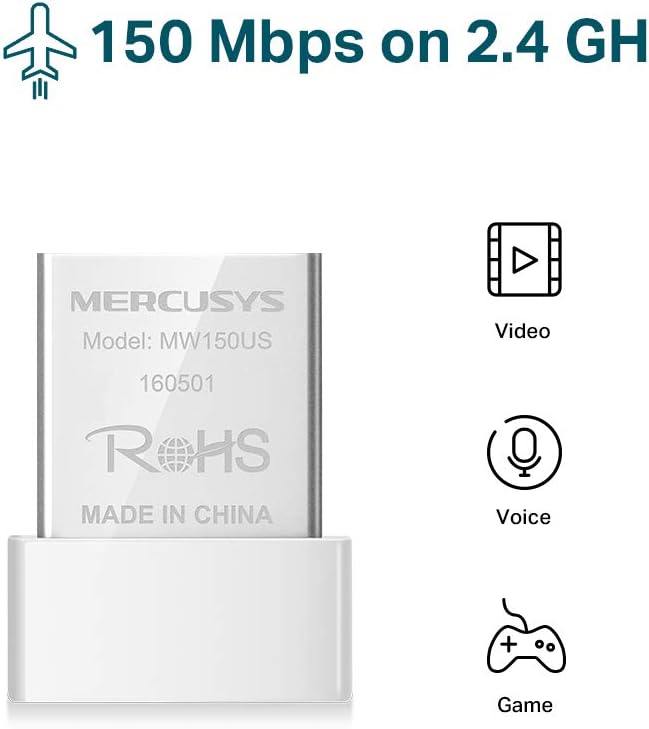
Image: The Mercusys MW150US N150 Wireless Nano USB Adapter, a compact device for wireless connectivity.
설치 가이드
Follow these steps to install and set up your Mercusys MW150US N150 Wireless Nano USB Adapter:
- 어댑터를 삽입합니다: Carefully insert the MW150US adapter into an available USB port on your computer.
- 드라이버 설치:
- Using the included CD: Insert the driver CD into your computer's CD-ROM drive and follow the on-screen instructions to install the necessary drivers.
- Downloading from Mercusys web대지: If your computer does not have a CD-ROM drive, or if you prefer the latest drivers, visit the official Mercusys web사이트(예: www.mercusys.com/en/download/MW150US) to download the drivers for your specific operating system.
- Windows 10 사용자를위한 참고 사항 : In many cases, Windows 10 may automatically install the necessary drivers upon insertion, making manual installation unnecessary.
- 네트워크에 연결: After driver installation, your computer should detect available Wi-Fi networks. Select your desired network from the list and enter the password to connect.

Image: Visual guide for the three easy setup steps: insert, install software, and connect to Wi-Fi.

Image: The Mercusys MW150US adapter is compatible with Windows 10, 8.1, 8, 7, and XP.
작동 지침
Wi-Fi 네트워크에 연결
Once the adapter is installed and drivers are loaded, you can connect to any available Wi-Fi network.
- 컴퓨터 시스템 트레이(일반적으로 Windows의 경우 오른쪽 하단 모서리)에 있는 Wi-Fi 아이콘을 클릭하세요.
- A list of available wireless networks will appear. Select the name (SSID) of your desired network.
- Click "Connect" and enter the network's security key or password when prompted.
- Once connected, the Wi-Fi icon will indicate a successful connection, and you can access the internet.
Using Soft AP Function (Wi-Fi Hotspot)
The Soft AP function allows your computer to share its wired internet connection wirelessly. This feature requires your computer to have a wired internet connection.
- 컴퓨터가 이더넷 케이블을 통해 인터넷에 연결되어 있는지 확인하세요.
- Open the Mercusys utility software (usually installed with the drivers).
- 유틸리티 내에서 "소프트 AP" 또는 "핫스팟" 기능을 찾아 활성화하십시오.
- Configure the hotspot's name (SSID) and password.
- Other wireless devices can now connect to your computer's Wi-Fi hotspot using the configured SSID and password.
유지
The Mercusys MW150US adapter is designed for durability and requires minimal maintenance.
- 깨끗하게 유지하십시오: Periodically wipe the adapter with a soft, dry cloth to remove dust. Avoid using liquid cleaners.
- 손상으로부터 보호: While its nano size is convenient, avoid bending or applying excessive force to the adapter when it's plugged into a USB port.
- 저장: 사용하지 않을 때는 어댑터를 깨끗하고 건조한 곳에 보관하고 극한 온도에 노출시키지 마십시오.

Image: The miniature design of the Mercusys MW150US adapter, highlighting its compact size for portability and convenience.
문제 해결
If you encounter issues with your Mercusys MW150US adapter, refer to the following common solutions:
- 어댑터가 감지되지 않음:
- Ensure the adapter is fully inserted into a working USB port. Try a different USB port.
- Verify that the drivers are correctly installed. Check Device Manager (Windows) for any yellow exclamation marks next to the network adapter. Reinstall drivers if necessary.
- 컴퓨터를 다시 시작하세요.
- Wi-Fi 네트워크에 연결할 수 없습니다:
- Wi-Fi 비밀번호를 다시 한번 확인하세요.
- Wi-Fi 라우터의 전원이 켜져 있고 신호를 송출하고 있는지 확인하세요.
- 와이파이 신호 강도를 높이려면 와이파이 공유기에 더 가까이 이동하세요.
- Restart your Wi-Fi router and your computer.
- 인터넷 속도가 느립니다:
- Ensure you are within a reasonable range of your Wi-Fi router.
- 다른 전자 기기(예: 전자레인지, 무선 전화기)로 인한 간섭이 있는지 확인하십시오.
- Verify that your internet service provider (ISP) is delivering the expected speed.
- Update the adapter's drivers to the latest version from the Mercusys web대지.
명세서
| 상표 | 머큐 시스 |
| 모델 번호 | MW150US |
| 하드웨어 인터페이스 | USB |
| 데이터 전송 속도 | 150Mbps |
| 호환 장치 | Desktop, Laptop, Smartphone (for Soft AP) |
| 호환되는 운영 체제 | Windows (XP, 7, 8, 8.1, 10) |
| 품목 무게 | 50그램 |
| 색상 | 빨간색 |
보증 정보
The Mercusys MW150US N150 Wireless Nano USB Adapter comes with a 4년 보증 directly from the manufacturer. Please retain your proof of purchase for warranty claims.
지원하다
For technical assistance, driver downloads, or warranty inquiries, please contact Mercusys customer support directly. Support services are provided by the manufacturer.
You can typically find contact information and support resources on the official Mercusys web대지: www.mercusys.com.