
1. 서론
The HTRC H150 Duo is a high-performance, twin-channel multi-charger designed for various battery types, including LiPo, LiFe, LiIon, LiHV, NiCd, NiMH, and PB batteries. It features dual independent outputs, allowing simultaneous charging of two different battery packs. This manual provides essential information for safe and efficient operation of your H150 Duo charger.
2. 안전 지침
Please read all safety warnings and instructions carefully before using this product. Failure to do so may result in fire, injury, or property damage.
- Always supervise the charging process. Never leave the charger unattended while it is connected to a power source or charging/discharging batteries.
- Ensure proper ventilation. Do not operate the charger in an enclosed space or cover it during use.
- Keep the charger away from moisture, heat, direct sunlight, and flammable materials.
- Use only the original cables and connectors provided with the charger.
- Verify battery type, cell count, voltage, and current settings match the battery specifications before starting any operation. Incorrect settings can cause severe damage to the battery and charger.
- Do not attempt to charge damaged, swollen, or leaking batteries.
- 어린이의 손이 닿지 않는 곳에 보관하세요.
3. 제품 오버view
3.1 패키지 내용
The HTRC H150 Duo package includes the following items:
- 1 x HTRC H150 AC/DC Duo Device
- 1 x AC Power Cord (US plug)
- 1 x DC 전원 코드
- 충전 케이블 2개
- 2 x Charging Boards with Pin Cords

Image: HTRC H150 Duo charger with all included accessories, including power cords, charge cables, and balance boards.
3.2 구성 요소 식별
Familiarize yourself with the various parts of your HTRC H150 Duo charger:
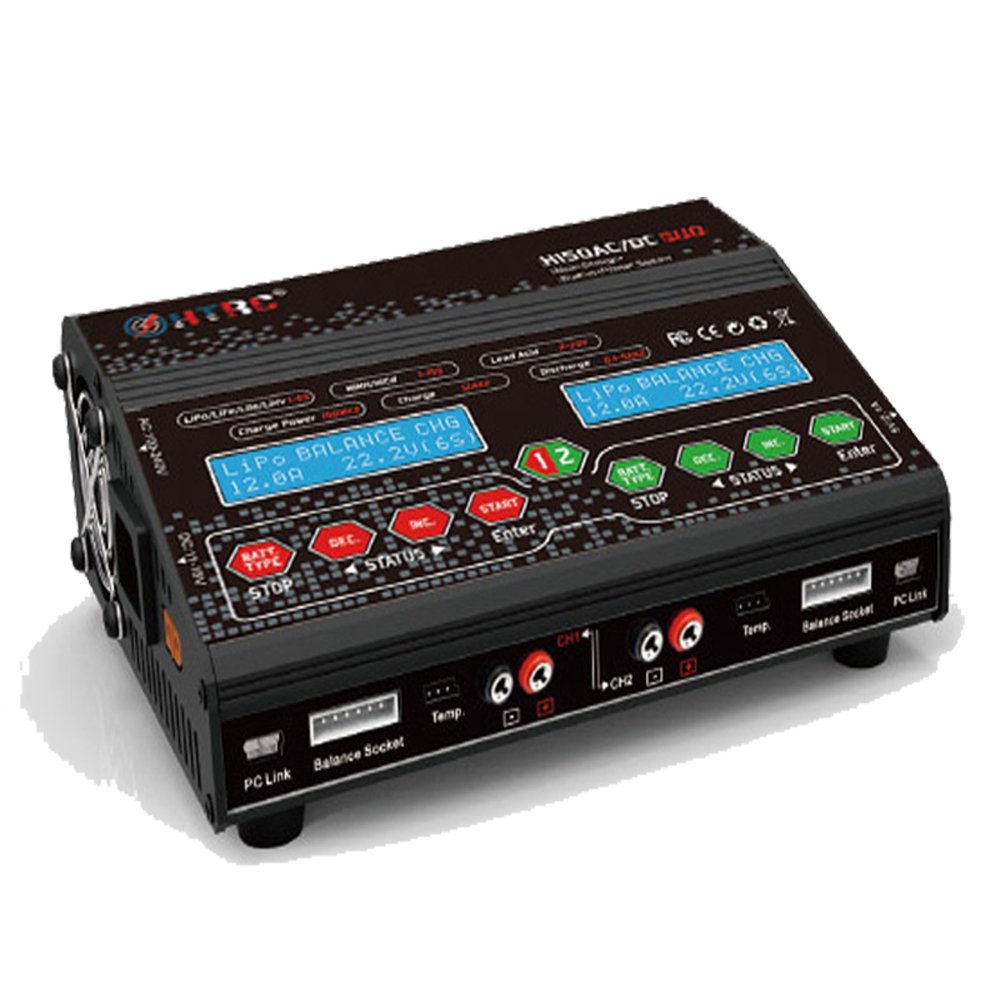
이미지: 앞면 view of the HTRC H150 Duo. It features two independent LCD displays, each with dedicated control buttons (BAT.TYPE, DEC, INC, STATUS, ENTER, START/STOP) for managing two charging channels simultaneously. Output ports and balance ports are located at the front bottom.

이미지: 측면 view of the HTRC H150 Duo, illustrating the cooling fans for heat dissipation, PC Link ports, 3-pin output ports, and 6S balance ports. A 5V/2.1A USB output port is also visible.

이미지: 후면 view of the HTRC H150 Duo, showing the AC input (100-240V) and DC input (11-28V) ports. The waterproof operation buttons are also highlighted.
4. 설정
4.1 전원 연결
The H150 Duo supports both AC and DC power inputs.
- AC 전원(110-240V): Connect the provided AC power cord to the AC input port on the charger and then plug it into a wall outlet.
- 직류 전원(11-28V): Connect the provided DC power cord to the DC input port on the charger and to a suitable DC power source (e.g., a car battery or a regulated DC power supply).
Once connected, the charger will power on, and the LCD displays will illuminate.
5. 사용 설명서
5.1 Basic Operation Flow
- 배터리 연결: Connect your battery to the appropriate output port and, if applicable, the balance port.
- 배터리 유형 선택: Press the 'BAT.TYPE' button to cycle through and select the correct battery chemistry (e.g., LiPo, NiMH, PB).
- 매개변수 설정: Use the 'DEC' and 'INC' buttons to adjust charging current, cell count, and other relevant parameters according to your battery's specifications.
- 설정 확인: Press the 'ENTER' button to confirm your selections.
- 작업 시작: Press and hold the 'START' button for a few seconds to begin the charging or discharging process. The charger will perform a safety check before starting.
- 작동 중지: Press the 'STOP' button at any time to halt the current operation.
5.2 충전 모드
- 밸런스 충전(LiPo/LiFe/LiIon/LiHV): This mode charges and balances individual cells of lithium-based batteries, ensuring optimal performance and longevity.
- Charge (NiCd/NiMH, PB): Standard charging mode for Nickel-Cadmium, Nickel-Metal Hydride, and Lead-Acid batteries.
- 해고하다: 사용자가 지정한 전압까지 배터리를 방전합니다.tage 또는 용량.
- 저장: Charges or discharges lithium batteries to their optimal storage voltage, preserving battery health during periods of inactivity.
5.3 USB DC Output
The charger includes a USB DC output port (5V 2.1A) for charging compatible USB devices. Connect your device to this port while the charger is powered on.
6. 유지관리
- 청소: 충전기 외부를 닦을 때는 부드럽고 마른 천을 사용하십시오. 용제나 연마성 세척제를 사용하지 마십시오.
- 저장: 직사광선이나 극한의 온도를 피하고 서늘하고 건조한 곳에 충전기를 보관하세요.
- 점검: Regularly inspect cables and connectors for any signs of damage. Replace damaged components immediately.
7. 문제 해결
- 충전기 전원이 켜지지 않음: Ensure both AC or DC power cables are securely connected and the power source is active.
- 표시되는 오류 메시지: Refer to the specific error code displayed on the screen. Common errors relate to incorrect battery settings, connection issues, or internal faults. Double-check all connections and settings.
- 배터리가 충전되지 않음: Verify that the battery type, cell count, and current settings are correct. Ensure the battery is properly connected to both the main output and balance ports (if applicable).
- 과열: Ensure the charger's cooling fans are not obstructed and the charger is in a well-ventilated area. Reduce the charging current if overheating persists.
8. 사양
| 특징 | 사양 |
|---|---|
| 입력 Voltage | AC 110-240V / DC 11-28V |
| 충전 회로 전원 | 150W x 2 |
| Discharge Circuit Power | 20W x 2 |
| 충전 전류 범위 | 0.1-12A x 2 |
| 방전 전류 범위 | 0.1-5A x 2 |
| 밸런싱을 위한 전류 드레인 | 500mA/셀 |
| LiPo/LiIon/LiFe/LiHv Cell Count | 1-6 cells x 2 |
| NiCd/NiMH 배터리 셀 개수 | 1-15 cells x 2 |
| Pb 배터리 볼륨tage | 2-20V x 2 |
| 스마트 배터리 지원 | I/II/III x 2 |
| USB DC Output | 5V 2.1A |
| 치수 | 195 x 143 x 70mm |
| 순중량 | 1.05kg(2.3파운드) |
9. 보증 및 지원
For warranty information or technical support, please refer to the documentation provided with your purchase or contact HTRC customer service through their official web사이트. 구매 증빙 자료로 구매 영수증을 보관하세요.