
1. 서론
구매해주셔서 감사합니다asing the BYINTEK BT140 WiFi Projector. This manual provides essential information for setting up, operating, and maintaining your projector. Please read it thoroughly before use to ensure proper functionality and to extend the lifespan of your device.
2. 안전 정보
화재, 감전 또는 부상을 방지하기 위해 다음 안전 수칙을 준수하십시오.
- l을 사용할 때 프로젝터 렌즈를 직접 쳐다보지 마십시오.amp 켜져 있습니다. 강렬한 빛이 눈 손상을 유발할 수 있습니다.
- Ensure proper ventilation. Do not block ventilation openings. Overheating can damage the projector.
- 프로젝터가 넘어지지 않도록 안정적이고 평평한 표면에 놓으십시오.
- 프로젝터를 물, 습기 및 인화성 물질로부터 멀리하십시오.
- 프로젝터와 함께 제공된 전원 어댑터만 사용하세요.
- 프로젝터를 직접 수리하려고 하지 마십시오. 모든 서비스는 자격을 갖춘 전문가에게 맡기십시오.
- 천둥번개가 칠 때나 장기간 사용하지 않을 때는 프로젝터의 전원 플러그를 콘센트에서 뽑아 두십시오.
3. 패키지 내용
모든 항목이 있는지 확인하세요.
- BYINTEK BT140 Projector
- 전원 케이블
- 원격 제어
- AV 케이블
- 사용 설명서 (본 문서)
Note: Specific accessories may vary slightly depending on the region or retailer.
4. 제품 오버view
프로젝터의 구성 요소와 인터페이스를 숙지하십시오.
이미지: 앞면 view of the BYINTEK BT140 Projector, showing the lens and ventilation grilles.
인터페이스:
- HDMI : Connect to devices like laptops, Blu-ray players, gaming consoles.
- USB: 미디어 재생을 위해 USB 드라이브를 연결하세요.
- SD 카드 슬롯: 미디어 재생을 위해 SD 카드를 삽입하세요.
- 유명인 : Connect to older devices using the included AV cable.
- VGA : Connect to computers with a VGA output.
- 오디오 출력: 외부 스피커 또는 헤드폰을 연결하세요.
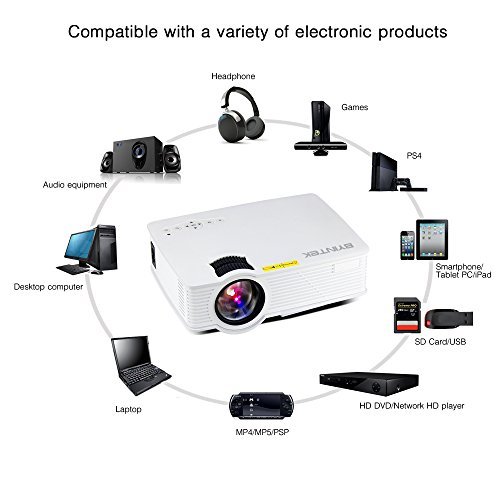
Image: Diagram illustrating various devices compatible with the BYINTEK BT140 Projector, including laptops, smartphones, tablets, gaming consoles (PS4, PSP), desktop computers, headphones, audio equipment, and HD media players, connected via HDMI, USB, SD, AV, and VGA ports.
5. 설정
5.1 배치
Place the projector on a stable surface. The recommended projection distance is 1.5 to 2.5 meters for an optimal screen size of 50 to 80 inches. The projector supports image sizes from 34 to 100 inches.
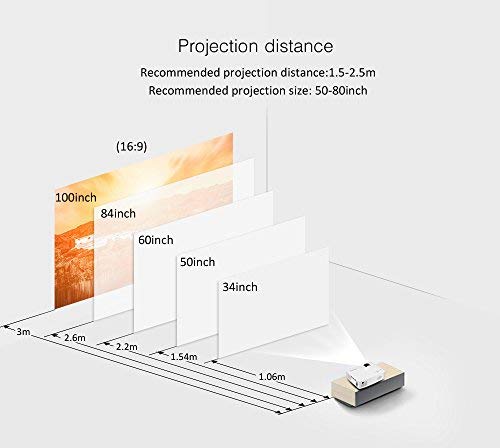
Image: Diagram showing recommended projection distances and corresponding screen sizes for the BYINTEK BT140 Projector, ranging from 34 inches at 1.06m to 100 inches at 3m.
5.2 전원 연결
- 프로젝터의 전원 입력 포트에 전원 케이블을 연결하십시오.
- 전원 케이블의 다른 쪽 끝을 벽면 콘센트에 꽂습니다.
5.3 장치 연결
- HDMI : Connect an HDMI cable from your source device (e.g., laptop, game console) to the projector's HDMI port.
- USB/SD: Insert a USB drive or SD card into the respective port for direct media playback.
- AV/VGA: Use the appropriate cable to connect older devices.
5.4 초점 조정
프로젝터 렌즈의 초점 링을 돌려 투사된 이미지가 선명하고 또렷해질 때까지 조정하십시오.
5.5 키스톤 보정
If the projected image appears trapezoidal, adjust the keystone correction dial (usually located near the lens) to square the image. The projector supports vertical keystone correction of ±15 degrees.
5.6 Wireless Connection (Airplay/Miracast)
The BT140plus model includes a built-in wireless push module supporting Airplay and Miracast functionality for wireless connection to smartphones, tablets, and iPads. Refer to the on-screen instructions for pairing your device.
6. 사용 설명서
6.1 전원 켜기/끄기
- 전원 켜기: 프로젝터나 리모컨의 전원 버튼을 누르세요.
- 전원 끄기 : 전원 버튼을 다시 누르십시오. 종료하라는 메시지가 나타나면 종료를 확인하십시오.
6.2 입력 소스 선택
Use the "Source" button on the remote control or the projector's control panel to cycle through available input sources (HDMI, USB, SD, AV, VGA, Wireless).
6.3 미디어 재생(USB/SD)
When a USB drive or SD card is inserted, the projector's multimedia interface will typically appear. Navigate through folders and select your desired media file (videos, photos, music) using the remote control.
- 지원되는 비디오 형식: RMVB/RM (Realvideo2.0/3.0/4.0), AVI (Xvid/H264), FLV (Sorenson H.263), MOV (H264), MP4 (MPEG4, AVC), MPG (MPG1)
- 지원되는 오디오 형식: MP3, WMA, AAC, AC3
7. 유지관리
7.1 렌즈 청소
Use a soft, lint-free cloth or lens cleaning paper to gently wipe the projector lens. Avoid using abrasive cleaners or excessive force, which can scratch the lens.
7.2 Cleaning the Projector Body and Vents
Wipe the projector's exterior with a soft, dry cloth. Use a small brush or compressed air to clear dust from the ventilation openings to ensure proper airflow and prevent overheating.
7.3리터amp 삶
The BYINTEK BT140 uses an LED lamp with an estimated lifespan of 20,000 hours, significantly reducing the need for lamp replacement compared to conventional lamps.
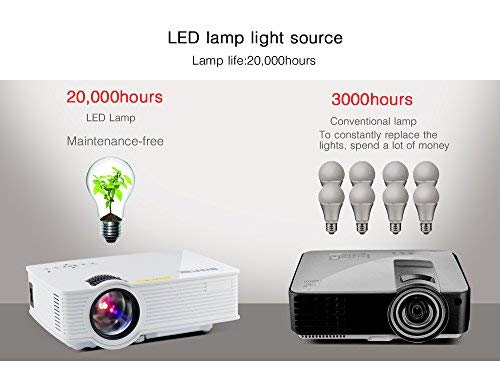
Image: Comparison showing the BYINTEK BT140's LED lamp with 20,000 hours lifespan versus conventional lamps with 3,000 hours lifespan, highlighting the maintenance-free aspect of LED technology.
8. 문제 해결
프로젝터에 문제가 발생하면 다음의 일반적인 문제와 해결 방법을 참조하세요.
| 문제 | 가능한 원인 / 해결책 |
|---|---|
| 화면에 이미지가 없습니다. |
|
| 이미지가 흐릿함 |
|
| 이미지는 사다리꼴입니다 |
|
| 소리가 나지 않습니다 |
|
| 리모컨이 작동하지 않습니다 |
|
9. 사양
Below are the technical specifications for the BYINTEK BT140 Projector:
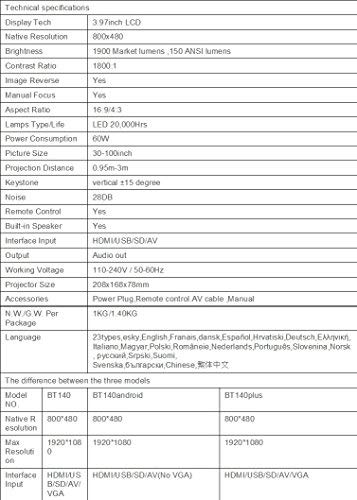
Image: Table detailing the technical specifications of the BYINTEK BT140 Projector, including display tech, resolution, brightness, contrast, aspect ratio, lamp life, power consumption, and interface inputs.
| 특징 | 세부 사항 |
|---|---|
| 디스플레이 기술 | 3.97인치 LCD |
| 네이티브 해상도 | 800 x 480 |
| 최대 디스플레이 해상도 | 1920 x 1080 (Support 1080P) |
| 명도 | 1900 Lumens (150 ANSI lumens) |
| 대비율 | 1800시 1분 |
| 이미지 반전 | 예 |
| 수동 초점 | 예 |
| 종횡비 | 16:9 / 4:3 |
| Lamp Type / Life | LED, 20,000시간 |
| 전력 소비 | 70와트 |
| 사진 크기 | 34-100 인치 |
| 투사 거리 | 0.95m - 3m |
| 키스톤 보정 | 수직 ±15도 |
| 소음 수준 | 28데시벨 |
| 원격 제어 | 예 |
| 내장 스피커 | 예 |
| 인터페이스 입력 | HDMI / USB / SD / AV / VGA |
| 오디오 출력 | 오디오 출력 포트 |
| 작업 볼륨tage | 110-240V / 50-60Hz |
| 프로젝터 크기 | 208 x 168 x 78mm |
| 순중량 | 950 Grams (1KG N.W./G.W. Per Package) |
| 연결 기술 | Wi-Fi (for Airplay/Miracast) |
| 호환 장치 | 노트북, 스마트폰, 태블릿 |
10. 보증 및 지원
BYINTEK products are designed for reliability and performance. For warranty information or technical support, please refer to the warranty card included with your product or contact BYINTEK customer service through their official web사이트 또는 소매점.
추가 지원이 필요하면 다음을 방문하세요. BYINTEK Store on Amazon.