
소개
The TKSTAR TK915 is a versatile and robust GPS tracker designed for real-time location tracking of vehicles and for personal security. It features a strong magnetic base for easy attachment, a waterproof design for durability, and a long-lasting battery for extended standby time. This manual provides detailed instructions for setting up, operating, maintaining, and troubleshooting your TK915 GPS tracker.
제품 끝view
패키지 내용
- 1 x TKSTAR GPS Tracker TK915
- 1 x USB 충전 케이블
- 1 x 보관 가방
- 1 x 사용자 설명서
장치 구성 요소

This image illustrates the key components of the TKSTAR TK915 GPS Tracker, including the strong magnetic base, silicone plug covering ports, USB charging port, SIM card slot, indicator light, and the induction sensor for anti-removal detection.
주요 특징
- 실시간 추적: Utilizes GPS/AGPS dual-mode positioning for accuracy up to 5 meters.
- 긴 대기 시간 : Up to 120 days standby with a 10000 mAh lithium battery.
- 자석 부착: Strong magnets allow for easy, no-installation mounting on any iron surface.
- 방수 디자인 : Unique waterproof construction ensures functionality in various weather conditions.
- 지오펜스 알람: Set predefined safe zones and receive alerts when the device enters or exits these areas.
- 과속 경보: Receive notifications if the tracked vehicle exceeds a preset speed limit.
- 저전력 경보 : Alerts when the battery level drops below 20%, prompting timely recharging.
- Vibration Sensor Alarm: Sends an SMS alert if the vehicle or luggage is illegally moved.
- Anti-removal Alarm: Notifies you if the tracker is removed from its attached surface.
- 과거 경로 재생: Review past travel routes of the device at any time.
치수

This image displays the TKSTAR TK915 GPS Tracker, highlighting its compact dimensions of 112mm length, 78mm width, and 28mm thickness.
설정
1. SIM 카드 설치
- 장치의 전원이 꺼져 있는지 확인하세요.
- Carefully open the silicone plug covering the SIM card slot.
- 삽입하다 2G GSM SIM card (850/900/1800/1900 MHz) into the slot. The SIM card is not included and must be purchased separately. Note: 3G and 4G SIM cards are not supported.
- Close the silicone plug securely to maintain waterproofing.
2. 초기 충전
- Connect the provided USB cable to the tracker's USB port and a 5V-1A wall charger (input 110-220V).
- Charge the device fully before first use. The indicator light will show charging status.
3. 전원 켜기/끄기
- To power on, press and hold the power button until the indicator lights activate.
- 전원을 끄려면 표시등이 꺼질 때까지 전원 버튼을 길게 누르십시오.
4. APN Setup for Online Tracking
To enable online tracking via the web platform or mobile application, GPRS must be enabled on the SIM card and the Access Point Name (APN) must be configured. Refer to your SIM card provider for the correct APN settings. Instructions for setting the APN are typically found in the full user manual or provided by the TKSTAR support platform.
작동 지침
1. 실시간 추적
- SMS Tracking: To get the device's location, call the SIM card number inserted in the tracker or send an SMS message to it. The device will reply with an SMS containing a Google Maps link showing its current position.
- Online Platform/App Tracking: After setting up the APN, log in to the TKSTAR web platform or mobile application using your device ID and password to view real-time location, historical routes, and manage settings.
2. Geo-fence Setting

This image depicts the Geo-fence feature, showing a map with a defined safe zone. The TKSTAR TK915 can alert the user if the tracked vehicle enters or exits this designated geographical area.
The Geo-fence feature allows you to define a virtual boundary. If the tracker moves into or out of this boundary, an alarm will be triggered. This setting is typically configured through the online tracking platform or mobile application.
3. Overspeed Alarm
This image illustrates the overspeed alarm function. A smartphone displays 'speed alarm' messages, indicating that the TKSTAR TK915 has detected the tracked vehicle exceeding a preset speed limit.
You can set a maximum speed limit for the tracker. If the device exceeds this speed, it will send an alarm notification (e.g., SMS or app notification) to the designated administrator number. This alarm typically functions only in continuous positioning mode.
4. 저전력 알람
When the battery power of the TK915 drops below 20%, the device will send a low power alarm notification, reminding you to recharge the battery promptly.
5. Vibration Sensor Alarm
If the device detects significant vibration, indicating potential unauthorized movement of the vehicle or asset it is attached to, it will send an SMS alert to your phone.
6. Anti-removal Alarm

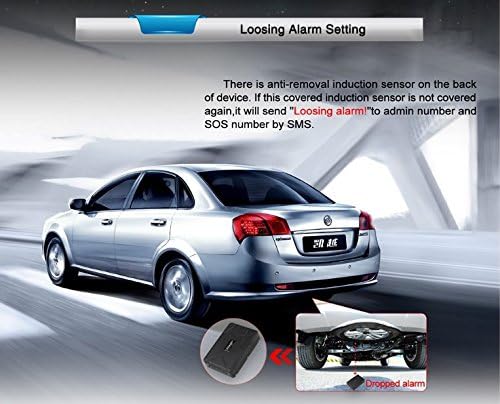
This image demonstrates the anti-removal alarm feature of the TKSTAR TK915. The tracker, shown magnetically attached underneath a car, will send an SMS alert if its induction sensor is uncovered, indicating unauthorized removal.
The TK915 is equipped with an induction sensor. If the device is removed from its magnetic attachment point, it will send an alert (e.g., "Loosing alarm") to the administrator number and any configured SOS numbers via SMS.
7. Historical Route Playback
Access the online tracking platform or mobile application to review the historical routes taken by the TK915 tracker over a specified period.
유지
충전 중
To ensure optimal performance and battery life, charge the TK915 using the provided USB cable and a compatible 5V-1A charger. Recharge the device when the low power alarm is triggered.
청소
Wipe the device with a soft, dry cloth. Avoid using harsh chemicals or abrasive cleaners. Ensure the silicone plug for the SIM card and USB port is always securely closed to maintain its waterproof integrity.

This image highlights the waterproof design of the TKSTAR TK915 GPS Tracker, showing water splashing around the device, suitable for outdoor use.
문제 해결
- 장치가 켜지지 않음: 배터리가 충전되어 있는지 확인하세요. 전원에 연결한 후 다시 시도해 보세요.
- GPS 신호 없음: 기기가 탁 트인 공간에 있는지 확인하십시오. view of the sky. GPS signals can be obstructed by buildings, tunnels, or dense foliage.
- No SMS reply: Check if the SIM card has sufficient credit and is active. Verify that the SIM card is a 2G GSM card and correctly inserted.
- Online tracking not working: Confirm that GPRS is enabled on the SIM card and the APN settings are correctly configured. Check your internet connection.
- 예상보다 배터리 수명이 짧음: Ensure the device is fully charged. Frequent tracking updates or poor network signal can consume more power.
For more detailed troubleshooting steps, please refer to the comprehensive user manual included with your product or contact customer support.
기술 사양
| 모델 번호 | 티케이915 |
| 치수 | 10 x 9 x 2 cm (approximately 112mm x 78mm x 28mm) |
| 순중량 | 300g |
| 색상 | 검은색 |
| 회로망 | GSM / GPRS (2G, 850/900/1800/1900 MHz) |
| GPS 정확도 | 5 미터 |
| 벽 충전기 입력 | 110-220V(전기) |
| 벽면 충전기 출력 | 5 V-1A |
| 배터리 | Rechargeable 3.7 V 10000 mAh Lithium battery |
| 대기 시간 | 최대 120일 |
| 특별 기능 | Waterproof, Strong Magnet, Anti-removal Alarm |
안전 정보
- 기기를 분해하거나 개조하지 마십시오. 이는 보증을 무효화하고 기기 손상을 초래할 수 있습니다.
- Use only the specified charger and accessories.
- 기기를 극한 온도, 직사광선, 화염에 가까이 두지 마세요.
- Ensure the SIM card slot is properly sealed to maintain waterproofing.
- 기기 및 배터리는 현지 규정에 따라 폐기하십시오.
보증 및 지원
For any questions, technical assistance, or warranty inquiries, please refer to the contact information provided with your purchase or reach out to TKSTAR customer support. If you need assistance, please write to us.