
소개
구매해주셔서 감사합니다asing the POWERFLEX PF-AZ01-Z003 Portable Bluetooth Speaker. This device is designed to provide high-quality audio playback and hands-free calling capabilities. Please read this manual carefully before using the speaker to ensure proper operation and to maximize its performance.

영상: The POWERFLEX PF-AZ01-Z003 Portable Bluetooth Speaker is shown from an angled perspective, highlighting its black finish, front grille, and the touch-sensitive control panel on its top surface, which features illuminated volume controls.
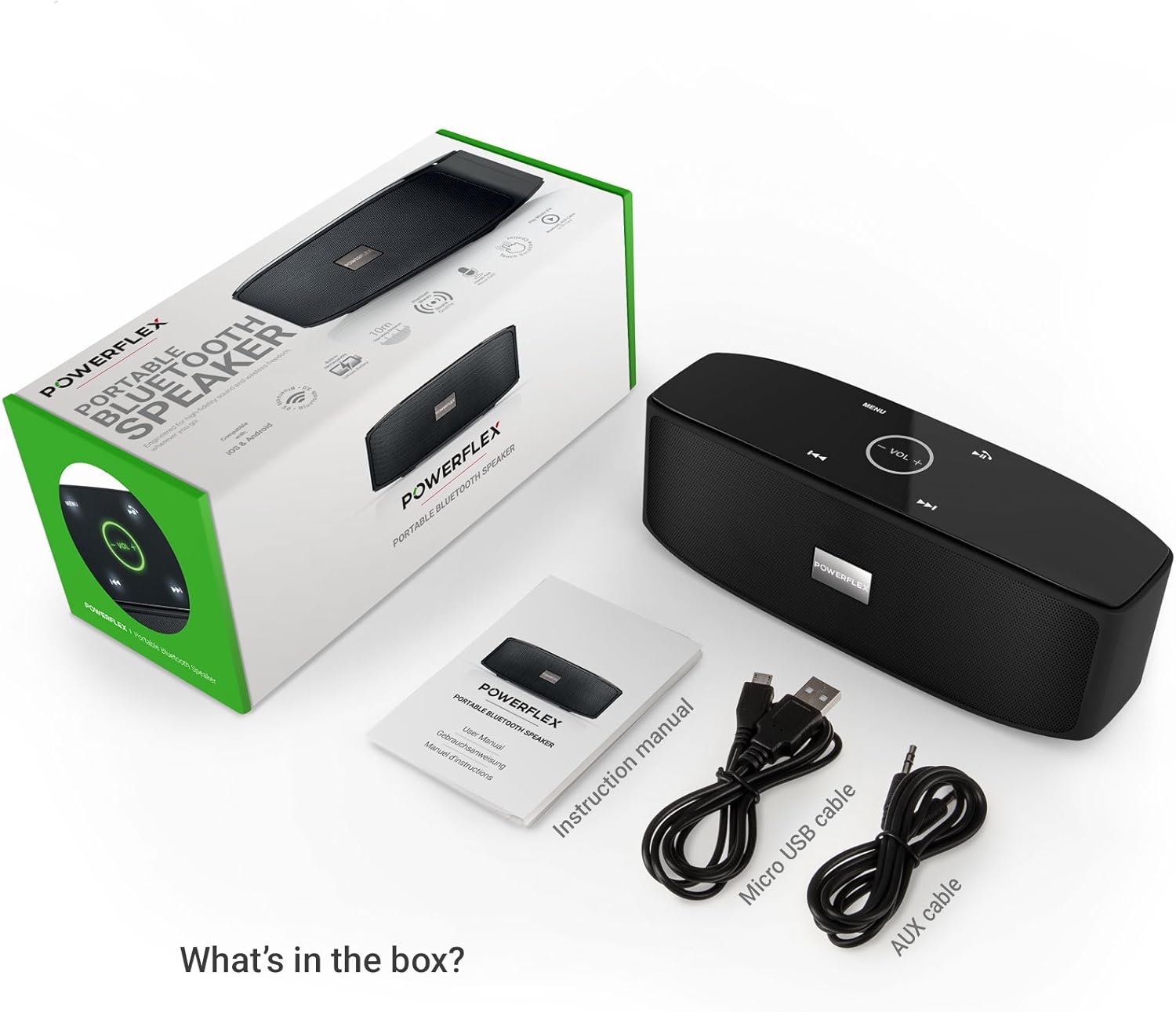
패키지 내용
다음 항목에 대한 상자를 체크해 주세요.
- POWERFLEX PF-AZ01-Z003 Portable Bluetooth Speaker
- 마이크로 USB 충전 케이블
- AUX 케이블
- 사용자 설명서

영상: This image displays the POWERFLEX PF-AZ01-Z003 Portable Bluetooth Speaker alongside its accessories: a Micro USB charging cable, an AUX cable, and the instruction manual. These are the items typically found inside the product packaging.
기능 이상view
The POWERFLEX PF-AZ01-Z003 speaker offers several key features for an enhanced audio experience:
- 우수한 오디오: Equipped with dual five-watt drivers for clear highs, detailed mid-ranges, and deep bass.
- 블루투스 3.0 연결: Provides a stable wireless connection up to 10 meters (33 feet).
- 핸즈프리 통화: Integrated microphone allows for clear phone calls.
- 다중 재생 옵션: Supports Bluetooth, AUX input, and TF (MicroSD) card playback.
- 터치 컨트롤: Intuitive touch-sensitive panel for easy music and call management.
- 휴대성 있는 디자인: Compact build for easy transport.

영상: This image presents a cutaway view of the POWERFLEX PF-AZ01-Z003 speaker, revealing its internal components, specifically the dual five-watt drivers. The visual emphasizes the speaker's design for delivering vibrant highs, detailed mid-ranges, and deep bass for true stereo sound.

영상: This image showcases the POWERFLEX PF-AZ01-Z003 speaker positioned in front of a collection of diverse iOS and Android Bluetooth-enabled devices, including smartphones and tablets. The arrangement visually confirms the speaker's broad compatibility with various mobile operating systems.

영상: This image demonstrates the compact design of the POWERFLEX PF-AZ01-Z003 speaker, showing it being easily placed into a backpack. The accompanying text highlights its portability and specific dimensions (190 x 58 x 70mm), indicating it fits conveniently into bags.
설정
1. 스피커 충전
The speaker is powered by an internal 1800 mAh rechargeable battery. Before first use, fully charge the speaker.
- 마이크로 USB 충전 케이블을 스피커의 DC5V 포트에 연결하세요.
- USB 케이블의 다른 쪽 끝을 USB 전원 어댑터(포함되지 않음) 또는 컴퓨터의 USB 포트에 연결합니다.
- The charging indicator light will illuminate. Once fully charged, the light will change color or turn off (refer to LED indicator section in the full manual for details).
2. 전원 켜기 / 끄기
스피커를 켜려면 ON/OFF 스위치를 'ON' 위치로 밀어주세요. 전원을 끄려면 스위치를 'OFF' 위치로 밀어주세요.
영상: 이 이미지는 자세한 내용을 제공합니다. view of the speaker's rear panel, highlighting the physical ON/OFF switch, the DC5V port for charging, the AUX input jack for wired connections, and the TF (MicroSD) card slot for direct media playback.
작동 지침
1. 블루투스 페어링
- Ensure the speaker is powered on and within 10 meters (33 feet) of your Bluetooth-enabled device.
- The speaker will automatically enter Bluetooth pairing mode, indicated by a flashing LED light (refer to LED indicator section in the full manual).
- 기기(스마트폰, 태블릿 등)에서 Bluetooth 설정으로 이동하여 사용 가능한 기기를 검색하세요.
- Select "PF-AZ01-Z003" from the list.
- Once paired, the speaker will emit an audible confirmation, and the LED light will become solid.

영상: This image demonstrates the speaker's Bluetooth connectivity, showing a smartphone wirelessly streaming music to the POWERFLEX PF-AZ01-Z003. Blue concentric circles emanate from the phone towards the speaker, symbolizing the wireless connection, and text indicates playback from up to 10 meters.
2. 음악 재생
Once connected via Bluetooth, you can play music from your device. The speaker also supports AUX cable and TF card playback.
- 블루투스: Play music directly from your paired device.
- 보조 입력: 제공된 3.5mm AUX 케이블을 사용하여 오디오 장치를 AUX 포트에 연결하십시오. 스피커가 자동으로 AUX 모드로 전환됩니다.
- TF 카드: MP3 파일이 들어 있는 TF(MicroSD) 카드를 삽입하세요. fileTF 카드 슬롯에 카드를 삽입하세요. 스피커가 자동으로 카드에 저장된 음악을 재생합니다.
3. 터치 컨트롤
The speaker features touch-sensitive controls on its top panel for easy operation.
- 재생/일시 중지: Tap the Play/Pause button (usually indicated by a triangle or two vertical bars).
- 볼륨 높이기/낮추기: Tap the '+' or '-' buttons to adjust the volume.
- 다음 트랙: Tap the '>>|' button.
- 이전 트랙 : Tap the '|<<' button.
- 모드/메뉴: Tap the 'MENU' button to switch between input modes (Bluetooth, AUX, TF).

영상: This image shows a hand interacting with the touch-sensitive controls on the top surface of the POWERFLEX PF-AZ01-Z003 speaker. A finger is pressing the 'VOL +' button, which is illuminated in green, while a smartphone displaying music playback is visible in the foreground, emphasizing the ease of control.
4. 핸즈프리 통화
The speaker includes a built-in microphone, allowing you to answer phone calls when connected via Bluetooth.
- 전화가 오면 음악이 일시 정지됩니다.
- Tap the Play/Pause button to answer the call.
- Speak into the speaker.
- Tap the Play/Pause button again to end the call.

영상: This image depicts a smartphone displaying an incoming call, positioned next to the POWERFLEX PF-AZ01-Z003 speaker. The text "Make hands free calls with the built-in microphone" is prominently displayed, indicating the speaker's capability for hands-free communication.
유지
To ensure the longevity and optimal performance of your POWERFLEX PF-AZ01-Z003 speaker, follow these maintenance guidelines:
- 청소: 부드럽고 마른 천으로 스피커 표면을 닦으세요. 연마성 세제, 알코올 또는 화학 용제는 사용하지 마세요.
- 저장: 스피커는 직사광선과 극한의 온도를 피해 시원하고 건조한 곳에 보관하세요.
- 물 노출: 이 스피커는 방수 기능이 없습니다. 물이나 과도한 습기에 노출시키지 마십시오.
- 배터리 관리 : 배터리 수명을 연장하려면 배터리를 자주 완전히 방전시키지 마십시오. 장기간 사용하지 않더라도 스피커를 정기적으로 충전하십시오.
문제 해결
If you encounter issues with your POWERFLEX PF-AZ01-Z003 speaker, refer to the following common problems and solutions:
| 문제 | 가능한 원인 | 해결책 |
|---|---|---|
| 스피커의 전원이 켜지지 않습니다. | 배터리가 소진되었습니다. | Micro USB 케이블을 사용하여 스피커를 충전하세요. |
| 블루투스로 페어링할 수 없습니다. | 스피커가 페어링 모드가 아닙니다. 기기가 너무 멀리 떨어져 있습니다. 기기에서 블루투스가 꺼져 있습니다. | Ensure speaker is in pairing mode (flashing LED). Move device closer. Enable Bluetooth on your device. Forget previous pairings and try again. |
| 소리가 나지 않거나 볼륨이 작습니다. | Volume too low on speaker or device; incorrect input mode; loose AUX cable. | Increase volume on both speaker and connected device. Press 'MENU' to select correct input mode. Ensure AUX cable is securely connected. |
| 사운드 왜곡. | 볼륨이 너무 크거나 기기가 스피커에서 너무 멀리 떨어져 있습니다. | Reduce volume on speaker and/or connected device. Move device closer to the speaker. |
명세서
| 특징 | 세부 사항 |
|---|---|
| 모델명 | PF-AZ01-Z003 |
| 상표 | 파워플렉스 |
| 연결 기술 | 블루투스, USB |
| 블루투스 버전 | 3.0 |
| 특징 | 휴대용, 내장 마이크 |
| 호환 장치 | Universal (iOS & Android Bluetooth enabled devices) |
| 장착 유형 | 테이블탑 |
| 전원 | 배터리 |
| 배터리 용량 | 1800mAh |
| 배터리 에너지 함량 | 6.66 와트시 |
| Lithium Ion Cells | 1 |
| 제품 치수 | 23 x 10.6 x 9.6cm |
| 제품 무게 | 760g |
| 색상 | 검은색 |
보증 및 지원
For warranty information and technical support, please refer to the documentation included with your purchase or contact POWERFLEX customer service. Keep your proof of purchase for warranty claims.
제조업체: 파워플렉스
제품 ASIN: B074M8W712