
1. 서론
구매해주셔서 감사합니다asing the Kaiser MSA-5708GY Professional 8-inch Amplified Wireless Speaker. This device is designed to provide high-quality audio with versatile connectivity options, including Bluetooth, USB, SD card, and AUX input. It also features a microphone input for public address or karaoke, and dynamic multicolor LED lights. Please read this manual thoroughly before operating the speaker to ensure proper use and to maximize its performance and longevity.
2. 안전 정보
- 전원: Use only the provided charging cable and adapter. Ensure the power supply matches the speaker's requirements.
- 물과 습기: Do not expose the speaker to water, rain, or excessive moisture. Avoid placing liquid-filled objects on or near the speaker.
- 열: Keep the speaker away from heat sources such as radiators, heat registers, stoves, or other heat-producing appliances.
- 통풍: 통풍구를 막지 마십시오. 스피커 주변에 충분한 공기 흐름이 확보되도록 하십시오.
- 청소: 청소하기 전에 전원을 차단하십시오. 마른 부드러운 천을 사용하십시오. 액체 세척제나 스프레이형 세척제는 사용하지 마십시오.
- 서비스: 이 제품을 직접 수리하려고 하지 마십시오. 모든 서비스는 자격을 갖춘 서비스 담당자에게 문의하십시오.
- 배터리: The speaker contains a rechargeable battery. Do not expose the battery to excessive heat or direct sunlight. Dispose of batteries according to local regulations.
3. 패키지 내용
패키지에 모든 품목이 들어 있는지 확인하세요.
- Kaiser MSA-5708GY Amplified 무선 스피커
- 유선 마이크
- 원격 제어
- Charging Cable / Power Adapter
4. 제품 오버view
Familiarize yourself with the main components and controls of your speaker.
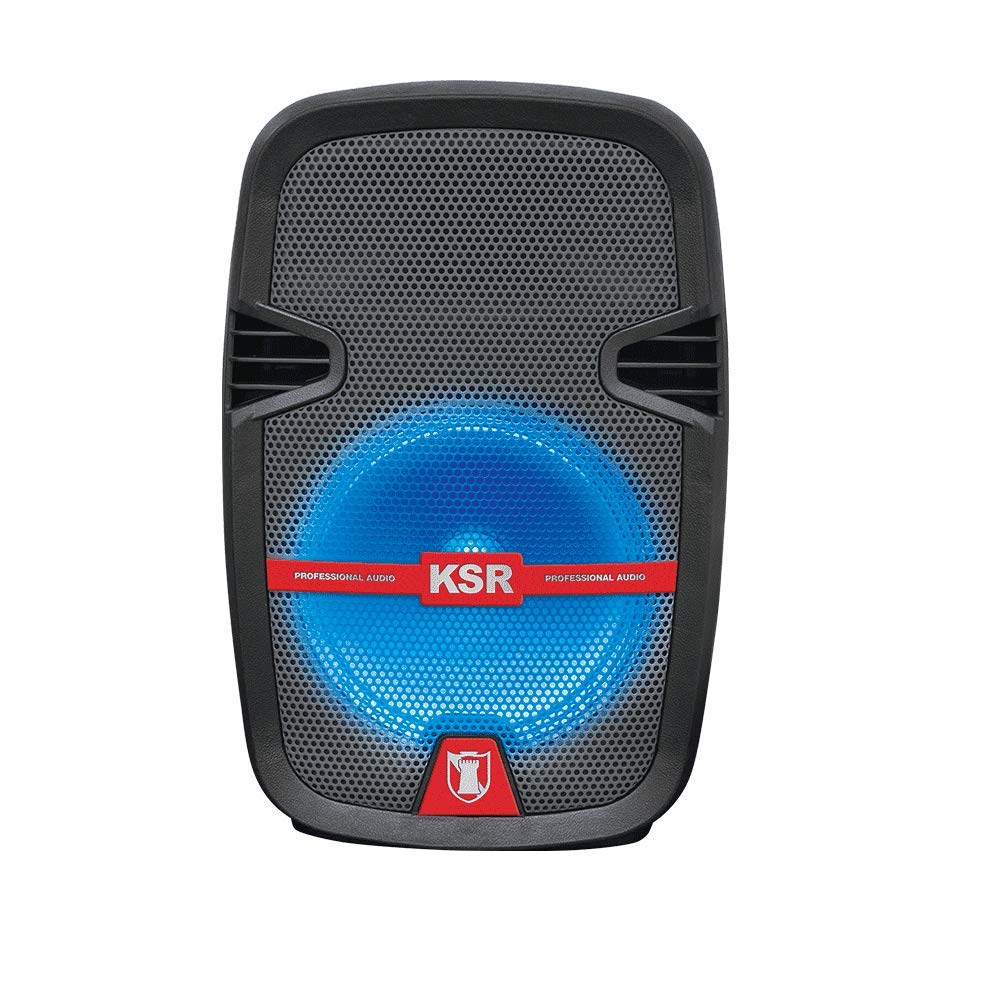
그림 1: 앞쪽 view of the Kaiser MSA-5708GY speaker, showing the 8-inch woofer with multicolor LED lights and the control panel.
제어판 기능:
- 표시하다: 현재 모드, 트랙 번호 또는 FM 주파수를 표시합니다.
- 모드 버튼: Switches between Bluetooth, USB, SD, AUX, and FM Radio modes.
- 재생/일시 정지 버튼: 재생을 시작하거나 일시 중지합니다.
- 이전/다음 버튼: 음악 트랙이나 FM 방송국을 탐색합니다.
- 볼륨 노브: 마스터 볼륨을 조정합니다.
- 마이크 볼륨 노브: 마이크 입력 볼륨을 조절합니다.
- Microphone Bass/Treble Knobs: Adjusts bass and treble for the microphone input.
- LED 전등 스위치: Toggles the multicolor LED lights on/off.
Rear Panel / Side Connections:
- USB 포트: USB 플래시 드라이브용입니다.
- SD 카드 슬롯: SD 메모리 카드용입니다.
- AUX 입력(3.5mm): 외부 오디오 장치의 경우.
- 마이크 입력(6.3mm): 유선 마이크 연결용입니다.
- 충전 포트: 전원 어댑터를 연결합니다.
- 전원 스위치: 스피커를 켜거나 끕니다.
- Stand Mount Socket: For mounting the speaker on a compatible stand.
5. 설정
5.1 배터리 충전
- 제공된 충전 케이블을 스피커의 충전 포트에 연결하십시오.
- 케이블의 다른 쪽 끝을 적절한 전원 콘센트에 꽂으십시오.
- The charging indicator light (if present) will illuminate, indicating that the battery is charging.
- Allow approximately 3-4 hours for a full charge. The indicator light may change or turn off when fully charged.
- 배터리 수명을 연장하려면 완전히 충전한 후 충전기를 분리하세요.
메모: For optimal battery performance, fully charge the speaker before first use.
5.2 전원 켜기/끄기
- To power on, locate the Power Switch on the speaker and toggle it to the "ON" position.
- To power off, toggle the Power Switch to the "OFF" position.
5.3 Mounting on a Stand
The speaker features a rear knob and a socket for mounting on a compatible speaker stand.
- Ensure the speaker stand is stable and rated for the speaker's weight (4 kg).
- Carefully place the speaker onto the stand's pole, aligning it with the stand mount socket.
- Tighten the rear knob on the speaker to secure it firmly to the stand.
6. 사용 설명서
6.1 블루투스 연결
- Power on the speaker. The speaker will typically enter Bluetooth pairing mode automatically, indicated by a flashing Bluetooth icon or a voice prompt. If not, press the "Mode" button until "Bluetooth" is selected.
- 모바일 기기(스마트폰, 태블릿 등)에서 Bluetooth를 활성화하고 사용 가능한 기기를 검색하세요.
- Select "MSA-5708GY" from the list of devices.
- Once paired, the speaker will confirm the connection, and the Bluetooth indicator will stop flashing.
- You can now play audio from your device through the speaker. Control playback and volume from your device or the speaker's controls.
메모: The Bluetooth range is up to 10 meters (33 feet) in open areas.
6.2 USB/SD 카드 재생
- Insert a USB flash drive or an SD card (pre-loaded with MP3 audio files) 스피커의 해당 포트/슬롯에 삽입하십시오.
- The speaker should automatically switch to USB or SD mode and begin playing audio. If not, press the "Mode" button to select "USB" or "SD".
- Use the Play/Pause, Previous, and Next buttons on the speaker or remote control to manage playback.
6.3 FM 라디오
- Power on the speaker and press the "Mode" button until "FM" mode is selected.
- Press and hold the Play/Pause button to initiate an automatic scan for FM stations. The speaker will scan and save available stations.
- Use the Previous and Next buttons to navigate through the saved FM stations.
6.4 AUX 입력
- 3.5mm 오디오 케이블(포함되지 않음)의 한쪽 끝을 스피커의 AUX 입력 포트에 연결합니다.
- 케이블의 다른 쪽 끝을 헤드폰 잭 또는 외부 오디오 장치(예: MP3 플레이어, 노트북)의 오디오 출력 단자에 연결하십시오.
- Press the "Mode" button until "AUX" mode is selected.
- Play audio from your external device. Adjust volume from both the external device and the speaker.
6.5 마이크 사용
- Connect the wired microphone to the 6.3mm microphone input jack on the speaker.
- "MIC VOL" 노브를 조절하여 마이크 볼륨을 조절하세요.
- Use the "MIC BASS" and "MIC TREBLE" knobs to fine-tune the microphone's sound.
6.6 다색 LED 조명
The speaker features integrated multicolor LED lights that illuminate the woofer.
- To activate or deactivate the LED lights, use the dedicated LED Light Switch on the control panel.
6.7 원격 제어 작동
The included remote control allows for convenient operation from a distance. Ensure the remote control has working batteries and is pointed towards the speaker's IR receiver.
- 전원 버튼: Turns the speaker on/off (standby).
- 모드 버튼: Switches input modes.
- 볼륨 +/- : 마스터 볼륨을 조정합니다.
- 재생/일시 중지: 재생을 시작/일시 중지합니다.
- 이전 다음: 트랙이나 FM 방송국을 건너뜁니다.
- EQ : (If available) Cycles through equalizer presets.
- 숫자 버튼: (If available) Direct track selection in USB/SD mode or FM station input.
7. 유지관리
7.1 청소
- 청소하기 전에는 항상 스피커의 전원을 차단하십시오.
- 스피커 외부 표면은 부드럽고 마른 보풀 없는 천으로 닦아주세요.
- 연마성 세척제, 왁스 또는 용제는 마감재를 손상시킬 수 있으므로 사용하지 마십시오.
- 어떠한 구멍에도 습기가 들어가지 않도록 주의하세요.
7.2 배터리 관리
- 배터리 수명을 연장하려면 배터리를 자주 완전히 방전시키지 마십시오.
- 스피커를 장시간 사용하지 않을 경우, 약 50%까지 충전하여 서늘하고 건조한 곳에 보관하세요. 과방전을 방지하기 위해 3~6개월마다 충전하세요.
- 배터리를 극한의 온도에 노출시키지 마십시오.
8. 문제 해결
| 문제 | 가능한 원인 | 해결책 |
|---|---|---|
| 전원이 없습니다 | Battery is drained; Power switch is off; Charging cable not connected properly. | Charge the battery; Ensure power switch is ON; Check charging cable connection. |
| 소리가 나지 않습니다 | Volume is too low; Incorrect input mode selected; Device not connected properly (Bluetooth, AUX, USB/SD). | Increase master volume; Select correct input mode; Reconnect device or re-pair Bluetooth. |
| 블루투스가 연결되지 않습니다 | Speaker not in pairing mode; Device Bluetooth is off; Speaker is too far from device; Interference. | Ensure speaker is in Bluetooth mode; Enable Bluetooth on device; Move device closer to speaker (within 10m); Avoid obstacles. |
| USB/SD 재생이 작동하지 않습니다 | 잘못된 file format; USB/SD card corrupted; Incorrect mode selected. | 보장하다 fileMP3 형식입니다. 다른 USB/SD 카드를 사용해 보세요. USB/SD 모드를 선택하세요. |
| 마이크가 작동하지 않습니다 | Microphone not connected; MIC VOL knob is low; Microphone is faulty. | Ensure microphone is securely connected; Increase MIC VOL; Test with another microphone if available. |
9. 사양
| 모델: | MSA-5708GY |
| 상표: | 황제 |
| 오디오 파워: | 2,500W PMPO / 8W RMS |
| 우퍼 크기: | 8인치(20.32cm) |
| 연결성: | Bluetooth, USB, SD, AUX (3.5mm), Microphone (6.3mm) |
| 블루투스 범위 : | 최대 10미터 |
| 배터리: | Rechargeable, up to 4 hours continuous music playback |
| 라디오: | FM 라디오 |
| 임피던스: | 4옴 |
| 치수(길이 x 너비 x 높이): | 30 x 44 x 25cm |
| 무게: | 4kg |
| 호환 장치: | 노트북, 스마트폰 |
10. 보증 정보
This Kaiser MSA-5708GY speaker comes with a 3개월 보증 구매일로부터 적용됩니다. 본 보증은 정상적인 사용 조건에서 발생하는 제조상의 결함에 한해 적용됩니다. 오용, 사고, 무단 개조 또는 일반적인 마모로 인한 손상은 보증 대상에서 제외됩니다. 보증 청구를 위해 구매 증빙 자료를 보관해 주십시오.
11. 고객 지원
If you encounter any issues or have questions regarding your Kaiser MSA-5708GY speaker that are not addressed in this manual, please contact Kaiser customer support. Refer to the product packaging or the official Kaiser web최신 연락처 정보는 사이트에서 확인하세요.
When contacting support, please have your product model number (MSA-5708GY) and proof of purchase readily available.