
1. 서론
This manual provides detailed instructions for the Symcode MJ-2030-W Barcode Scanner. This device offers both 2.4GHz wireless and USB 2.0 wired connectivity, designed for efficient and reliable barcode scanning in various environments. Please read this manual thoroughly before operating the scanner to ensure proper use and to maximize its performance.
2. 제품 오버view
The Symcode MJ-2030-W is a versatile handheld laser barcode scanner. Key features include:
- 이중 연결: Supports both 2.4GHz wireless and USB 2.0 wired connections.
- 확장된 범위: Effective wireless communication up to 200 meters outdoors and 100 meters indoors.
- 긴 배터리 수명: Equipped with a 2000mAh rechargeable battery, providing extended operation.
- 두 가지 작동 모드: Instant upload and storage modes for flexible data handling.
- Customizable Scanning: Supports prefix/suffix settings and character manipulation.
- 내구성 있는 디자인: Features a shock-resistant silicone casing (IP54 rated) for enhanced protection.
3. 설정
3.1 패키지 내용
시작하기 전에 패키지에 모든 품목이 들어 있는지 확인하세요.
- Symcode MJ-2030-W Barcode Scanner
- Mini USB Receiver (2.4GHz wireless dongle)
- USB 케이블(충전 및 유선 연결용)
- 사용 설명서 (본 문서)
3.2 스캐너 연결
이 스캐너는 두 가지 주요 연결 방식을 제공합니다.
3.2.1 2.4GHz 무선 연결
- Insert the mini USB receiver into an available USB 2.0 port on your computer.
- Turn on the barcode scanner. It will automatically pair with the receiver.
- 연결이 성공하면 스캐너에서 특정 소리가 나거나 LED 표시등이 켜집니다.

Figure 1: The reliable mini USB receiver for wireless connection.

Figure 2: Scanner in use with 2.4GHz wireless connection.
3.2.2 USB 유선 연결
- Connect one end of the provided USB cable to the scanner's USB port.
- USB 케이블의 다른 쪽 끝을 컴퓨터의 사용 가능한 USB 2.0 포트에 연결하십시오.
- The scanner will be recognized as a HID keyboard device, and no additional drivers are typically required.
4. 사용 설명서
4.1 기본 스캐닝
To scan a barcode, aim the laser beam at the center of the barcode and press the trigger button. A successful scan is usually indicated by a beep and/or a green LED light.
4.2 데이터 업로드 모드
The scanner supports two modes for uploading scanned data:
4.2.1 즉시 업로드 모드
In this mode, scanned barcodes are immediately transmitted to the connected computer. This is suitable for real-time data entry.
4.2.2 저장 모드
When the scanner is out of range of the receiver or disconnected, it can store scanned barcodes internally. The scanner supports storing approximately 1000 barcodes in offline memory. To upload stored data, reconnect the scanner to your computer (either wirelessly or via USB) and scan the specific 'Upload Data' barcode (refer to the programming guide for this barcode, if provided). The stored data will then be transmitted to your computer.
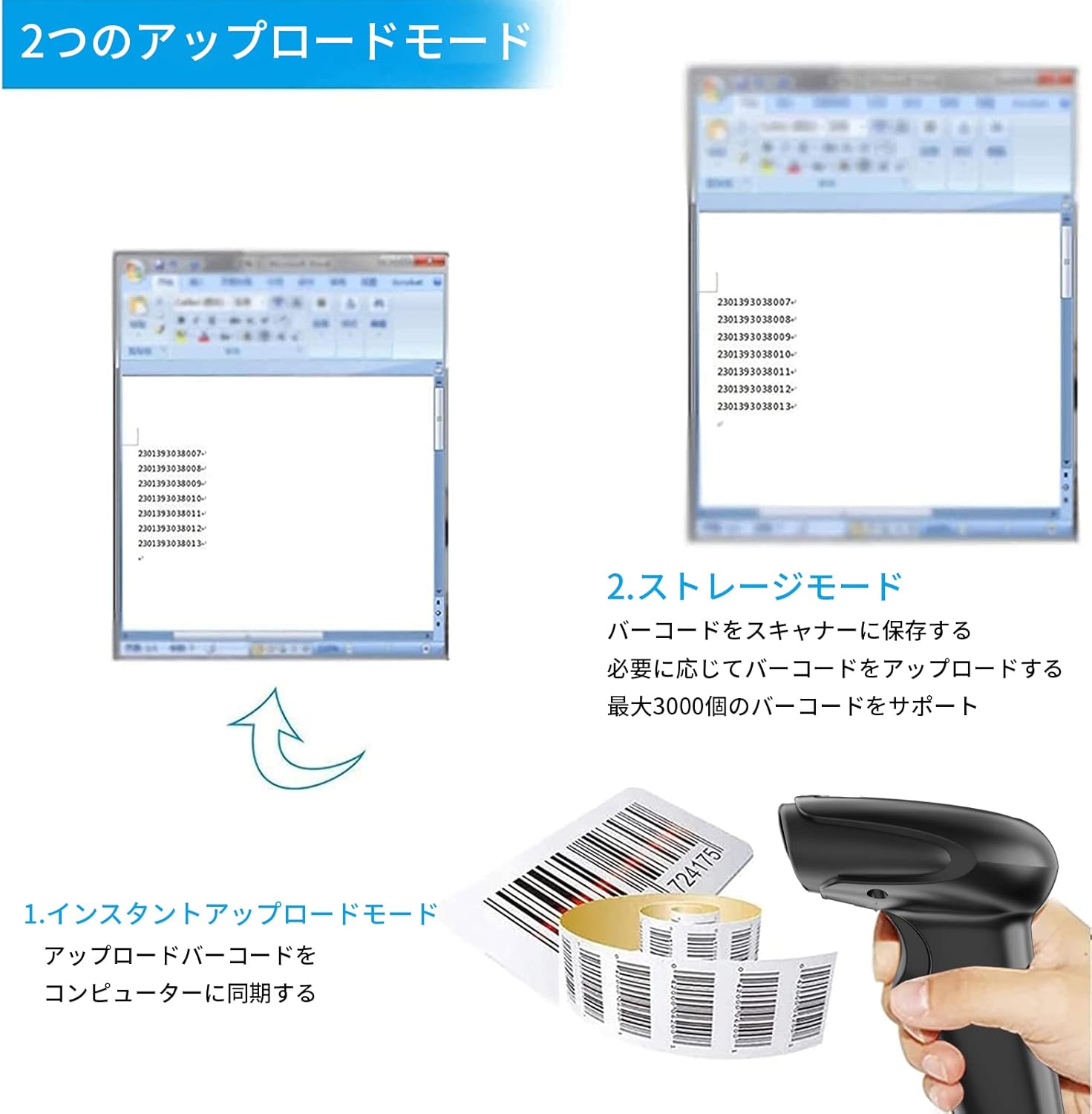
그림 3: 즉시 업로드 및 저장 모드의 예시.
4.3 Programmable Barcodes
The Symcode MJ-2030-W scanner allows for customization of barcode data output:
- 접두사 및 접미사 설정: You can configure the scanner to add a specific prefix or suffix to each scanned barcode data.
- Character Insertion/Deletion: Specific characters can be inserted or deleted from the scanned data.
Refer to the separate programming guide (if included) or the manufacturer's website for detailed instructions on how to program these settings by scanning specific configuration barcodes.

Figure 4: Scanner demonstrating programmable barcode features.
5. 배터리 및 충전
The scanner is equipped with a 2000mAh rechargeable battery. For optimal performance, ensure the battery is fully charged before first use.
- 충전 시간: 완전히 충전하는 데 약 3~4시간이 걸립니다.
- 운영 기간: A full charge can provide up to 12,000 hours of standby time or approximately 74,000 scans.
- 충전 방법: Connect the scanner to a computer or a USB power adapter using the provided USB cable.

Figure 5: Battery specifications and shock-resistant design.
6. 유지관리
- 청소: Use a soft, dry cloth to clean the scanner's exterior. For the scanning window, use a soft, lint-free cloth slightly damp물이나 순한 세척액으로 닦으십시오. 연마성 세척제나 용제는 사용하지 마십시오.
- 저장: 스캐너는 직사광선과 극한의 온도를 피해 시원하고 건조한 곳에 보관하세요.
- 내구성: The scanner features a black silicone protective cover with IP54 rating, designed to protect the glass window from scratches and the unit from drops up to 6.56 feet (2 meters).
7. 문제 해결
7.1 스캐너가 응답하지 않음
- Ensure the scanner is turned on and fully charged.
- For wireless connection, verify the mini USB receiver is securely plugged into the computer and the scanner is within range. Try re-pairing if necessary (refer to the programming guide for pairing instructions).
- For wired connection, ensure the USB cable is properly connected to both the scanner and the computer. Try a different USB port.
7.2 바코드가 스캔되지 않음
- 바코드가 선명하고 손상되지 않았으며 밝게 잘 보이는지 확인하십시오.
- 스캐너와 바코드 사이의 거리와 각도를 조정하세요.
- Check if the scanner is in the correct operating mode (e.g., not in a configuration mode).
7.3 Unexpected Sound Volume
If the scanner's beep volume is too loud or too quiet, refer to the programming guide for specific barcodes that allow adjustment of the sound settings.
7.4 누락된 구성 요소
If any components, such as the receiver or a programming code sheet, are missing from your package, please contact customer support immediately.
8. 사양
| 특징 | 사양 |
|---|---|
| 상표 | 기호 코드 |
| 모델 번호 | MJ-2030-W |
| 색상 | 하얀색 |
| 치수 | 17.53 x 8.38 x 11.43cm |
| 무게 | 280.66g |
| 전원 | 배터리 구동 |
| 연결 기술 | 2.4GHz 무선, USB 케이블 |
| 배터리 용량 | 2000mAh |
| 무선 범위(실외) | 최대 200m |
| 무선 범위(실내) | 최대 100m |
| 저장 용량 | Approx. 1000 barcodes (offline mode) |
| 낙하 저항 | 최대 6.56피트(2미터) |
| 보호 등급 | IP54 |

Figure 6: Wireless transmission distance capabilities.
9. 보증 및 지원
Symcode products are designed for reliability and performance. For warranty information, technical support, or service inquiries, please refer to the contact information provided with your purchase or visit the official Symcode website. Please have your product model number (MJ-2030-W) and purchase details ready when contacting support.