
1. 소개 및 이상view
The AULA Excalibur 109R is a one-handed mechanical gaming keyboard designed for enhanced gaming performance. It features customizable RGB LED backlighting, blue mechanical switches for tactile feedback, and programmable macro keys. The ergonomic design includes a removable wrist rest for comfort during extended use.
주요 특징은 다음과 같습니다.
- Customizable RGB LED Backlight with 5 pre-programmed modes and user-defined profiles.
- 8 programmable keys for macros and hotkeys.
- Durable Blue Mechanical Switches with an ultra-long lifetime of up to 50 million clicks.
- Ergonomic design with a removable wrist rest to reduce fatigue.
- 100% Anti-Ghosting with all Key Roll-over on USB.
- Compatibility with Windows XP, Vista, 7, 8, 10, and MAC OS X.
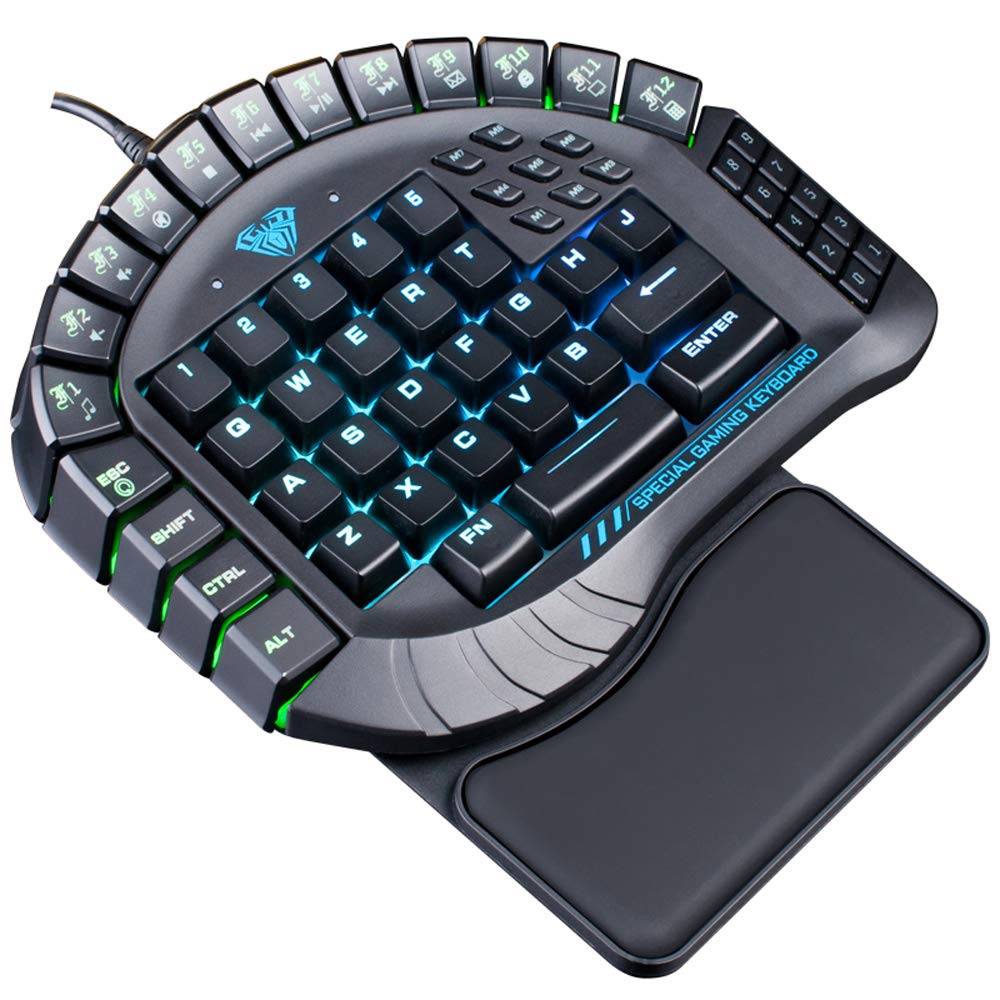
그림 1: 상향식 view of the AULA Excalibur 109R keyboard with RGB backlighting active.
2. 설정 지침
2.1 키보드 연결
The AULA Excalibur 109R keyboard is a plug-and-play device. Connect the USB connector from the keyboard directly to an available USB port on your computer. No additional drivers are typically required for basic functionality on supported operating systems.
2.2 손목 받침대 부착하기
For enhanced ergonomic comfort, attach the removable wrist rest to the keyboard. Align the wrist rest with the bottom edge of the keyboard and secure it into place. The wrist rest is designed to provide support during long gaming sessions.

그림 2: 클로즈업 view of the ergonomic, removable wrist rest.
3. 사용 설명서
3.1 RGB 백라이트 사용자 정의
The keyboard features customizable RGB backlighting. It comes with 5 pre-programmed lighting modes. You can also create and save 5 customized backlighting profiles. Refer to the included software or the manufacturer's website for detailed instructions on customizing lighting effects and profiles.

그림 3: 키보드 표시asing dynamic RGB backlighting.
3.2 매크로 키 프로그래밍
The AULA Excalibur 109R includes 8 independent macro keys and 10 hotkeys accessible via the Fn key. These keys can be programmed to execute complex commands or sequences with a single press. Programming is typically done through the dedicated software provided with the keyboard or available for download from the manufacturer's official website. Consult the software's user interface for specific programming steps.
3.3 절전 모드
To conserve power, the keyboard will automatically enter sleep mode after 10 minutes of inactivity. To reactivate the keyboard, simply press any key.
Video 1: Demonstration of the AULA Excalibur 109R keyboard's RGB backlighting and key responsiveness. This video illustrates the dynamic lighting effects and the tactile feedback of the mechanical keys.
4. 유지관리
4.1 청소
키보드를 청소하려면 부드럽고 마른 천을 사용하세요. 잘 지워지지 않는 오염의 경우,amp cloth with mild soap can be used, ensuring no liquid enters the key switches or internal components. Avoid using harsh chemicals or abrasive cleaners.
4.2 Liquid Spill Precaution
Keep the device away from liquids and chemicals. In the event of a liquid spill, immediately unplug the keyboard. The keyboard is designed with drainage holes at the bottom. Deploy the keyboard feet to allow any liquid to drain out. Allow the keyboard to dry completely before reconnecting it.

그림 4: 밑면 view of the keyboard, highlighting the drainage holes for liquid spills.
5. 문제 해결
5.1 키보드가 응답하지 않음
- USB 케이블이 키보드와 컴퓨터에 모두 단단히 연결되어 있는지 확인하세요.
- 키보드를 컴퓨터의 다른 USB 포트에 연결해보세요.
- If the keyboard is in sleep mode, press any key to reactivate it.
- 키보드가 문제인지 아니면 컴퓨터 설정 문제인지 확인하려면 다른 컴퓨터에서 키보드를 테스트해 보세요.
5.2 백라이트 문제
- Verify that the keyboard's lighting functions are enabled. Refer to the operating instructions for backlight customization.
- 커스텀 프로를 사용하는 경우files, ensure they are correctly loaded via the software.
- Ensure the keyboard's software/drivers are up to date, if applicable, as they control advanced lighting features.
5.3 Macro Key Malfunction
- Confirm that the macro keys have been programmed correctly using the dedicated software.
- Check for any conflicts with other software or system settings that might interfere with macro execution.
- Ensure the software is running in the background if required for macro functionality.
6. 사양
| 특징 | 세부 사항 |
|---|---|
| 상표 | 아울라 |
| 모델 번호 | 109R |
| 연결 기술 | 유선 (USB) |
| 키보드 설명 | 게임, 기계식 |
| 스위치 유형 | 블루 스위치 |
| 키의 개수 | 60 |
| 키포스 | 60±10g |
| 주요 경로 | 4.0mm |
| 정격 볼륨tag전자/현재 | 직류 5V |
| Product Dimensions (without wrist rest) | 8.4"(L) x 7.28"(W) x 1.89"(H) ± 0.02 inch |
| Product Dimensions (with wrist rest) | 8.4"(L) x 9.69"(W) x 1.89"(H) ± 0.02 inch |
| 키보드 무게 | 1.1파운드(약 0.5kg) |
| 재료 | 플라스틱 |
| 운영 체제 호환성 | Windows Vista/7/8/10, MAC OS X |
| 특별 기능 | Macro, Customizable RGB Backlight, Anti-Ghosting |
7. 보증 정보
This AULA Excalibur 109R keyboard comes with a 30일 보증 구매일로부터 유효합니다. 본 보증은 정상적인 사용 조건에서 발생하는 제조상의 결함 및 오작동에 적용됩니다. 단, 오용, 사고, 무단 개조 또는 부적절한 유지보수로 인한 손상은 보증 대상에서 제외됩니다. 보증 청구를 위해 구매 증빙 자료를 보관해 주십시오.
8. 지원
For further assistance, technical support, or warranty inquiries, please contact AULA customer service. Refer to the product packaging or the official AULA web연락처 정보 및 추가 지원 자료는 해당 사이트를 참조하십시오.