
RØDE TX-XLR
Rode RodeLink TX-XLR Wireless Plug-On XLR Transmitter
사용자 설명서
Model: TX-XLR | Brand: RØDE
1. 서론
The RØDELink TX-XLR is a versatile wireless plug-on XLR transmitter designed for professional audio applications. It seamlessly integrates with your RØDELink digital wireless system, offering reliable audio transmission and the convenience of one-touch synchronization. This unit is capable of supplying P48 phantom power, making it compatible with a wide range of condenser microphones. Its flexible power options include 2 x AA batteries, Sony NP-F series batteries, or continuous power via micro USB.

그림 1.1: 전면 view of the Rode RodeLink TX-XLR Wireless Plug-On XLR Transmitter, showcasin컴팩트한 디자인과 XLR 커넥터가 특징입니다.
2. 특징
- 전원 유연성: Operates on 2 x AA batteries, Sony NP-F series batteries, or continuous power via micro USB.
- 내부 안테나: Features an integrated antenna for a streamlined design and robust wireless performance.
- Dual Input Connections: Equipped with an XLR input with a locking collar and a 3.5mm TRS locking jack socket for versatile microphone connectivity.
- Phantom Power (P48): Provides 48V phantom power for condenser microphones.
- 컴팩트한 크기: Measures 120mm x 45mm x 45mm, making it highly portable.
- 견고한 구조: Built with durable metal material for reliability in various environments.
- Digital Wireless System: Part of the RØDELink digital wireless system for secure and clear audio transmission.
3. 안전 정보
Please read and understand all safety instructions before using the TX-XLR transmitter. Failure to follow these guidelines may result in injury, damage to the device, or voiding of the warranty.
- 장치를 물이나 과도한 습기에 노출시키지 마십시오.
- 극한의 온도 변화를 피하십시오. 권장되는 환경 조건 내에서 기기를 작동 및 보관하십시오.
- Use only specified power sources (AA batteries, NP-F batteries, or micro USB power).
- Do not attempt to disassemble or modify the unit. Refer all servicing to qualified RØDE personnel.
- 어린이의 손이 닿지 않는 곳에 보관하세요.
- 현지 규정에 따라 배터리를 책임감 있게 폐기하세요.
4. 설정
4.1 Powering the TX-XLR
The TX-XLR offers multiple power options:
- AA 배터리: Open the battery compartment and insert two (2) AA batteries, ensuring correct polarity.
- Sony NP-F Battery: The unit is designed to accept a Sony NP-F series battery. Align the battery with the compartment and slide it into place until it clicks.
- 마이크로 USB: Connect a micro USB cable to the micro USB port on the side of the unit and to a suitable USB power source (e.g., computer, USB wall adapter). This provides continuous power and can also charge rechargeable NP-F batteries if inserted.
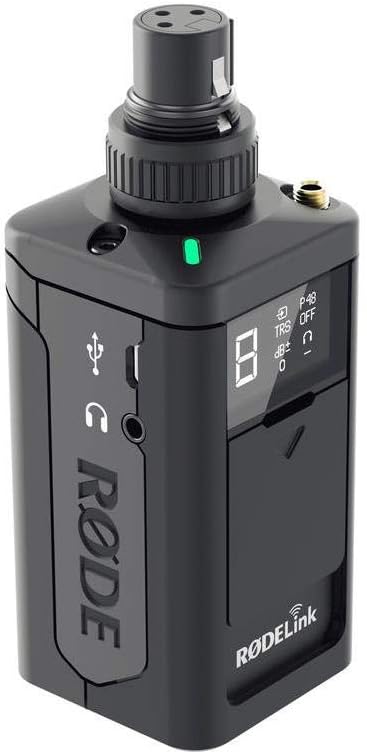
그림 4.1: 측면 view of the TX-XLR, highlighting the micro USB port for power and the 3.5mm headphone monitoring jack.
4.2 마이크 연결
The TX-XLR features an XLR input with a locking collar. Simply plug your XLR microphone into the top of the unit. For microphones requiring phantom power, ensure the P48 phantom power setting is enabled on the TX-XLR (refer to Section 5.1 for controls).
Additionally, a 3.5mm TRS locking jack socket is available for connecting lavalier microphones or other devices with a 3.5mm output.

Figure 4.2: Front panel of the TX-XLR, showing the OLED display and control buttons for easy access to settings.
4.3 Pairing with a RØDELink Receiver
The TX-XLR utilizes one-touch sync for quick and easy pairing with a compatible RØDELink receiver (e.g., RX-CAM). Follow these steps:
- Ensure both the TX-XLR and the RØDELink receiver are powered on.
- On the TX-XLR, navigate to the pairing menu using the control buttons.
- On the receiver, activate its pairing mode.
- The units should automatically detect and pair with each other. The display on both units will confirm a successful connection.
5. 운영
5.1 컨트롤 및 디스플레이
The TX-XLR features an intuitive OLED display and control buttons for managing settings:
- 전원 버튼: Press and hold to turn the unit on/off. A short press may activate/deactivate mute.
- 탐색 버튼(좌/우): 메뉴 옵션을 탐색하고 값을 조정하는 데 사용됩니다.
- 선택 버튼: 선택 사항을 확인하거나 하위 메뉴로 들어갑니다.
- OLED 디스플레이: Shows current channel, battery status, audio levels, phantom power status (P48), and other settings.
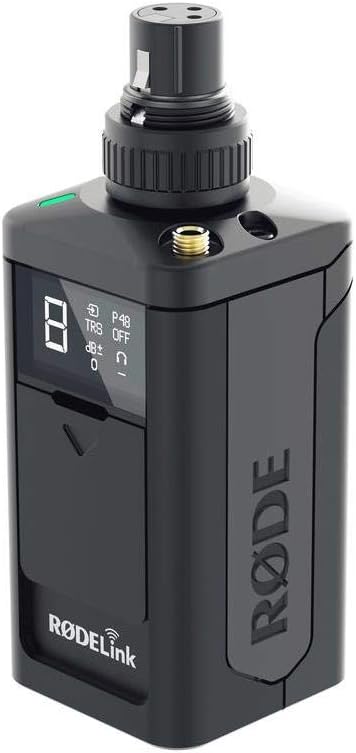
그림 5.1: 각도 view of the TX-XLR, providing a clear look at the display and the tactile control buttons.
5.2 Adjusting Audio Gain
To optimize your audio levels, you can adjust the gain on the TX-XLR. Use the navigation buttons to access the gain setting on the display and increase or decrease the input sensitivity as needed. Monitor your audio levels on the receiver or a connected monitoring device to prevent clipping.
5.3 팬텀 파워 활성화
If using a condenser microphone that requires 48V phantom power, navigate to the P48 setting on the TX-XLR's display and activate it. Ensure your microphone is connected before enabling phantom power.
6. 유지관리
6.1 청소
To clean the TX-XLR, use a soft, dry cloth. Do not use abrasive cleaners, solvents, or harsh chemicals. Avoid getting moisture into any openings.
6.2 보관
When not in use for extended periods, remove batteries from the unit to prevent leakage. Store the TX-XLR in a cool, dry place, away from direct sunlight and extreme temperatures.
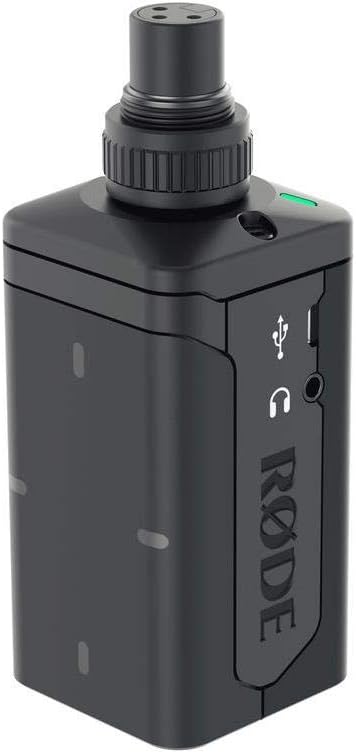
그림 6.1: 후면 view of the TX-XLR, illustrating the battery compartment for AA or NP-F series batteries.
7. 문제 해결
| 문제 | 가능한 원인 | 해결책 |
|---|---|---|
| 전원이 없습니다 | Dead batteries; Incorrect battery insertion; USB cable not connected or faulty. | Replace batteries; Check battery polarity; Ensure USB cable is securely connected to a working power source. |
| 오디오 출력이 없습니다 | Transmitter not paired; Microphone not connected; Phantom power off (for condenser mics); Gain too low; Muted. | Re-pair transmitter and receiver; Check microphone connection; Enable P48 phantom power; Increase gain; Check mute status. |
| Poor audio quality / Dropouts | Interference; Out of range; Low battery. | Move away from other wireless devices; Reduce distance between transmitter and receiver; Replace or charge batteries. |
| 팬텀 파워가 작동하지 않습니다 | P48 setting disabled; Faulty microphone or cable. | Enable P48 in settings; Test with a different microphone or XLR cable. |
8. 사양
| 특징 | 세부 사항 |
|---|---|
| 모델명 | TX-XLR |
| 전원 | 2 x AA battery, NP-F series battery, or micro USB |
| 안테나 | 내부 |
| 입력 연결 | XLR with locking collar, 3.5mm TRS locking jack socket |
| 입력 임피던스 | 1kΩ (XLR), 10kΩ (3.5mm) |
| 치수(길이 x 너비 x 높이) | 120mm x 45mm x 45mm (Product Dimensions: 17.78 x 7.62 x 12.7 cm) |
| 품목 무게 | 222g |
| 재료 | 금속 |
| 주파수 범위 | 20Hz - 20kHz |
| 연결 기술 | 무선, USB |
| 특징 | Runs on Plug-In Power, Wireless Connectivity |
9. 보증 및 지원
RØDE products are designed and manufactured to the highest quality standards. For information regarding warranty coverage, product registration, and technical support, please visit the official RØDE web사이트 또는 고객 서비스 부서에 문의하십시오.
Always refer to the official RØDE web최신 정보와 지원 자료를 제공하는 사이트입니다.
Ask a question about this manual
Ask about setup, troubleshooting, compatibility, parts, safety, or missing instructions. Manuals+ will review the question and use this page’s manual context to help answer it.