
Salicru SLC 700 Twin Pro2 (699CA000001)
Salicru SLC 700 Twin Pro2 UPS 사용자 설명서
Model: SLC 700 Twin Pro2 (699CA000001) | Brand: Salicru
1. 서론
This manual provides essential information for the safe and efficient operation of your Salicru SLC 700 Twin Pro2 Uninterruptible Power System (UPS). This online double conversion UPS is designed to provide clean, stable, and reliable power to critical equipment, protecting against power outages, surges, and fluctuations. Please read this manual thoroughly before installation and operation.
2. 안전 지침
Always observe the following safety precautions to prevent injury and damage to the UPS or connected equipment.
- UPS c를 열지 마십시오.asing. 내부에는 사용자가 직접 수리할 수 있는 부품이 없습니다. 모든 수리는 자격을 갖춘 서비스 담당자에게 맡기십시오.
- 무정전 전원 공급 장치(UPS)를 직사광선이 비치는 곳, 열원 근처, 또는 먼지, 습기, 부식성 물질이 과도한 환경에 설치하지 마십시오.
- 무정전 전원 공급 장치(UPS)가 접지된 전원 콘센트에 연결되어 있는지 확인하십시오.
- Do not block ventilation openings. Adequate airflow is crucial for proper operation and to prevent overheating.
- 화재 발생 시 이산화탄소 소화기 또는 분말 소화기를 사용하십시오. 물은 절대 사용하지 마십시오.
- Disconnect the UPS from the AC power source before cleaning or performing any maintenance.
- UPS에는 내장 배터리가 있습니다. UPS 또는 배터리를 불 속에 버리지 마십시오. 배터리가 폭발할 수 있습니다.
- Battery servicing should be performed or supervised by personnel knowledgeable about batteries and the required precautions.
3. 패키지 내용
패키지에 모든 품목이 들어 있는지 확인하세요.
- Salicru SLC 700 Twin Pro2 UPS Unit
- 사용 설명서 (본 문서)
- 전원 코드
- USB 통신 케이블
- 소프트웨어 CD(해당되는 경우)
4. 제품 오버view
4.1 전면 패널

그림 4.1: 앞쪽 view of the Salicru SLC 700 Twin Pro2 UPS, showing the LCD display and control panel.
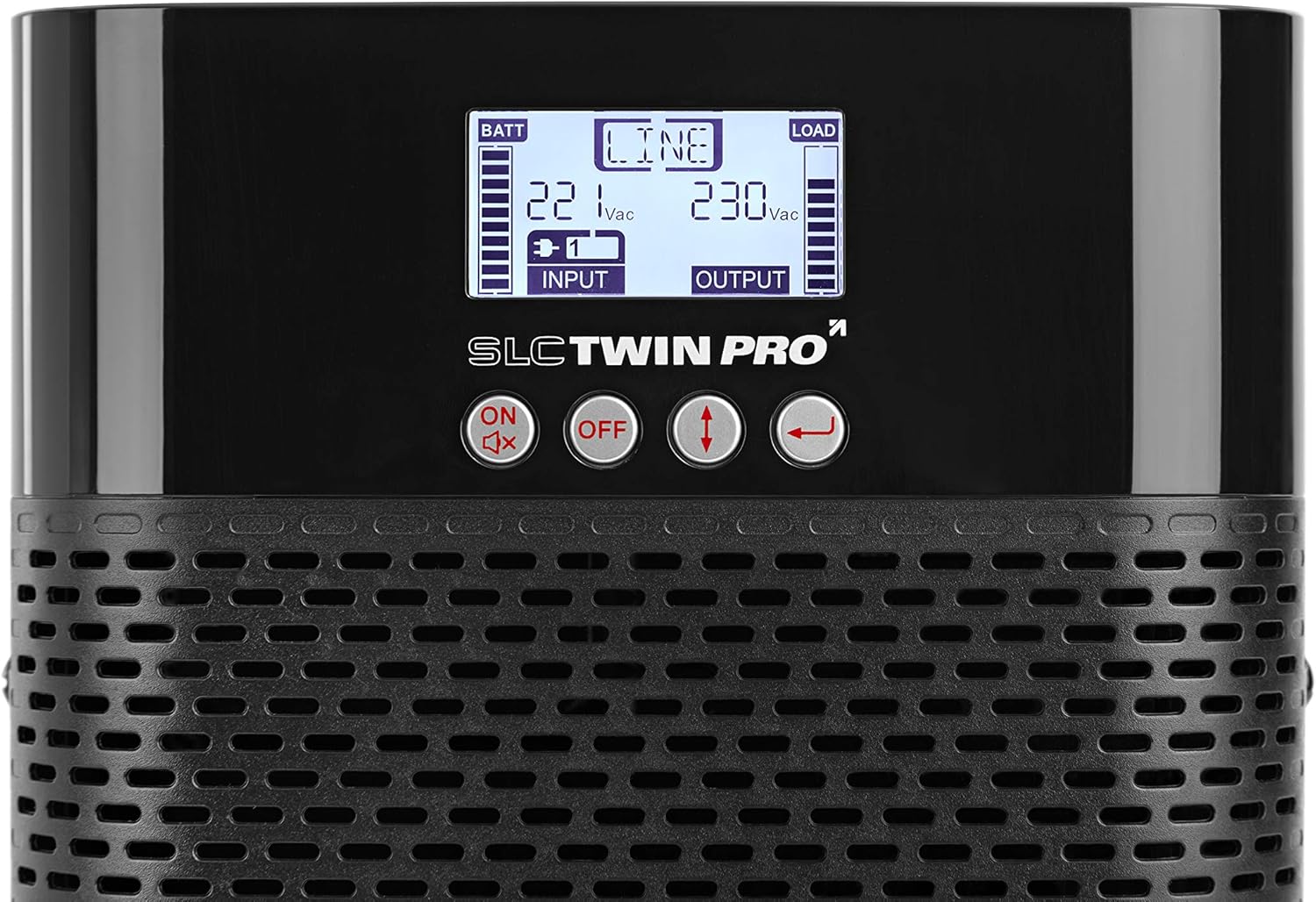
그림 4.2: Close-up of the LCD display and control buttons. The display shows battery status, input/output voltage, and load level. Buttons include ON/Mute, OFF, Up/Down arrows, and Enter.
- LCD 디스플레이: Shows real-time UPS status, input/output voltag예를 들어 배터리 잔량, 부하 용량 및 다양한 작동 모드 등이 있습니다.
- 제어 버튼:
- ON/Mute: 무정전 전원 공급 장치를 켜거나 알람을 음소거합니다.
- OFF : Powers off the UPS.
- 위/아래 화살표: Navigate through LCD menu options.
- 입력하다: 선택 사항을 확인하거나 하위 메뉴로 들어갑니다.
- 환기 그릴: Ensures proper airflow for cooling the internal components.
4.2 후면 패널

그림 4.3: 뒤쪽 view of the Salicru SLC 700 Twin Pro2 UPS, detailing the connection ports and cooling fan.
- AC 입력: Power cord connection for incoming utility power.
- AC 출력 소켓: Outlets for connecting protected equipment.
- 차단기 : Resettable circuit breaker for overload protection.
- 냉각 팬: Dissipates heat from the unit.
- USB 포트: For connecting to a computer for monitoring and management software.
- EPO(비상 전원 끄기) 포트: For remote emergency shutdown.
- 지능형 슬롯: For optional communication cards (e.g., SNMP card).
5. 설정
5.1 배치
Choose a suitable location for the UPS:
- UPS를 평평하고 안정적인 표면에 놓으십시오.
- Ensure adequate clearance around the ventilation openings (front, sides, and rear) for proper airflow.
- Avoid areas with high humidity, extreme temperatures, or direct sunlight.
- Keep the UPS away from strong electromagnetic fields.
5.2 전원 연결
- 제공된 전원 코드를 연결하십시오. 교류 입력 port on the rear panel of the UPS.
- Plug the other end of the power cord into a grounded wall outlet.
- Allow the UPS to charge its internal batteries for at least 8 hours before initial use to ensure full runtime capacity. The UPS will charge even if it is turned off.
5.3 장치 연결
Connect your critical equipment to the AC 출력 소켓 on the rear panel of the UPS. Ensure that the total power consumption of all connected devices does not exceed the UPS's capacity (700VA / 630W).
- Connect computers, monitors, network devices, and other sensitive electronics.
- Do not connect laser printers or other high-surge current devices to the UPS output, as this may overload the unit.
6. 운영
6.1 UPS 켜기
- UPS가 AC 전원에 연결되어 있는지 확인하십시오.
- 를 누르고 계세요 켜짐/음소거 button on the front panel for approximately 2 seconds until you hear a beep.
- The UPS will perform a self-test, and the LCD display will illuminate, showing the current status.
6.2 UPS 전원 끄기
- If the UPS is supplying power to connected devices, ensure they are properly shut down.
- 를 누르고 계세요 끄다 button on the front panel for approximately 2 seconds until you hear a beep.
- The UPS will shut down, and the LCD display will turn off.
- To completely remove power, disconnect the power cord from the wall outlet.
6.3 LCD 디스플레이 정보
The LCD display provides real-time operational status. Use the Up/Down arrow buttons to cycle through different information screens.
| 지시자 | 설명 |
|---|---|
| 배트 | 배터리 충전 수준. |
| 선 | Indicates the UPS is operating on utility power (Online mode). |
| 짐 | Output load level. |
| 입력 Voltage | Current incoming AC voltage. |
| 출력 볼륨tage | Current outgoing AC voltage supplied by the UPS. |
| 배터리 모드 | 정전 중에 UPS가 배터리 전원으로 작동 중임을 나타냅니다.tage. |
| 바이패스 모드 | Indicates the UPS is supplying utility power directly to the load, bypassing the inverter. |
7. 유지관리
적절한 유지 관리는 UPS의 수명 연장과 최적의 성능을 보장합니다.
- 배터리 관리 :
- Recharge the batteries every 3 months if the UPS is not in use to prevent battery degradation.
- Perform a battery calibration (if supported by software) annually to ensure accurate runtime estimates.
- Batteries typically last 3-5 years. Contact qualified service personnel for battery replacement.
- 청소:
- Use a soft, dry cloth to clean the exterior of the UPS.
- 액체 또는 에어로졸 세척제를 사용하지 마십시오.
- 먼지가 쌓이는 것을 방지하기 위해 환기구를 주기적으로 청소하십시오.
- 저장:
- If storing the UPS for an extended period, ensure the batteries are fully charged.
- 시원하고 건조한 곳에 보관하세요.
- Recharge the batteries every 3 months during storage.
8. 문제 해결
This section addresses common issues you might encounter with your UPS. If the problem persists, contact technical support.
| 문제 | 가능한 원인 | 해결책 |
|---|---|---|
| UPS가 켜지지 않습니다. | AC 전원 입력 없음; 배터리 부족; UPS 오류. | Check power cord connection and wall outlet. Allow batteries to charge. If problem persists, contact support. |
| UPS가 계속해서 경고음을 울립니다. | On battery mode; Overload; Battery fault. | Check if utility power is present. Reduce connected load. Check battery status on LCD. |
| UPS goes to battery mode frequently. | Unstable utility power; Sensitivity setting too high. | Check utility power quality. Adjust UPS input voltage sensitivity via software (if available). |
| 배터리 작동 시간이 짧습니다. | Batteries not fully charged; Old batteries; Overload. | Allow batteries to fully charge. Consider battery replacement if old. Reduce connected load. |
9. 사양
Key technical specifications for the Salicru SLC 700 Twin Pro2 UPS.
| 특징 | 세부 사항 |
|---|---|
| 모델 번호 | 699CA000001 |
| 상표 | 살리크루 |
| 제품 치수 | 35.6 x 14.4 x 22.8cm |
| 품목 무게 | 9.3kg |
| 출력 전력 용량 | 700VA / 630W |
| 입력 Voltage | 220V(XNUMXV) |
| 출력 볼륨tage | 230V(XNUMXV) |
| 현재 평가 | 2 Amps |
| 폼 팩터 | 탑 |
| 커넥터 유형 | ATX, EPS, USB |
| 필요한 배터리 | 1개의 리튬 이온 배터리(포함) |
| 색상 | 검은색 |
| 기술 | 온라인 이중 변환 |
| 출력 전력 계수 | 0.9 |
10. 보증 및 지원
For warranty information and technical support, please refer to the warranty card included with your product or visit the official Salicru web사이트. 보증 청구를 위해 구매 증빙 자료로 구매 영수증을 보관하세요.
Salicru Official Web대지: www.salicru.com
Ask a question about this manual
Ask about setup, troubleshooting, compatibility, parts, safety, or missing instructions. Manuals+ will review the question and use this page’s manual context to help answer it.