
1. 서론
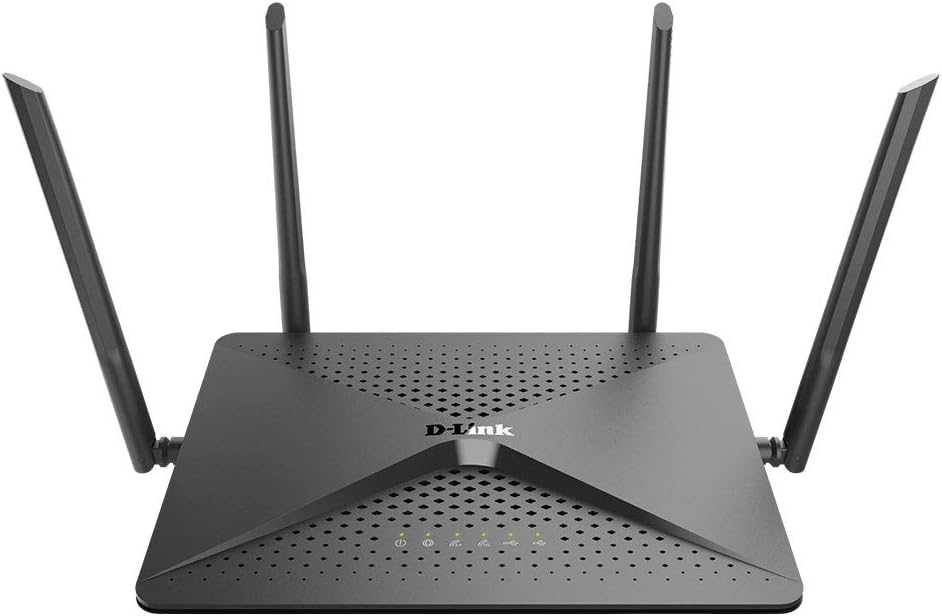
The D-Link DIR-882-US AC2600 MU-MIMO Wi-Fi Wireless Router is designed to provide high-performance wireless connectivity for demanding home network tasks such as HD streaming, online gaming, and supporting multiple connected devices. It features dual-band Wi-Fi with speeds up to 2,533 Mbps (800 Mbps on 2.4GHz and 1,733 Mbps on 5GHz), a powerful dual-core processor, AC Smart Beam Technology, and Intelligent Quality of Service (QoS) for traffic prioritization. Four high-performance external antennas ensure maximum wireless range and coverage throughout your home.
2. 패키지 내용
제품 패키지에 모든 품목이 들어 있는지 확인하세요.
- DIR-882-US device
- 전원 어댑터
- Ethernet Cable (RJ45 Cable)
- 빠른 설치 가이드
3. 설정 가이드
3.1. 물리적 연결
라우터를 연결하려면 다음 단계를 따르세요.
- Position the Antennas: Ensure all four external antennas are securely attached and oriented for optimal signal coverage.
- 전원에 연결: Plug the power adapter into the router's power port and then into a wall outlet. Ensure the power button is pressed if applicable.
- 모뎀에 연결: Connect one end of the provided Ethernet cable to the 기가비트 WAN 포트 (usually labeled 'Internet') on the router and the other end to your modem's Ethernet port.
- 장치 연결(선택 사항): For wired connections, connect your computer or other network devices to any of the 4 Gigabit LAN Ports 이더넷 케이블을 사용합니다.

3.2. 초기 구성
After physical setup, configure your router using the web기반 인터페이스:
- Access the Router: 열기 web 라우터에 연결된 컴퓨터의 웹 브라우저 (Wi-Fi 또는 이더넷을 통해).
- Enter Router Address: In the browser's address bar, type
http://dlinkrouter.local./or192.168.0.1Enter를 누르세요. - 로그인: When prompted, the default username is
Admin. Leave the password field blank. - 설치 마법사를 따르세요: The D-Link setup wizard will guide you through configuring your internet connection, Wi-Fi network name (SSID), and password. It is highly recommended to change the default Wi-Fi password and router login password for security.

4. 라우터 작동
4.1. Wi-Fi 연결
The DIR-882-US operates on dual bands (2.4GHz and 5GHz) and utilizes advanced technologies for optimal performance:
- 듀얼 밴드: Creates two separate networks for faster speeds and flexibility, allowing older devices to connect to 2.4GHz and newer, high-bandwidth devices to 5GHz.
- 4x4 Data Streams: Supports four simultaneous data streams for increased throughput, enabling more devices to connect without slowing down the Wi-Fi.
- MU-MIMO 기술: Enables the router to send and receive data from multiple devices simultaneously, significantly improving efficiency and performance in multi-device environments.
- AC Smart Beam: Tracks your connected devices to enhance Wi-Fi speed and range throughout your home, directing Wi-Fi signals directly to your devices.
- 스마트 연결: Automatically assigns devices to the optimal Wi-Fi band (2.4GHz or 5GHz) for the best performance.


4.2. USB 포트 사용
The router includes two USB ports (one USB 3.0 and one USB 2.0) for connecting external storage devices. This allows you to share files, media, and documents across your network, creating a personal cloud storage solution.
4.3. Performance and Processing
Equipped with a powerful dual-core processor, the DIR-882-US significantly boosts both wired and wireless performance, ensuring smooth operation even under heavy network load.

4.4. 권장 사용법
The D-Link DIR-882-US is suitable for various demanding home network activities:

5. 유지관리
To ensure optimal performance and longevity of your D-Link DIR-882-US router, consider the following maintenance practices:
- 펌웨어 업데이트: Regularly check the D-Link support website for the latest firmware updates. Updating firmware can improve performance, add new features, and address security vulnerabilities.
- 정기 재부팅: Periodically rebooting your router (unplugging it from power for 10-15 seconds and plugging it back in) can help clear its memory and resolve minor performance issues.
- 물리적 청소: Keep the router clean and free of dust. Use a soft, dry cloth to wipe the exterior. Ensure ventilation holes are not obstructed to prevent overheating.
- 안전한 배치: Place the router in a central location, away from obstructions, direct sunlight, and heat sources.
6. 문제 해결
This section provides solutions to common issues you might encounter with your D-Link DIR-882-US router.
| 문제 | 가능한 해결책 |
|---|---|
| 인터넷에 연결되지 않았습니다. | Check if the WAN port LED is lit. Ensure the Ethernet cable from the modem is securely connected. Reboot both the modem and the router. Contact your Internet Service Provider (ISP) if the issue persists. |
| 와이파이 속도가 느리거나 연결이 불안정합니다. | Ensure your devices are connected to the appropriate Wi-Fi band (5GHz for faster speeds). Reduce interference by moving the router away from other electronics. Check for firmware updates. Consider adjusting the MTU value in router settings (Settings > Internet > Advanced) if webpages load slowly or images are missing. The optimal MTU value is often 1500. |
| 라우터에 접근할 수 없습니다 web 인터페이스. | Ensure your device is connected to the router's network. Try using a different web browser. Verify the router's IP address (default is 192.168.0.1 or dlinkrouter.local./). If you forgot the password, perform a factory reset (see manual for specific steps). |
| Wi-Fi signal is weak in certain areas. | Reposition the router to a more central location. Adjust antenna orientation. Consider using a Wi-Fi extender or mesh system for larger homes. |
7. 기술 사양
| 특징 | 세부 사항 |
|---|---|
| 모델 번호 | DIR-882-US |
| 제품 치수 | 9 x 7 x 1.8 인치 |
| 품목 무게 | 1.25파운드 |
| 무선 표준 | 802.11ac, 802.11b, 802.11g, 802.11n |
| 주파수 대역 클래스 | 듀얼 밴드(2.4GHz 및 5GHz) |
| Wi-Fi 속도 | Up to 2600 Mbps (800 Mbps in 2.4GHz + 1733 Mbps in 5GHz) |
| 프로세서 | 듀얼 코어 프로세서 |
| 이더넷 포트 | 4 x 기가비트 LAN, 1 x 기가비트 WAN |
| USB 포트 | 1 X USB 3.0, 1 X USB 2.0 |
| 안테나 | 4개의 고성능 외부 안테나 |
| 특별 기능 | MU-MIMO, AC Smart Beam, Intelligent QoS, WPS |
| 보안 | WPA/WPA2 Encryption |
| 포함된 구성 요소 | DIR-882-US device, Power Adapter, Ethernet Cable (RJ45 Cable), Quick Install Guide, Gift Box |
8. 보증 및 지원
For warranty information and technical support, please refer to the documentation included with your product or visit the official D-Link support web대지. NS website typically provides FAQs, troubleshooting guides, driver downloads, and contact information for customer service.