
1. 서론
The Focal Shape 50 is a versatile monitoring loudspeaker designed for professional audio environments. It offers extended low-frequency response and precise control, making it suitable for rooms up to 130 sq ft (12 sq m). This manual provides essential information for the proper setup, operation, and maintenance of your Shape 50 studio monitor.

그림 1.1: 전면 view of the Focal Shape 50 Studio Monitor, showcasing its dark walnut finish and speaker components.
2. 패키지 내용
Before proceeding with installation, please verify that all components are present in the packaging:
- Focal Shape 50 Studio Monitor (1 unit)
- 전원 코드
- 사용 설명서 (본 문서)
3. 설정
3.1 배치
The Shape 50 monitor is designed to be placed near a wall due to its port-less design. For optimal listening, position the monitor at a distance of approximately 30 inches (80 cm) from your listening position. Ensure the monitors are placed symmetrically in your room to achieve a balanced stereo image.
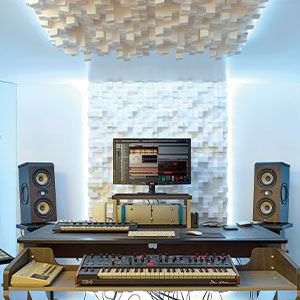
그림 3.1: 예ample of a studio setup with two Focal Shape 50 monitors positioned for optimal sound monitoring.
3.2 연결
Connect your audio source to the Shape 50 monitor using an RCA cable. Ensure all connections are secure before powering on the unit.
- 오디오 입력: Use the RCA input for connecting your audio interface or mixer.
- 힘: Connect the provided power cord to the monitor's power inlet and then to a suitable electrical outlet.

Figure 3.2: Rear panel of the Focal Shape 50, showing the RCA input, power connection, and various adjustment controls.
3.3 장착
The Shape 50 includes threads for ceiling and wall mount fastening. Mounting accessories are not supplied and must be purchased separately. Consult a professional for proper installation of wall or ceiling mounts.
4. 사용 설명서
4.1 전원 켜기/끄기
To power on the monitor, ensure all audio connections are made, then connect the power cord and flip the power switch located on the rear panel. To power off, reverse this process.
4.2 설정 조정
The Shape 50 features numerous settings on its rear panel for optimal integration into various acoustic environments and for accurate control of sound reproduction. These include adjustments for high-frequency, mid-frequency, and low-frequency response, allowing you to tailor the sound to your specific room and preferences.
4.3 Flexible Listening Position
The monitor's low directivity tweeter design allows for a flexible listening position, providing consistent sound quality even when slightly off-axis from the monitor.
5. 유지관리
To ensure the longevity and optimal performance of your Focal Shape 50 monitors, follow these maintenance guidelines:
- 청소: Use a soft, dry cloth to clean the exterior surfaces of the monitor. Avoid abrasive cleaners or solvents.
- 통풍: Ensure adequate airflow around the monitor to prevent overheating. Do not block the ventilation openings.
- 환경: Operate the monitor in a stable environment, away from extreme temperatures, humidity, and direct sunlight.
6. 문제 해결
If you encounter issues with your Focal Shape 50 monitor, refer to the following common troubleshooting steps:
- 소리 없음:
- Check if the monitor is powered on and the power cord is securely connected.
- Verify that the audio source is active and connected correctly to the monitor's input.
- Ensure the volume levels on both the monitor and the audio source are appropriately set.
- 왜곡된 소리:
- 클리핑 현상을 방지하려면 오디오 소스의 입력 레벨을 낮추십시오.
- 모든 케이블에 손상이나 느슨한 연결 부분이 있는지 확인하십시오.
- Ensure the monitor's rear panel settings are not causing excessive boosting of certain frequencies.
- 윙윙거리는 소리 또는 윙윙거리는 소음:
- 모든 오디오 케이블이 제대로 차폐되어 있는지 확인하십시오.
- Try connecting the monitor to a different power outlet, preferably on a different circuit.
- 주변에 간섭을 일으킬 수 있는 전자 기기가 있는지 확인하십시오.
If the issue persists after attempting these steps, please contact Focal customer support.
7. 사양
| 특징 | 사양 |
|---|---|
| 상표 | 초점 |
| 모델명 | 모양 50 |
| 모델 번호 | 3544059801524DW001 |
| 스피커 유형 | 감시 장치 |
| 스피커 최대 출력 전력 | 1000 와트 |
| 주파수 응답 | 35000Hz |
| 연결 기술 | (주)알에이씨에이 |
| 오디오 출력 모드 | 스테레오, 서라운드 |
| 장착 유형 | Wall Mount (accessories not supplied) |
| 인클로저 재료 | 호두 |
| 서브우퍼 직경 | 5 인치 |
| 우퍼 직경 | 5 인치 |
| 색상 | 다크 월넛 |
| 품목 치수(D x W x H) | 9.5인치 깊이 x 12.3인치 너비 x 7.5인치 높이 |
| 품목 무게 | 14.33 파운드 |
| 전원 | 코드식 전기 |
| 오디오 채널 수 | 2.0 |
| 호환 장치 | 스마트폰, 태블릿, MP3 플레이어, 데스크탑, 텔레비전, 프로젝터, 노트북 |
8. 보증 정보
The Focal Shape 50 Studio Monitor is covered by a 2년 제조사 보증 구매일로부터 적용됩니다. 이 보증은 정상적인 사용 조건에서 발생하는 재료 및 제조상의 결함에 적용됩니다. 단, 오용, 사고, 무단 개조 또는 부적절한 설치로 인한 손상은 보증 대상에서 제외됩니다.
Please retain your proof of purchase for warranty claims. For detailed warranty terms and conditions, refer to the official Focal web사이트를 방문하거나 고객 지원팀에 문의하세요.
9. 지원
For technical assistance, troubleshooting beyond this manual, or warranty inquiries, please contact Focal customer support through their official web사이트 또는 제품 설명서와 함께 제공된 연락처 정보를 참조하세요.
온라인 리소스: 공식 Focal을 방문하세요 web제품 등록, FAQ, 추가 지원 자료를 제공하는 사이트입니다.