
아웨이 A880BL
Awei A880BL Wireless Sports Headset User Manual
모델: A880BL
소개
Thank you for choosing the Awei A880BL Wireless Sports Headset. This manual will guide you through the features, setup, and operation of your new headset. Please read it carefully before use and retain it for future reference.

Image: The Awei A880BL Wireless Sports Headset with a blue connecting cable, designed for in-ear use with ear hooks for secure fit.
중요한 안전 정보
- 헤드셋을 극한의 온도나 습도에 노출시키지 마십시오.
- 헤드셋을 떨어뜨리거나 강한 충격을 주지 마십시오.
- Do not disassemble or modify the headset. This will void the warranty.
- 헤드셋을 어린이와 애완동물의 손이 닿지 않는 곳에 보관하세요.
- 제공된 충전 케이블이나 인증된 동등 제품만 사용하세요.
- 높은 볼륨으로 장시간 청취하면 청력이 손상될 수 있습니다.
패키지 내용
패키지에 모든 품목이 들어 있는지 확인하세요.
- Awei A880BL Wireless Sports Headset
- USB 충전 케이블
- 다양한 크기의 이어팁
- 사용 설명서 (본 문서)

Image: Contents of the Awei A880BL package, showing the black headset with yellow cable, a white USB charging cable, three pairs of gold-colored ear tips, and a small yellow instruction card, all next to the product box.
제품 끝view
The Awei A880BL headset features a secure over-ear hook design, in-ear earbuds, and an integrated control panel for easy access to functions.
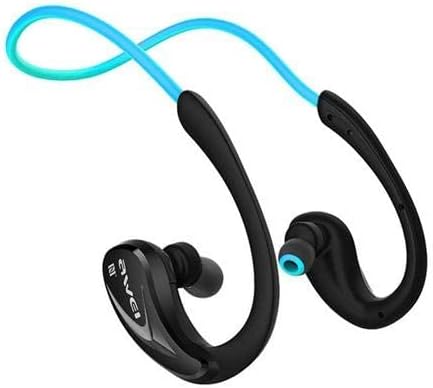
이미지: 클로즈업 view of one side of the Awei A880BL headset, highlighting the in-ear earbud and the ergonomic ear hook design.
설정
1. 헤드셋 충전
Before first use, fully charge the headset. Connect the USB charging cable to the headset's charging port and a power source (e.g., computer USB port or USB wall adapter). The indicator light will show charging status and turn off or change color when fully charged.
2. 블루투스 페어링
- 헤드셋이 꺼져 있는지 확인하십시오.
- Press and hold the Multi-function button (usually the power button) until the indicator light flashes red and blue alternately, indicating pairing mode.
- 기기(스마트폰, 태블릿 등)에서 Bluetooth를 활성화하고 사용 가능한 기기를 검색하세요.
- 검색된 장치 목록에서 "Awei A880BL"을 선택하십시오.
- 페어링이 완료되면 표시등이 파란색으로 천천히 깜빡이거나 파란색으로 계속 켜집니다.
3. NFC Speed Pairing (if supported by your device)
The Awei A880BL supports NFC for quick pairing with compatible devices.
- Ensure NFC is enabled on your device and the headset is in pairing mode or powered on.
- Tap your NFC-enabled device against the NFC area on the headset (refer to product diagram if available for exact location).
- 기기에서 페어링 요청을 확인하세요.
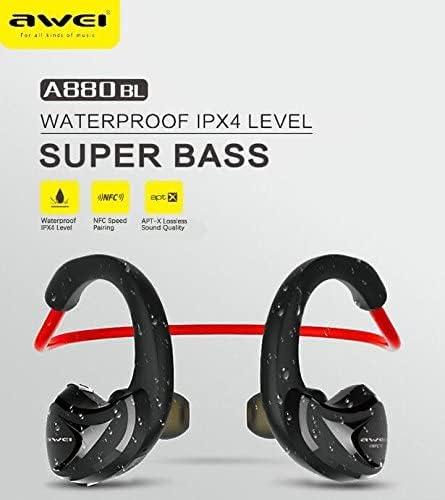
Image: A graphic highlighting key features of the Awei A880BL, including "WATERPROOF IPX4 LEVEL", "NFC Speed Pairing", and "APT-X Lossless Sound Quality".
4. 헤드셋 착용하기
For optimal comfort and sound quality, ensure the headset is worn correctly.
- 1단계: Hold the headset with both hands, with the earbuds facing inwards.
- 2단계: Gently place the earbuds into your ears, guiding the ear hooks over the top of your ears.
- 3단계: Adjust the flexible cable behind your neck for a secure and comfortable fit.
- 4단계: The headset should sit comfortably and securely, even during physical activity.

Image: A four-panel image demonstrating the steps to correctly wear the Awei A880BL headset, showing how to position the earbuds and adjust the neckband.
작동 지침
전원 켜기/끄기
- 전원 켜기: Press and hold the Multi-function button for approximately 3 seconds until you hear a power-on prompt and the indicator light flashes blue.
- 전원 끄기 : Press and hold the Multi-function button for approximately 5 seconds until you hear a power-off prompt and the indicator light turns red and then off.
음악 재생
- 재생/일시 중지: 다기능 버튼을 짧게 누르세요.
- 다음 트랙: 볼륨 높이기(+) 버튼을 길게 누릅니다.
- 이전 트랙 : 볼륨 낮추기(-) 버튼을 길게 누릅니다.
- 볼륨 업: 볼륨 높이기(+) 버튼을 짧게 누르세요.
- 볼륨 작게 : 볼륨 낮추기(-) 버튼을 짧게 누르세요.
통화 관리
- 전화 받기: 전화가 걸려오면 다기능 버튼을 짧게 누르세요.
- 통화 종료: 통화 중에 다기능 버튼을 짧게 누르세요.
- 전화 거부: 전화가 걸려오면 다기능 버튼을 길게 누르세요.
- 마지막 번호 재다이얼: 다기능 버튼을 두 번 누릅니다.
음성 지원
- Voice Assistant 활성화 : Triple-press the Multi-function button (functionality depends on your connected device).
유지 보수 및 관리
- 청소: 헤드셋을 부드럽고 마른 천으로 닦으십시오. 연마성 세척제나 용제를 사용하지 마십시오.
- 저장: 헤드셋은 직사광선과 극한의 온도를 피해 서늘하고 건조한 곳에 보관하세요.
- 배터리 관리 : To prolong battery life, charge the headset regularly, even if not in frequent use. Avoid fully discharging the battery for extended periods.
- 방수 기능: The Awei A880BL is rated IPX4 waterproof, meaning it is resistant to splashing water from any direction. It is suitable for sports and light rain but should not be submerged in water.
문제 해결
| 문제 | 해결책 |
|---|---|
| 헤드셋의 전원이 켜지지 않습니다. | 헤드셋이 완전히 충전되었는지 확인하십시오. 전원에 연결한 후 다시 시도하십시오. |
| 기기와 페어링할 수 없습니다. |
|
| 소리가 나지 않거나 볼륨이 작습니다. |
|
| 연결이 간헐적입니다. |
|
명세서
| 특징 | 세부 사항 |
|---|---|
| 모델 번호 | A880BL |
| 연결성 | 무선(블루투스, NFC) |
| 헤드폰 유형 | In-ear, Sports Headset (with ear hooks) |
| 마이크로폰 | 예 |
| 소음 제거 | 능동 잡음 제거 (ANC) |
| 주파수 응답 범위 | 20~22000Hz |
| 감광도 | 110 ± 3dB |
| 임피던스 | 16옴 |
| 방수성 | IPX4 Level (Splash-proof) |
| 지원되는 오디오 코덱 | APT-X |
| 제어 유형 | Button Control (Volume, Play/Pause, Call, Voice Assistant) |
| 충전 포트 | USB |
| 케이블 길이 | 0.6 meters (Charging cable) |
| 무게 | 30그램 |
| 재료 | 플라스틱 |
| 사운드 시스템 | 평형 전기자 드라이버 |
| 앱 지원 | 예 |
| 메모리 카드 지원 | 아니요 |
보증 및 지원
For warranty information and technical support, please refer to the warranty card included in your package or contact Awei customer service through their official web사이트 또는 공인 유통업체에 문의하십시오. 구매 증빙 자료로 구매 영수증을 보관하십시오.
관련 문서A880BL


Ask a question about this manual
Ask about setup, troubleshooting, compatibility, parts, safety, or missing instructions. Manuals+ will review the question and use this page’s manual context to help answer it.