
1. 서론
This manual provides essential information for the installation, operation, and maintenance of your Sangoma FreePBX Phone System 60. Please read this manual thoroughly before using the device to ensure proper functionality and to prevent damage. Keep this manual for future reference.
2. 제품 오버view
The Sangoma FreePBX Phone System 60 is a robust, purpose-built appliance designed for businesses requiring a reliable and scalable IP PBX solution. It supports up to 60 licensed extensions and 40 concurrent calls, making it suitable for small to medium-sized enterprises. The system integrates the powerful FreePBX software, offering a comprehensive suite of telephony features and management tools.
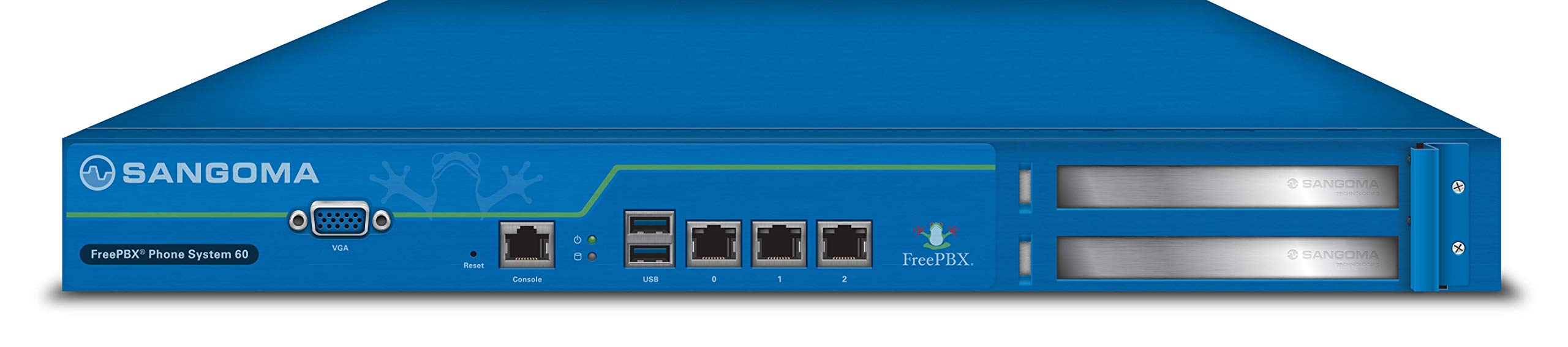
이미지: 앞면 view of the Sangoma FreePBX Phone System 60, showcasing its compact design and various front-facing ports for connectivity and management.
3. 주요 특징
- Extension Capacity: Supports up to 60 licensed extensions.
- Call Capacity: Handles up to 40 concurrent calls.
- 관리 인터페이스: Local VGA console, Web GUI, and SSH access for flexible administration.
- 네트워크 연결성: Equipped with 3x Gigabit Ethernet Ports for high-speed network integration.
- 주변 포트 : Includes 1x Serial Console (RJ45), 1x VGA port, and 2x USB ports for additional connectivity.
- 확장 슬롯: Features 2 PCI Express slots for future hardware upgrades or specialized cards.
- 운영 체제: Runs on a Linux-based operating system, providing stability and security.
- 권장 사용: Optimized for business telephony environments.
4. 설정
Follow these general steps to set up your FreePBX Phone System 60. For detailed configuration, refer to the official Sangoma documentation available online.
- 시스템 압축 해제: Carefully remove the FreePBX Phone System 60 from its packaging. Ensure all components are present.
- 전원 연결: Connect the provided power adapter to the system's power input and then to a suitable power outlet.
- 네트워크 연결 : Connect one of the Gigabit Ethernet ports to your local area network (LAN) using an Ethernet cable. It is recommended to use the designated WAN/LAN port if specified.
- 초기 접근:
- 로컬 콘솔: Connect a VGA monitor and a USB keyboard/mouse to the system for direct console access.
- Web 그래픽 사용자 인터페이스: Once the system boots and obtains an IP address (or is configured with a static IP), access the web-based graphical user interface (GUI) from a computer on the same network using a web 브라우저.
- SSH: For advanced users, SSH access is available for command-line management.
- 초기 구성: Follow the on-screen prompts or web interface instructions to complete the initial setup, including network settings, administrator credentials, and basic FreePBX configuration.
For complex deployments or if you require assistance, Sangoma offers optional remote installation and configuration services.
5. 사용 설명서
The Sangoma FreePBX Phone System 60 operates using the FreePBX software, which provides a comprehensive interface for managing your telephony system. Key operational aspects include:
- 확장 관리: Create, modify, and delete extensions for your users. Configure voicemail, call forwarding, and other extension-specific settings.
- 트렁크 구성: Set up and manage SIP trunks or other telephony connections to your service provider for inbound and outbound calls.
- 통화 라우팅: Configure inbound and outbound routes to direct calls appropriately. This includes IVRs (Interactive Voice Response), ring groups, and queues.
- User Portal: Users can often access a self-service portal to manage their own extension settings, check voicemail, and view 통화 기록.
- 시스템 모니터링: Utilize the FreePBX dashboard and reporting tools to monitor system performance, call activity, and resource usage.
Detailed instructions for specific FreePBX features are available within the FreePBX documentation and community resources.
6. 유지관리
Regular maintenance ensures the longevity and optimal performance of your FreePBX Phone System 60.
- 소프트웨어 업데이트: Regularly check for and apply FreePBX and operating system updates to ensure security and access to the latest features.
- 백업: Perform regular backups of your FreePBX configuration and call data. This is crucial for disaster recovery.
- 물리적 검사: 기기에 먼지가 쌓였는지, 특히 환기구 주변에 먼지가 있는지 주기적으로 점검하십시오. 과열을 방지하기 위해 적절한 공기 흐름을 유지하십시오.
- 환경 조건: Operate the system within recommended temperature and humidity ranges. Avoid exposing it to direct sunlight or excessive moisture.
- 보안: 정기적으로 다시view and update strong passwords for all administrative and user accounts. Implement firewall rules and other security best practices.
Optional annual support and software maintenance plans are available from Sangoma to assist with ongoing system health and updates.
7. 문제 해결
If you encounter issues with your FreePBX Phone System 60, consider the following troubleshooting steps:
- 전원 없음: Ensure the power adapter is securely connected to both the system and a working power outlet. Check the power indicator light on the device.
- 네트워크 연결 문제: Verify that Ethernet cables are properly connected. Check network switch status and ensure the system has a valid IP address. Ping the system's IP address from another device on the network.
- 접근할 수 없습니다 Web 그래픽 사용자 인터페이스: Confirm the system's IP address. Ensure your computer is on the same network segment. Try clearing your browser's cache or using a different browser.
- No Dial Tone/Call Issues: Check trunk registration status in FreePBX. Verify inbound and outbound routes are correctly configured. Ensure extensions are registered to their respective phones.
- 시스템 성능: If the system is slow or unresponsive, check system resource usage (CPU, memory) via the local console or SSH. Restarting the FreePBX services or the entire system may resolve temporary issues.
- 소프트웨어 오류: Consult the FreePBX logs for specific error messages. The FreePBX community forums and Sangoma support resources can provide solutions for common software-related problems.
If problems persist, contact Sangoma support or refer to your support plan details.
8. 사양
| 특징 | 세부 사항 |
|---|---|
| 모델명 | FreePBX Phone System 60 |
| 제품 치수 | 17 x 21 x 7 인치 |
| 품목 무게 | 11.82파운드 |
| 제조업체 | Sangoma Technologies Inc |
| ASIN | B06XNKGPJR |
| 첫 번째 이용 가능 날짜 | 14년 2017월 XNUMX일 |
| 특징 | WPS (Wireless Protected Setup - Note: Feature may be related to network configuration, not direct wireless connectivity of the unit itself) |
| 주파수 대역 클래스 | Dual-Band (Note: Typically refers to Wi-Fi, but for this wired device, it might imply network card capabilities or compatibility with dual-band network environments) |
| 호환 장치 | Laptop, Personal Computer, Smartphone, Tablet (for management and softphone integration) |
| 추천 용도 | 사업 |
| 연결 기술 | 이더넷 |
| 색상 | 파란색 |
| 안테나 유형 | Internal (Note: Likely refers to internal components, as the device is primarily wired) |
| 운영 체제 | 리눅스 |
9. 보증 및 지원
The Sangoma FreePBX Phone System 60 typically comes with a manufacturer's warranty. For specific warranty terms and conditions, please refer to the documentation included with your purchase or visit the official Sangoma web대지.
Sangoma offers various support options, including:
- Annual Support & Software Maintenance Plans: These optional plans provide ongoing technical support and access to software updates.
- Remote Installation & Configuration Services: Professional services are available for assistance with initial setup and complex configurations.
For technical assistance, visit the Sangoma support portal or contact your authorized reseller.