
1. 서론
Thank you for choosing the BBC Jadel K100 Gaming Keyboard. This manual provides essential information for setting up, operating, maintaining, and troubleshooting your new keyboard. The Jadel K100 is designed for gaming, office, and daily home use, featuring multimedia keys and a mechanical suspension design for a responsive typing experience.
제품의 올바른 작동과 제품 수명 연장을 위해 사용 전에 본 설명서를 꼼꼼히 읽어 주십시오.
2. 패키지 내용
포장을 뜯으실 때 모든 물품이 있는지 확인해 주세요.
- BBC Jadel K100 Gaming Keyboard
- 사용 설명서 (본 문서)
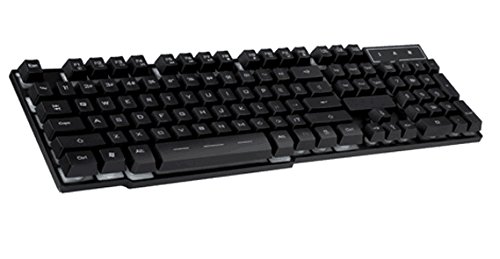
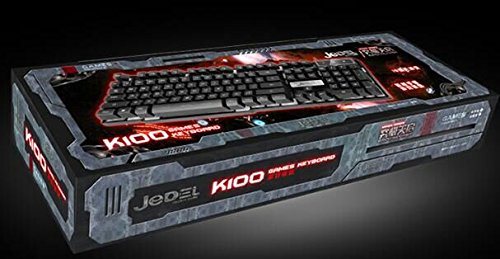
Image 1: The BBC Jadel K100 Gaming Keyboard, showcasin디자인과 포장에 있어서.
3. 설정
Follow these steps to connect your BBC Jadel K100 Gaming Keyboard to your computer:
- 키보드 풀기: 키보드를 포장에서 조심스럽게 꺼내세요.
- 컴퓨터에 연결: Locate an available USB port on your laptop or desktop computer. Insert the USB connector of the keyboard firmly into the USB port.
- 드라이버 설치: The keyboard is plug-and-play. Your operating system (Windows, macOS, Linux) should automatically detect and install the necessary drivers. This process may take a few moments.
- 연결 확인: Once drivers are installed, the keyboard should be ready for use. Test by typing in a text editor or browser.
메모: This keyboard is compatible with laptops and desktop computers running standard operating systems.
4. 사용 설명서
The Jadel K100 keyboard features a standard 104-key layout, including a numeric keypad and function keys. It also incorporates multimedia functions accessible via the FN 열쇠.
이미지 2: 클로즈업 view of the BBC Jadel K100 keyboard's main keys, including Esc, Tab, Caps Lock, Shift, Ctrl, and Alt.
4.1. 표준 주요 기능
All standard alphanumeric, symbol, and navigation keys operate as expected on a typical keyboard.
4.2. Multimedia Functions (FN Key)
The Jadel K100 includes an FN (Function) key, similar to those found on laptops, to access multimedia controls. To use these functions, press and hold the FN key, then press the corresponding function key (F1-F12) or other designated keys.
Common multimedia functions typically include:
- FN + F1-F12: Control media playback (play/pause, stop, previous/next track), volume (mute, volume up/down), and other system functions (e.g., open default browser, email client, calculator). Refer to the keycap legends for specific functions.
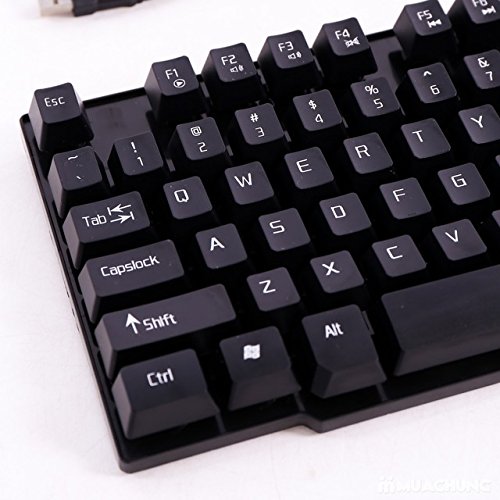
이미지 3: 상세 view of the BBC Jadel K100 keyboard's F-keys, which often include multimedia shortcuts when combined with the FN key.
4.3. 게임 경험
The mechanical suspension design provides a tactile and responsive feel, enhancing the gaming experience. The keyboard is designed for durability and comfort during extended gaming sessions.
5. 유지관리
적절한 유지관리는 키보드의 수명과 최적의 성능을 보장합니다.
- 청소:
- 청소하기 전에 키보드를 컴퓨터에서 분리하세요.
- 부드럽고 털이 없는 천을 살짝 사용하세요.amp물이나 순한 세척액을 사용하여 키캡과 표면을 닦으세요.
- 키 사이의 먼지와 이물질을 제거하려면 압축 공기를 사용하세요.
- 강한 화학 물질이나 연마성 세척제를 사용하거나 액체를 키보드에 직접 뿌리지 마세요.
- 저장: 장시간 사용하지 않을 때는 키보드를 직사광선과 극한의 온도를 피해 서늘하고 건조한 곳에 보관하세요.
- 손질: 키보드를 떨어뜨리거나 과도한 힘을 가하지 마십시오. 내부 구성 요소나 키 메커니즘이 손상될 수 있습니다.
6. 문제 해결
If you encounter issues with your BBC Jadel K100 keyboard, refer to the following common problems and solutions:
| 문제 | 가능한 원인 | 해결책 |
|---|---|---|
| 키보드가 응답하지 않습니다 | USB 연결이 느슨하거나, USB 포트에 결함이 있거나, 드라이버에 문제가 있습니다. |
|
| 특정 키가 작동하지 않습니다 | Debris under keycap, physical damage, software conflict. |
|
| 멀티미디어 키가 작동하지 않습니다 | Incorrect usage of FN key, software conflict. |
|
7. 사양
| 특징 | 세부 사항 |
|---|---|
| 상표 | BBC |
| 모델 번호 | Jadel K100 |
| 키보드 설명 | 노름 |
| 키의 개수 | 104 |
| 키 유형 | 기계적 서스펜션 |
| 색상 | 검은색 |
| 호환 장치 | 노트북, 데스크탑 PC |
| 연결성 | USB |
| 스타일 | 현대의 |
| 손의 방향 | 양손잡이 |
| 제조업체 | bbc |
8. 보증 및 지원
Specific warranty details for the BBC Jadel K100 Gaming Keyboard are not provided in this manual. For warranty information, please refer to the product packaging or contact your retailer at the point of purchase.
For technical support or further assistance, please contact the manufacturer or your retailer. Keep your purchase receipt as proof of purchase for any warranty claims.