
소개
This manual provides instructions for the Sentry BT900 On-Neck Bluetooth Headphones. It covers setup, operation, maintenance, and troubleshooting to ensure proper use of your wireless audio device.
패키지 내용
제품 패키지에 다음 품목이 포함되어 있는지 확인하세요.
- Sentry BT900 On-Neck Bluetooth Headphones
- USB 충전 케이블
- Assorted Ear Tips
- 사용자 설명서
제품 끝view
Familiarize yourself with the components of your Sentry BT900 headphones.
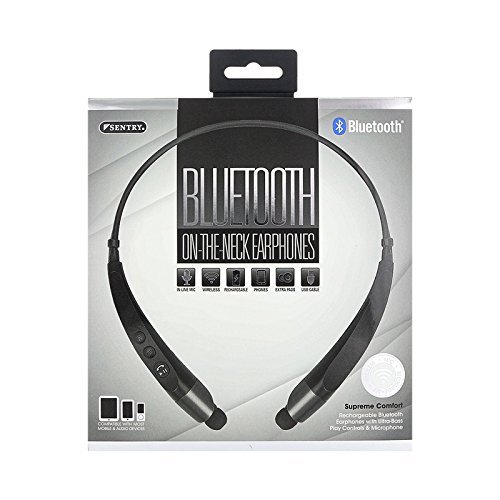
The image displays the Sentry BT900 headphones, featuring a flexible neckband designed for comfortable wear. The earbuds are connected to the neckband, and control buttons are typically located on one side of the neckband for easy access.
주요 구성 요소:
- 전원/다기능 버튼: 전원 켜기/끄기, 재생/일시정지, 전화 받기/끊기 등에 사용됩니다.
- 볼륨 높이기/다음 트랙 버튼: Increases volume, skips to the next track.
- 볼륨 낮추기/이전 트랙 버튼: Decreases volume, skips to the previous track.
- 마이크로 USB 충전 포트: 충전 케이블을 연결합니다.
- LED 표시등: 전원, 충전, 페어링 상태를 표시합니다.
- 마이크로폰: 핸즈프리 통화를 위해.
헤드폰 충전하기
처음 사용하기 전에 헤드폰을 완전히 충전하십시오.
- USB 충전 케이블의 작은 쪽 끝을 헤드폰의 마이크로 USB 포트에 연결하세요.
- USB 충전 케이블의 큰 쪽 끝을 USB 전원(예: 컴퓨터 USB 포트, USB 벽면 어댑터)에 연결합니다.
- 충전 중에는 LED 표시등이 켜지고, 충전이 완료되면 색상이 바뀌거나 꺼집니다.
- 일반적으로 완전 충전에는 약 2~3시간이 걸립니다.
Bluetooth 장치와 페어링
Follow these steps to connect your headphones to a Bluetooth-enabled device:
- 헤드폰이 꺼져 있고 완전히 충전되어 있는지 확인하십시오.
- 를 누르고 계세요 전원/다기능 버튼 for approximately 5-7 seconds until the LED indicator flashes red and blue alternately, indicating pairing mode.
- 블루투스 기능이 있는 기기(스마트폰, 태블릿 등)에서 블루투스 설정으로 이동하세요.
- Bluetooth를 활성화하고 사용 가능한 장치를 검색합니다.
- Select 'Sentry BT900' from the list of found devices.
- Once paired, the LED indicator on the headphones will typically flash blue slowly or turn solid blue.
- If a passcode is requested, enter '0000'.
헤드폰 작동
전원 켜기/끄기:
- 전원 켜기: 를 누르고 계세요 전원/다기능 버튼 for 3 seconds. The LED indicator will flash blue.
- 전원 끄기 : 를 누르고 계세요 전원/다기능 버튼 for 3 seconds. The LED indicator will flash red and then turn off.
음악 재생:
- 재생/일시 중지: 를 누르세요 전원/다기능 버튼 한 번.
- 다음 트랙: 를 누르고 계세요 볼륨 높이기 버튼.
- 이전 트랙 : 를 누르고 계세요 볼륨 낮추기 버튼.
통화 관리:
- 전화 받기/종료: 를 누르세요 전원/다기능 버튼 한 번.
- 전화 거부: 를 누르고 계세요 전원/다기능 버튼 2초 동안.
- 마지막 번호 재다이얼: 두 번 누르세요 전원/다기능 버튼.
볼륨 조절:
- 볼륨 증가: 를 누르세요 볼륨 높이기 버튼 자꾸.
- 볼륨 감소: 를 누르세요 볼륨 낮추기 버튼 자꾸.
유지
청소:
Gently wipe the headphones and earbuds with a soft, dry cloth. For ear tips, remove them and clean with a mild soap solution if necessary, then rinse and dry completely before reattaching.
저장:
헤드폰을 직사광선과 극한의 온도를 피해 서늘하고 건조한 곳에 보관하세요. 헤드폰 위에 무거운 물건을 올려놓지 마세요.
배터리 관리 :
배터리 수명을 연장하려면 배터리를 자주 완전히 방전하지 마세요. 장시간 사용하지 않더라도 헤드폰을 정기적으로 충전하세요.
문제 해결
헤드폰의 전원이 켜지지 않습니다:
Ensure the headphones are fully charged. Connect to a power source and attempt to power on after a few minutes.
기기와 페어링할 수 없습니다:
Ensure the headphones are in pairing mode (flashing red and blue LED). Make sure Bluetooth is enabled on your device and it is within range (typically 10 meters). Turn off and on both the headphones and the device, then try pairing again.
소리가 나지 않거나 볼륨이 낮음:
헤드폰과 연결된 기기의 볼륨 레벨을 확인하세요. 헤드폰이 제대로 페어링되고 연결되었는지 확인하세요. 헤드폰을 다시 페어링해 보세요.
음질이 좋지 않음:
헤드폰과 기기 사이에 장애물이 없는지 확인하십시오. 기기에 더 가까이 이동하십시오. 다른 무선 기기로 인한 간섭이 있는지 확인하십시오.
충전 문제:
Verify the USB cable is securely connected to both the headphones and the power source. Try a different USB cable or power source.
명세서
- 모델: BT900
- 무선 통신 기술: 블루투스
- 배터리 유형: 리튬 이온 1개(포함)
- 품목 무게: 2.39 온스
- 제품 크기: 8.25 x 1.5 x 6.75 인치
- 특별 기능: Microphone Included, Wireless
- 한국어: 080068549000
보증 및 지원
For warranty information, please refer to the documentation included with your purchase or contact Sentry customer support.
보증 청구를 위해 구매 증빙 자료를 보관하십시오.