
소개
This manual provides detailed instructions for the setup, operation, and maintenance of your Axess CKRD3803 Digital AM/FM Clock Radio. Please read this manual thoroughly before using the device to ensure proper function and to maximize your user experience.
제품 끝view
The Axess CKRD3803 is a versatile clock radio featuring a 1.2-inch red LED display, digital AM/FM radio, dual alarm settings, and a calendar function. It includes an Aux input jack for external audio devices and a battery backup system to maintain settings during power interruptions.
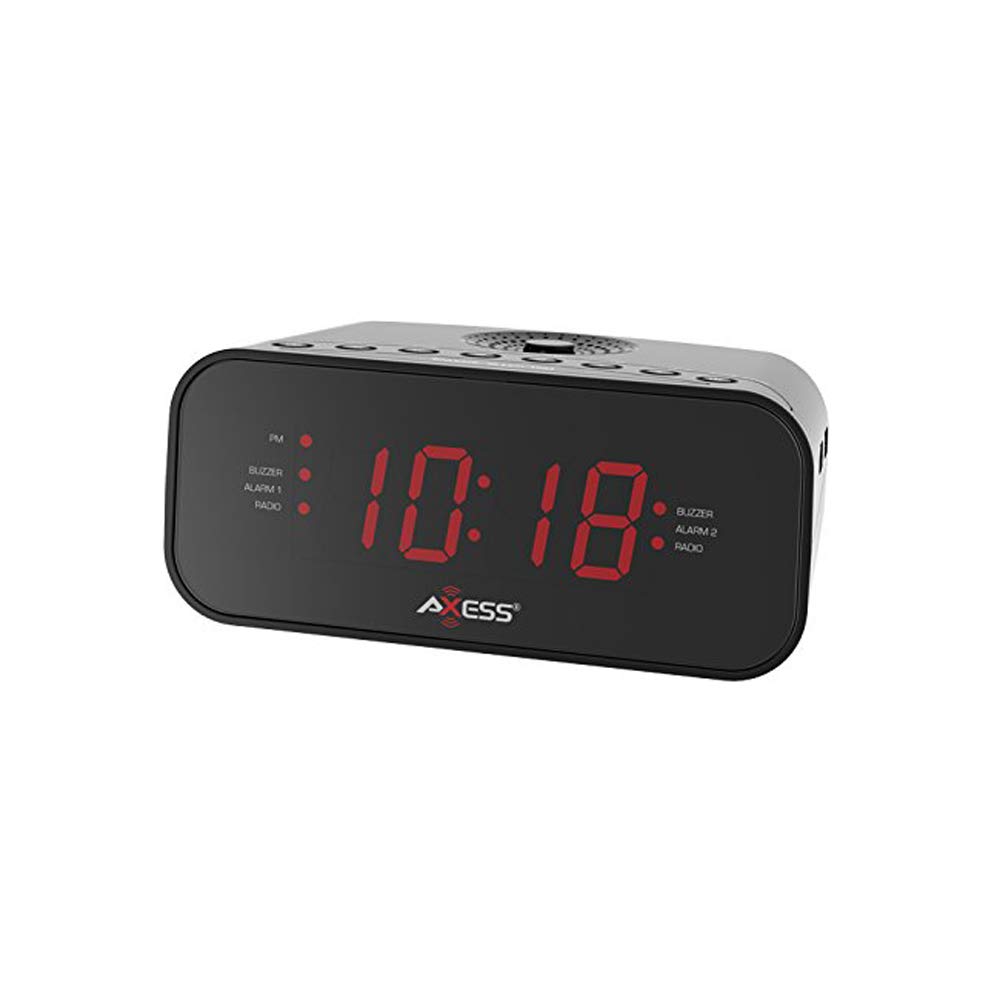
이미지: 앞면 view of the Axess CKRD3803 Digital AM/FM Clock Radio. The device is black with a large red LED display showing '10:18'. Indicators for PM, Buzzer, Alarm 1, Radio, and Alarm 2 are visible on either side of the time display.
주요 특징:
- Large 1.2-inch Red LED Display with two-step dimmer.
- Digital AM/FM Radio.
- Dual Alarm with Buzzer or Radio options.
- Sleep and Snooze Functions.
- Calendar Function.
- Auxiliary Input Jack.
- Battery Backup (2 x AAA batteries, not included) for power outag에스.
설정
전원 연결:
- Uncoil the built-in power cord (pigtail antenna).
- Plug the power cord into a standard AC wall outlet (120V, 60Hz).
- LED 디스플레이에 불이 들어오면 기기에 전원이 공급되고 있음을 나타냅니다.
배터리 백업 설치:
For uninterrupted timekeeping during power outages, install backup batteries.
- 장치 하단에서 배터리 칸을 찾으세요.
- 배터리 덮개를 엽니다.
- Insert two (2) AAA batteries (not included), observing the correct polarity (+ and -) as indicated inside the compartment.
- 배터리 덮개를 단단히 닫으세요.
Note: Batteries are for backup only and will not power the display or radio functions during a power outage. They only preserve time and alarm settings.
작동 지침
시간 설정:
- 를 누르고 계세요 시간 설정 시 숫자가 깜빡일 때까지 버튼을 누르세요.
- 를 누르세요 시간 button repeatedly to adjust the hour. Observe the 'PM' indicator for correct AM/PM setting.
- 를 누르세요 분 분을 조정하려면 버튼을 반복해서 누르세요.
- 12시간제와 24시간제(군대식) 시간 형식을 전환하려면 버튼을 누르십시오. 12/24시간 button while the time is flashing.
- 를 누르세요 시간 설정 버튼을 다시 누르면 시간 설정 모드를 확인하고 종료합니다.
Setting the Alarm (Alarm 1 and Alarm 2):
The CKRD3803 features two independent alarms.
- 를 누르고 계세요 알람 1 세트 (또는 알람 2 세트) button until the alarm hour digits begin to flash.
- 를 누르세요 시간 button to adjust the alarm hour. Observe the 'PM' indicator.
- 를 누르세요 분 알람 시간을 조정하는 버튼입니다.
- 를 누르세요 알람 1 세트 (또는 알람 2 세트) button again to confirm the time.
- 시간을 확인한 직후 버튼을 누르십시오. 알람 1 모드 (또는 알람 2 모드) button repeatedly to select the alarm source: 부저 or 라디오해당 표시등이 켜집니다.
- 알람을 활성화 또는 비활성화하려면 버튼을 누르십시오. 알람 1 켜기/끄기 (또는 알람 2 켜기/끄기) button. The alarm indicator will light up when active.
무선 작동:
- 를 누르세요 라디오 켜기/끄기 버튼을 눌러 라디오를 켭니다.
- 를 누르세요 오전/FM AM과 FM 대역을 전환하는 버튼입니다.
- 를 누르세요 튠 + or 튜닝 - 원하는 주파수에 수동으로 맞추는 버튼입니다.
- 누르고 있으세요 튠 + or 튜닝 - 자동 스테이션 스캔용입니다.
- 를 사용하여 볼륨을 조정합니다. 볼륨 + or 용량 - 버튼.
- To improve FM reception, extend the pigtail antenna fully. For AM reception, rotate the unit for best signal.
- 를 누르세요 라디오 켜기/끄기 button again to turn the radio off.
스누즈 기능 :
알람이 울리면 누르세요 선잠 버튼을 눌러 약 9분 동안 알람을 일시적으로 끄세요. 이 시간이 지나면 알람이 다시 울립니다.
수면 기능 :
라디오를 들으며 잠들려면 잠 button while the radio is playing. Repeatedly press the 잠 button to cycle through sleep timer options (e.g., 90, 60, 30, 15 minutes, or OFF). The radio will automatically turn off after the selected time.
디스플레이 조광기:
를 누르세요 주차 button to adjust the brightness of the LED display between two levels (bright and dim).
보조 입력:
외부 오디오 장치(예: MP3 플레이어, 스마트폰)를 연결하세요. AUX IN jack on the unit using a 3.5mm audio cable (not included). The audio from the external device will play through the clock radio's speaker.
유지
To ensure the longevity and optimal performance of your Axess CKRD3803, follow these simple maintenance guidelines:
- 청소: 부드럽고 마른 천으로 닦으세요. 연마성 세제, 왁스, 용제는 마감재를 손상시킬 수 있으므로 사용하지 마세요.
- 전원 코드: Regularly check the power cord for any signs of damage. If damaged, discontinue use and seek professional repair.
- 배터리 교체: Replace backup batteries annually or when the unit is stored for extended periods to prevent leakage.
- 놓기: 본 제품을 직사광선, 열원 근처, 습도나 먼지가 많은 곳에 두지 마십시오.
문제 해결
If you encounter issues with your Axess CKRD3803, please refer to the following common problems and solutions:
| 문제 | 가능한 원인 | 해결책 |
|---|---|---|
| 디스플레이가 비어 있습니다. | No AC power; Dimmer set to lowest setting. | Ensure power cord is securely plugged in. Press the 주차 밝기를 높이는 버튼입니다. |
| 시간/알람을 설정할 수 없습니다. | Buttons not pressed correctly or in sequence. | Refer to the "Setting the Time" and "Setting the Alarm" sections for precise steps. Ensure you press and hold the SET button until digits flash. |
| 알람이 울리지 않습니다. | Alarm not activated; Volume too low (for radio alarm). | Ensure the alarm is set and the alarm indicator light is on. For radio alarm, increase radio volume. |
| 라디오 수신 상태가 좋지 않습니다. | Antenna not positioned correctly; Weak signal. | Fully extend the pigtail antenna for FM. Rotate the unit for optimal AM reception. Try a different location. |
| 전원을 끄면 시간/설정이 초기화됩니다.tage. | 백업 배터리가 설치되지 않았거나 방전되었습니다. | Install fresh AAA batteries in the battery compartment. |
| Stuck in 24-hour (military) time. | 12/24H setting not adjusted during time setup. | Enter time setting mode (press and hold 시간 설정). While digits are flashing, press the 12/24시간 형식을 전환하는 버튼입니다. |
명세서
- 모델: CKRD3803(주)
- 표시하다: 1.2인치 적색 LED
- 전원: 교류 120V ~ 60Hz
- 배터리 백업 : AAA 배터리 2개 (포함되지 않음)
- 라디오 밴드: 오전/FM
- 치수: 2.95 x 6.89 x 4.21인치(높이 x 너비 x 깊이)
- 무게: 1 파운드
- 재료: 아크릴로 니트릴 부타디엔 스티렌
- 특별 기능: Dual Alarm, Calendar Function, Aux-in, Sleep/Snooze, Dimmer
보증 및 지원
For warranty information or technical support, please refer to the documentation included with your purchase or visit the official Axess web사이트. 보증 청구에 대비해 구매 증빙 자료로 구매 영수증을 보관하세요.