
소개
The ASUS PRIME Z270-A motherboard is engineered to provide maximum performance and customizable style for your PC build. Designed for 7th generation Intel Core processors, it offers advanced features for both enthusiasts and everyday users. Key technologies include 5-Way Optimization for intelligent auto-tuning, AURA Sync RGB lighting for personalized aesthetics, and robust connectivity options like Dual M.2 and USB 3.1 Type-A/C for high-speed data transfer.
제품 끝view
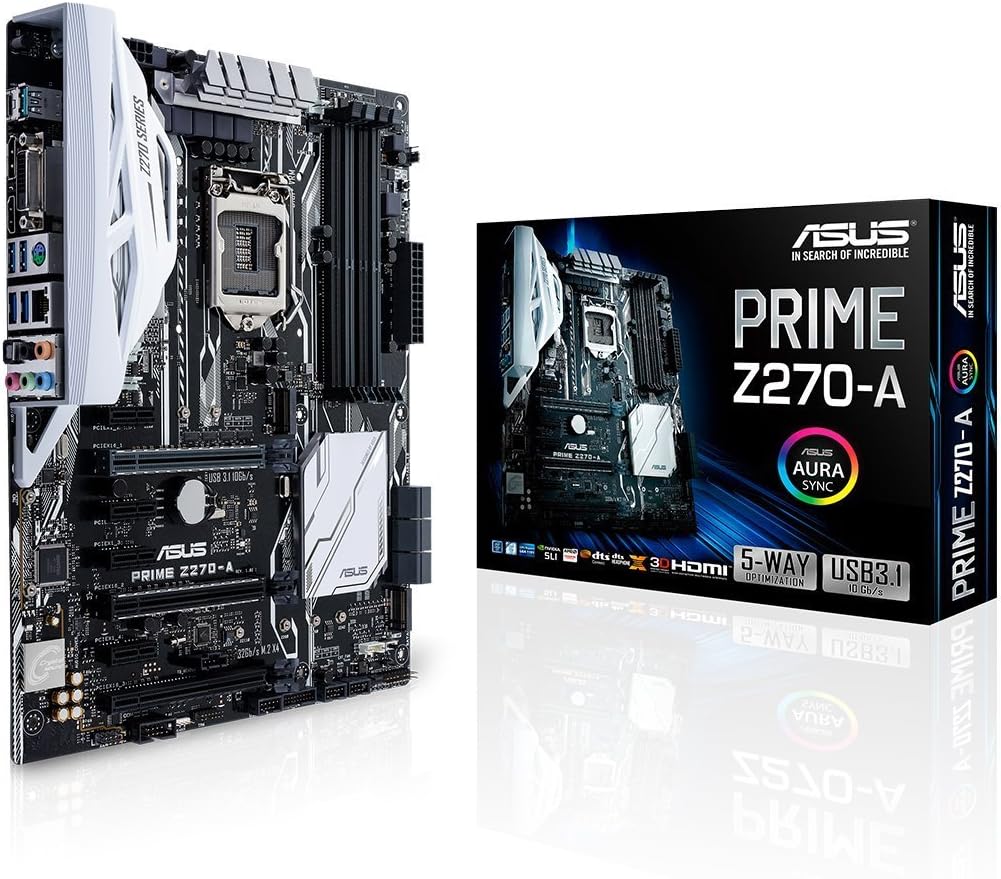
Figure 1: The ASUS PRIME Z270-A motherboard alongside its retail packaging, showcasin디자인과 브랜딩을 담당합니다.

그림 2: 각도가 있는 view of the ASUS PRIME Z270-A motherboard, highlighting its various components and white accents.
영상 1: 공식 오버view of the ASUS PRIME Z270-A Motherboard, detailing its features and capabilities.
주요 특징
- 5방향 최적화: Provides intelligent auto-tuning and dynamic fan calibration, automatically tailoring overclocking profiles for maximum performance and efficient cooling.
- 향상된 연결성: Features integrated Dual M.2 slots for high-speed storage, Intel Optane Memory compatibility, and versatile USB 3.1 Type-A/Type-C connections.
- Safe Slot Technology: Dual patent-pending Safe Slots utilize an injection molding process with metal framing, providing stronger, firmly anchored PCIe slots for heavy graphics cards.
- AURA Sync RGB 조명: Offers a vast spectrum of colors and effects that can be synchronized across an expanding ecosystem of AURA Sync enabled products, allowing for personalized lighting schemes.
- 3D Printing Mounts: On-board mounts enable users to integrate custom 3D-printed parts, allowing for unique aesthetic and functional enhancements to their build.
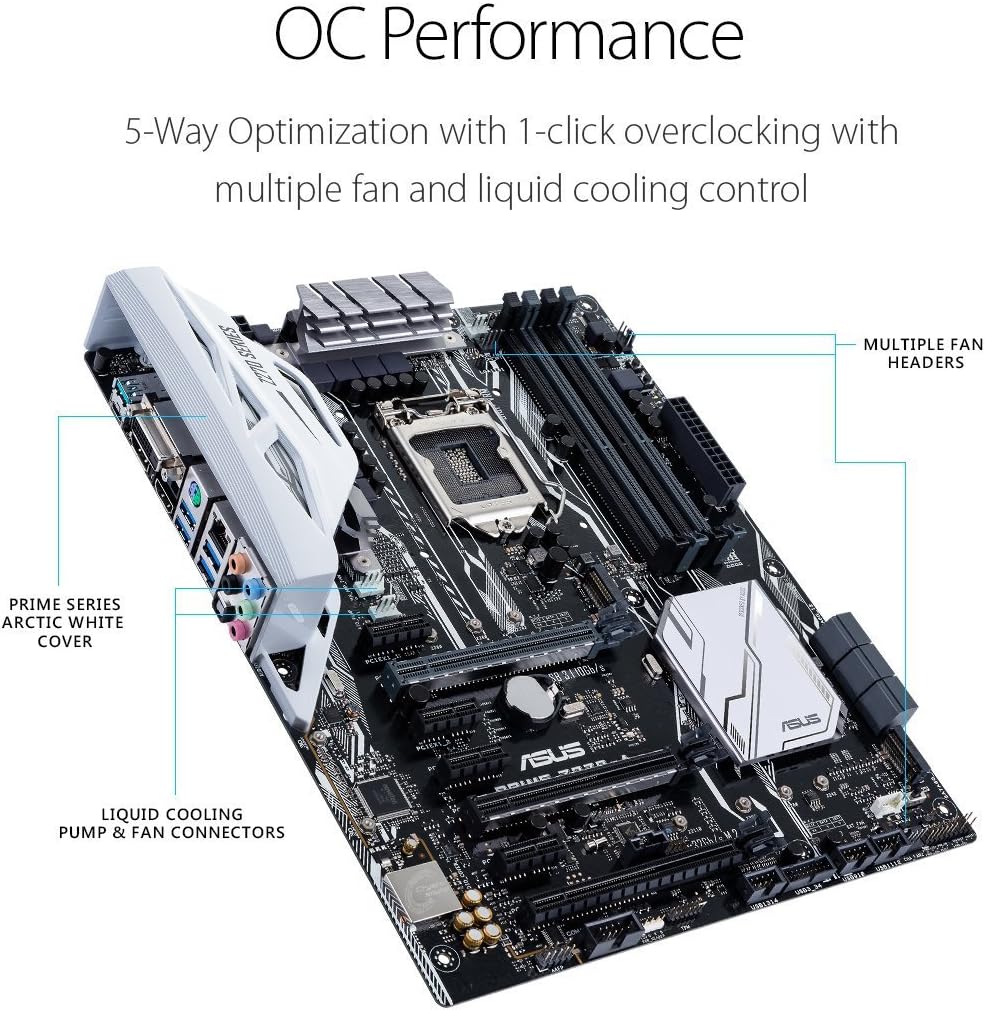
Figure 3: The motherboard highlighting features related to OC Performance, including multiple fan headers and liquid cooling pump/fan connectors.
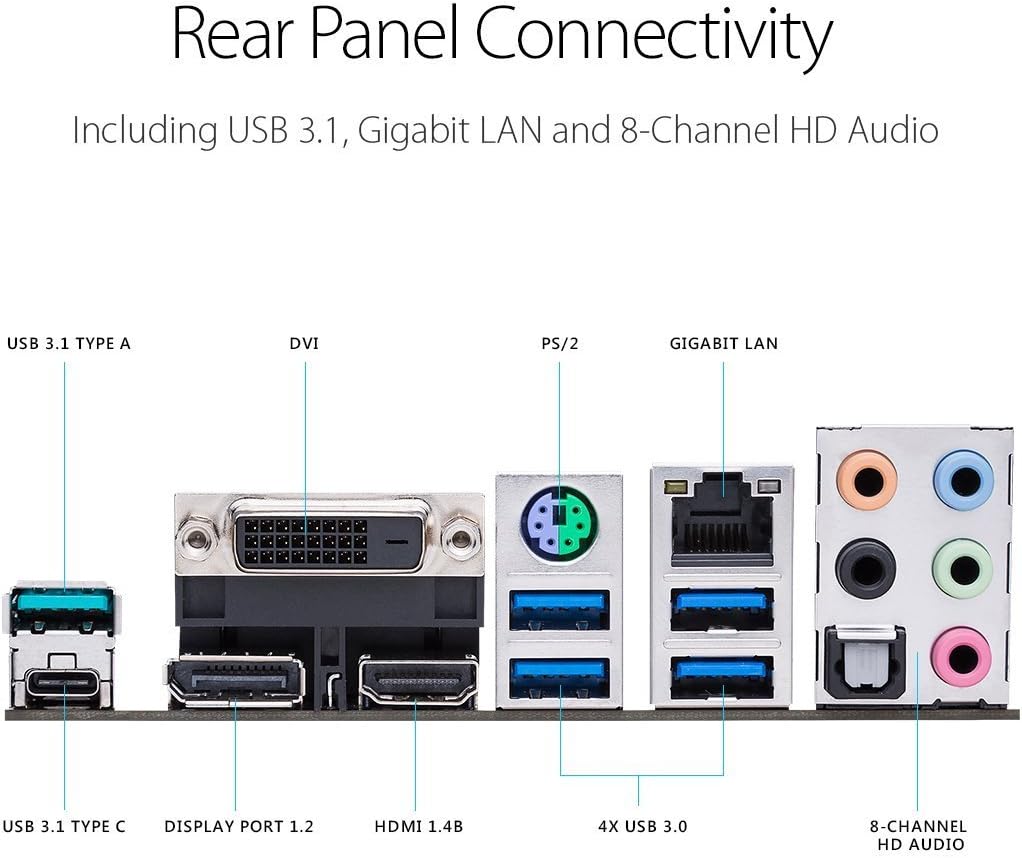
그림 4: 자세한 view of the rear I/O panel, showing USB 3.1 Type-A and Type-C ports, DVI, DisplayPort 1.2, HDMI 1.4B, 4x USB 3.0, PS/2, Gigabit LAN, and 8-Channel HD Audio ports.
설정
패키지 내용:
설치를 시작하기 전에 아래 나열된 모든 구성품이 패키지에 포함되어 있는지 확인하십시오.
- 사용자 설명서
- Serial ATA 6.0Gb/s 케이블(3)
- SLI HB 브리지 (양방향-M)
- ASUS Q-Shield
- Q-connector
- M.2 나사 패키지
- CPU 설치 도구
설치 단계:
- 섀시 준비: Ensure your computer case is ready for motherboard installation, with appropriate standoffs installed.
- CPU 설치: Carefully place the 7th Generation Intel Core processor into the LGA1151 socket. Refer to the CPU Installation Tool for proper alignment.
- CPU 쿨러 설치: 선택한 CPU 쿨러를 제조사의 지침에 따라 장착하십시오.
- 메모리(RAM) 설치: Insert DDR4 memory modules into the DIMM slots. For dual-channel configuration, refer to the motherboard manual for correct slot pairing. The motherboard supports up to 64GB of DDR4 memory at speeds up to 3866MHz.
- M.2 SSD 설치 (선택 사항): If using M.2 storage, install the M.2 SSDs into the dual M.2 slots and secure them with the provided M.2 screw package.
- 그래픽 카드(GPU) 설치: Insert your graphics card into one of the PCIe x16 slots. The Safe Slot technology provides enhanced support for heavier GPUs.
- 저장 장치 연결: Use the provided Serial ATA 6.0Gb/s cables to connect your SATA hard drives or SSDs to the motherboard.
- 전원 공급 장치 연결: 전원 공급 장치의 24핀 ATX 전원 커넥터와 8핀 CPU 전원 커넥터를 마더보드에 연결합니다.
- 전면 패널 케이블 연결: Connect the front panel headers (power button, reset button, USB ports, audio jacks) using the Q-connector for easier installation.
- 섀시에 마더보드 설치: Carefully place the motherboard into the chassis, aligning it with the standoffs, and secure it with screws.
- 주변기기 연결: 모니터, 키보드, 마우스 및 기타 주변 장치를 후면 I/O 포트에 연결합니다.
작동 지침
최초 부팅 및 BIOS/UEFI 설정:
Upon the first power-on, the system will typically enter the BIOS/UEFI interface. Here, you can configure boot order, system time, and other essential settings. Press the 델 key during startup to enter the BIOS. The ASUS UEFI BIOS provides an intuitive graphical interface for easy navigation and configuration.
드라이버 설치:
After installing your operating system (e.g., Windows 10), it is crucial to install the latest drivers for your motherboard components. These can be found on the official ASUS support website for the PRIME Z270-A model. Key drivers include chipset, audio, LAN, and graphics drivers (if using integrated graphics).
AURA Sync Software:
To customize the RGB lighting on your motherboard and any connected AURA Sync compatible devices, download and install the ASUS AURA Sync software from the ASUS website. This software allows you to choose from various lighting effects and colors to personalize your system's aesthetics.
유지
- 먼지 제거: 압축 공기를 사용하여 마더보드와 부품의 먼지를 정기적으로 청소하십시오. 청소하기 전에 시스템 전원이 꺼져 있고 플러그가 뽑혀 있는지 확인하십시오.
- BIOS 업데이트: 정기적으로 ASUS 지원을 확인하세요 website for BIOS updates. Updating the BIOS can improve system stability, compatibility, and performance. Follow the instructions provided by ASUS carefully when performing a BIOS update.
- 드라이버 업데이트 : Keep all motherboard drivers updated to ensure optimal performance and compatibility with new software and hardware.
- 물리적 검사: 메인보드에 손상, 느슨한 연결 또는 부풀어 오른 콘덴서와 같은 이상 징후가 있는지 주기적으로 점검하십시오.
문제 해결
If you encounter issues with your ASUS PRIME Z270-A motherboard, consider the following common troubleshooting steps:
- 전원 없음/부팅 불가:
- 모든 전원 케이블(24핀 ATX, 8핀 CPU)이 안전하게 연결되어 있는지 확인하세요.
- 전원 공급 장치의 작동 여부를 확인하십시오.
- Ensure front panel power switch cable is correctly connected.
- 디스플레이 없음:
- Ensure monitor cable is connected to the graphics card (or motherboard if using integrated graphics).
- 그래픽 카드와 RAM 모듈을 다시 장착하세요.
- 램 스틱 하나만 꽂고 부팅해 보세요.
- 시스템 불안정/충돌:
- BIOS와 모든 드라이버를 최신 버전으로 업데이트하세요.
- Check CPU and GPU temperatures to ensure proper cooling.
- 메모리 진단 도구를 실행하여 RAM 오류를 확인하세요.
- 주변 인식 문제:
- Ensure USB devices are connected to appropriate ports (USB 2.0, 3.0, 3.1).
- Install or update USB controller drivers.
For more detailed troubleshooting or advanced issues, please refer to the comprehensive user manual available on the ASUS support web해당 웹사이트를 방문하거나 ASUS 고객 지원팀에 문의하십시오.
명세서
| 범주 | 사양 |
|---|---|
| 상표 | 아수스 |
| 시리즈 | 프라임 Z270-A |
| 모델 번호 | 프라임 Z270-A |
| CPU 소켓 | LGA 1151 |
| 호환 프로세서 | 7세대 인텔 코어 |
| 칩셋 유형 | 인텔 Z270 |
| RAM 메모리 기술 | DDR4 |
| 메모리 클럭 속도 | 2133MHz (오버클럭 시 최대 3866MHz) |
| 메모리 저장 용량 | 64GB(최대) |
| USB 2.0 포트 수 | 6 (via headers) |
| 제품 크기(LxWxH) | 10.36 x 2.68 x 12.92 인치 |
| 품목 무게 | 2.42파운드 |
| 플랫폼 | 윈도우 10 |
보증 및 지원
The ASUS PRIME Z270-A motherboard comes with a manufacturer's warranty. For specific warranty terms, conditions, and duration, please refer to the warranty card included with your product or visit the official ASUS support web대지.
For further assistance, technical support, driver downloads, and detailed user guides, please visit the ASUS 지원 Web대지. You can also find the full user manual in PDF format via the following links: