
Artlii YG300
Artlii YG300 Mini Portable Projector User Manual
모델: YG300
1. 서론
This manual provides detailed instructions for the safe and efficient operation of your Artlii YG300 Mini Portable Projector. Please read this manual thoroughly before using the product and retain it for future reference.
2. 안전 정보
프로젝터 손상을 방지하고 사용자의 안전을 확보하려면 다음 안전 예방 조치를 준수하세요.
- l을 사용할 때 프로젝터 렌즈를 직접 쳐다보지 마십시오.amp 켜져있습니다.
- 과열을 방지하기 위해 적절한 환기를 유지하세요. 환기구를 막지 마세요.
- Use only the provided power adapter or a compatible power bank (5V/2A).
- 프로젝터를 물이나 다른 액체로부터 멀리하세요.
- 프로젝터를 직접 분해하거나 수리하려고 하지 마십시오. 자격을 갖춘 서비스 담당자에게 문의하십시오.
- 어린아이의 손이 닿지 않는 곳에 보관하세요.
3. 패키지 내용
패키지에 모든 품목이 들어 있는지 확인하세요.
- Artlii YG300 Mini Portable Projector
- 전원 어댑터
- 리모컨 (AAA 배터리는 포함되지 않습니다)
- AV Cable (3-in-1)
- 사용자 가이드(이 매뉴얼)

Image: Contents of the Artlii YG300 package, including the projector, remote control, power adapter, and AV cable.
4. 제품 오버view
프로젝터의 구성 요소와 조작법을 숙지하십시오.
4.1 정면 View
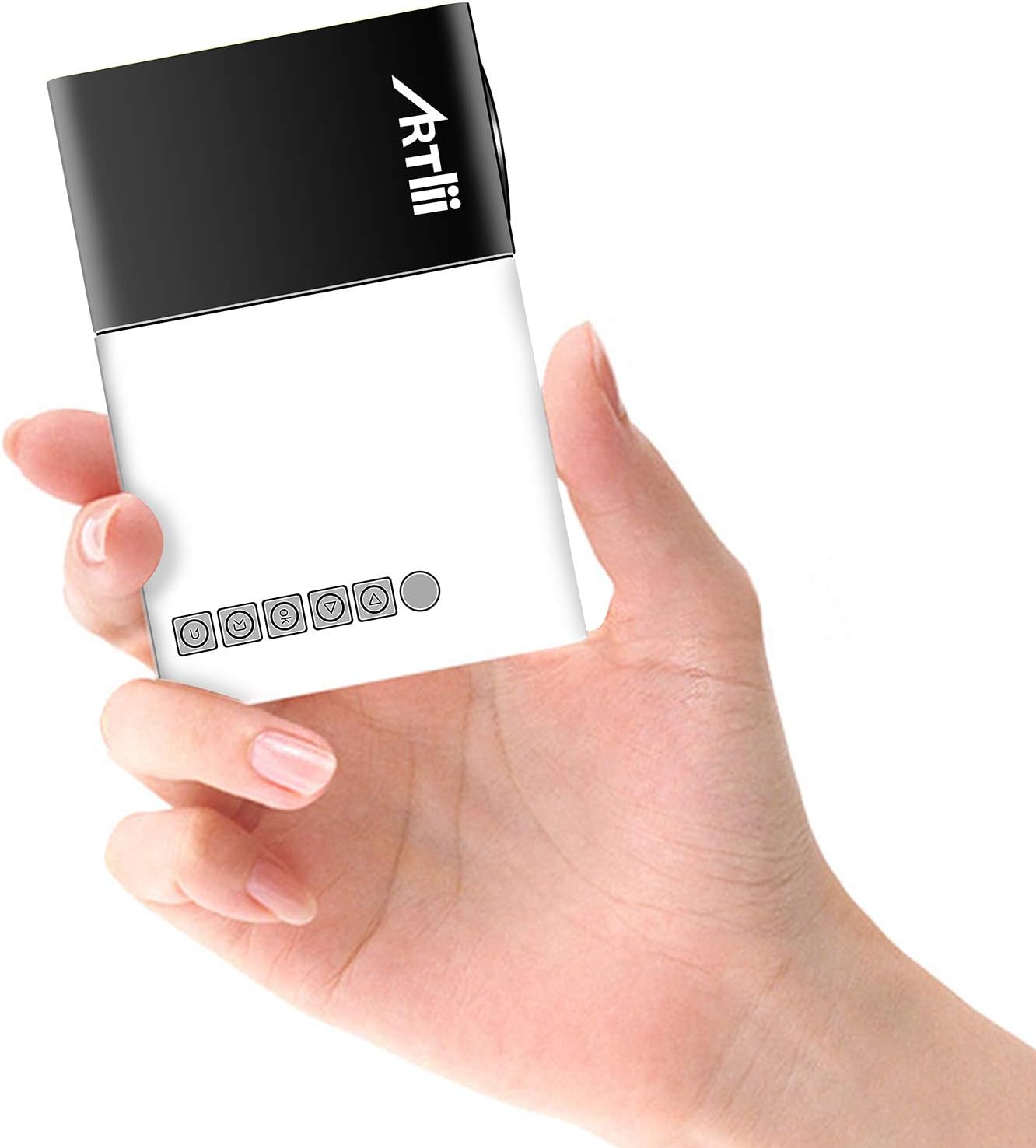
Image: The Artlii YG300 Mini Portable Projector, showing its compact size and top-mounted control buttons.
The front of the projector features the lens and a focus adjustment dial. The top panel includes control buttons for navigation and selection.
4.2 측면 및 후면 Views (포트 및 연결)

Image: Diagram illustrating the various input and output ports on the Artlii YG300 projector, including HDMI, USB, Micro SD, AV, and audio out.
- HDMI 포트 : Connect to devices like laptops, game consoles, or streaming sticks.
- USB 포트: 미디어 재생을 위해 USB 플래시 드라이브를 연결하세요.
- 마이크로 SD 카드 슬롯: 미디어 재생을 위해 Micro SD 카드를 삽입하세요.
- AV 포트: Connect to older devices using the included AV cable.
- 오디오 출력(3.5mm 잭): 외부 스피커 또는 헤드폰을 연결하세요.
- DC 전원 입력: 전원 어댑터를 연결합니다.
- Micro USB (5V) Input: Alternative power input for power banks.
5. 설정
5.1 프로젝터 전원 켜기
- Connect the power adapter to the DC Power Input port on the projector and then to a power outlet.
- Alternatively, connect a 5V/2A power bank to the Micro USB (5V) Input port.
- 프로젝터나 리모컨의 전원 버튼을 눌러 전원을 켜세요.

Image: The Artlii YG300 projector being powered by a portable power bank via its Micro USB input, demonstrating its portability.
5.2 배치 및 화면 크기
Place the projector on a stable surface. The optimal projection distance and screen size are:
- 투사 거리: 0.8m to 2.0m (approximately 2.6ft to 6.5ft)
- Projected Dimension Range: 24 to 60 inches diagonally
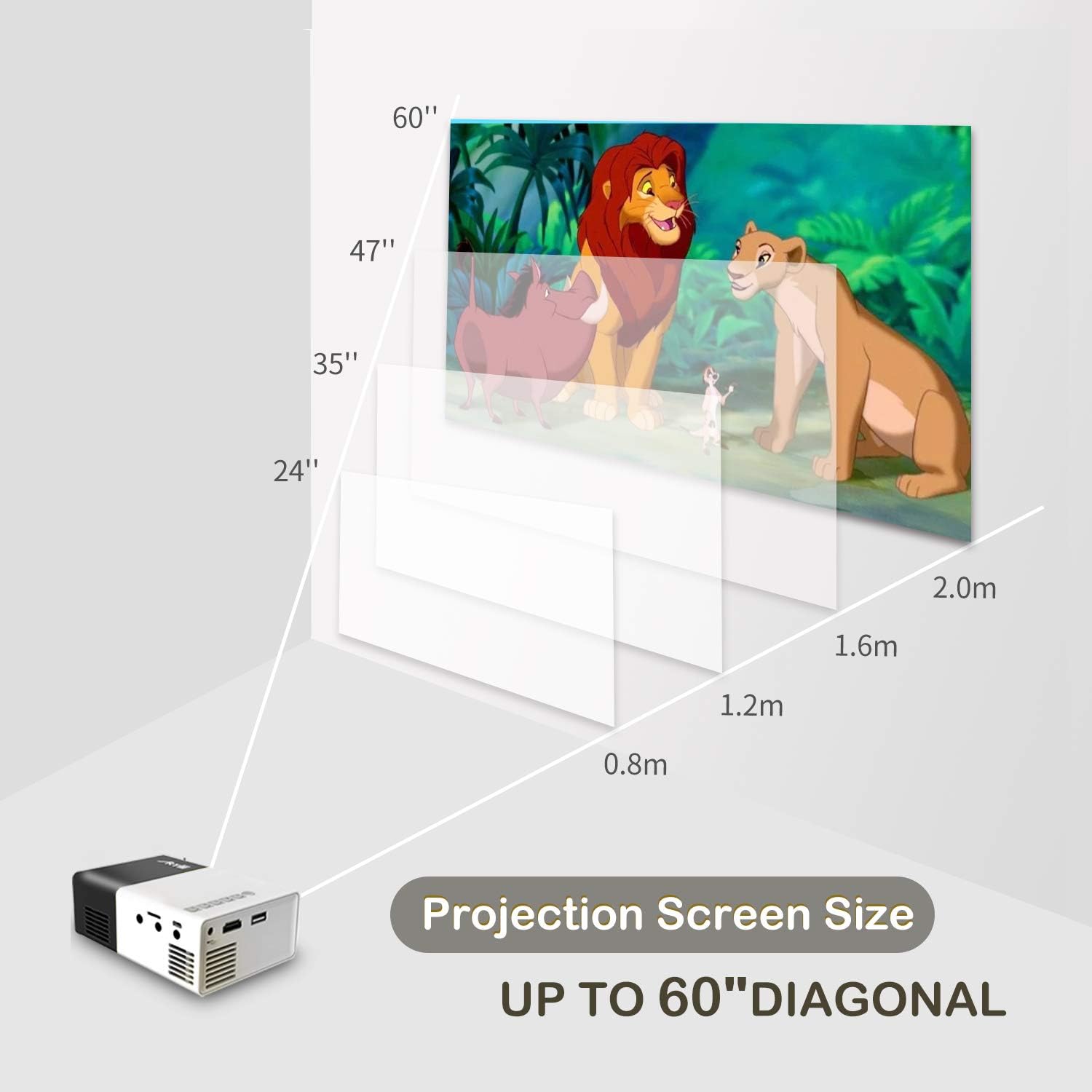
Image: A diagram illustrating the relationship between projection distance and screen size for the Artlii YG300 projector, showing screen sizes from 24 to 60 inches.
5.3 초점 조정
Rotate the focus adjustment dial located near the lens until the projected image is clear and sharp.
6. 프로젝터 작동
6.1 입력 장치 연결
프로젝터는 다양한 입력 소스를 지원합니다.
- HDMI : Connect an HDMI cable from your device (laptop, streaming stick, game console) to the projector's HDMI port.
- USB: USB 포트에 USB 플래시 드라이브를 삽입합니다.
- 마이크로 SD: Insert a Micro SD card into the Micro SD card slot.
- 유명인 : Use the included 3-in-1 AV cable to connect to devices with AV output.
6.2 입력 소스 선택
After connecting a device, use the remote control or the projector's control buttons to navigate to the main menu and select the corresponding input source (e.g., HDMI, USB, SD, AV).
6.3 미디어 재생
When a USB drive or Micro SD card is selected, the projector's interface will allow you to browse and play supported media files:
- 비디오 형식: AVI(AC3)/FLV/MKV/MP4/RM/MPG(MPEG1)/MPG(MPEG2)/MOV(MPEG4)/AVI (MPEG)/3GP/ DIVX/RMVB/VOB/TS/TP
- 오디오 포맷: MP3/MAV/WMA/M4A(AAC)/AC3
- 그림 형식 : JPEG/JPG/PNG/BMP/MPO
- 문서 형식: 텍스트
6.4 오디오 출력
The projector has a built-in speaker. For enhanced audio, connect external speakers or headphones to the 3.5mm Audio Out jack.
7. 유지관리
7.1 청소
- 프로젝터 외부를 닦을 때는 부드럽고 마른 천을 사용하십시오.
- 렌즈를 닦을 때는 렌즈 전용 세척용 천과 세척액을 사용하십시오. 연마성 재질은 사용하지 마십시오.
- 환기구에 먼지나 이물질이 없는지 확인하세요.
7.2리터amp 삶
The projector utilizes an LED lamp with an estimated lifespan of up to 30,000 hours. No lamp 일반적으로 정상적인 사용 조건에서는 제품 수명 동안 교체가 필요합니다.
8. 문제 해결
| 문제 | 가능한 원인 | 해결책 |
|---|---|---|
| 이미지가 투영되지 않았습니다 |
|
|
| 이미지가 흐릿함 |
|
|
| 소리가 나지 않습니다 |
|
|
| 리모컨이 작동하지 않습니다 |
|
|
9. 사양
| 상표 | Artlii |
| 모델 | YG300 (Artlii-MINI) |
| 디스플레이 기술 | 액정표시장치 |
| 광원 | 주도의 |
| Lamp 명도 | 400-600 루멘스 |
| 네이티브 해상도 | 320 x 240 픽셀 |
| 지원되는 해상도 | Up to 1920 x 1080 pixels (1080p) |
| 대비율 | 800시 1분 |
| 종횡비 | 4:3 / 16:9 |
| Projected Dimension Range | 24-60 인치 |
| 투사율 | 1.6시 1분 |
| 입력 포트 | HDMI, AV, MicroSD (TF), USB, Micro USB (5V) |
| 출력 포트 | 3.5mm 오디오 잭 |
| 내장 스피커 | 예 |
| 소음 수준 | 21데시벨 |
| 전원 공급 장치 | AC 220V (adapter) / DC 5V/2A (Micro USB) |
| 전력 소비 | 24 와트 |
| 제품 치수 | 12.4 x 8.3 x 4.6cm |
| 제품 무게 | 250g |
| 원격 제어 | 포함됨 |
10. 보증 및 지원
The Artlii YG300 Mini Portable Projector comes with a 1-month 100% Money-Back Policy and a 1-year factory warranty. For technical assistance or warranty claims, please contact Artlii customer support. Local maintenance centers are available to assist with service needs.
For further information or support, please visit the official Artlii web사이트 또는 고객 서비스 부서에 문의하십시오.
Ask a question about this manual
Ask about setup, troubleshooting, compatibility, parts, safety, or missing instructions. Manuals+ will review the question and use this page’s manual context to help answer it.