
1. 서론
This manual provides essential instructions for the safe and effective use of your Instacrate Collapsible 12-Gallon Storage Bin. Please read this manual thoroughly before initial use and retain it for future reference. Proper understanding of these instructions will ensure optimal performance and longevity of your product.
2. 안전 정보
부상이나 제품 손상을 방지하기 위해 다음 안전 지침을 준수하십시오.
- 과부하하지 마십시오: Exceeding the stated capacity may cause the bin to break or contents to spill, leading to potential injury.
- 적절한 취급: Always lift the bin using both handles when it contains items. Avoid dragging or dropping.
- 어린이와 애완동물: Keep children and pets away from the bin during assembly and collapsing to prevent pinching or entrapment.
- 안정적인 배치: Ensure the bin is placed on a flat, stable surface to prevent tipping.
- 재료 호환성: Do not store corrosive chemicals or extremely hot items directly in the bin.
3. 패키지 내용
패키지에 모든 구성품이 들어 있는지 확인하세요.
- Instacrate 12-Gallon Collapsible Storage Bin (Quantity: 3)
4. 설치 및 조립
Follow these steps to expand your Instacrate for use:
- Place the collapsed bin on a flat, stable surface with the top side facing upwards.
- Gently pull the short side panels upwards until they are fully extended.
- Next, pull the long side panels upwards. Ensure the locking tabs on the long panels engage securely into the slots on the short panels. You should hear a click or feel them lock into place.
- Confirm all four side panels are upright and securely locked. The bin is now ready for use.
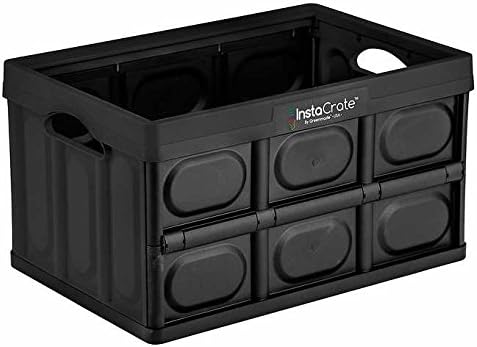
Image 1: The Instacrate in its fully expanded and assembled configuration, ready for storage.
5. 사용 설명서
5.1 Filling and Stacking
- Place items evenly inside the bin. Avoid concentrating heavy items in one area.
- Do not fill above the top edge of the bin to allow for potential stacking.
- For stacking, ensure the bottom bin is stable and not overloaded. Place the top bin carefully to align with the bottom bin's edges.
5.2 Collapsing for Storage
To collapse the Instacrate for compact storage:
- Ensure the bin is completely empty.
- Locate the locking tabs on the long side panels. Gently push these tabs inwards to disengage them from the short panels.
- Fold the long side panels inwards towards the center of the bin.
- Fold the short side panels inwards, allowing them to lie flat on the base.
- The bin should now be flat and compact for easy storage.

Image 2: The Instacrate in its collapsed, flat configuration, demonstrating its space-saving design.
6. 유지관리 및 관리
To maintain your Instacrate in optimal condition:
- 청소: Wipe down the bin with a damp cloth and mild soap as needed. Avoid abrasive cleaners or harsh chemicals, which may damage the plastic.
- 건조: Ensure the bin is completely dry before collapsing or storing to prevent mold or mildew.
- 저장: Store the collapsed bins in a cool, dry place away from direct sunlight to prevent material degradation.
7. 문제 해결
If you encounter issues with your Instacrate, refer to the following common problems and solutions:
- 문제: The bin does not stay expanded.
해결책: Ensure all four side panels are fully pulled up and the locking tabs on the long panels are securely engaged into the slots on the short panels. Apply gentle pressure to lock them into place. - 문제: The bin is difficult to collapse.
해결책: Verify the bin is empty. Ensure the locking tabs are fully disengaged before attempting to fold the side panels. Do not force the panels. - 문제: Visible damage or cracks.
해결책: Discontinue use if the bin is significantly damaged, as its structural integrity may be compromised. Contact Instacrate customer support for assistance.
8. 사양
| 특징 | 세부 사항 |
|---|---|
| 용량 | 12 Gallons (per bin) |
| 품목 무게 | 약 14.27파운드(3개입 기준) |
| 패키지 크기 | 31.5 x 21.5 x 11.5 인치 |
| 재료 | 플라스틱 |
| 특별 기능 | Collapsible, Stackable |
| 색상 | 검은색 |
9. 보증 및 지원
For warranty information, product support, or to report any issues not covered in this manual, please contact Instacrate customer service through the retailer where the product was purchased or visit the official Instacrate website. Please have your purchase details and product model information available when contacting support.