
소개
This manual provides detailed instructions for the use and maintenance of your Strong SRT 7404 HD remote control. This remote is designed as an original replacement for the Strong SRT 7404 HD FRANSAT receiver, ensuring full compatibility and functionality.
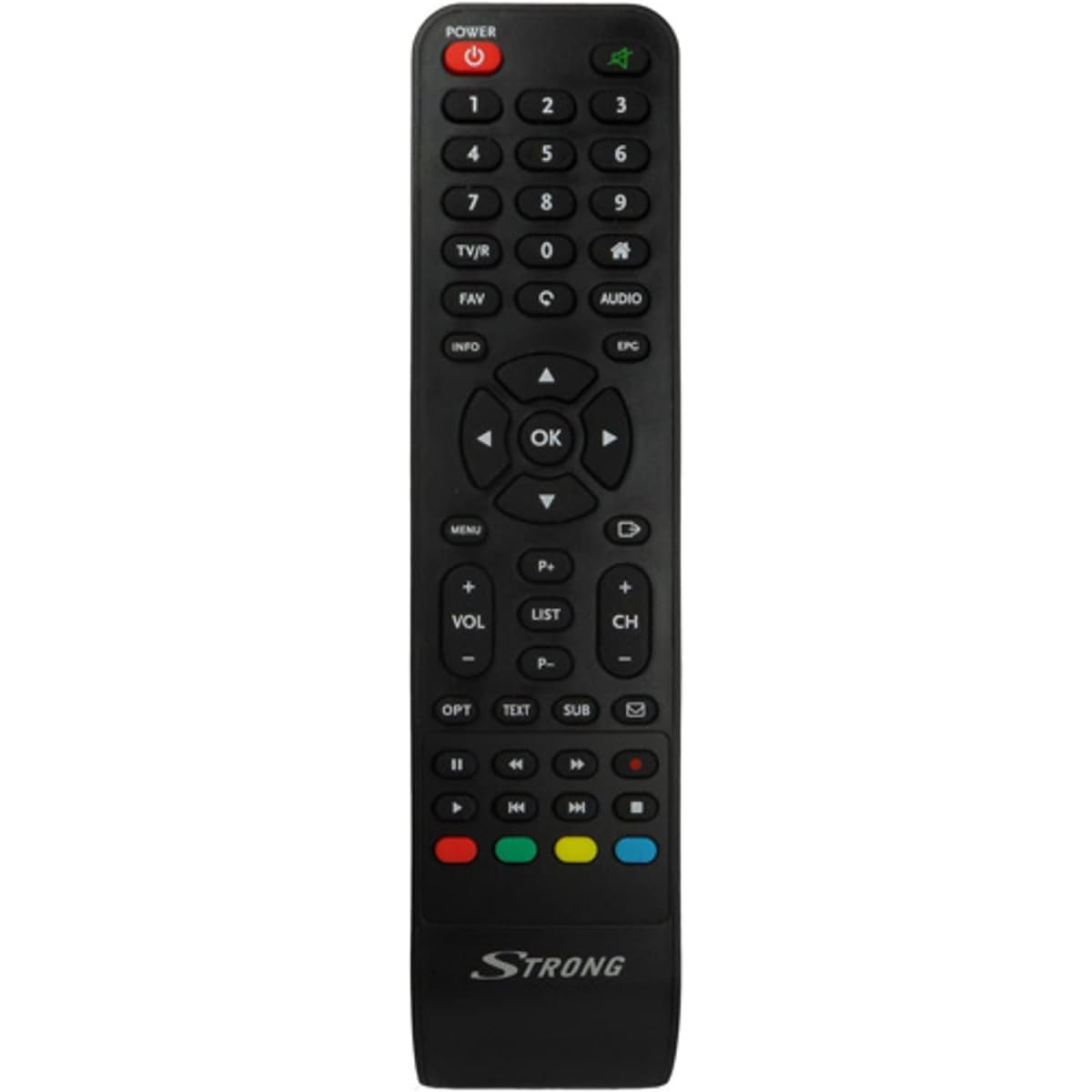
Image: The Strong SRT 7404 HD remote control, black in color, featuring various control buttons for television and receiver functions.
설정
1. 배터리 설치
- 리모콘 뒷면에서 배터리함을 찾으세요.
- 배터리 덮개를 아래쪽으로 밀거나 화살표 방향으로 밀어서 엽니다.
- AAA 알칼리 건전지 2개(별도 구매)를 넣을 때, 건전지함 안쪽의 표시와 양극(+) 및 음극(-) 단자가 정확히 일치하는지 확인하십시오.
- 배터리 덮개를 다시 밀어서 제자리에 고정하고 딸깍 소리가 날 때까지 밀어 넣습니다.
Note: Always use new alkaline batteries for optimal performance. Do not mix old and new batteries, or different types of batteries.
2. 초기 사용
The Strong SRT 7404 HD remote control is an original replacement and is pre-programmed for the Strong SRT 7404 HD FRANSAT receiver. No additional setup or pairing is typically required. Simply install the batteries and point the remote control towards your receiver to begin operation.
작동 지침
This section outlines the basic functions of the remote control buttons.
- 전원 버튼: 수신기를 켜거나 끕니다.
- 채널 위/아래: Navigates through television channels.
- 볼륨 높이기/낮추기: 오디오 볼륨을 조절합니다.
- 음소거 버튼: 오디오를 끄거나 다시 재생합니다.
- 숫자 버튼(0-9): Directly selects channels or enters numerical data.
- 메뉴 버튼: 수신기의 메인 메뉴에 접근합니다.
- 탐색 버튼(위, 아래, 왼쪽, 오른쪽, 확인): 메뉴를 탐색하고 선택 사항을 확인하는 데 사용됩니다.
- 종료/뒤로가기 버튼: 이전 화면으로 돌아가거나 메뉴를 종료합니다.
- 정보 버튼: 프로그램 정보를 표시합니다.
- 색상 버튼(빨간색, 녹색, 노란색, 파란색): Functions vary depending on the on-screen menu or application.
Refer to your Strong SRT 7404 HD FRANSAT receiver's manual for specific functions related to its menu system and advanced features.
유지
청소
리모컨을 청소하려면 부드럽고 마른 천으로 표면을 부드럽게 닦으세요. 찌든 때는 가볍게 두드리세요.ampen the cloth with water. Avoid using abrasive cleaners, solvents, or alcohol, as these can damage the remote's finish or internal components.
배터리 교체
Replace batteries when the remote control becomes unresponsive or its range decreases significantly. Follow the battery installation steps outlined in the "Setup" section. Dispose of used batteries according to local regulations.
저장
장기간 사용하지 않을 때는 배터리 누액을 방지하기 위해 배터리를 제거하십시오. 누액은 리모컨을 손상시킬 수 있습니다. 리모컨은 직사광선과 극한 온도 변화를 피해 서늘하고 건조한 곳에 보관하십시오.
문제 해결
- 리모콘이 응답하지 않음:
- 배터리가 극성(+/-)에 맞춰 올바르게 삽입되었는지 확인하십시오.
- 오래된 배터리를 새 알칼리 배터리로 교체하세요.
- 리모컨과 수신기의 적외선 센서 사이에 장애물이 없는지 확인하십시오.
- 유효 작동 범위(최대 10미터) 내에 있는지 확인하십시오.
- 리모컨을 수신기에 직접 대세요.
- 특정 버튼이 작동하지 않음:
- 리모컨 표면, 특히 작동하지 않는 버튼 주변을 청소하여 접촉을 방해할 수 있는 먼지나 이물질을 제거하십시오.
- If cleaning and battery replacement do not resolve the issue, the button or remote may be faulty.
명세서
| 특징 | 세부 사항 |
|---|---|
| 상표 | 강한 |
| 모델명 | 7404 |
| 특징 | 가벼움 |
| 색상 | 검은색 |
| 최대 지원 장치 | 1 |
| 호환 장치 | TV Decoder (Strong SRT 7404 HD FRANSAT Receiver) |
| 연결 기술 | 고주파 |
| 버튼의 수 | 5 |
| 컨트롤러 유형 | 원격 제어 |
| 최대 범위 | 10 미터 |
| 배터리 유형 | 알칼리성(AAA, 미포함) |
| 원산지 | 중국 |
보증 및 지원
보증 정보
This Strong SRT 7404 HD remote control comes with a 2-year warranty from the date of purchase. This warranty covers manufacturing defects under normal use. Please retain your proof of purchase for warranty claims.
고객 지원
For further assistance, technical support, or warranty inquiries, please contact Strong customer service. Contact details can typically be found on the official Strong web사이트나 제품 판매점을 통해 구매하세요.
You can visit the official Strong brand store for more information: Strong Brand Store