
1. 서론
The Surecom SW-102 is a compact and versatile digital VHF/UHF antenna power and SWR meter designed for radio enthusiasts and professionals. It provides direct digital readout of VSWR, forward power, and reflected power without the need for calibration. Its low insertion loss allows for permanent connection within your setup. The device also features a built-in frequency counter and displays comprehensive information including frequency, power, SWR, forward power (FW), reflected power (RW), and battery voltage.
2. 안전 정보
- 장치를 극한의 온도, 습도 또는 직사광선에 노출시키지 마십시오.
- 기기를 떨어뜨리거나 심한 충격을 주지 마십시오.
- 기기를 분해하거나 개조하지 마십시오. 보증이 무효화되고 손상이 발생할 수 있습니다.
- Use only the specified charger (5V micro USB) to prevent damage to the battery and device.
- Ensure proper connection of all cables and adapters before operation to prevent damage to the meter or connected equipment.
- This device is designed for analog radio systems only and is not compatible with DMR radios.
3. 패키지 내용
패키지를 열 때 아래 나열된 모든 품목이 들어 있고 상태가 양호한지 확인하세요.
- 1x SURECOM SW-102 Meter
- 1x Charger Cable (Micro USB)
- 1x Users Manual
- SL16 to SMA-F Connector (included)
- SL16 to SMA-M Connector (included)
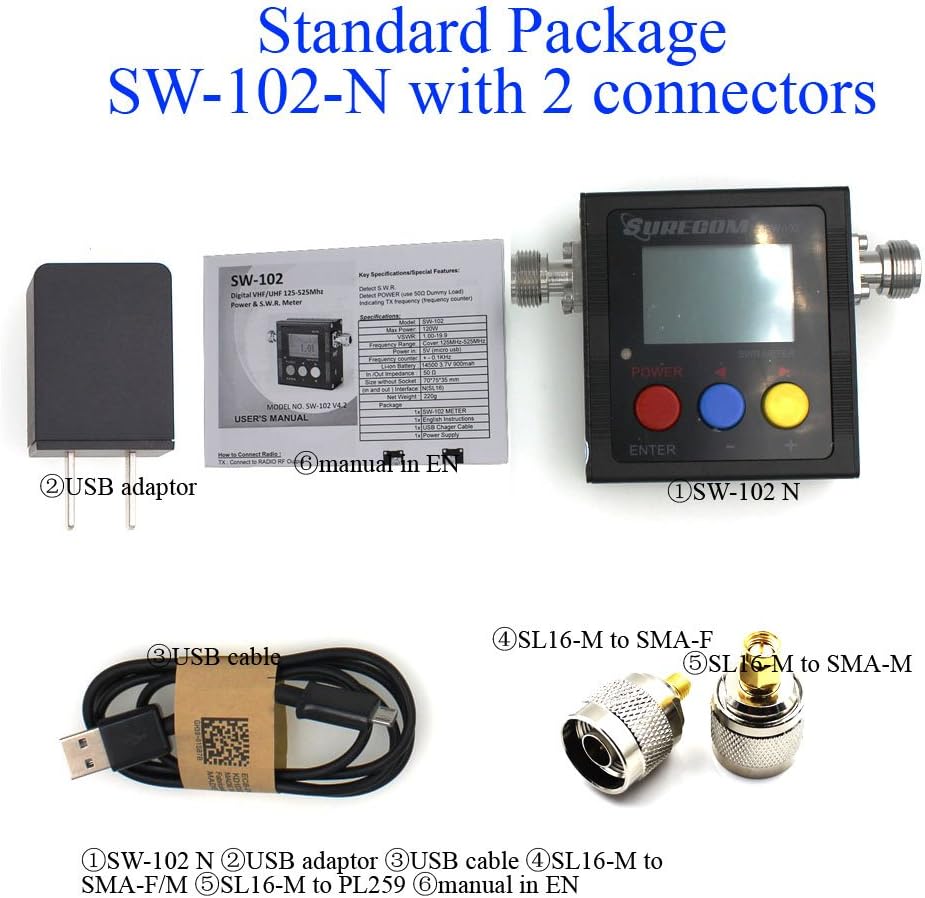
4. 제품 오버view
4.1. 주요 특징
- Direct digital readout of VSWR, Forward Power, and Reflected Power.
- 보정이 필요하지 않습니다.
- Maximum measurable power range up to 120W.
- Low insertion loss (<0.15dB VHF, <0.25dB UHF) allows permanent connection.
- Built-in Frequency Counter.
- All-function display: Frequency, Power, SWR, FW, RW, Battery voltage.
- Compact and handheld size with large LCD display.
4.2. 구성 요소 및 제어


The SW-102 features an N-J Interface for connections. Optional accessories such as SL16 to SMA and SL16 to BNC adapters are available to ensure compatibility with various radio and antenna connectors.

5. 설정
5.1. Connecting the Meter
To connect the Surecom SW-102, connect the output of your transceiver to the "TX" port on the meter. Then, connect your antenna or dummy load to the "ANT" port. Ensure proper adapters or cables are used if your device has different connector types. The device ships with SL16 to SMA-F and SL16 to SMA-M connectors for common applications.
Watch the video below for a visual guide on connecting the SW-102 to your radio and antenna:
Video 5.1: Demonstration of unboxing, physical overview, and connecting the Surecom SW-102 to a radio and antenna for SWR measurement.
5.2. 전원 켜기
To power on the SW-102, press and hold the 빨간 버튼 for 2 seconds. To power off, press and hold the 빨간 버튼 다시 2초간.
6. 사용 설명서
6.1. 측정하기
Once connected and powered on, the SW-102 will display real-time measurements. To measure SWR and power, ensure the meter is in a vertical position and avoid touching the antenna during measurement. Press the PTT (Push-To-Talk) button on your radio to transmit, and the meter will display the VSWR, transmit power, and other relevant data.
더 볼tage Standing Wave Ratio (VSWR) is an indication of the amount of mismatch between an antenna and the feed line connecting to it. The range of values for VSWR is from 1 to ∞. A VSWR value under 2 is considered suitable for most antenna applications. The antenna can be described as having a good match. So when someone says that the antenna is poorly matched, very often it means that the VSWR value exceeds 2 for a frequency of interest.
Video 6.1: Demonstration of taking SWR measurements with the Surecom SW-102, including proper positioning and interpreting the display.
6.2. 디스플레이 소개
The LCD display provides comprehensive information at a glance. Key indicators include:
- 배터리 상태
- 근무시간
- 전송 전력(W)
- 전송 주파수(MHz)
- VSWR(볼tage 정상파 비율)
- Forward Power (FW)
- Reflected Power (RW)
Video 6.2: Detailed introduction to the Surecom SW-102's display, explaining each parameter and its significance.
6.3. Function Memory Save
To save function memory settings:
- 를 누르세요 MENU (Blue button).
- 누르다 F1 (Red button) to select a function (1-6).
- 값을 조정하려면 다음을 사용하세요. Blue button (-) 그리고 Yellow button (+).
- 를 누르세요 빨간 버튼 확인하려면 2초 동안 기다리세요.
- 를 누르세요 파란색 버튼 to SAVE and EXIT.
7. 유지관리
7.1. 배터리 충전
The SW-102 is equipped with a 3.7V Li-ion rechargeable battery (14500 type). To charge the device, connect the provided USB charger cable to the micro USB port on the side of the meter and plug the other end into a 5V (0.5-1A) USB power source.

Video 7.1: Instructions on how to charge the Surecom SW-102 using the provided USB cable.
7.2. 절전 기능
- 이 장치의 특징은 다음과 같습니다. 자동 전원 끄기 function, configurable from 1 to 9 minutes.
- 그만큼 백라이트 also has an AUTO OFF feature, configurable from 1 to 9 minutes, to conserve battery life.
8. 문제 해결
- If the device does not power on, ensure the battery is charged.
- If readings are inconsistent, check all cable connections for tightness and proper adapter usage.
- Ensure the SW-102 is used with analog radios only. 그것은 not compatible with DMR radios.
- For significant discrepancies in SWR readings, verify the antenna's condition and proper installation.
9. 사양
| 특징 | 사양 |
|---|---|
| 주파수 범위 | 100 - 520MHz |
| Measurable Power Range | 0~120W |
| 최대 전력 입력 | 120와트 |
| 정확성 | +/- 5% |
| VSWR 범위 | 1.00 ~ 19.9 |
| 임피던스 | 50Ω |
| Insertion Loss (VHF) | <0.15데시벨 |
| Insertion Loss (UHF) | <0.25데시벨 |
| 작동 온도 | 0℃ ~ 60℃ |
| Input Frequency Counter | 예 |
| 배터리 용량tage 디스플레이 | 예 |
| 배터리 유형 | 3.7V Li-ion Rechargeable Battery (14500) |
| 자동 전원 끄기 | 1-9 minutes (configurable) |
| 충전기 입력 | 5V(마이크로 USB) |
| 백라이트 자동 끄기 | 1-9 minutes (configurable) |
| Interface (In and Out) | N (SL16) |
| 크기 | 66*68*37(mm) |
| 무게 | 220g |
| 품목 무게 | 13.4 온스 |
| 패키지 크기 | 7.76 x 5.43 x 1.81 인치 |
10. 보증 및 지원
Specific warranty information and detailed support contacts are not provided in this manual. Please refer to the product packaging or the manufacturer's official web보증 세부 정보 및 고객 지원 옵션은 해당 사이트를 참조하십시오.