
1. 서론
The PETKIT P410 Smart Pet Drinking Fountain is designed to provide your pets with fresh, filtered water. Featuring an intelligent working mode, a triple purification system, and an ultra-silent pump, this 2-liter capacity fountain ensures your pet's hydration needs are met with convenience and efficiency. This manual will guide you through the setup, operation, and maintenance of your new pet drinking fountain.

Image 1.1: The PETKIT P410 Smart Pet Drinking Fountain, a white square-shaped device with a clear top and a water level indicator on the front.

이미지 1.2: 오버view of the PETKIT P410's key features, including its triple purifying system, intelligent working mode, water-shortage alert, and filter replacement notification.
2. 안전 정보
- 기기를 사용하기 전에 모든 지침을 주의 깊게 읽으세요.
- 이 제품은 실내에서만 사용하세요.
- Do not immerse the electrical adapter or power cord in water or other liquids.
- Ensure the power cord is placed where it cannot be tripped over or damaged.
- 분수대를 청소하거나 유지 보수하기 전에는 항상 전원을 차단하십시오.
- Keep out of reach of children and pets during assembly and disassembly.
- Use only original PETKIT parts and accessories.
3. 패키지 내용
패키지에 모든 품목이 들어 있는지 확인하세요.
- PETKIT P410 Smart Pet Drinking Fountain Unit
- 필터 트레이
- 필터 요소(사전 설치 또는 별도 구매)
- 물 펌프
- 전원 어댑터
- 사용자 설명서
4. 설정
- 구성 요소 풀기: 포장에서 모든 부품을 조심스럽게 꺼냅니다.
- 헹굼 구성품: Rinse the water tray, filter tray, and water tank thoroughly with clean water. Do not use soap or harsh detergents.
- 필터 설치: Place the filter element into the filter tray. Ensure it is seated correctly.
- 분수를 조립하십시오: Place the water pump into its designated slot in the main unit. Then, place the filter tray with the filter element on top of the pump. Finally, place the drinking tray on top of the filter tray.
- 물로 채우십시오: Fill the water tank with clean drinking water up to the MAX fill line. The water level indicator on the front will show the current water volume.
- 전원 연결: Connect the power adapter to the fountain and then plug it into a wall outlet. The fountain will start operating.

이미지 4.1: 내부 view of the PETKIT P410, highlighting the water level indicator and internal components.
5. 작동 모드
The PETKIT P410 offers two operating modes: Smart Mode and Normal Mode. You can switch between modes using the button on the front of the fountain.
- 스마트 모드 : Equipped with a light sensor, the fountain automatically adjusts the frequency of water output between day and night. This mode is quieter and more energy-efficient, providing water when needed while conserving power.
- 일반 모드: In this mode, the fountain provides a continuous flow of water, ensuring constant access for your pets, especially after periods of high activity.

Image 5.1: Illustration showing the PETKIT P410's control button for switching between Smart and Normal operating modes.
경고 표시기
- 블루 라이트: A blue indicator light signifies a low water level. The fountain will automatically shut off when the water level is critically low to prevent pump damage. Refill the water tank promptly.
- 오렌지 빛: An orange indicator light signals that it is time to replace the filter element. Refer to the Maintenance section for filter replacement instructions.
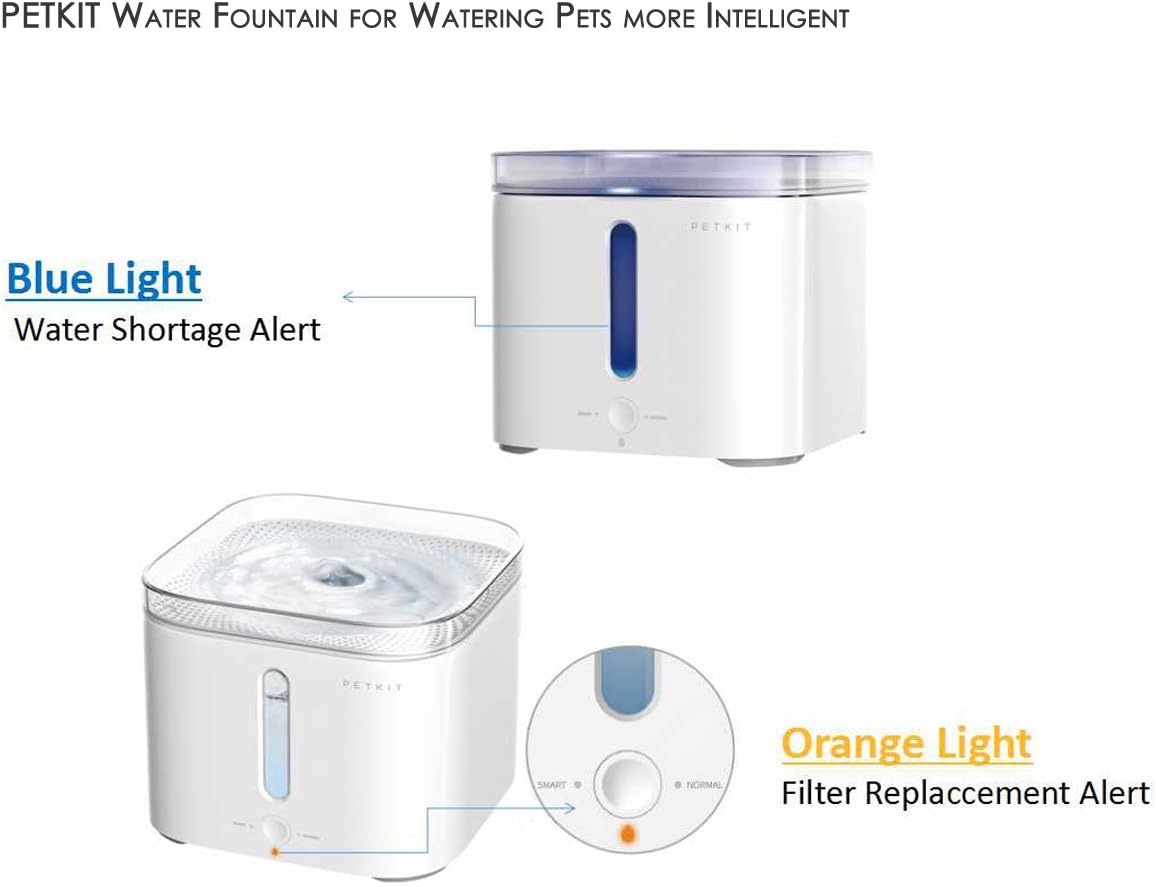
Image 5.2: The PETKIT P410 displaying a blue light for water shortage and an orange light for filter replacement.
6. 유지관리
6.1 분수 청소
Regular cleaning is essential to maintain hygiene and prolong the life of your fountain. It is recommended to clean the fountain at least once a week.
- Unplug the fountain from the power outlet.
- Disassemble the drinking tray, filter tray, and water tank.
- 필터 요소를 제거하십시오.
- Clean all components (except the power adapter and pump motor) with clean water. You may use a soft brush to remove any residue. Do not use abrasive cleaners.
- Rinse thoroughly to ensure no cleaning residue remains.
- Reassemble the fountain after all parts are clean.
6.2 필터 교체
The PETKIT P410 uses a triple cleaning system filter, consisting of a mesh screen, activated carbon, and ion-exchange resin, to purify the water. The orange indicator light will illuminate when it's time to replace the filter, typically every 1-2 months depending on usage and water quality.

이미지 6.1: 상세 view of the PETKIT P410's filter components, including the mesh screen, activated carbon filter, and ion-exchange resin.
- 분수의 플러그를 뽑습니다.
- Remove the drinking tray and filter tray.
- 기존 필터 요소를 제거합니다.
- Rinse the new filter element under running water for a few minutes to remove any loose carbon dust.
- Place the new filter element into the filter tray.
- Reassemble the fountain and plug it back in.
- Press and hold the mode button for 5 seconds to reset the filter replacement reminder. The orange light will turn off.
7. 문제 해결
| 문제 | 가능한 원인 | 해결책 |
|---|---|---|
| 물의 흐름이 없습니다 | Power not connected; Low water level; Pump clogged; Filter clogged. | Check power connection; Refill water; Clean pump; Replace filter. |
| 분수는 시끄럽다 | Low water level; Pump dirty or obstructed; Improper assembly. | Refill water; Clean pump and impeller; Reassemble correctly. |
| 블루라이트 켜짐 | 수위가 낮습니다. | 물탱크를 다시 채우세요. |
| 주황색 표시등이 켜져 있습니다. | 필터를 교체해야 합니다. | Replace the filter and reset the indicator (press and hold mode button for 5 seconds). |
8. 사양
| 상표 | 펫킷 |
| 모델 번호 | TKWT1WH |
| 제품 치수 | 19.69 x 19.69 x 16.81cm |
| 품목 무게 | 1.13kg(2.5파운드) |
| 용량 | 2리터 |
| 재료 | 플라스틱 |
| 전원 | 코드식 전기 |
| 권tage | 12 볼트 |
9. 보증 및 지원
For warranty information or technical support, please refer to the warranty card included with your product or visit the official PETKIT website. You may also contact PETKIT customer service directly for assistance with product issues or inquiries.
10. Pet Usage Examp레

Image 10.1: A dog happily drinking fresh water from the PETKIT P410 Smart Pet Drinking Fountain.

Image 10.2: A cat drinking from the PETKIT P410 Smart Pet Drinking Fountain, demonstrating its suitability for feline companions.