
소개
This manual provides detailed instructions for setting up, operating, and maintaining your ASUS RT-AC58U AC1300 Dual Band Gigabit Wireless Router. Please read this guide thoroughly to ensure proper installation and optimal performance of your device.
The ASUS RT-AC58U is designed to deliver high-speed Wi-Fi connectivity with advanced features such as MU-MIMO technology, parental controls, and a versatile USB 3.0 port for enhanced network performance and management.
상자 안에 무엇이 들어있나요?
제품 패키지에 모든 품목이 들어 있는지 확인하세요.
- ASUS RT-AC58U AC1300 Dual Band Gigabit Wireless Router
- 전원 어댑터
- 이더넷 케이블
- 빠른 시작 가이드
- 보증 카드
- 사용 설명서 (본 문서)
- Software Drivers CD (if applicable)
제품 끝view
The ASUS RT-AC58U router features a sleek design with four external antennas for improved Wi-Fi range and stability. It supports dual-band Wi-Fi (2.4 GHz and 5 GHz) and includes multiple ports for wired connections and USB devices.
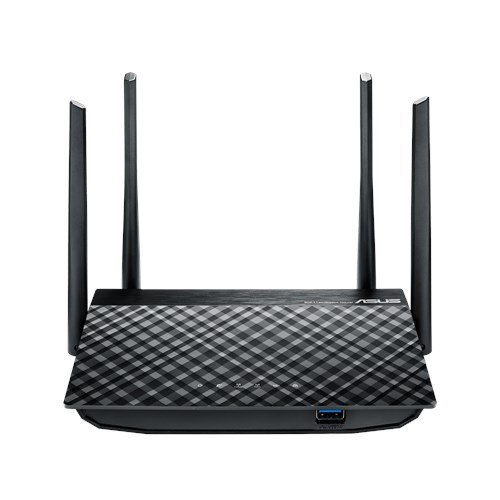
그림 1: 전면 view of the ASUS RT-AC58U Router, showcasing its four external antennas and patterned top surface.
주요 특징:
- AC1300 듀얼 밴드 Wi-Fi: Simultaneous 2.4 GHz and 5 GHz bands for combined speeds up to 1300 Mbps.
- MU-MIMO 기술: Enables multiple devices to connect at full Wi-Fi speed simultaneously.
- 강력한 프로세서: Equipped with a Qualcomm IPQ4018 (717 MHz, 4 cores) SOC and 128MB memory for efficient multi-device performance.
- Improved Wi-Fi Range: Four external antennas with AiRadar beamforming technology enhance signal coverage.
- Multi-purpose USB 3.0 Port: Offers 10x faster data transfers than USB 2.0 for file sharing and printer connections.
- 보호자 관리: Monitor and filter internet activities for family and children.
- 기가비트 이더넷 포트: Ensures fast wired connections for devices like PCs and gaming consoles.

Figure 2: Illustration highlighting the powerful processor of the ASUS RT-AC58U, contributing to higher network speeds.
포트 및 표시기:
Familiarize yourself with the ports and LED indicators on your router for easy setup and monitoring.
- 전원 포트: 전원 어댑터에 연결합니다.
- WAN 포트: 인터넷 접속을 위해 모뎀에 연결합니다.
- LAN 포트(x4): 컴퓨터, 게임 콘솔, 스마트 TV와 같은 유선 기기에 연결됩니다.
- USB 3.0 포트 : For connecting external storage devices or printers.
- WPS 버튼: Wi-Fi 기기에 빠르고 안전하게 연결하기 위해.
- 재설정 버튼: 공장 초기 설정으로 복원하려면.
- LED 표시등: Provide status updates for power, internet, Wi-Fi bands, LAN ports, and USB activity.
설정
Follow these steps to set up your ASUS RT-AC58U router:
- 라우터 압축 풀기: Remove the router and all accessories from the box.
- 라우터 위치 지정: Place the router in a central location to maximize Wi-Fi coverage. Avoid placing it near obstructions or other electronic devices that may cause interference.
- 안테나 연결: Ensure the four external antennas are securely attached and oriented vertically for optimal signal.
- 전원에 연결: Plug the power adapter into the router's power port and then into an electrical outlet. Wait for the power LED to light up.
- 모뎀에 연결: Connect one end of the provided Ethernet cable to the WAN port (usually blue) on your router and the other end to your modem's Ethernet port. Ensure your modem is powered on and connected to the internet.
- 기기 연결 (선택 사항): For initial configuration, you can connect a computer to one of the router's LAN ports (yellow) using another Ethernet cable. Alternatively, you can connect wirelessly using the default Wi-Fi network name (SSID) and password found on the router's label.
- 접근하기 Web 인터페이스: 열기 web browser on your connected device and navigate to
router.asus.comor192.168.1.1. Follow the on-screen instructions of the ASUS Web GUI to complete the internet setup wizard, set up your Wi-Fi network name and password, and configure an administrator password for the router.
라우터 작동
Once set up, your ASUS RT-AC58U router provides a robust network for your home or office. Here's how to utilize its key features:
Dual Band Wi-Fi (2.4 GHz and 5 GHz):
The router broadcasts two separate Wi-Fi networks. The 2.4 GHz band offers wider coverage and better penetration through walls, suitable for general browsing and devices further away. The 5 GHz band provides faster speeds and less interference, ideal for bandwidth-intensive tasks like 4K video streaming and online gaming, especially for devices closer to the router.

Figure 3: Demonstrates multiple users enjoying full Wi-Fi speeds simultaneously, thanks to the router's multi-device performance capabilities.
MU-MIMO 기술:
Multi-User, Multiple-Input, Multiple-Output (MU-MIMO) technology allows the router to communicate with multiple compatible devices simultaneously, rather than sequentially. This significantly improves network efficiency and speed, especially in environments with many connected devices.
보호자 관리:
라우터에 접근하세요 web interface to configure parental control settings. You can set schedules for internet access, block specific websites or applications, and monitor internet usage for connected devices. This helps create a safer online environment for your family.
USB 3.0 Port Functionality:
The USB 3.0 port allows you to connect various devices:
- Network Storage (NAS): Connect an external hard drive or USB flash drive to create network-attached storage, allowing all connected devices to access files.
- 프린터 공유: USB 프린터를 라우터에 연결하면 네트워크상의 모든 장치에서 프린터를 사용할 수 있습니다.
- 3G/4G USB Dongle Support: Use a compatible 3G/4G USB dongle as a primary or backup internet connection.
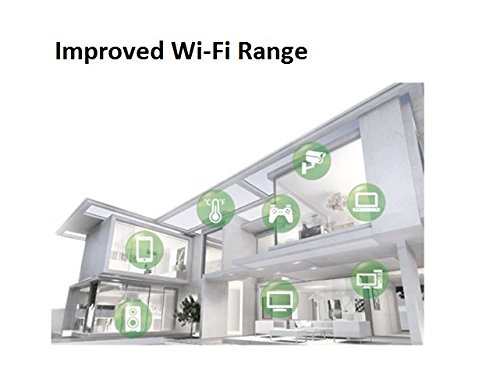
Figure 4: The ASUS RT-AC58U router connected to a Reliance Jio 4G dongle, demonstrating its capability to share mobile broadband internet across the network.
유지
정기적인 유지 관리는 라우터의 수명 연장과 최적의 성능을 보장합니다.
- 펌웨어 업데이트: ASUS 지원 웹사이트에서 제공하는 최신 펌웨어 업데이트를 정기적으로 확인하고 설치하십시오. web사이트 또는 라우터를 통해 web 인터페이스. 펌웨어 업데이트에는 성능 향상, 보안 패치 및 새로운 기능이 포함되는 경우가 많습니다.
- 라우터 재시작: 네트워크 문제가 발생하면 10초 동안 전원 어댑터를 뽑았다가 다시 꽂아 라우터를 다시 시작해 보세요.
- 공장 초기화 : In case of persistent issues or if you forget your administrator password, you can perform a factory reset. Locate the Reset button (often a small pinhole) on the router, press and hold it for about 5-10 seconds until the power LED blinks, then release. This will restore all settings to their factory defaults, requiring you to reconfigure the router.
- 물리적 청소: Keep the router free from dust by gently wiping it with a soft, dry cloth. Ensure ventilation openings are not blocked.
문제 해결
This section addresses common issues you might encounter with your ASUS RT-AC58U router.
인터넷에 연결되지 않음:
- Check if the WAN LED on the router is lit. If not, ensure the Ethernet cable from your modem is securely connected to the router's WAN port.
- 모뎀이 제대로 작동하고 인터넷에 연결되어 있는지 확인하세요.
- 모뎀과 라우터를 다시 시작하세요.
- 라우터에 접근하세요 web interface and check the internet connection status. Run the setup wizard again if necessary.
Poor Wi-Fi Signal or Range:
- Ensure the router is placed centrally and away from large metal objects, concrete walls, or other electronic devices that can cause interference.
- Adjust the orientation of the external antennas.
- Note that the 5 GHz band offers higher speeds but has a shorter range and less penetration than the 2.4 GHz band. Consider connecting devices further away to the 2.4 GHz network.
- 라우터의 펌웨어를 최신 버전으로 업데이트하세요.

Figure 5: An architectural diagram illustrating how the router's improved Wi-Fi range covers various rooms and floors within a home.
Slow Data Transfer Rates (Wired or Wireless):
- Ensure you are using Gigabit Ethernet cables (Cat5e or Cat6) for wired connections to fully utilize the router's Gigabit ports.
- For wireless connections, ensure your devices support 802.11ac and are connected to the 5 GHz band for optimal speed.
- Check for background applications or devices consuming significant bandwidth.
- Perform a speed test to verify your internet service provider's speed.
USB 장치가 인식되지 않음:
- Ensure the USB device is properly formatted (e.g., NTFS, FAT32) and compatible with the router.
- Try connecting the USB device to a different port or restarting the router.
- 라우터를 확인하세요 web interface for USB application settings and ensure the USB device is enabled.
명세서
| 특징 | 세부 사항 |
|---|---|
| 상표 | 아수스 |
| 모델명 | Asus AC1300 |
| 모델 번호 | RT-AC58U |
| 무선 표준 | 802.11ac |
| 주파수 대역 클래스 | 듀얼 밴드(2.4GHz, 5GHz) |
| 데이터 전송 속도 | 최대 1300Mbps(AC1300) |
| 안테나 유형 | 외부(안테나 4개) |
| 포트 수 | 4 x LAN, 1 x WAN, 1 x USB 3.0 |
| 연결 기술 | 이더넷, Wi-Fi |
| 제어 방법 | 앱, Web 인터페이스 |
| OS 지원 | Windows 10/8.1/8/7, Mac OS X 10.1/10.4/10.5/10.6/10.7/10.8 |
| 전원 공급 장치 | AC Input: 110V~240V (50~60Hz), DC Output: 12 V with max. 1.5 A current |
| 품목 무게 | 762그램 |
| 한국어: | 889349375334 |
보증 및 지원
Your ASUS RT-AC58U router comes with a manufacturer's warranty. Please refer to the included Warranty Card for specific terms and conditions, including warranty period and coverage details.
For technical support, driver downloads, firmware updates, and additional resources, please visit the official ASUS support web사이트에서 FAQ와 문제 해결 가이드도 확인하실 수 있습니다.
ASUS 지원 Web대지: https://www.asus.com/support/
제품 비디오 끝view
비디오 1: 간략한 설명view of the ASUS RT-AC58U AC1300 Dual Band Gigabit Wireless Router's key features and benefits.