
소개
This manual provides comprehensive instructions for the safe installation, operation, and maintenance of your Insignia Full Motion TV Wall Mount, model NS-HTVMM1702-C. This mount is designed to securely hold televisions with screen sizes ranging from 33 to 46 inches. Please read this manual thoroughly before installation and retain it for future reference.
중요한 안전 정보
Improper installation or use of this product can result in serious injury or damage. Always follow these safety guidelines:
- Read all instructions before assembly and installation. If you do not understand the instructions or have any doubts, contact a qualified installer.
- 설치 표면이 마운트와 텔레비전의 총 무게를 안전하게 지탱할 수 있는지 확인하십시오.
- Do not exceed the maximum weight capacity of the mount. Refer to the specifications section for details.
- 제조업체에서 제공하거나 지정한 하드웨어만 사용하십시오.
- Never install the mount into drywall alone. It must be secured to a solid wall stud or appropriate concrete/brick anchors.
- 설치하는 동안 어린이와 애완동물이 접근하지 못하도록 하세요.
- 주기적으로 모든 연결을 점검하여 안전한지 확인하세요.
패키지 내용
Before beginning installation, ensure all parts are present and undamaged. While specific component names may vary, a typical package includes:
- 벽판 조립체
- TV 브래킷 (2개)
- 하드웨어 키트(다양한 나사, 와셔, 스페이서, 앵커)
- 사용 설명서
If any parts are missing or damaged, do not proceed with installation. Contact customer support for assistance.
설정 및 설치
Follow these steps carefully for a secure installation. Professional installation is recommended if you are unsure about any part of the process.
Step 1: Prepare the Wall Mount
Unpack all components. If the wall plate and articulating arm are separate, assemble them according to the diagrams provided in the included quick setup guide. Ensure all pivot points move freely.
This video demonstrates the general assembly and installation process for a full-motion TV wall mount, including attaching components and preparing for wall mounting.
2단계: TV에 브래킷 부착
Carefully place your television face down on a soft, clean surface. Attach the two vertical TV brackets to the back of your television using the appropriate screws and spacers from the hardware kit. Ensure the brackets are centered horizontally and vertically on the TV's VESA mounting holes. Do not overtighten screws.
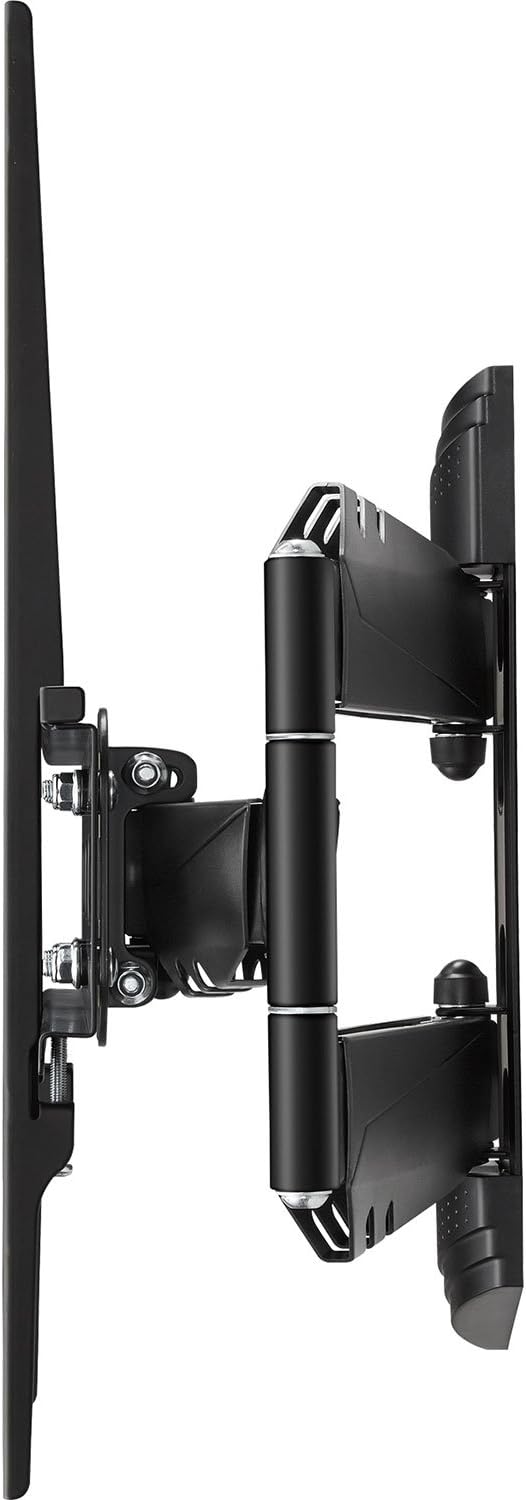
이 이미지는 측면 프로를 보여줍니다.file of the Insignia full motion TV wall mount with the TV mounting brackets attached, illustrating the depth and articulation capability.
3단계: 벽면 플레이트를 벽에 장착합니다.
Determine the desired height and location for your TV. Use a stud finder to locate the center of a wooden wall stud. Mark the drilling locations for the wall plate. Drill pilot holes and securely fasten the wall plate to the wall using the provided lag bolts. For concrete or brick walls, use appropriate concrete anchors and drill bits (not always included). Use a level to ensure the wall plate is perfectly horizontal before tightening all fasteners.

이 이미지는 앞면을 표시합니다. view of the Insignia full motion TV wall mount, showing the wall plate and the articulating arm mechanism in a compact position.
4단계: 벽걸이 플레이트에 TV를 걸기
With assistance, carefully lift the television (with the attached brackets) and hook the brackets onto the wall plate. Ensure the TV is securely seated. Engage any safety locking mechanisms on the brackets to prevent accidental dislodgement. Double-check all connections for security.

This image illustrates the Insignia full motion TV wall mount in an extended and angled position, demonstrating its articulating capabilities for flexible view주고받음.
Operating the TV Wall Mount
Your full-motion wall mount allows for flexible positioning of your television to achieve optimal viewing angles from various locations in a room.
- 기울기 조정: To adjust the vertical tilt of your TV, locate the tilt adjustment knobs or bolts on the TV brackets. Loosen them slightly, adjust the screen to your desired upward or downward angle, and then re-tighten securely.
- 회전 조정: To swivel the TV horizontally, gently push or pull the side of the television to rotate it left or right. The articulating arm will move smoothly.
- 확장 및 수축: To extend or retract the TV from the wall, gently pull the television forward or push it back towards the wall. The articulating arm will extend or fold as needed.
Always handle the TV carefully and with two hands when making adjustments. Avoid sudden movements.
유지
정기적인 유지 관리는 TV 벽걸이 거치대의 수명 연장과 안전한 작동을 보장합니다.
- 청소: Wipe the mount with a soft, dry cloth to remove dust. Avoid using abrasive cleaners, solvents, or harsh chemicals, as these can damage the finish.
- 정기 검사: Every few months, visually inspect all mounting points, screws, and connections. Ensure all fasteners are tight and secure. Do not overtighten. Check for any signs of wear or damage to the mount components.
- 매끄럽게 하기: The articulating joints are designed for smooth movement. If movement becomes stiff, a small amount of silicone-based lubricant can be applied to the pivot points, but this is rarely necessary.
문제 해결
TV 벽걸이 거치대에 문제가 발생하면 다음의 일반적인 문제 및 해결 방법을 참조하십시오.
- TV가 수평이 아닙니다: Check the level of the wall plate and the TV brackets. Loosen the necessary fasteners, adjust, and re-tighten. Ensure the TV's VESA mounting holes are used correctly.
- 마운트가 헐거워지거나 불안정하게 느껴집니다. Immediately remove the TV from the mount. Re-check all wall mounting screws and TV bracket screws to ensure they are securely tightened. Verify that the wall structure is adequate and that the mount's weight capacity has not been exceeded.
- Difficulty adjusting TV position (tilt, swivel, extension): Check for any obstructions. Ensure that tilt adjustment knobs are not overtightened if applicable. If the articulating arm is stiff, inspect for any debris in the joints.
- 누락된 하드웨어: Refer to the package contents list. If parts are missing, contact Insignia customer support. Do not substitute with unapproved hardware.
제품 사양
| 특징 | 세부 사항 |
|---|---|
| 상표 | 휘장 |
| 모델 번호 | NS-HTVMM1702-C |
| 장착 유형 | 벽걸이형 |
| 이동 유형 | 관절 가동 (완전 동작) |
| 재료 | 금속 |
| 색상 | 검은색 |
| Minimum Supported Screen Size | 33 인치 |
| Maximum Supported Screen Size | 46 인치 |
| 호환 장치 | 텔레비전 |
| 소포 크기 | 49.61 x 31.39 x 7.19cm |
| 품목 무게 | 4.3kg |
| 한국어: | 600603202117 |
보증 정보 및 고객 지원
For specific warranty details, terms, and conditions, please refer to the warranty card included with your product or visit the official Insignia website. For technical assistance, troubleshooting not covered in this manual, or to inquire about replacement parts, please contact Insignia customer support.
Manufacturer Contact Information: Peachtree City, GA 30269, US.