
제품 끝view
The 8Bitdo Ultimate Wired Controller is officially licensed by Xbox, offering a modern design and robust features for an enhanced gaming experience. It is compatible with Xbox Series X, Xbox Series S, Xbox One, and Windows 10 & 11.
주요 특징은 다음과 같습니다.
- Officially Licensed by Xbox. Compatible with Xbox Series X, Xbox Series S, Xbox One & Windows 10 and above.
- Ultimate Software wirelessly with iOS and Android & wired on Xbox and PC.
- 커스텀 프로file switch button, 3 profiles, switch on the fly.
- Customize button mapping, adjust stick & trigger sensitivity, vibration control and more.
- Two extra Pro-level Back Buttons and 3.5mm Audio Jack to directly connect your headphones.
- Perfect classic d-pad, trigger vibration, enhanced grip & a 3 meter cable.

그림 1: 전면 view of the 8Bitdo Ultimate Wired Controller in Black.
설정
The 8Bitdo Ultimate Wired Controller is designed for plug-and-play functionality. Simply connect the controller to your compatible device using the integrated USB cable.
Connecting to Xbox Console:
- Ensure your Xbox Series X|S or Xbox One console is powered on.
- Plug the USB-A end of the controller's cable into an available USB port on your Xbox console.
- The controller will automatically connect and the Xbox button on the controller will illuminate.
Windows PC에 연결하기:
- Ensure your Windows 10 or Windows 11 PC is powered on.
- Plug the USB-A end of the controller's cable into an available USB port on your PC.
- The PC should automatically detect and install the necessary drivers. The Xbox button on the controller will illuminate once connected.

Figure 2: The 8Bitdo Ultimate Wired Controller connected to a laptop for PC gaming.
운영
기본 컨트롤:
- 아날로그 스틱: 움직임과 카메라 제어에 사용됩니다.
- 방향 패드: For directional input, often used in retro games or menu navigation.
- A/B/X/Y 버튼: 표준 작업 버튼.
- LT/RT (트리거): Analog triggers with vibration motors for immersive feedback.
- LB/RB (어깨 버튼): Digital shoulder buttons.
- Xbox 버튼: Powers on the controller, accesses the Xbox Guide.
- View Button (Two squares icon): Accesses in-game menus or system features.
- Menu Button (Three lines icon): Accesses game options or system menus.
- Share Button (Arrow pointing up): 스크린샷이나 비디오 클립을 캡처합니다.
전문가 수준의 뒤로 가기 버튼:
The controller features two extra programmable back buttons (P1 and P2) located on the underside. These can be mapped to any other button for quick access during gameplay.
찬성file 스위칭:
The controller has a dedicated Custom Profile switch button (three dots icon) to cycle through 3 customizable profiles on the fly. Each profile can store different button mappings, stick/trigger sensitivities, and vibration settings.
오디오 컨트롤:
- 3.5mm 오디오 잭: Connect your gaming headset directly to the controller.
- 음소거 스위치: A dedicated switch to mute your microphone.
- 볼륨 조절: 프로를 잡아라file button and press UP/DOWN on the D-Pad to increase/decrease game volume. Hold the Profile button and press LEFT/RIGHT on the D-Pad to adjust game/chat balance.

Figure 3: The bottom of the controller with the 3.5mm audio jack and mute switch.
Customization (Ultimate Software)
The 8Bitdo Ultimate Software allows for extensive customization of your controller. It is available on Xbox, Windows 10 and above, Android, and iOS. While the controller is wired for gameplay, the mobile app connects wirelessly via Bluetooth for customization.
Features of Ultimate Software:
- 버튼 매핑: Remap any button to your preferred function.
- 스틱 감도: Adjust the sensitivity and dead zones of both analog sticks.
- 트리거 감도: Fine-tune the sensitivity and dead zones of the LT/RT triggers.
- 진동 제어: Adjust the strength of the vibration motors in different areas of the controller.
- 찬성file 관리: 최대 3개의 사용자 정의 프로를 만들고 저장하세요files directly on the controller, allowing you to switch between them without re-configuring.
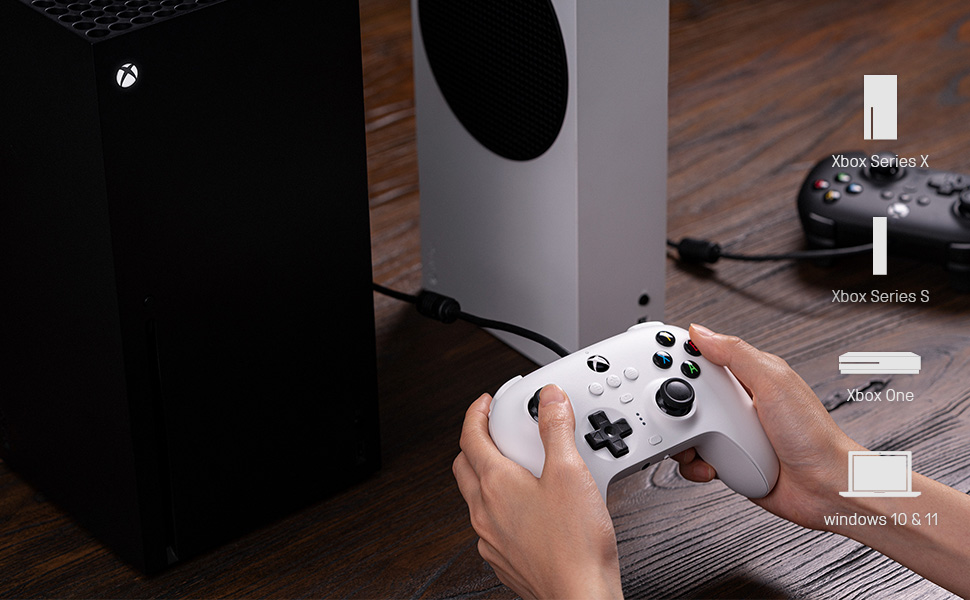
Figure 4: The 8Bitdo Ultimate Software interface for customizing button mapping.
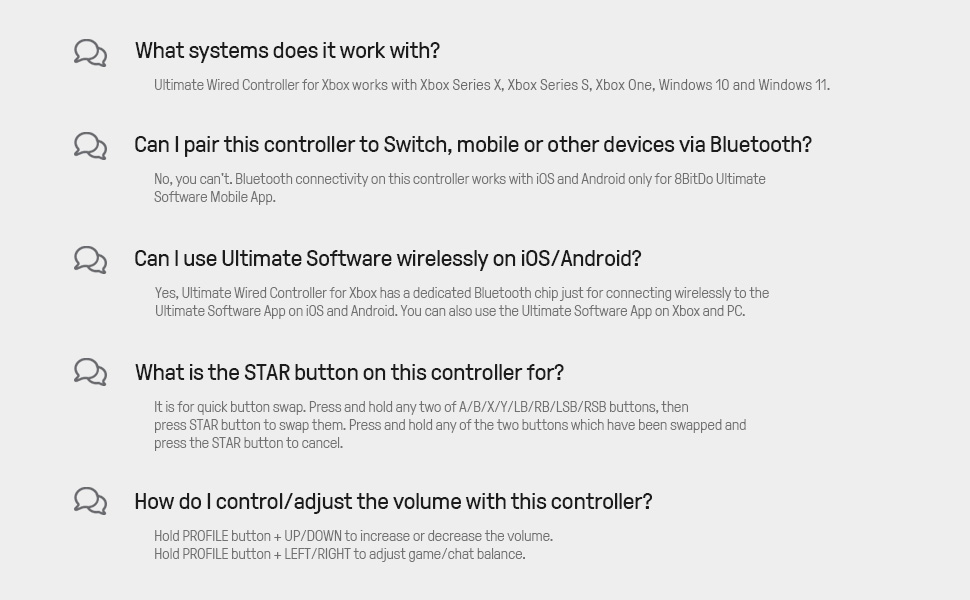
Figure 5: The 8Bitdo Ultimate Software interface for adjusting stick and trigger sensitivity.
호환성
The 8Bitdo Ultimate Wired Controller is designed for broad compatibility across various gaming platforms:
- Xbox Consoles: Xbox Series X, Xbox Series S, Xbox One.
- PC: Windows 10 and Windows 11.
- 다른 플랫폼: The controller has also been tested to work with RetroPie on Raspberry Pi and the Mr. Project for retro gaming emulation.
메모: While the Ultimate Software is available on iOS and Android for customization, the controller itself does not function as a game controller on mobile phones or tablets for gameplay.

Figure 6: The 8Bitdo Ultimate Wired Controller is compatible with Xbox consoles and Windows PCs.
유지
To ensure the longevity and optimal performance of your 8Bitdo Ultimate Wired Controller, follow these maintenance guidelines:
- 청소: 부드럽고 마른 천을 사용하여 컨트롤러를 정기적으로 닦으세요. 잘 지워지지 않는 오염의 경우, 가볍게 두드리세요.amp 천을 사용할 수 있지만, 포트나 버튼에 습기가 들어가지 않도록 하십시오.
- 저장: Store the controller in a cool, dry place away from direct sunlight and extreme temperatures. Avoid wrapping the cable tightly around the controller to prevent damage to the cable or internal connections.
- 케이블 관리: The integrated 3-meter (9.84 ft) USB cable is durable, but avoid excessive pulling, bending, or twisting, especially near the connection points.
문제 해결
- 컨트롤러가 응답하지 않음:
- USB 케이블이 컨트롤러와 콘솔/PC에 제대로 연결되어 있는지 확인하십시오.
- 컨트롤러를 다른 USB 포트에 연결해 보세요.
- 콘솔이나 PC를 재시작하세요.
- Buttons Feeling Sticky or Unresponsive:
- Clean around the buttons with a cotton swab lightly damp이소프로필 알코올로 소독함.
- Ensure the controller's firmware is up to date using the 8Bitdo Ultimate Software.
- D-Pad Input Issues (Errant Diagonals):
- While the D-Pad is designed for precision, some retro games may interpret inputs differently. Experiment with the stick sensitivity settings in the Ultimate Software.
- Rumble Motors Noise/Weakness:
- Adjust vibration strength via the Ultimate Software. Note that some noise may be inherent to the motor design.
- Cable Length Insufficient:
- The controller comes with a 3-meter (9.84 ft) cable. If more length is needed, a USB extension cable may be required.
명세서
| 특징 | 세부 사항 |
|---|---|
| 브랜드 이름 | 8 비트도 |
| 모델명 | 6922621502227 |
| 호환 장치 | Xbox Series X, Xbox Series S, Xbox One, Windows 10, Windows 11, PC |
| 컨트롤러 유형 | 게임패드 |
| 연결 기술 | USB(유선) |
| 케이블 길이 | 3미터(9.84피트) |
| 추가 기능 | Two Pro-level Back Buttons, 3.5mm Audio Jack, Custom Profile Switch Button, Ultimate Software (iOS/Android/Xbox/PC) |
| 버튼 수량 | 18 |
| 품목 무게 | 11.7 온스 |
| 품목 치수 | 3.94 x 1.97 x 1.57 인치 |
| 색상 | 검은색 |
보증 및 지원
보증: This product comes with a 1-year warranty from the manufacturer, 8Bitdo.
For further support, firmware updates, or detailed information on the Ultimate Software, please visit the official 8Bitdo web사이트를 방문하거나 고객 서비스에 문의하세요.
공식 제품 영상
영상 1: 공식 종료view of the 8Bitdo Ultimate Wired Controller for Xbox, showcasin그 특징과 디자인.