
1. 서론
This manual provides detailed instructions for the installation, operation, and maintenance of the CP PLUS CP-UVR-1616K1-V3 16-Channel 1080P Digital Video Recorder (DVR). This device supports 16 channels of video input and 16 channels of audio input, offering comprehensive surveillance capabilities. It is designed for reliable performance in various security applications.
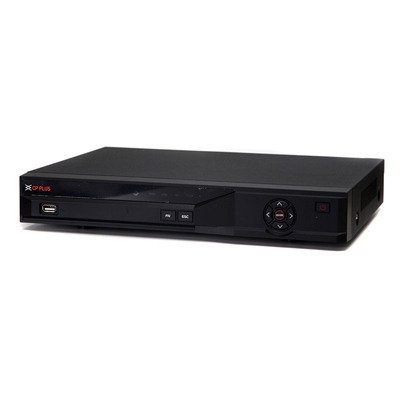
그림 1: 전면 view of the CP PLUS CP-UVR-1616K1-V3 DVR unit.
2. 안전수칙
- Ensure proper ventilation around the DVR to prevent overheating.
- 장치를 물이나 습기에 노출시키지 마십시오.
- 장치와 함께 제공된 전원 어댑터만 사용하십시오.
- DVR을 직사광선이나 열원 근처에 두지 마세요.
- 물리적인 손상을 방지하기 위해 장치를 조심스럽게 다루십시오.
3. 설정 및 설치
3.1 풀기
포장에서 모든 구성품을 조심스럽게 꺼내십시오. 포장 목록에 있는 모든 품목이 있는지 확인하십시오.
3.2 하드웨어 연결
- 카메라 연결: Connect your HDCVI, Analog, or IP cameras to the BNC video input ports (16 channels available) on the rear panel of the DVR.
- 오디오 연결: Connect audio input devices to the 16 RCA audio input channels. Connect an audio output device to the 1 RCA audio output channel.
- 디스플레이 연결: Connect a monitor or television to the HDMI or VGA output port for video display.
- 네트워크 연결: Connect an Ethernet cable from the DVR's network port to your router or network switch for remote access and IP camera integration.
- 하드디스크 설치(선택 사항): If not pre-installed, open the DVR casing and connect a SATA HDD (up to 6TB) to the internal SATA port. Secure the HDD with screws.
- USB 장치 연결: Connect a mouse or USB storage device to one of the two USB 2.0 ports.
- 전원 켜기: 전원 어댑터를 DVR에 연결한 다음 전원 콘센트에 꽂으세요. DVR이 자동으로 켜집니다.
4. 사용 설명서
4.1 초기 설정 마법사
Upon first power-on, the DVR will guide you through an initial setup wizard. Follow the on-screen prompts to configure basic settings such as language, date/time, network settings, and user accounts.
4.2 라이브 View
초기 설정 후 DVR은 라이브를 표시합니다. view of connected cameras. You can switch between different display splits (1/4/8/9/16 channels) using the on-screen controls or mouse.
4.3 녹음
The DVR supports various recording modes including continuous, motion detection, and scheduled recording.
- Main Stream Recording: 1080P (1~15fps), 1080N/720P/960H/D1/HD1/BCIF/CIF/QCIF (1~25/30fps).
- Extra Stream Recording: CIF/QCIF (1~15fps).
Access the recording settings through the main menu to configure your preferred recording schedule and parameters.
4.4 재생
다시view 기록된 footage, navigate to the Playback menu. You can search for recordings by date, time, and event type.
4.5 모바일 접속
Download the official mobile applications (iCMOB, gCMOB, wCMOB) from your device's app store to access live view and playback remotely. Refer to the app's instructions for setup.
4.6 CMS Software
For centralized management of multiple DVRs, use the KVMS or KVMS Pro CMS software. Install the software on a compatible computer and follow the provided instructions for device addition and management.
5. 유지관리
- 정기 청소: Keep the DVR free from dust. Use a soft, dry cloth for cleaning. Do not use liquid cleaners.
- 펌웨어 업데이트: Periodically check the CP PLUS official web최적의 성능과 보안을 보장하기 위한 펌웨어 업데이트 사이트입니다.
- 하드 드라이브 상태: Monitor the health of the installed hard drive through the DVR's system settings. Replace the HDD if errors are detected.
- 백업 녹화: Regularly back up important recordings to an external USB storage device or network storage.
6. 문제 해결
| 문제 | 가능한 원인 | 해결책 |
|---|---|---|
| 모니터에 비디오 출력이 없습니다. | HDMI/VGA 케이블이 헐거워졌거나, 모니터에서 입력 소스가 잘못 선택되었거나, DVR 전원이 켜져 있지 않을 수 있습니다. | 케이블 연결 상태를 확인하고, 모니터가 올바른 입력으로 설정되어 있는지 확인하고, DVR 전원이 켜져 있는지 확인하십시오. |
| 카메라가 표시되지 않습니다. | Loose BNC cable, camera power issue, incorrect camera type selected. | Check camera connections and power, verify camera compatibility and settings in DVR menu. |
| 녹음이 없습니다. | HDD not installed or faulty, recording schedule not configured, insufficient storage. | Install/check HDD, configure recording schedule, check HDD space. |
| 원격 접속이 작동하지 않습니다. | 네트워크 케이블이 분리되었거나, 네트워크 설정이 잘못되었거나, 방화벽이 차단했을 수 있습니다. | Check network cable, verify IP address/gateway/DNS settings, configure port forwarding or P2P. |
7. 사양
| 특징 | 세부 사항 |
|---|---|
| 모델 | CP-UVR-1616K1-V3 |
| 비디오 입력 | 16 channel BNC (HDCVI/Analog/IP up to 5Mp) |
| 오디오 입력/출력 | 16 channel RCA input, 1 channel RCA output |
| 비디오 출력 | 1 HDMI, 1 VGA (Simultaneous) |
| 비디오 해상도 | 1080P(1920×1080), 1080N(960×1080), 720P, 960H, D1, HD1, BCIF, CIF, QCIF |
| 비디오 압축 | H.264 |
| 오디오 압축 | G.711 |
| Recording Frame Rate (Main Stream) | 1080P (1~15fps), 1080N/720P/960H/D1/HD1/BCIF/CIF/QCIF (1~25/30fps) |
| HDD 지원 | 1 SATA port, up to 6TB |
| USB 인터페이스 | 2개의 USB 2.0 |
| 모바일 소프트웨어 | iCMOB, gCMOB, wCMOB |
| CMS 소프트웨어 | KVMS, KVMS Pro |
| 치수 | 325mm x 255mm x 55mm |
| 무게 | 1.5Kg (without HDD) |
8. 지원 및 보증
For technical assistance, product support, or warranty inquiries, please contact CP PLUS customer service. Refer to the official CP PLUS website for the most current contact information and warranty terms.
공식적인 Web대지: www.cpplusworld.com
보증 청구를 위해 구매 증빙서류로 구매 영수증을 보관하세요.