
1. 제품 오버view
The D-Link DFE-530TX+ is a 10/100BASE-TX Fast Ethernet PCI Adapter designed to provide high-speed network connectivity for desktop computers. This adapter supports both 100BASE-TX (Category 5 UTP cable) and 10BASE-T (Category 3/4/5 UTP cable) connections, operating at speeds of 10Mbps or 100Mbps. It features full-duplex capability, effectively doubling the network speed to 20/200Mbps, and includes Plug-and-Play functionality for simplified installation.
주요 특징은 다음과 같습니다.
- PCI interface for desktop computer compatibility.
- Supports a wide range of operating systems.
- Full Duplex Mode support for 20/200Mbps operation.
- Half Duplex Mode support for 10/100Mbps operation.
- Compliant with PCI 2.1/2.2 ACPI Power Management.
- Wake-On-LAN (WOL) functionality, including Magic Packet, LinkChg, and Microsoft wake-up frame.
- Compliant with PC 99 Standard.
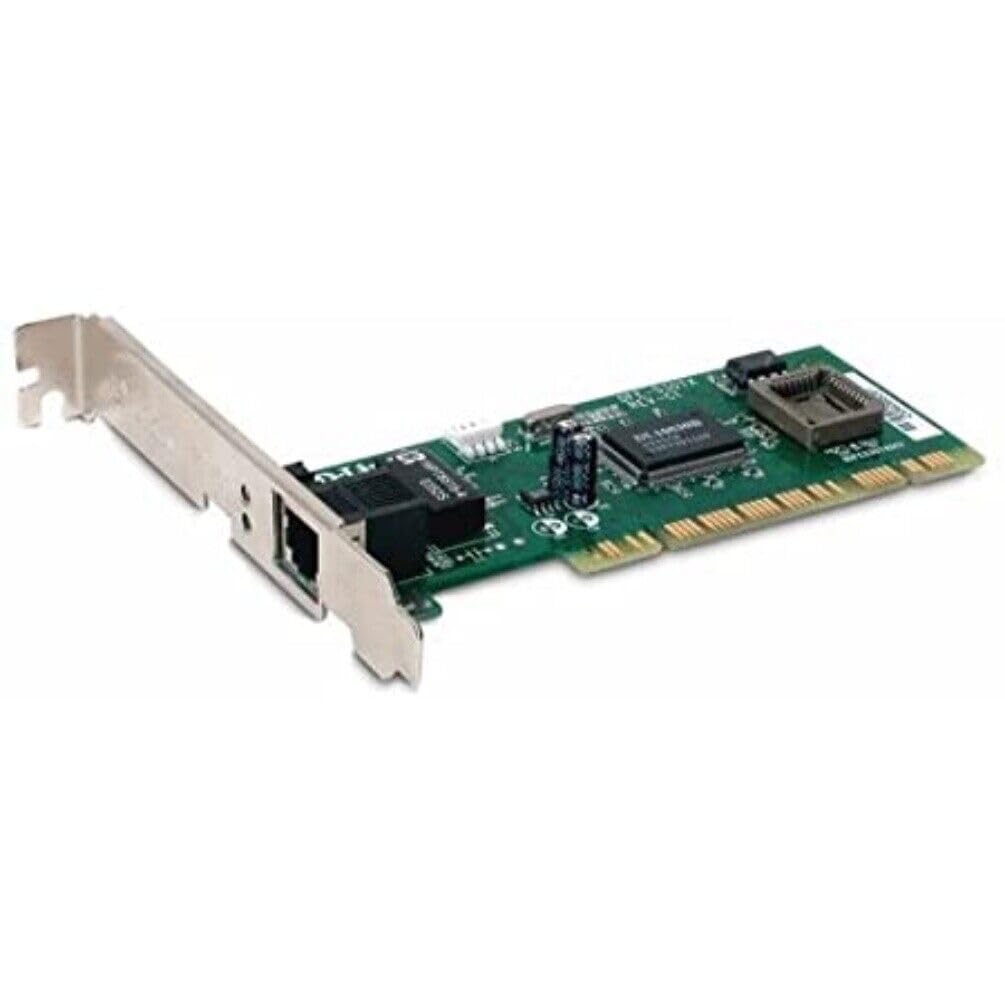
그림 1: D-Link DFE-530TX+ Fast Ethernet PCI Adapter. This image shows the green circuit board with various electronic components, including chips and capacitors, and a silver PCI bracket with an RJ-45 Ethernet port.
2. 설정 및 설치
Follow these steps to install your D-Link DFE-530TX+ PCI Adapter into your desktop computer.
- 컴퓨터를 준비하세요:
- Power off your computer and unplug the power cord from the electrical outlet.
- Open the computer case. Refer to your computer's manual for instructions on how to safely open the case.
- Install the PCI Adapter:
- Locate an available PCI slot on your computer's motherboard.
- Remove the metal bracket cover from the chosen PCI slot on the back of your computer case.
- Carefully insert the DFE-530TX+ adapter into the PCI slot, ensuring it is firmly seated. Apply even pressure to both ends of the card.
- Secure the adapter with the screw removed from the metal bracket cover.
- 컴퓨터 케이스를 닫습니다.
- Replace the computer case cover and secure it.
- Plug the power cord back into the electrical outlet and power on your computer.
- 드라이버 설치:
- The DFE-530TX+ supports Plug-and-Play. Most modern operating systems (e.g., Windows 10) will automatically detect and install the necessary drivers upon startup.
- If drivers are not automatically installed, refer to the driver CD (if included) or download the latest drivers from the official D-Link support web대지.
3. 어댑터 작동
Once the adapter is physically installed and drivers are loaded, you can connect it to your network.
- 이더넷 케이블 연결:
- Connect one end of a standard Ethernet cable (Category 5 or higher for 100Mbps) to the RJ-45 port on the DFE-530TX+ adapter.
- Connect the other end of the Ethernet cable to an available port on your network switch, router, or hub.
- LED 표시등:
The DFE-530TX+ features three on-board LEDs for diagnostics:
- 링크 LED : 네트워크 연결이 성공했음을 나타냅니다.
- 솔리드 그린: 유효한 네트워크 링크가 설정되었습니다.
- 끄다: 네트워크 링크가 감지되지 않았습니다.
- 활동 LED: Indicates network data transmission.
- 녹색 깜박임: 데이터가 전송되거나 수신되고 있습니다.
- 끄다: 네트워크 활동이 없습니다.
- 10/100Mbps LED: Indicates the current connection speed.
- 솔리드 그린: Connected at 100Mbps.
- 끄다: Connected at 10Mbps.
- 링크 LED : 네트워크 연결이 성공했음을 나타냅니다.
Verify that the Link LED is solid green and the Activity LED flashes when network traffic is present. The 10/100Mbps LED will indicate your current connection speed.
4. 유지관리
The D-Link DFE-530TX+ adapter requires minimal maintenance. To ensure optimal performance and longevity:
- Keep the computer's interior clean and free of dust to prevent overheating of components, including the network adapter.
- 컴퓨터 케이스 내부의 공기 흐름이 적절한지 확인하십시오.
- 어댑터를 극한의 온도나 습도에 노출시키지 마세요.
- Periodically check for updated drivers on the D-Link support website to ensure compatibility and performance enhancements.
5. 문제 해결
If you encounter issues with your D-Link DFE-530TX+ adapter, refer to the following troubleshooting tips:
- 링크 표시등 없음:
- Ensure the Ethernet cable is securely connected to both the adapter and the network device (switch/router).
- 다른 이더넷 케이블을 사용해 보세요.
- Verify that the network device (switch/router) is powered on and functioning correctly.
- Check if the adapter is properly seated in the PCI slot.
- 컴퓨터를 다시 시작하세요.
- 네트워크 속도가 느립니다:
- Check the 10/100Mbps LED. If it's off, the connection is at 10Mbps. Ensure your network device supports 100Mbps and the cable is Category 5 or higher.
- Ensure your computer's drivers for the adapter are up to date.
- 다른 이더넷 케이블로 테스트해 보세요.
- Verify that other devices on your network are not consuming excessive bandwidth.
- Adapter Not Detected by Operating System:
- Ensure the adapter is correctly installed in the PCI slot.
- Check Device Manager (Windows) to see if the adapter is listed, possibly with a yellow exclamation mark. If so, reinstall or update the drivers.
- 어댑터를 다른 PCI 슬롯에 설치해 보세요.
- 간헐적인 연결:
- 느슨한 케이블 연결을 확인하십시오.
- Ensure there is no electromagnetic interference from other devices.
- 어댑터 드라이버를 업데이트하세요.
- Consider replacing the Ethernet cable.
6. 사양
| 모델 번호 | DFE-530TX+ |
| 네트워킹 유형 | 네트워크 어댑터 |
| 폼 팩터 | 플러그인 카드 |
| 네트워크 인터페이스 | PCI |
| 포트 수량 | 1 x RJ-45 (Ethernet 10Base-T/100Base-TX) |
| 데이터 전송 속도 | 100Mbps |
| 데이터 링크 프로토콜 | Ethernet, Fast Ethernet |
| 연결 기술 | 열광한 |
| 준수 표준 | IEEE 802.3, IEEE 802.3U |
| 케이블 유형 | Ethernet 10BASE-T, Ethernet 100Base-TX (Category 3/4/5 UTP) |
| PC 호환성 | PC, 맥, 유닉스 |
| 특징 | Auto-negotiation, Full duplex capability, Wake on LAN (WOL) |
| 제품 치수 | 9.4 x 6.7 x 1.5 인치 |
| 품목 무게 | 181그램(6.38온스) |
| 한국어: | 790069220333 |
7. 보증 및 지원
The D-Link DFE-530TX+ Fast Ethernet PCI Adapter comes with a 2년 한정 보증 구매일로부터. 이 보증은 정상적인 사용 하에서 재료 및 제조상의 결함을 포함합니다.
For technical support, driver downloads, or further information, please visit the official D-Link support web사이트에서 추가 자료와 FAQ를 찾아보실 수도 있습니다.
보증 청구를 위해 구매 증명서를 보관하십시오.