
소개
Thank you for choosing the Awei A860BL-BK Bluetooth In-Ear Earphones. This manual provides essential information for the proper setup, operation, and maintenance of your device. Please read it thoroughly before use to ensure optimal performance and longevity of your earphones.
패키지 내용
아래 나열된 모든 품목이 패키지에 들어 있는지 확인하세요.
- Awei A860BL-BK Bluetooth In-Ear Earphones
- USB 충전 케이블
- 이어팁(다양한 사이즈)
- 사용자 설명서

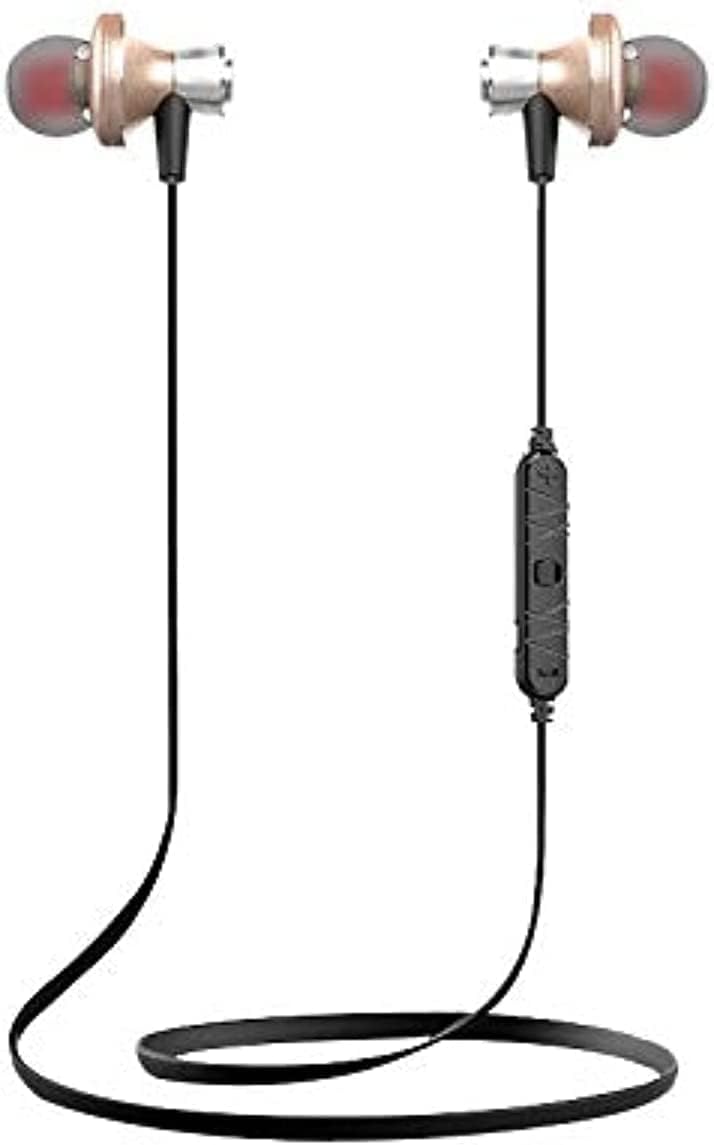
제품 끝view
The Awei A860BL-BK earphones are designed for wireless audio playback and hands-free calling. They feature an in-ear design for comfortable fit and sound isolation.

설정
1. 이어폰 충전하기
Before first use, fully charge the earphones. Connect the USB charging cable to the charging port on the earphones and to a compatible USB power source (e.g., computer, wall adapter). The charging indicator light will typically show red during charging and turn off or blue when fully charged.
- 충전 시간: 약 1시간 30분에서 2시간 30분 정도 소요됩니다.
2. 블루투스 페어링
To connect your earphones to a Bluetooth-enabled device:
- 이어폰이 완전히 충전되어 있고 전원이 꺼져 있는지 확인하십시오.
- Press and hold the multi-function button on the earphones until the indicator light flashes red and blue alternately, indicating pairing mode.
- 기기(스마트폰, 태블릿 등)에서 Bluetooth를 활성화하고 사용 가능한 기기를 검색하세요.
- Select "Awei A860BL-BK" from the list of found devices.
- Once connected, the indicator light on the earphones will typically flash blue slowly or turn off.
If pairing fails, turn off both devices, restart them, and repeat the pairing process.
작동 지침
전원 켜기/끄기
- 전원 켜기: 다기능 버튼을 약 3초간 길게 누르면 표시등이 파란색으로 깜빡입니다.
- 전원 끄기 : Press and hold the multi-function button for approximately 3-5 seconds until the indicator light flashes red and then turns off.
음악 제어
- 재생/일시 중지: 다기능 버튼을 짧게 누릅니다.
- 다음 트랙: 볼륨 + 버튼을 길게 누르세요.
- 이전 트랙 : 볼륨 - 버튼을 길게 누르세요.
- 볼륨 업: 볼륨 + 버튼을 짧게 누르세요.
- 볼륨 작게 : 볼륨 - 버튼을 짧게 누르세요.
통화 제어
- 전화 받기/종료: 다기능 버튼을 짧게 누릅니다.
- 전화 거부: 다기능 버튼을 길게 누르세요.
- 마지막 번호 재다이얼: 다기능 버튼을 두 번 누르세요.
음성 지원
- Voice Assistant 활성화 : Triple-press the multi-function button (functionality depends on your connected device).
유지
적절한 관리는 이어폰의 수명과 성능을 보장합니다.
- 청소: 이어폰을 닦을 때는 부드럽고 마른 천을 사용하십시오. 연마성 세척제나 용제를 사용하지 마십시오.
- 저장: 이어폰은 직사광선과 극한의 온도를 피해 서늘하고 건조한 곳에 보관하세요.
- 방수 기능: 이 이어폰은 방수가 안됨. Avoid exposure to liquids, moisture, and high humidity.
- 케이블 관리: Avoid pulling the cable excessively or bending it sharply to prevent damage.
문제 해결
If you encounter issues with your Awei A860BL-BK earphones, refer to the following common solutions:
| 문제 | 가능한 해결책 |
|---|---|
| 이어폰 전원이 켜지지 않습니다. | Ensure the earphones are fully charged. Connect to a power source and charge for 1-2 hours. |
| 기기와 페어링할 수 없습니다. |
|
| 소리가 나지 않거나 볼륨이 작습니다. |
|
| 통화 품질이 좋지 않습니다. |
|
명세서
Detailed technical specifications for the Awei A860BL-BK Bluetooth In-Ear Earphones:
- 상표: 아웨이
- 모델: A860BL-BK
- 연결성: 무선(블루투스)
- 블루투스 버전: Not specified (assumed standard)
- 무선 범위: 최대 10미터
- 마이크로폰: 예
- 음악 지원: 예
- 색상: 검은색
- 이어폰 유형: 인이어
- 충전 시간: 1-2시간
- 음악 재생 시간: 약 4시간
- 통화 시간: 약 6시간
- 소음 제어: 아니요
- 제어 유형: Volume control, Touch
- 방수 기능: 방수가 안됨
- 포함된 구성 요소: 귀 팁
안전 정보
다음 안전 지침을 준수하십시오.
- Do not disassemble, repair, or modify the earphones.
- 극한의 온도, 직사광선, 화기 근처에 두지 마세요.
- 물이나 기타 액체에 노출되지 않도록 하십시오.
- 청력 손상을 방지하려면 장시간 이어폰을 너무 높은 볼륨으로 사용하지 마세요.
- 어린이와 애완동물의 손이 닿지 않는 곳에 보관하세요.
보증 및 지원
보증 정보 또는 기술 지원이 필요하시면 구매 시 제공된 설명서를 참조하시거나 판매점에 문의하십시오. 보증 청구를 위해서는 구매 증빙 자료를 보관해 두시기 바랍니다.


