
소개
The Korg Volca Kick is an analog kick generator featuring an MS-20 resonator and a 16-step sequencer. It is designed to produce a wide range of kick drum and bass sounds, from tight, punchy kicks to deep, resonant bass, suitable for various electronic music genres. This manual provides essential information for setting up, operating, and maintaining your Volca Kick.

그림 1: 전면 view of the Korg Volca Kick, showcasing its controls and 16-step sequencer.
설정
전원 공급 장치
- 배터리: The Volca Kick requires 6 AA batteries for portable operation. Ensure batteries are inserted with correct polarity.
- AC 어댑터 : For extended use, connect a compatible 9V DC center-negative AC adapter (sold separately) to the DC 9V jack.
오디오 연결
- 산출: Connect headphones or an audio cable from the AUDIO OUT jack to a mixer or amp리퍼.
- 내장 스피커: The unit features a built-in speaker for immediate sound output without external amp합리화.
Synchronization and MIDI
- 입출력 동기화: Use the SYNC IN and SYNC OUT jacks to synchronize with other Korg Volca series devices or compatible equipment.
- 미디 입력: Connect a MIDI cable to the MIDI IN port to control the Volca Kick from an external MIDI device or DAW.
작동 지침
Basic Controls and Sound Generation
The Volca Kick utilizes an analog kick generator based on the MS-20 filter, allowing for powerful and resonant sounds. The interface provides direct control over various parameters to shape your kick and bass sounds.
- 정점: Adjusts the fundamental frequency of the kick sound.
- 만곡부: Controls the pitch envelope, creating a 'bending' effect typical of kick drums.
- 시간: Sets the duration of the pitch bend.
- Pulse Color: Modifies the timbre of the pulse oscillator.
- 수준: Adjusts the output level of the pulse oscillator.
- 공격: Controls the attack time of the amp리파이어 봉투.
- 부식: Controls the decay time of the amp리파이어 봉투.
- 운전하다: Adds distortion and saturation for aggressive sound shaping.
- 음정: Adjusts the overall tonal character of the sound.

그림 2: 각도 view of the Korg Volca Kick, highlighting the various knobs and buttons for sound manipulation.
16단계 시퀀서
The integrated 16-step sequencer allows for intuitive pattern creation and real-time performance.
- Step Buttons: Use the 16 step buttons to program your rhythm patterns. Press a button to activate a step, press again to deactivate.
- Record Mode : Enter record mode to capture real-time knob movements (motion sequencing) and note inputs.
- 재생/정지: Starts and stops the sequencer playback.
- 속도: Adjusts the playback speed of the sequencer.
- 그네: Adds a rhythmic swing feel to your patterns.
- 악센트: Adds emphasis to specific steps.
- 터치 FX: Provides real-time effects for dynamic performance.
- Active Step: Allows you to skip steps in a pattern, creating variations.
- 메모리: Save and recall your created patterns.
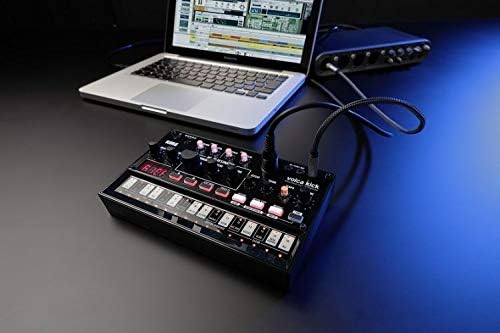
Figure 3: The Korg Volca Kick connected to a laptop, demonstrating its integration capabilities with external devices.
유지
To ensure the longevity and optimal performance of your Korg Volca Kick, follow these maintenance guidelines:
- 청소: 부드럽고 마른 천으로 제품을 닦으십시오. 연마성 세제나 용제는 사용하지 마십시오.
- 저장: 제품을 직사광선, 극한 온도 및 높은 습도를 피해 서늘하고 건조한 곳에 보관하십시오.
- 배터리 관리 : 장기간 사용하지 않을 경우 배터리 누출을 방지하기 위해 배터리를 제거하세요.
문제 해결
If you encounter issues with your Volca Kick, refer to the following common troubleshooting steps:
- 전원 없음: Check battery installation and charge level. If using an AC adapter, ensure it is correctly connected and the correct voltage/polarity.
- 소리 없음: Verify that the volume knob is turned up. Check audio cable connections and ensure external speakers/headphones are working.
- 시퀀서가 재생되지 않음: Ensure the sequencer is in play mode and not paused or stopped. Check tempo settings.
- MIDI 관련 문제: Confirm MIDI cable connection and correct MIDI channel settings on both the Volca Kick and your external device.
명세서
| 특징 | 사양 |
|---|---|
| 본체 소재 | 플라스틱 |
| 품목 무게 | 13.3온스(377그램) |
| 제품 치수 | 10.35 x 6.02 x 2.79 인치 |
| 품목 모델 번호 | VOLCAKICK |
| 배터리 | AA 건전지 6개 필요 (알칼리성) |
| 커넥터 유형 | 9V DC Centre-Negative |
| 키보드 키 수 | 16 |
| 제조업체 | 코르그 USA 주식회사 |
보증 및 지원
보증 정보 및 기술 지원에 대해서는 Korg 공식 웹사이트를 참조하십시오. web웹사이트를 방문하거나 가까운 Korg 대리점에 문의하십시오. 보증 청구를 위해 구매 증빙 자료를 보관하십시오.