1. 서론
The Viecar CY300 is a compact and efficient OBDII car diagnostic scanner designed to retrieve vehicle diagnostic information. This tool supports all OBD II protocols, including the Controller Area Network (CAN) protocol, making it compatible with most 1996 and newer vehicles.
This manual provides detailed instructions for the proper use and maintenance of your CY300 diagnostic scanner.
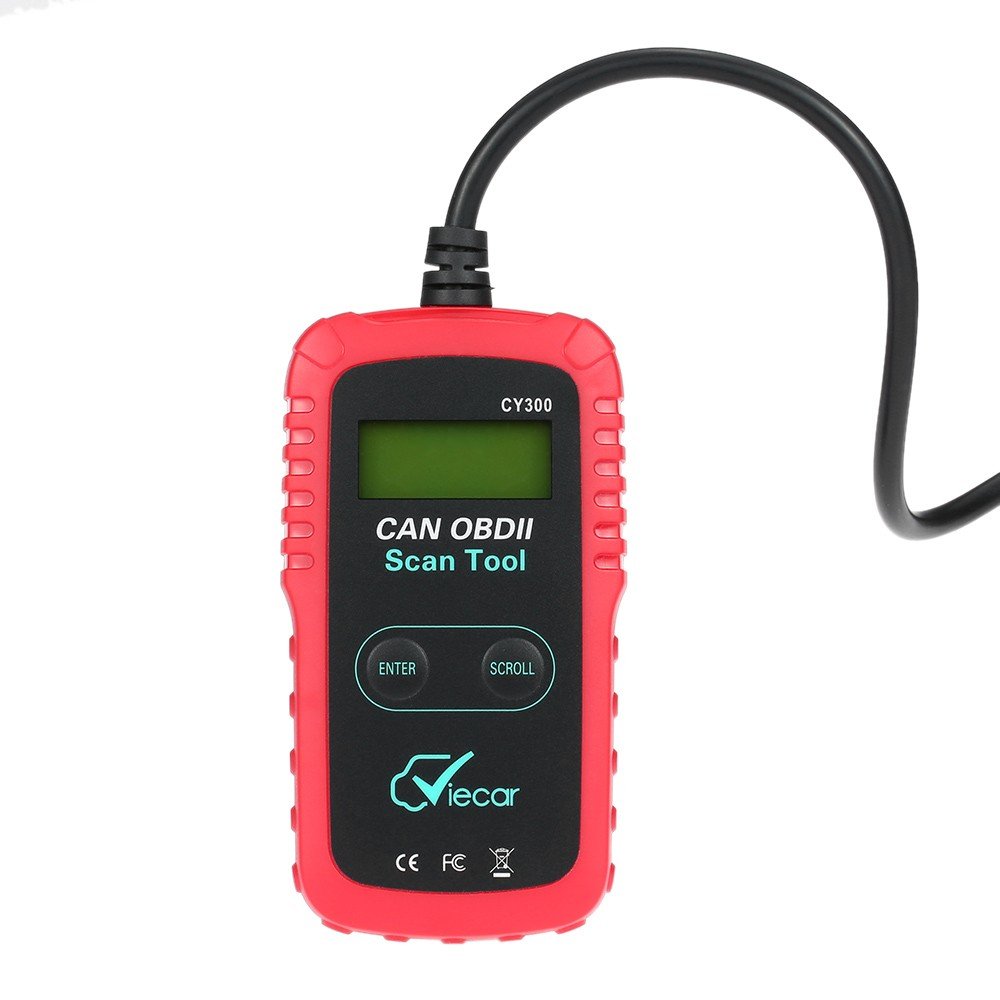
Figure 1.1: Viecar CY300 OBDII Car Diagnostic Scanner. The device is red and black with an integrated cable and OBDII connector.
2. 안전 정보
- 항상 안전한 환경에서 자동차 테스트를 수행하세요.
- ANSI 표준을 충족하는 보안경을 착용하십시오.
- 의복, 머리카락, 손, 도구, 테스트 장비 등을 움직이거나 뜨거운 엔진 부품에서 멀리 두십시오.
- 환기가 잘 되는 작업 공간에서 차량을 운전하세요. 배기가스는 유독합니다.
- 구동 바퀴 앞에 블록을 놓고 테스트를 하는 동안 차량을 절대로 혼자 두지 마십시오.
- 점화 코일, 분배기 캡, 점화 와이어 및 점화 플러그 주변에서 작업할 때는 각별히 주의하십시오. 이러한 구성 요소는 위험한 볼륨을 생성합니다.tag엔진이 작동 중일 때.
- 휘발유/화학/전기 화재에 적합한 소화기를 가까이에 두십시오.
- 점화가 켜져 있거나 엔진이 작동 중인 동안에는 테스트 장비를 연결하거나 분리하지 마십시오.
3. 제품 오버view
The Viecar CY300 is designed for ease of use, featuring a clear display and intuitive buttons for navigation.
3.1 주요 특징
- 일반 진단 문제 코드(DTC)와 제조사별 DTC를 읽고 삭제합니다.
- Turns off the Check Engine Light (MIL).
- Supports multiple trouble code requests: generic, pending, and manufacturer-specific codes.
- Reviews emission readiness status of OBD monitors.
- Determines Malfunction Indicator Lamp (MIL) status.
- Retrieves Vehicle Identification Number (VIN) on 2002 and newer vehicles that support Mode 9.
- Easy plug-and-play operation.
- No internal batteries required; powered directly via the detachable OBD II cable from the vehicle.
3.2 장치 구성 요소

Figure 3.1: Labeled components of the Viecar CY300. This image highlights the LCD display, Enter button, Scroll button, and the OBD II connector.
- LCD 디스플레이: Backlit, 2-line, 8-character display for showing diagnostic information.
- 입력 버튼: 선택 사항이나 작업을 확인합니다.
- 스크롤 버튼: Navigates through menus and data.
- OBD II 커넥터: Connects the tool to the vehicle's OBD II port.
4. 설정
The Viecar CY300 is designed for simple plug-and-play operation. Follow these steps to set up your device:
- OBD II 포트를 찾으십시오: The OBD II port is typically located under the dashboard on the driver's side of the vehicle. Refer to your vehicle's service manual for the exact location if you cannot find it.
- 스캐너 연결: With the vehicle's ignition off, firmly plug the CY300's OBD II connector into the vehicle's OBD II port. Ensure a secure connection.
- 점화 켜기: Turn the vehicle's ignition to the "ON" position (do not start the engine). The scanner will automatically power on, drawing power from the vehicle's battery.
- 시스템 초기화: The scanner will perform a system initialization and link to the vehicle's onboard computer. This may take a few seconds. Once linked, the main menu or a diagnostic screen will appear.
5. 사용 설명서
Once the scanner is connected and powered on, you can begin diagnostic operations.
5.1 진단 문제 코드(DTC) 읽기
- 메인 메뉴에서 다음을 사용하세요. 스크롤 button to navigate to the "Read Codes" option.
- 를 누르세요 입력하다 버튼을 눌러 선택하세요.
- The scanner will display any stored DTCs. Use the 스크롤 버튼을 view 코드가 여러 개인 경우 모두 포함합니다.
5.2 진단 문제 코드(DTC) 삭제
경고: Clearing DTCs will erase all diagnostic data from the vehicle's computer. Ensure you have recorded any necessary information before proceeding.
- 메인 메뉴에서 다음을 사용하세요. 스크롤 button to navigate to the "Erase Codes" option.
- 를 누르세요 입력하다 버튼을 눌러 선택하세요.
- Confirm your choice when prompted. The Check Engine Light (MIL) should turn off after successful clearing.
5.3 Checking I/M Readiness Status
This function checks the status of the emission-related monitoring systems to determine if they are ready for an emissions test.
- 메인 메뉴에서 다음을 사용하세요. 스크롤 button to navigate to the "I/M Readiness" option.
- 를 누르세요 입력하다 버튼을 눌러 선택하세요.
- The display will show the status of various monitors (e.g., "OK" for complete, "INC" for incomplete).
5.4 Retrieving Vehicle Information (VIN)
This function allows you to retrieve the Vehicle Identification Number (VIN) for vehicles that support Mode 9.
- 메인 메뉴에서 다음을 사용하세요. 스크롤 button to navigate to the "Vehicle Info" option.
- 를 누르세요 입력하다 버튼을 눌러 선택하세요.
- The VIN will be displayed on the screen.
6. 유지관리
Proper maintenance ensures the longevity and reliable operation of your Viecar CY300 scanner.
- 청소: Use a soft, dry cloth to clean the exterior of the scanner. Do not use abrasive cleaners or solvents.
- 저장: Store the device in a clean, dry environment away from direct sunlight, extreme temperatures, and excessive moisture. Keep it in its original packaging or a protective case when not in use.
- 케이블 관리: Avoid bending or kinking the OBD II cable excessively. Always grasp the connector when plugging or unplugging, not the cable itself.
- 소프트웨어 업데이트: 제조사 확인해보세요 web최적의 성능과 최신 차량과의 호환성을 보장하기 위해 정기적으로 사이트에서 사용 가능한 소프트웨어 업데이트를 확인하십시오.
7. 문제 해결
If you encounter issues with your Viecar CY300, refer to the following common troubleshooting steps:
- 전원 없음:
- Ensure the OBD II connector is firmly plugged into the vehicle's port.
- 차량의 시동 스위치가 "ON" 위치에 있는지 확인하십시오.
- Check the vehicle's fuse for the OBD II port (consult your vehicle's manual).
- Link Error / Communication Error:
- Confirm the vehicle is OBD II compliant (generally 1996 and newer).
- Ensure the ignition is on and the engine is off.
- Check for any loose connections at the OBD II port.
- Try connecting the scanner to a different OBD II compliant vehicle to rule out a scanner issue.
- 화면 멈춤 현상:
- 차량에서 스캐너를 분리하고 몇 초 기다린 후 다시 연결하십시오.
- 차량 배터리에 충분한 충전량이 있는지 확인하십시오.
- 잘못된 판독:
- 스캐너 소프트웨어가 최신 버전인지 확인하십시오.
- Verify the vehicle's information (VIN, year, make, model) is correctly recognized by the scanner.
8. 사양
The following table outlines the technical specifications for the Viecar CY300 OBDII Car Diagnostic Scanner:

Figure 8.1: Visual representation of Viecar CY300 dimensions and key specifications.
| 사양 | 세부 사항 |
|---|---|
| 모델 | Viecar CY300 |
| 색상 | 빨간색 + 검은색 |
| 재료 | 플라스틱 |
| 표시하다 | Backlit LCD, 2-line, 8 characters |
| 작동 온도 | 0°C ~ 50°C(32°F ~ 122°F) |
| 보관 온도 | -20°C ~ 70°C (-4°F ~ 158°F) |
| 전원 | 10 to 15.5 Volts provided via vehicle battery (no internal batteries) |
| 제품 크기(L x W x H) | 12cm x 6.5cm x 2.1cm (약 4.7 x 2.6 x 0.8인치) |
| 패키지 무게 | 260g (약 9온스) |
| 한국어: | 712383577481, 712383583871, 712383579997 |
| ASIN | B01KSV9GDM |
| 첫 번째 이용 가능 날짜 | 17년 2016월 XNUMX일 |
9. 보증 및 지원
보증 관련 정보는 구매 시 제공된 문서를 참조하시거나 판매점에 문의하십시오. 구체적인 보증 조건은 지역 및 판매점에 따라 다를 수 있습니다.
If you require technical support or have questions not covered in this manual, please contact the retailer or manufacturer directly. Keep your purchase receipt and product model number (CY300) available for faster service.
