
DESCO 718
SCS 718 정적 센서 사용 설명서
Model: 718 | Brand: DESCO
1. 서론
This manual provides essential information for the proper use, setup, operation, and maintenance of the SCS 718 Static Sensor. The SCS 718 is a handheld device designed for measuring electrostatic charge voltage. It features a red LED lamp for accurate measurement distance guidance and can be used with the 718A Charger (Part No: 718CH) to perform ionizer function checks. This sensor is specifically designed for measuring charged potential.
2. 제품 오버view
The SCS 718 Static Sensor is a compact and portable instrument used to detect and measure static electricity. Its primary function is to identify and quantify electrostatic charges on surfaces, which is crucial in environments where static discharge can cause damage or interference.
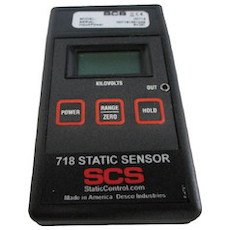
Figure 1: SCS 718 Static Sensor. This image displays the SCS 718 Static Sensor, a handheld device. The front panel features a digital display at the top, below which are three rectangular buttons: 'POWER' on the left, 'RANGE/ZERO' in the center, and 'HOLD' on the right. The device is labeled '718 STATIC SENSOR' with the 'SCS' logo and 'StaticControl.com Made in America Desco Industries' at the bottom.
3. 특징
- Electrostatic measurement capability.
- 적색 LED lamp for accurate measurement distance guidance.
- Compatibility with 718A Charger (Part No: 718CH) for ionizer function checks.
- Measures charged potential.
4. 안전 정보
기기를 작동하기 전에 모든 안전 지침을 읽고 숙지하십시오. 그렇지 않을 경우 부상이나 제품 손상이 발생할 수 있습니다.
- 장치를 극한의 온도, 습도 또는 직사광선에 노출시키지 마십시오.
- 장치를 떨어뜨리거나 강한 충격을 가하지 마십시오.
- 장치를 열거나 개조하지 마십시오. 모든 정비는 자격을 갖춘 기술자에게 맡기십시오.
- 기기를 액체 및 부식성 물질로부터 멀리하십시오.
- Ensure the measurement area is clear of obstructions and potential hazards.
5. 설정
The SCS 718 Static Sensor is designed for immediate use. No battery installation is required as the device does not use batteries.
- 짐 풀기: Carefully remove the sensor from its packaging and inspect for any signs of damage.
- 초기 확인: 를 누르세요 힘 button to turn on the device. The display should illuminate.
- 제로화 : Before each measurement, ensure the device is zeroed. Point the sensor away from any charged objects and press the RANGE/ZERO button to reset the reading to zero.
6. 사용 설명서
Follow these steps to accurately measure electrostatic charges:
- 전원 켜기: 를 누르세요 힘 button to activate the sensor.
- Zero the Sensor: Hold the sensor in free air, away from any charged surfaces. Press the RANGE/ZERO button until the display reads "0.00" or close to zero. This calibrates the sensor for accurate readings.
- 측정을 위한 위치 선정: Point the sensor towards the object or surface you wish to measure. The red LED lamp on the sensor acts as a distance guide. Position the sensor so that the red LED light is focused on the target surface, typically indicating the optimal measurement distance (e.g., 1 inch or 2.5 cm).
- 디스플레이 읽기: The display will show the electrostatic charge in kilovolts (kV).
- 읽기 일시 중지: 디스플레이에 현재 값을 고정하려면 버튼을 누르십시오. 잡고 있다 버튼을 누르세요. 다시 누르면 홀드가 해제되고 실시간 읽기가 재개됩니다.
- Ionizer Function Check (with 718A Charger):
- Connect the SCS 718 Static Sensor to the 718A Charger (Part No: 718CH).
- Follow the instructions provided with the 718A Charger to perform ionizer function checks. This typically involves measuring the decay time of a charge.
- 전원 끄기 : 를 누르세요 힘 사용하지 않을 때는 버튼을 다시 눌러 기기를 끄세요.
7. 유지관리
Proper maintenance ensures the longevity and accuracy of your SCS 718 Static Sensor.
- 청소: Use a soft, dry, lint-free cloth to clean the exterior of the sensor. Do not use abrasive cleaners, solvents, or liquids.
- 저장: Store the sensor in a cool, dry place, away from direct sunlight and extreme temperatures. Keep it in its original packaging or a protective case when not in use to prevent dust accumulation and physical damage.
- 구경 측정: Regular calibration is recommended to maintain measurement accuracy. Refer to DESCO's official web교정 서비스를 받으려면 해당 웹사이트를 방문하거나 고객 지원팀에 문의하십시오.
8. 문제 해결
| 문제 | 가능한 원인 | 해결책 |
|---|---|---|
| 장치의 전원이 켜지지 않습니다. | Internal power issue. | Ensure the power button is pressed firmly. If still unresponsive, contact customer support. |
| 부정확한 판독값. | Sensor not zeroed; environmental interference; dirty sensor. | Zero the sensor before each use. Ensure no strong electromagnetic fields are nearby. Clean the sensor surface. Consider professional calibration. |
| Red LED not illuminating. | LED 오작동. | 수리 또는 교체에 대해서는 고객 지원 센터에 문의하십시오. |
9. 사양
| 기인하다 | 값 |
|---|---|
| 제조업체 | 데스코 |
| 부품 번호 | 718 |
| 제품 무게 | 130g(0.13kg) |
| 패키지 크기 | 26 x 19 x 8cm |
| 배터리 사용 | 아니요 |
| ASIN | B01KMB21LM |
| 첫 번째 가능한 날짜 | 18년 2016월 XNUMX일 |
10. 보증 및 지원
For information regarding product warranty, please refer to the warranty card included with your purchase or visit the official DESCO website. For technical support, troubleshooting assistance, or service inquiries, please contact DESCO customer service through their official channels.
제조업체: 데스코
Web대지: www.desco.com (전amp(링크는 실제 링크와 다를 수 있습니다)
Ask a question about this manual
Ask about setup, troubleshooting, compatibility, parts, safety, or missing instructions. Manuals+ will review the question and use this page’s manual context to help answer it.