
1. 서론
구매해주셔서 감사합니다asing the Metronic Gulli 477148 CD-MP3 Player with USB Port. This portable audio device is designed for ease of use, allowing you to enjoy your favorite music from various sources including CDs, CD-R/RW, MP3 discs, and USB flash drives. This manual provides detailed instructions to help you set up, operate, and maintain your device for optimal performance.

그림 1: 전면 view of the Metronic Gulli 477148 CD-MP3 Player.
2. 안전 정보
본 제품을 사용하기 전에 모든 안전 지침을 주의 깊게 읽으십시오. 나중에 참조할 수 있도록 이 설명서를 보관하십시오.
- 전원: 지정된 전원 어댑터나 배터리만 사용하세요. 볼륨을 확인하세요.tage는 장치의 요구 사항과 일치합니다.
- 물과 습기: Do not expose the device to rain, moisture, or immerse it in water.
- 열: 라디에이터, 난방 장치, 스토브 또는 기타 장치(예: 열원)에서 장치를 멀리 두십시오. amp열을 생성하는 발전기.
- 통풍: 환기구를 막지 마십시오. 제조업체의 지침에 따라 설치하십시오.
- 청소: 마른 천으로만 닦으십시오.
- 서비스: 이 제품을 직접 수리하려고 하지 마십시오. 모든 서비스는 자격을 갖춘 서비스 담당자에게 문의하십시오.
- 헤드폰: 청력 손상을 방지하려면 장시간 높은 볼륨으로 청취하지 마십시오.
3. 제품 오버view
Familiarize yourself with the various parts and controls of your CD-MP3 player.
3.1 전면 패널 컨트롤 및 포트

Figure 2: Front panel with controls and ports.
- Volume Up/Down Buttons (V+/V-): 재생 볼륨을 조절하세요.
- LCD 디스플레이: Shows track number, time, mode, and ID3 tag 정보.
- 모드 버튼: Switches between CD, USB, and other available modes.
- 재생/일시 정지 버튼: 재생을 시작하거나 일시 중지합니다.
- 중지 버튼 : 재생을 중지합니다.
- 이전/되감기 버튼: Skips to the previous track or rewinds the current track.
- 다음/빨리 감기 버튼: Skips to the next track or fast forwards the current track.
- 헤드폰 잭(3.5mm): 개인 청취를 위해 헤드폰을 연결하십시오.
- 보조 입력: 외부 오디오 장치를 연결합니다.
- USB 포트: Connect a USB flash drive for MP3 playback.
3.2 후면 패널

Figure 3: Rear panel with power input.
- AC 전원 입력: Connect the provided AC power adapter.
- 배터리 칸: (Located on the bottom, not visible in this image) Insert batteries for portable use.
4. 설정
4.1 장치 전원 공급
The Metronic Gulli 477148 can be powered by either an AC adapter or batteries.
- AC 전원: Connect the supplied AC power adapter to the AC power input on the rear of the unit and plug the other end into a standard wall outlet.
- 배터리 전원: Open the battery compartment (usually on the bottom of the unit). Insert 6 x 1.5V C-type batteries (not included), ensuring correct polarity (+/-). Close the battery compartment securely.
4.2 초기 전원 켜기
를 누르세요 전원 켜기/끄기 button (if available, otherwise the Mode button usually powers it on) to turn on the device. The LCD display will illuminate.
5. 사용 설명서
5.1 CD 재생
- CD 수납공간 뚜껑을 엽니다.
- CD(CD, CD-R/RW 또는 MP3 CD)를 라벨 면이 위를 향하도록 스핀들에 올려놓으세요.
- CD 수납부 뚜껑을 단단히 닫으세요.
- 를 누르세요 방법 버튼을 눌러 CD 모드를 선택합니다.
- 를 누르세요 재생/일시정지 버튼을 눌러 재생을 시작합니다.
- 사용하세요 이전/되감기 그리고 다음/빨리 감기 트랙을 탐색하는 버튼입니다.
- 다음을 사용하여 볼륨 조절 V+/V- 버튼.
5.2 USB 포트 사용
- MP3가 포함된 USB 플래시 드라이브 삽입 fileUSB 포트에 s.
- 를 누르세요 방법 button to select USB mode. The device will automatically scan and begin playing MP3 files.
- 사용하세요 이전/되감기 그리고 다음/빨리 감기 트랙을 탐색하는 버튼입니다.
- 다음을 사용하여 볼륨 조절 V+/V- 버튼.
5.3 헤드폰 사용
Connect any standard 3.5mm headphones to the headphone jack for private listening. When headphones are connected, sound will typically be muted from the built-in speakers.
5.4 AUX 입력
Connect an external audio device (e.g., smartphone, tablet) to the AUX input using a 3.5mm audio cable (not included). Press the 방법 button to select AUX mode. Audio from the external device will play through the CD-MP3 player's speakers.
5.5 Special Playback Functions
- ID3 Function: MP3를 재생할 때 files from a CD or USB, the LCD display will show information such as album name, artist, and track title.
- 반복 기능: 를 누르세요 반복하다 button (if available, often combined with Mode or a dedicated button) to repeat the current track or all tracks.
- 프로그램 기능: Allows you to program a specific order of tracks for playback. Refer to the device's specific button for programming.
- 랜덤 함수: 무작위 순서로 트랙을 재생합니다.
- Intro Function: Plays the first 10 seconds of each track on a CD or USB, allowing for quick song preview.
6. 유지관리
6.1 청소
- 부드럽고 마른 천으로 장치 외부를 닦으세요.
- 연마성 세척제, 왁스 또는 용제는 마감재를 손상시킬 수 있으므로 사용하지 마십시오.
- CD 렌즈의 경우, 특수 CD 렌즈 클리너 디스크를 사용하세요.
6.2 보관
When not in use for extended periods, store the device in a cool, dry place. Remove batteries if storing for a long time to prevent leakage.
7. 문제 해결
| 문제 | 가능한 원인 | 해결책 |
|---|---|---|
| 전원이 없습니다 | AC adapter not connected properly; Batteries depleted or incorrectly inserted. | AC 어댑터 연결 상태를 확인하십시오. 배터리를 교체하거나 극성이 올바른지 확인하십시오. |
| 소리가 나지 않습니다 | 볼륨이 너무 낮음; 헤드폰이 연결됨; 잘못된 모드가 선택됨. | Increase volume; Disconnect headphones; Select correct mode (CD, USB, AUX). |
| CD가 재생되지 않습니다 | CD inserted incorrectly; CD dirty or scratched; CD compartment not closed; Incorrect mode. | Insert CD with label side up; Clean or replace CD; Close lid firmly; Select CD mode. |
| USB가 재생되지 않음 | USB drive not inserted correctly; USB drive not formatted correctly; No MP3 files on USB; Incorrect mode. | Reinsert USB drive; Ensure USB is FAT32 formatted; Transfer MP3 files to USB; Select USB mode. |
| 디스플레이가 작동하지 않음 | Device off; Faulty unit. | Turn on device; If problem persists, contact support. |
8. 사양
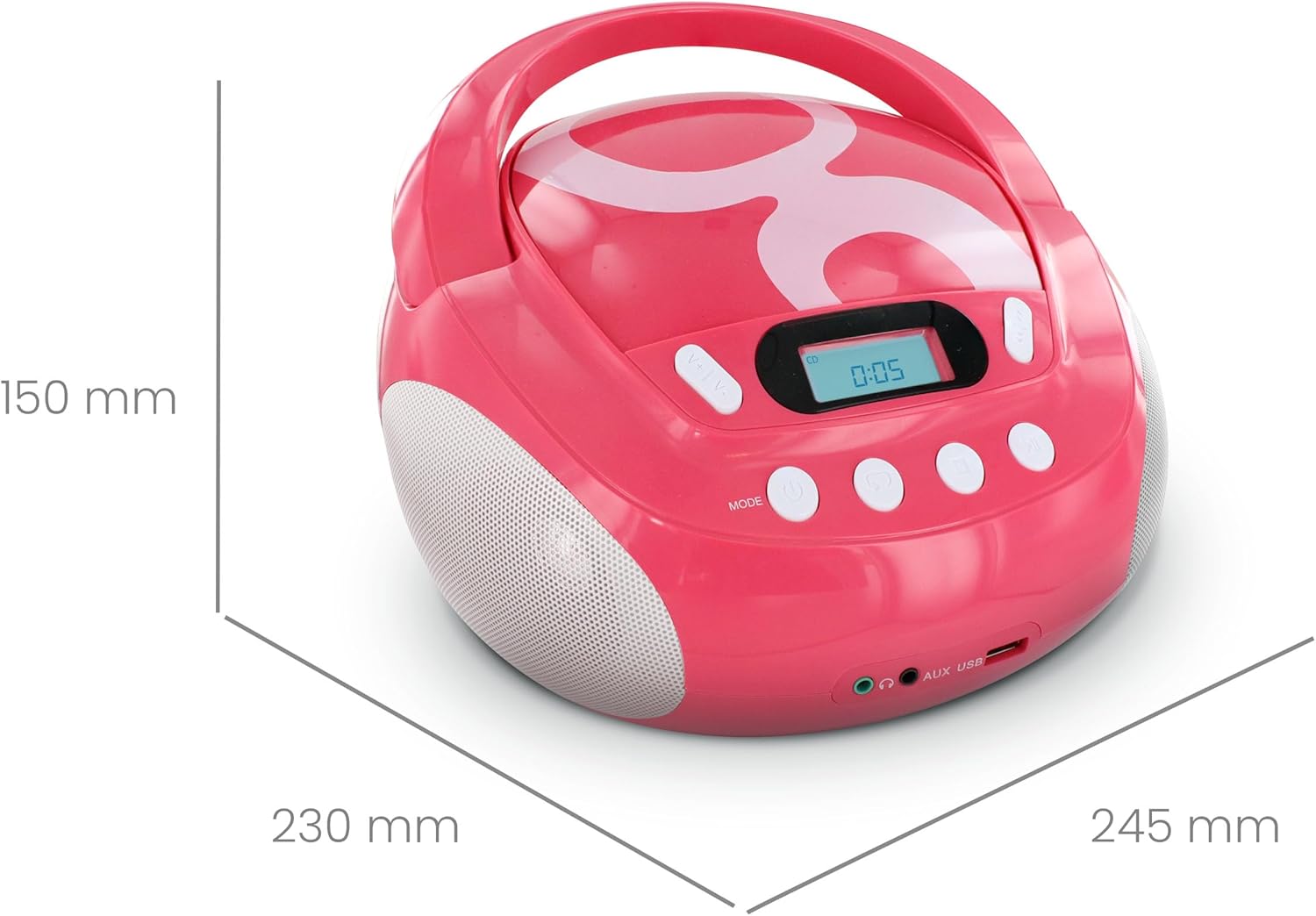
그림 4: 제품 치수
| 상표 | 메트로 닉 |
| 모델 번호 | 477148 |
| 색상 | Gulli Rose |
| 호환 가능한 미디어 | CD, CD-R/RW, MP3-CD, USB (MP3 files) |
| 연결 기술 | 보조, USB |
| 헤드폰 잭 | 3.5mm (XNUMXmm) |
| 스피커 유형 | 스테레오 재생 |
| 출력 전력 | 2 와트 |
| 전원 | AC Powered, Battery Powered (6 x 1.5V C-type batteries) |
| 치수(길이 x 너비 x 높이) | 28 x 24 x 16cm(약 11 x 9.4 x 6.3인치) |
| 품목 무게 | 1900그램 (1.9kg / 4.19파운드) |
| 표시하다 | 백라이트가 있는 LCD |
9. 보증 및 지원
9.1 제조업체 보증
이 제품에는 다음이 포함되어 있습니다. 2년 제조사 보증 구매일로부터 1년입니다. 보증 청구를 위해 구매 증빙 자료를 보관해 주십시오. 보증은 정상적인 사용 상태에서 발생하는 재료 및 제조상의 결함에 적용됩니다.
9.2 고객 지원
For assistance with installation or use of this product, please contact the manufacturer's support line:
전화: 0892 350 315
(Note: This number may incur charges depending on your service provider and location.)