
소개
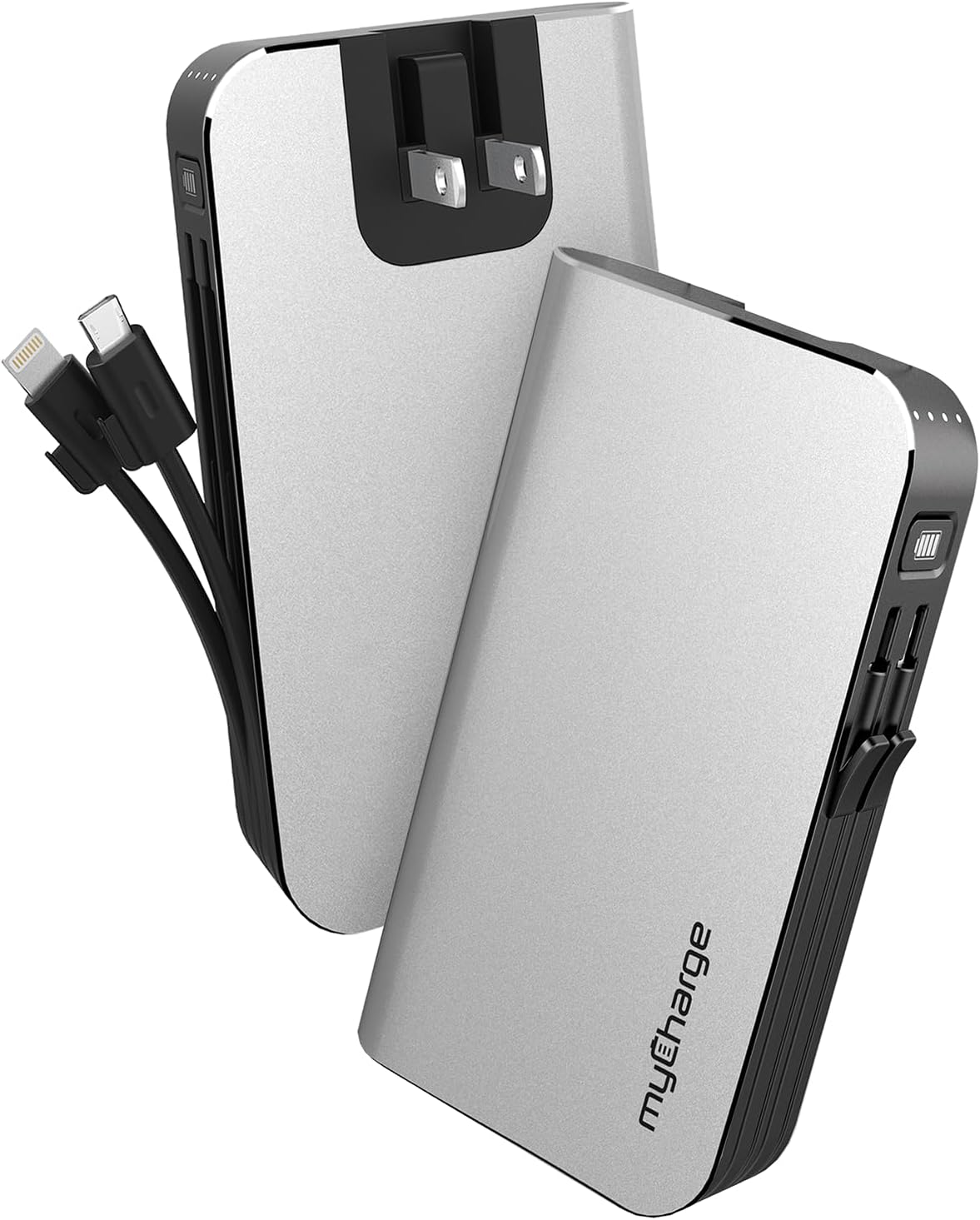
The myCharge HubMax portable charger, model HB10V, is a versatile power bank designed to provide on-the-go power for your mobile devices. It features a 10050mAh internal battery, integrated Lightning and Micro USB charging cables, and a built-in wall plug for convenient recharging of the power bank itself. This manual provides instructions for the proper use and care of your HubMax charger.
설정
Initial Charging of the HubMax
Before first use, fully charge your myCharge HubMax. The device features a foldable wall plug for direct connection to a standard AC outlet.
- Locate the foldable wall prongs on the side of the HubMax.
- Flip out the prongs and plug the HubMax directly into a wall outlet.
- The LED indicators on the device will illuminate to show the charging status. A full recharge typically takes approximately 4.6 hours.
- Once fully charged, unplug the device and fold the prongs back into the unit for storage.
작동 지침
모바일 장치 충전
The HubMax allows you to charge up to three devices simultaneously using its built-in cables and USB-A port.
- 내장 케이블 사용: Extend the integrated Lightning cable for Apple devices or the Micro USB cable for compatible Android and other devices. Connect the appropriate cable to your device's charging port.
- USB-A 포트 사용: For devices requiring a different cable type (e.g., USB-C), connect your device's standard USB charging cable to the USB-A output port on the HubMax.
- The HubMax will automatically begin charging your connected device(s). The LED indicators will show the remaining battery capacity of the HubMax.
- For optimal charging speed, ensure your device is compatible with Power Delivery or Quick Charge 3.0 standards, which the HubMax supports for faster charging (up to 2.4x faster than standard chargers).


유지
Proper maintenance ensures the longevity and optimal performance of your myCharge HubMax.
- 청소: 부드럽고 마른 천을 사용하여 장치 외부를 청소하십시오. 가혹한 화학 물질이나 연마재를 사용하지 마십시오.
- 저장: Store the HubMax in a cool, dry place away from direct sunlight and extreme temperatures.
- 배터리 관리 : 배터리 수명을 최상으로 유지하려면 보조 배터리를 자주 완전히 방전시키지 마십시오. 배터리 잔량이 부족할 때 충전하십시오.
- 케이블 관리: Handle the built-in cables gently. Avoid excessive bending or pulling to prevent damage.
문제 해결
If you encounter issues with your myCharge HubMax, refer to the following common solutions:
- HubMax Not Charging:
- Ensure the wall plug is fully extended and securely inserted into a working AC outlet.
- 다른 장치를 연결해 콘센트가 작동하는지 확인하세요.
- Device Not Charging from HubMax:
- Verify that the HubMax itself has sufficient charge (check LED indicators).
- Ensure the built-in cables or your external USB cable are securely connected to both the HubMax and your device.
- 문제의 원인을 파악하기 위해 다른 케이블이나 장치를 사용해 보세요.
- 느린 충전:
- Ensure your device is compatible with fast charging protocols supported by the HubMax.
- 충전 중에는 기기를 장시간 사용하지 마세요. 충전 속도가 느려질 수 있습니다.
명세서
| 특징 | 세부 사항 |
|---|---|
| 모델 번호 | HB10V |
| 상표 | 마이 차지 |
| 배터리 용량 | 10050mAh(리튬폴리머) |
| 제품 치수 | 0.9 x 2.8 x 4.6 인치 |
| 품목 무게 | 3.53 온스 |
| 커넥터 유형 | Built-in Lightning Cable, Built-in Micro USB, USB-A Output Port |
| 특별 기능 | Built-in Wall Plug, Integrated Cables |
| 충전 시간 | Approximately 4.6 hours (via wall plug) |
보증 및 지원
For warranty information and customer support, please refer to the official myCharge web사이트를 방문하거나 고객 서비스에 직접 문의하세요. 보증 청구를 위해 구매 증빙 자료를 보관하세요.
제조업체: 마이 차지
추가 지원이 필요하면 다음을 방문하세요. www.mycharge.com