
1. 서론
Thank you for choosing the Urmet 1750/4 Mirro Color Monitor. This manual provides essential information for the safe and efficient installation, operation, and maintenance of your new monitor. Please read this manual thoroughly before use and retain it for future reference.
The Urmet 1750/4 Mirro Color Monitor is designed to provide clear video and audio communication for your intercom system. It features intuitive controls for adjusting display settings and can be integrated with Yokis radio series products for enhanced home automation capabilities.
2. 안전 정보
- 전기 안전: Installation and wiring must be performed by a qualified electrician in accordance with local electrical codes. Disconnect power before performing any installation or maintenance.
- 환경: Do not expose the monitor to extreme temperatures, humidity, or direct sunlight. Avoid installing in areas with excessive dust or vibrations.
- 청소: 세척에는 부드럽고 마른 천을 사용하십시오. 연마성 세척제나 용매를 사용하지 마십시오.
- 수정 사항: Do not attempt to open or modify the monitor. Unauthorized modifications can void the warranty and pose safety risks.
3. 패키지 내용
모든 품목이 들어 있는지 확인하려면 패키지 내용물을 확인하세요.
- Urmet 1750/4 Mirro Color Monitor
- 마운팅 브래킷
- 나사와 벽면 플러그
- 사용 설명서 (본 문서)
- (Note: Additional accessories like power supply or specific wiring may be sold separately depending on your system configuration.)
4. 설정 및 설치
4.1 모니터 장착
- Choose a suitable location for the monitor, typically near the entrance or in a central living area, ensuring it is at an appropriate view잉 높이.
- 제공된 나사와 벽 플러그를 사용하여 장착 브래킷을 벽에 고정하십시오. 브래킷이 수평이고 단단히 고정되었는지 확인하십시오.
- Refer to the wiring diagram provided with your intercom system for connecting the monitor. Connect all necessary cables (power, video, audio, data) to the terminals on the back of the monitor.
- Carefully attach the monitor to the mounting bracket, ensuring it clicks securely into place.
4.2 초기 전원 켜기
Once installation is complete and all connections are secure, restore power to the intercom system. The monitor should power on and display a standby screen or the video feed from the outdoor unit.
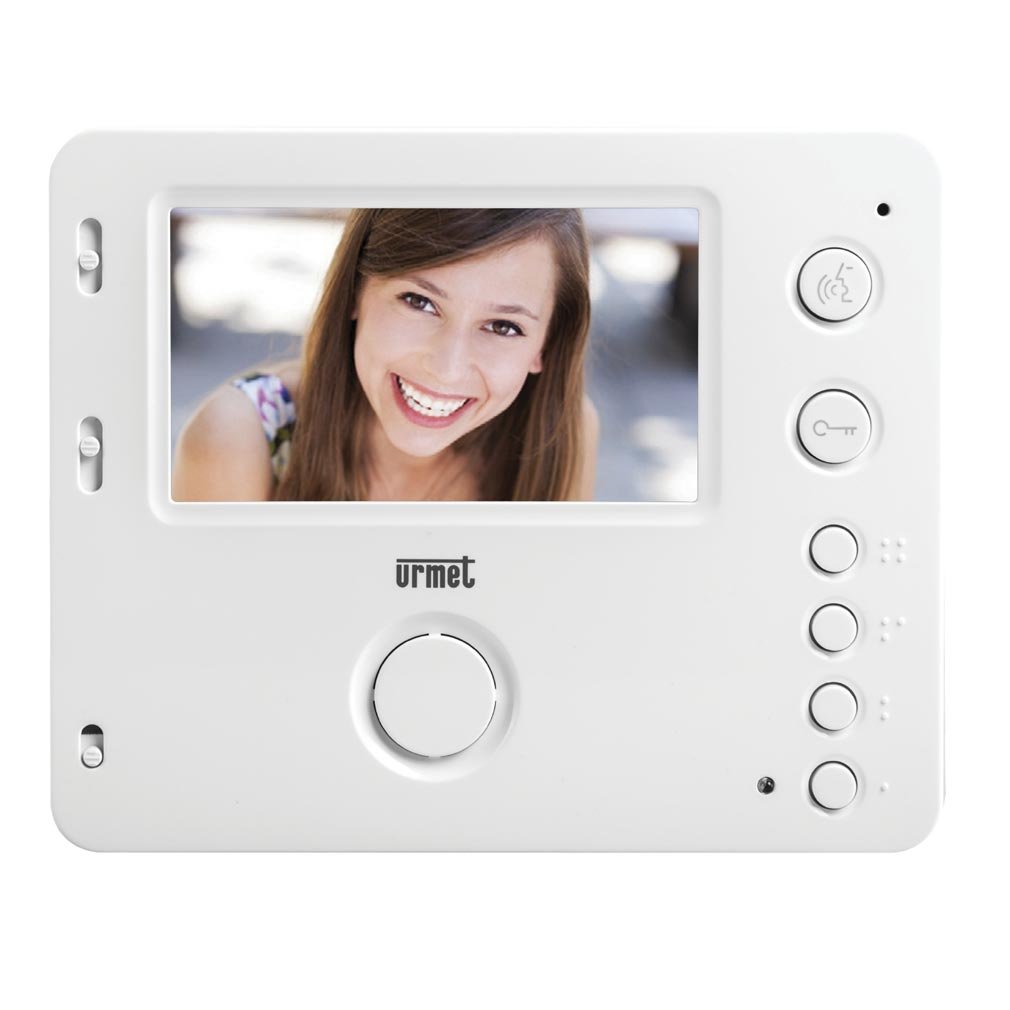
그림 1: 전면 view of the Urmet 1750/4 Mirro Color Monitor. This image shows the display screen and control buttons, illustrating the sleek design and user interface.
5. 사용 설명서
The Urmet 1750/4 Mirro Color Monitor offers straightforward operation for daily use.
5.1 기본 기능
- 전화 받기 : 방문객이 실외기의 호출 버튼을 누르면 모니터에서 벨소리가 울리고 방문객의 이미지가 표시됩니다. 답변 button (typically marked with a telephone icon) to establish communication.
- 문 열기: 통화 중에 도어 릴리스 button (typically marked with a key icon) to unlock the entrance.
- 모니터링: 를 누르세요 감시 장치 button (typically marked with a camera icon) to view the outdoor camera feed without an incoming call.
5.2 Adjusting Display and Ringtones
The monitor features scroll wheels, usually located on the side or bottom edge, for adjusting settings:
- 벨소리 볼륨: Use the dedicated scroll wheel to increase or decrease the ringtone volume.
- 차이: Adjust the contrast scroll wheel to modify the difference between light and dark areas on the screen.
- 명도: Adjust the brightness scroll wheel to control the overall luminance of the display.
5.3 Yokis Radio Series Integration (Optional)
The Urmet 1750/4 monitor is compatible with products from the Yokis radio series. By adding a wireless e4bpp transmitter (sold separately), you can initiate home automation commands directly from the monitor.
- e4bpp Transmitter: Connect the e4bpp transmitter according to its specific installation guide.
- 명령 버튼: Once integrated, two separate buttons on the monitor can be configured to trigger specific Yokis scenarios, such as turning lights on/off or activating a central control for home entry/exit. Refer to the e4bpp transmitter manual for configuration details.
6. 유지관리
Regular maintenance ensures the longevity and optimal performance of your Urmet 1750/4 Mirro Color Monitor.
- 화면 청소: 부드럽고 보풀이 없는 천으로 화면을 부드럽게 닦으세요. 잘 지워지지 않는 얼룩은 가볍게 닦아주세요.ampen the cloth with water. Do not spray cleaning solutions directly onto the screen.
- C 청소asing: 부드럽고 마른 천을 사용하여 모니터를 청소하십시오.asing. 강한 화학 물질이나 연마재의 사용을 피하세요.
- 통풍: Ensure that the ventilation openings on the monitor (if any) are not blocked to prevent overheating.
7. 문제 해결
모니터에 문제가 발생하면 다음의 일반적인 문제와 해결 방법을 참조하세요.
| 문제 | 가능한 원인 | 해결책 |
|---|---|---|
| 화면에 이미지가 없습니다. | No power; loose video cable; outdoor unit not functioning. | Check power supply; ensure video cable is securely connected; check outdoor unit. |
| No sound during call | Loose audio cable; speaker/microphone issue; volume too low. | Check audio cable connections; adjust volume scroll wheel; contact support if issue persists. |
| 화질이 나쁘다 | Incorrect brightness/contrast settings; dirty camera lens (outdoor unit); faulty cable. | Adjust brightness and contrast scroll wheels; clean outdoor camera lens; check video cable integrity. |
| 문 열림이 작동하지 않습니다 | Faulty wiring to door lock; door release mechanism issue. | Verify wiring to the door lock; test the door release mechanism independently; consult an electrician. |
If the problem persists after attempting these solutions, please contact Urmet technical support or a qualified service technician.
8. 사양
Below are the technical specifications for the Urmet 1750/4 Mirro Color Monitor:
- 상표: 우르멧
- 모델 번호: 1750/4
- 화면 크기: 4.3 인치
- Display Surface Description: 광택있는
- 새로 고침 빈도: 120Hz
- 특별 기능: Home automation integration, high refresh rate
- 연결 기술 : HDMI (Note: This might refer to internal components or specific system connections, not necessarily a user-facing HDMI port for external devices.)
- HDMI 포트 수: 1
- 하드웨어 인터페이스: HDMI
- 컬러 디스플레이: 예
- 품목 무게: 330.69 Pounds (Note: This weight seems unusually high for a monitor. Please verify product specifications if this is critical. It might be a data entry error.)
9. 보증 및 지원
Urmet products are manufactured to high-quality standards and are covered by a limited warranty. For specific warranty terms and conditions, please refer to the warranty card included with your product or visit the official Urmet web대지.
For technical assistance, troubleshooting, or service inquiries, please contact Urmet customer support. Contact information can typically be found on the Urmet web사이트 또는 제품 포장에 표시하세요.
Urmet 공식 Web대지: www.urmet.com