
소개
This manual provides essential instructions for the installation, operation, and maintenance of your LiftMaster 41A5273-1 Security Multi-Function Wall Control Panel. Please read this manual thoroughly before attempting to install or operate the device to ensure proper function and safety.
제품 끝view
The LiftMaster 41A5273-1 is a multi-function wall control panel designed for use with LiftMaster garage door openers operating at 390MHz. It provides convenient control over your garage door and its integrated lighting system.
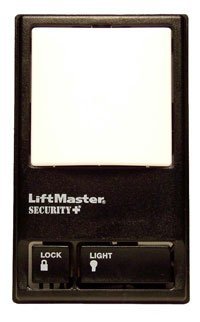
Image showing the LiftMaster 41A5273-1 Security Multi-Function Wall Control Panel, typically mounted on a wall, featuring buttons for garage door operation, light control, and a lock function.
주요 특징:
- 390 MHz compatibility with LiftMaster garage door openers.
- Multi-function control for garage door operation.
- Integrated light control features.
- Lock feature for enhanced security.
설정 및 설치
Proper installation is crucial for the safe and reliable operation of your wall control panel. It is recommended to consult the full installation guide provided with your garage door opener or seek professional assistance if you are unsure about any steps.
일반 설치 단계:
- 안전이 최우선입니다. Disconnect power to the garage door opener before beginning installation.
- 장착 위치: Choose a convenient location within sight of the garage door, at least 5 feet (1.5 meters) above the floor to keep it out of reach of small children.
- 배선: Connect the wall control panel to the garage door opener's terminal block using low-voltage wire. Ensure correct polarity if specified by your opener's manual.
- 안전한 장착: Mount the panel securely to the wall using the provided screws.
- 복원력 : 차고문 개폐기에 전원을 다시 연결합니다.
- 테스트: Test the wall control panel's functions (door operation, light control, lock feature) to ensure it is working correctly.
Note: This panel is designed for 390MHz LiftMaster garage door openers. Compatibility with other frequencies or brands is not guaranteed.
작동 지침
Once installed, the LiftMaster 41A5273-1 wall control panel provides intuitive control over your garage door system.
기능:
- 차고 문 작동 방법: Press the main button to open or close the garage door. Pressing it again during operation will stop the door.
- 조명 제어: The light button allows you to turn the garage door opener's light on or off independently of the door operation. The light will also activate automatically when the door is operated.
- 잠금 기능: The lock button disables all remote controls and wireless keypads, preventing unauthorized access. The garage door can still be operated using the wall control panel. To deactivate the lock feature, press the lock button again.
유지
The LiftMaster 41A5273-1 wall control panel requires minimal maintenance to ensure long-term performance.
- 청소: Periodically wipe the surface of the control panel with a soft, dry cloth. Avoid using abrasive cleaners or solvents.
- 점검: Occasionally check the wiring connections to ensure they are secure.
- 환경 조건: Ensure the panel is not exposed to excessive moisture or extreme temperatures, which can affect its electronic components.
문제 해결
If you encounter issues with your wall control panel, try the following troubleshooting steps:
- 패널이 응답하지 않음:
- 차고 문 자동 개폐기에 전원이 들어오는지 확인하세요.
- Inspect the wiring connections at both the wall control panel and the garage door opener for loose or damaged wires.
- Ensure the "Lock" feature is not activated.
- Remote Controls Not Working:
- Verify that the "Lock" feature on the wall control panel is not engaged.
- Check the batteries in your remote controls.
- Reprogram your remote controls if necessary, following the instructions for your specific garage door opener model.
- 조명이 작동하지 않음:
- Check the light bulb in the garage door opener.
- Ensure the light button on the wall control panel is pressed.
If problems persist after attempting these steps, contact LiftMaster customer support or a qualified garage door technician.
명세서
| 모델 번호: | 41A5273-1 |
| 상표: | 리프트마스터 |
| 제조업체: | 챔벌린 그룹 |
| 빈도: | 390MHz |
| 색상: | 검은색 |
| 스타일: | 현대의 |
| 품목 패키지 수량: | 1 |
| 필요한 배터리: | 아니요 |
| 첫 이용 가능 날짜: | 19년 2016월 XNUMX일 |
보증 및 지원
Specific warranty details for the LiftMaster 41A5273-1 Security Multi-Function Wall Control Panel are not provided in this document. For warranty information, technical support, or to purchase replacement parts, please visit the official LiftMaster web사이트를 방문하거나 고객 서비스에 직접 문의하세요.
제조사 웹사이트에서 지원 자료, FAQ 및 연락처 정보를 찾아볼 수 있는 경우가 많습니다. web대지: www.liftmaster.com