
1. 서론
The Zmodo Outdoor Security Camera Wireless (2 Pack) provides a comprehensive monitoring solution for your home or business. This system features 1080p Full HD video, night vision, and motion detection capabilities. Designed for both indoor and outdoor use, it offers remote viewing via the Zmodo app and is compatible with Amazon Alexa and Google Assistant for voice control.
주요 특징은 다음과 같습니다.
- 간편한 설정: Connect cameras within minutes using the Zmodo app.
- True 1080p HD Live Video: 낮과 밤 viewing up to 65ft in the dark.
- Alexa와 함께 작동 : Control your camera with voice commands.
- Smartz Eaze Cloud Recording: Receive video clips upon motion detection (14-day free trial included).
- Wall-mount Design: Flexible installation for optimal view각도를 나타냅니다.
2. 상자 안에 무엇이 들어있나요?
The Zmodo Outdoor Security Camera Wireless (2 Pack) package includes the following items:
- 2 x Zmodo Outdoor Cameras

3. 설정
Setting up your Zmodo Outdoor Security Camera is a straightforward process. Follow these steps for quick installation and configuration.
3.1 물리적 설치
- 위치를 선택하세요: Select a suitable location for your camera, ensuring it has a clear view of the area you wish to monitor and is within range of your Wi-Fi network. The camera is designed for wall mounting.
- 카메라 장착: Use the provided mounting bracket and screws to securely attach the camera to a wall or desired surface.
- 전원 연결: Plug the camera's power adapter into a nearby electrical outlet.
- 와이파이 안테나를 연결하세요: Screw the Wi-Fi antenna into the designated port on the back of the camera.


3.2 앱 구성
- Download the Zmodo App: Download the free Zmodo app from your smartphone's app store (iOS or Android).
- 계정 생성: Open the app and follow the on-screen instructions to create a new Zmodo account or log in if you already have one.
- 장치 추가: In the app, select the option to add a new device. Follow the prompts to connect your camera to your Wi-Fi network. This typically involves scanning a QR code on the camera or following guided steps.
- 카메라 이름을 지어주세요: Assign a descriptive name to your camera (e.g., "Front Door Camera," "Backyard Camera") for easy identification.
3.3 설정 비디오
For visual guidance on the setup process, refer to the following videos:
4. 사용 설명서
Once your Zmodo camera is set up, you can begin monitoring your property and utilizing its smart features.
4.1 라이브 View 및 재생
- 실시간 영상 보기: Open the Zmodo app on your smartphone or tablet. Select the desired camera from your device list to view its live 1080p Full HD video feed.
- 야간 투시경: 카메라는 저조도 환경에서 자동으로 야간 투시 모드로 전환되어 최대 65피트 거리까지 선명한 흑백 영상을 제공합니다.
- 클라우드 스토리지: With the optional Smartz Eaze cloud recording plan, motion-triggered video clips are saved to the cloud. You can review, save, and share footage at any time. A 14-day free trial is available.


4.2 동작 감지 및 알림
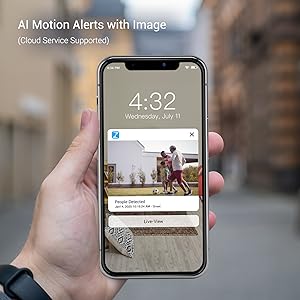
- 알림 수신: The camera sends intelligent mobile alerts to your smartphone when motion is detected.
- AI 동작 감지: Advanced AI helps detect and identify humans, pets, and vehicles accurately, reducing false alerts.
4.3 알렉사 통합
The Zmodo camera is compatible with Amazon Alexa, allowing for convenient voice control.
- 음성 명령: Use commands like "Alexa, show me the front door" to view a live stream from your camera on compatible Alexa devices such as Echo Show or Fire TV.
- 펌웨어 업데이트: Ensure your Zmodo product is updated to the latest device version for optimal interaction with Amazon Alexa.

4.4 Alexa Integration Video
Watch this video for detailed instructions on how to integrate your Zmodo camera with Amazon Alexa and Fire TV:
5. 유지관리
To ensure optimal performance and longevity of your Zmodo Outdoor Security Camera, follow these maintenance guidelines:
- 정기 청소: 카메라 렌즈는 주기적으로 부드러운 천으로 닦아주세요.amp cloth to remove dust, dirt, or smudges that may affect image clarity. Avoid abrasive cleaners.
- 연결 확인: Ensure all cables (power, antenna) are securely connected and free from damage.
- 펌웨어 업데이트: Regularly check for and install firmware updates through the Zmodo app to benefit from new features, improvements, and security enhancements.
- 날씨 보호: While the camera is IP65 waterproof, ensure it is installed in a location that minimizes direct exposure to extreme weather conditions if possible, to prolong its lifespan.

6. 문제 해결
If you encounter issues with your Zmodo camera, refer to the following common problems and solutions:
| 문제 | 가능한 해결책 |
|---|---|
| 카메라 오프라인/Wi-Fi에 연결할 수 없음 | Ensure the camera is powered on. Check your Wi-Fi signal strength at the camera's location. Restart your router and the camera. Re-add the camera through the Zmodo app. |
| 비디오 품질이 좋지 않음 | Clean the camera lens. Ensure adequate lighting for day vision. Check Wi-Fi signal strength; a weak signal can degrade video quality. |
| 동작 감지 알림이 수신되지 않았습니다. | Verify motion detection is enabled in the app settings. Check app notification settings on your phone. Ensure the camera has a clear view 감지 영역의. |
| Alexa integration not working | Ensure the Zmodo skill is enabled in the Alexa app and your Zmodo account is linked. Verify your Alexa device (Echo Show/Fire TV) is connected to the same network. Update camera firmware. |
7. 사양
Detailed technical specifications for the Zmodo Outdoor Security Camera (Model ZM-W0002-2):
| 특징 | 세부 사항 |
|---|---|
| 상표 | 즈모도 |
| 모델명 | ZM-W0002-2 |
| 연결 기술 | Cloud, Wi-Fi, 2.4GHz |
| 특별 기능 | HD Resolution, Motion Sensor, Night Vision |
| 실내/실외 사용 | 실내, 실외 |
| 호환 장치 | 알렉사, 구글 어시스턴트 |
| 마운트 유형 | 벽걸이형 |
| 색상 | 하얀색 |
| 폼 팩터 | 총알 |
| 방수 등급 | IP65 |
| 사진 센서 해상도 | 1080 픽셀 |
| 비디오 캡처 해상도 | 1080p |
| 프레임 속도 | 25fps |
| View잉 각도 | 90도 |
| 광학 줌 | 4 개 |
| 나이트 비전 범위 | 65 피트 |
| 전원 | 코드식 전기 |
| 권tage | 12 볼트 |
| 왓tage | 5 와트 |
| 품목 치수 | 2.2 x 2.1 x 3.4 인치 |
8. 보증 및 지원
보증: The Zmodo Outdoor Security Camera comes with a 3-year manufacturer's warranty.
고객 지원: For technical assistance, troubleshooting, or warranty claims, please visit the official Zmodo website or contact their customer support team. Refer to the Zmodo app or packaging for the most up-to-date contact information.