
1. 서론
This user manual provides detailed instructions for the safe and effective operation of your Jumper Medical Infrared Ear Thermometer, Model JPD-FR301. This device is designed for accurate body temperature measurement in the ear canal for all ages, including infants, children, and adults.
처음 사용하기 전에 이 설명서를 자세히 읽고 나중에 참고할 수 있도록 보관하세요.
2. 제품 특징
- Digital Infrared (IR) Ear Thermometer with protective cap.
- Fast 1-second measurement for quick results.
- Acoustic fever alarm for elevated temperatures (> 37.5 °C).
- Memory storage for the last 20 measurement readings.
- 섭씨(°C)와 화씨(°F) 간 온도 표시 전환이 가능합니다.
- Ergonomic design for comfortable handling and use.
- High sensitivity for maximum precision.
- Meets high hygienic standards.
- Certified with CE, FDA, ISO 13485 + AC:2012, ISO 10993-1, ISO 10993-10, Norm IEC 60601-1-2, and conforms to the Medical Devices Directive - MDD (EU).
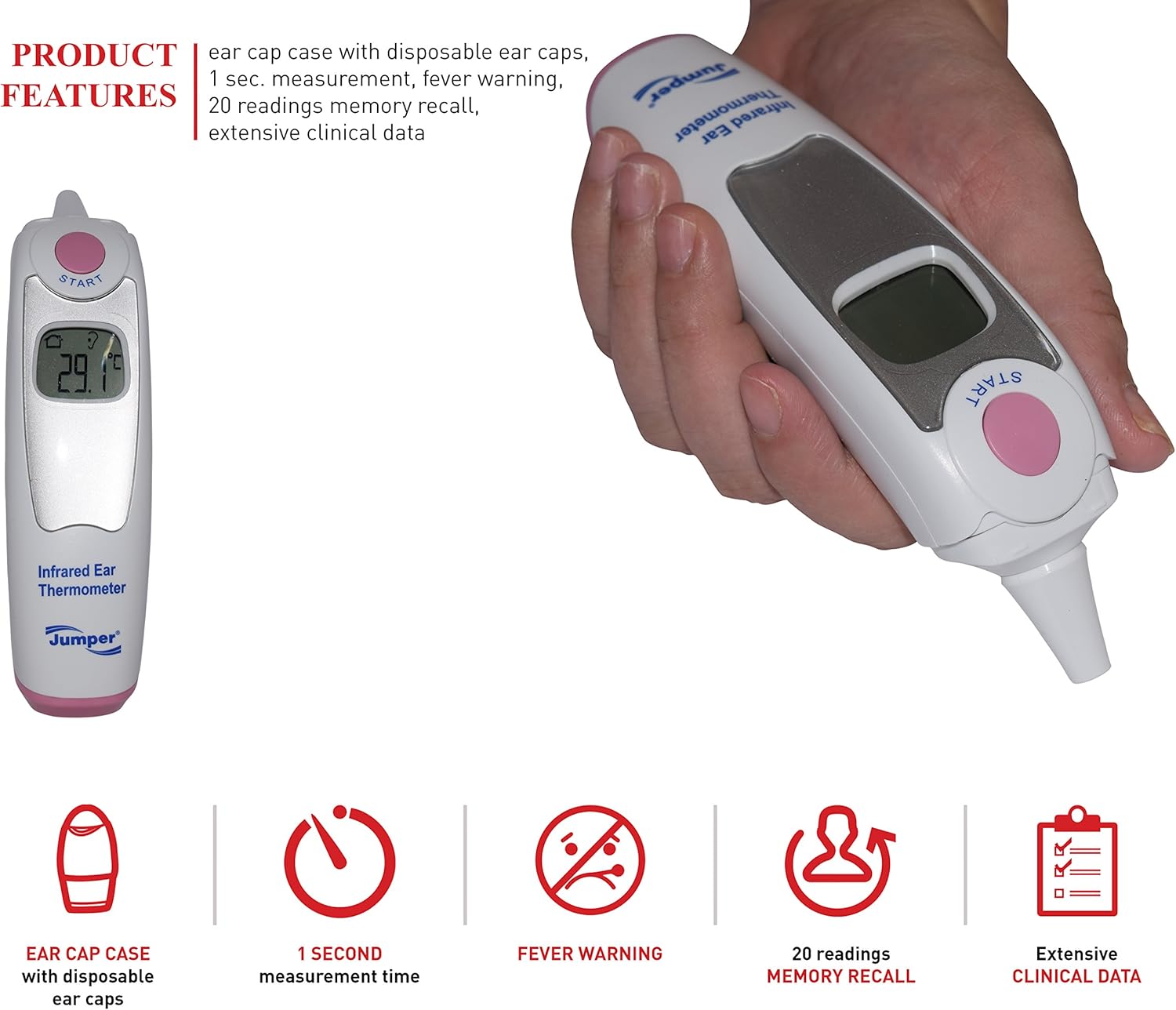
그림 2.1: The Jumper Medical Infrared Ear Thermometer held in a hand, showcasing its ergonomic shape and the clear LCD display.
3. Get to Know Your Product (Components)

그림 3.1: Labeled diagram of the JPD-FR301 thermometer components.
- 측정 버튼: Used to initiate a temperature measurement.
- LCD 디스플레이: 온도 측정값, 모드 표시기, 배터리 상태를 표시합니다.
- 감지기: The infrared sensor located at the tip for accurate ear temperature detection.
- 배터리 덮개: 배터리 구획을 보호합니다.
- Ear cap case: Storage for disposable ear caps.
- Disposable ear caps: Hygienic covers for the sensor.
- 상단 덮개: Part of the ear cap case.
- 뒷면 커버: Part of the ear cap case.
4. 포장 내용물
패키지를 열 때 아래 나열된 모든 품목이 들어 있고 상태가 양호한지 확인하세요.
- Jumper Medical Infrared Ear Thermometer unit (JPD-FR301)
- Pouch or storage bag
- Ear cap case with disposable ear caps
- 2 pcs of AAA battery

그림 4.1: 제품 포장에 포함된 모든 품목.
5. 설정
5.1 배터리 설치
The thermometer requires 2 AAA batteries for operation. To install or replace batteries:
- Locate the battery cover (4) on the back of the thermometer.
- 배터리 커버를 밀어서 엽니다.
- AAA 배터리 두 개를 넣고, 칸 내부에 표시된 대로 올바른 극성(+ 및 -)을 맞추세요.
- 배터리 덮개를 딸깍 소리가 날 때까지 단단히 닫으세요.
5.2 Attaching/Using Ear Cap Case
The ear cap case (5) holds disposable ear caps (6) for hygienic use. Always use a new, undamaged ear cap for each measurement.

그림 5.1: Steps for handling the ear cap case and disposable ear caps.
- To open the ear cap case, gently lift the top cover (7) or slide the rear cover (8).
- Take out a disposable ear cap.
- Carefully place the ear cap onto the sensor (3) of the thermometer until it is securely fitted.
- After use, dispose of the used ear cap properly.
6. 사용 설명서
6.1 측정하기
- Ensure a new, clean disposable ear cap is securely attached to the sensor.
- Press the "START" (Measuring button 1) to turn on the thermometer. The display will show the last measurement or a standby indicator.
- Gently insert the sensor tip with the ear cap into the ear canal. For accurate readings, ensure the tip is pointing towards the eardrum.
- Press the "START" button again to initiate the measurement.
- The measurement will be completed in approximately 1 second, and the result will be displayed on the LCD (2).
- If the temperature is elevated (fever alarm), an audible alert will sound.
- The thermometer will automatically store the reading in its memory.
- Remove the thermometer from the ear and dispose of the used ear cap.
6.2 섭씨와 화씨 간 전환
To switch the temperature unit between Celsius (°C) and Fahrenheit (°F):
- With the thermometer turned off, press and hold the "START" button for approximately 5 seconds until the unit changes on the display.
- Release the button. The new unit will be set for future measurements.
6.3 메모리 리콜
The thermometer stores the last 20 measurement readings. To recall them:
- 온도계를 켭니다.
- Briefly press the "START" button repeatedly to cycle through the stored readings. Each press will display the next previous reading.
7. 유지관리
7.1 온도계 청소
- Always clean the thermometer after each use, especially the sensor area.
- 부드러운 천을 가볍게 사용 dampened with 70% isopropyl alcohol to wipe the sensor and the body of the thermometer.
- 온도계를 물이나 다른 액체에 담그지 마십시오.
- 온도계를 보관하기 전에 완전히 자연 건조시키십시오.
- 연마성 세제나 독한 화학 물질을 사용하지 마십시오.
7.2 보관
Store the thermometer in its original pouch or the ear cap case in a cool, dry place, away from direct sunlight and extreme temperatures.
If the thermometer will not be used for an extended period, remove the batteries to prevent leakage and damage.
7.3 작동 및 보관 조건

그림 7.1: Recommended environmental conditions for operation and storage.
Operating Environment Conditions:
- 온도: +10°C ~ +40°C (50°F ~ 104°F)
- 기압: 86kPa ~ 106kPa
- 습기: 15-85% RH, 비응축
Storage & Transportation Conditions:
- 온도: -10°C ~ +50°C(14°F ~ 122°F)
- 기압: 50kPa ~ 106kPa
- 습기: <93 % RH, 비 응축
8. 문제 해결
| 문제 | 가능한 원인 | 해결책 |
|---|---|---|
| 온도계가 켜지지 않습니다. | 배터리가 소진되었거나 잘못 삽입되었습니다. | 올바른 극성을 확인하여 새 AAA 배터리로 교체하세요. |
| 부정확한 판독값. | Used or damaged ear cap; sensor dirty; improper insertion into ear canal; extreme environmental conditions. | Use a new, clean ear cap. Clean the sensor. Ensure correct insertion. Operate within specified temperature and humidity ranges. |
| "Lo" 또는 "Hi"가 표시됩니다. | 온도가 측정 범위를 벗어났습니다. | Ensure the thermometer is used in the correct operating temperature range and the subject's temperature is within human body temperature limits. |
| Fever alarm sounds frequently. | Subject's temperature is consistently above 37.5 °C (99.5 °F). | This indicates an elevated temperature. Consult a medical professional if fever persists. |
9. 사양
| 특징 | 세부 사항 |
|---|---|
| 모델: | JPD-FR301 |
| 제품 유형: | 적외선 귀 온도계 |
| 전원: | 2 x AAA Batteries (Battery-operated) |
| 측정 시간 : | 1초 |
| 메모리 용량 : | 20개의 독서 |
| 온도 단위: | 섭씨(°C) / 화씨(°F) 전환 가능 |
| 재료: | 플라스틱 |
| 연령대: | Child and Adult |
| 한국어: | 635833227234 |
| 인증: | CE, FDA, ISO 13485 + AC:2012, ISO 10993-1, ISO 10993-10, Norm IEC 60601-1-2, MDD (EU) |
| 포장 치수 : | 19.4 x 13.2 x 6.4cm |
| 무게: | 300 Grams (packaged) |
10. 보증 및 지원
For warranty information or technical support, please refer to the warranty card included in your product packaging or contact Jumper Medical customer service directly. Contact details can typically be found on the manufacturer's official web사이트 또는 제품 포장에 표시되어 있습니다.
Please have your model number (JPD-FR301) and purchase information ready when contacting support.