
1. 서론
구매해주셔서 감사합니다asing the Axess SPBT1041 Portable Bluetooth Speaker. This device is designed to provide high-quality audio playback from various sources, including Bluetooth-enabled devices, USB drives, SD cards, and auxiliary input. It also features an FM radio function and a built-in microphone for hands-free calls. Its portable design with an adjustable strap makes it suitable for both indoor and outdoor use.
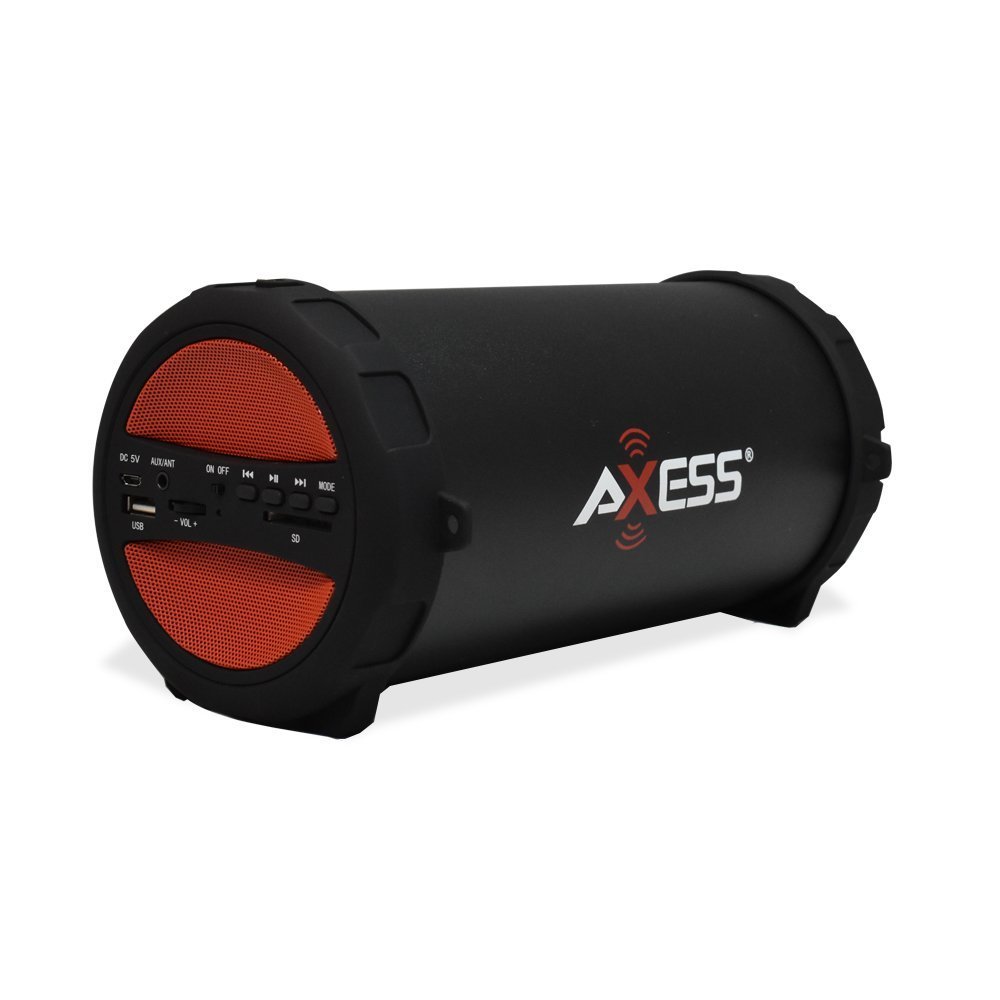
Figure 1: Axess SPBT1041 Portable Bluetooth Speaker (Red variant).

Figure 2: Key features of the SPBT1041 speaker, including FM Radio, USB Input, and AUX Input.
2. 패키지 내용
다음 품목이 패키지에 포함되어 있는지 확인하세요.
- Axess SPBT1041 Portable Bluetooth Speaker
- USB 충전 케이블
- 보조 오디오 케이블
- 조절 가능한 어깨 스트랩
- 사용 설명서
3. 디바이스 오버view
스피커의 조작 버튼과 포트에 익숙해지세요.

Figure 3: Control panel and ports of the Axess SPBT1041 speaker.
- DC 5V 포트: 스피커를 충전합니다.
- AUX/ANT Port: For auxiliary audio input or connecting an external FM antenna.
- 온 / 오프 스위치: 스피커의 전원을 켜거나 끕니다.
- USB 포트: USB 플래시 드라이브에서 오디오를 재생합니다.
- SD 카드 슬롯: For playing audio from an SD memory card.
- Volume Control (-VOL +): 스피커 볼륨을 조정합니다.
- Previous Track/Rewind Button: 이전 트랙으로 건너뛰거나 되감기합니다.
- 재생/일시 정지 버튼: Plays or pauses audio. Also answers/ends calls in Bluetooth mode.
- Next Track/Fast Forward Button: 다음 트랙으로 건너뛰거나 빨리 감기를 합니다.
- MODE 버튼: 블루투스, FM 라디오, USB, SD 카드, AUX 입력 모드 간 전환이 가능합니다.
4. 설정
4.1 스피커 충전
Before first use, fully charge the speaker. Connect the provided USB charging cable to the DC 5V port on the speaker and the other end to a USB power source (e.g., computer USB port, USB wall adapter). The charging indicator light will illuminate during charging and turn off when fully charged.

Figure 4: The speaker can be played while charging, featuring a 1500 mAh battery.
4.2 전원 켜기/끄기
슬라이드 켜짐/꺼짐 switch to the 'ON' position to power on the speaker. Slide it to 'OFF' to power off.
5. 사용 설명서
5.1 블루투스 모드
- 스피커 전원을 켜세요. 그러면 자동으로 블루투스 페어링 모드로 진입하며, 음성 안내가 나옵니다.
- 모바일 기기(스마트폰, 태블릿 등)에서 Bluetooth를 활성화하세요.
- 검색 available Bluetooth devices and select "SPBT1041" from the list.
- 페어링이 완료되면 스피커에서 소리가 나면서 확인됩니다. 이제 기기의 오디오를 스피커를 통해 재생할 수 있습니다.
- To disconnect, disable Bluetooth on your device or press the MODE button on the speaker to switch modes.
5.2 USB/SD 카드 모드
- USB 플래시 드라이브를 USB 포트에 삽입하거나 SD 카드를 SD 카드 슬롯에 삽입합니다.
- 스피커가 자동으로 저장 장치를 감지하고 오디오 재생을 시작합니다. files. 그렇지 않은 경우 다음을 누릅니다. 방법 button to switch to USB or SD mode.
- Use the Previous/Next Track buttons to navigate and the Play/Pause button to control playback.
5.3 FM 라디오 모드
- 스피커의 전원을 켜고 버튼을 누릅니다. 방법 FM 라디오 안내 음성이 들릴 때까지 버튼을 누르세요.
- For better reception, connect the auxiliary audio cable to the AUX/ANT port; it acts as an external antenna.
- 를 누르고 계세요 재생/일시정지 사용 가능한 FM 방송국을 자동으로 스캔하고 저장하는 버튼입니다.
- Use the Previous/Next Track buttons to switch between saved stations.
5.4 AUX 입력 모드
- Connect one end of the auxiliary audio cable to the AUX/ANT port on the speaker and the other end to the audio output of your external device (e.g., MP3 player, laptop).
- 를 누르세요 방법 스피커가 AUX 모드로 전환될 때까지 버튼을 누르십시오.
- 외부 기기에서 재생과 볼륨을 제어하세요.
5.5 통화 기능 (블루투스 모드)
- When a call comes in during Bluetooth mode, press the 재생/일시정지 버튼을 클릭합니다.
- 를 누르세요 재생/일시정지 버튼을 다시 누르면 통화가 종료됩니다.
Video 1: Demonstration of the Axess Portable Bluetooth Speaker's portability and ease of use in an outdoor setting. This video showcases the speaker's design and how it can be carried with its strap, highlighting its suitability for various activities.
6. 유지관리
6.1 청소
Wipe the speaker with a soft, dry cloth. Do not use abrasive cleaners or solvents. Avoid exposing the speaker to excessive moisture.
6.2 배터리 관리
To prolong battery life, avoid fully discharging the speaker frequently. Recharge the battery when the low battery indicator or audible prompt is heard. If storing the speaker for an extended period, charge it to approximately 50% every few months.
6.3 보관
스피커는 직사광선과 극한의 온도를 피해 시원하고 건조한 곳에 보관하세요.
7. 문제 해결
- 전원 없음: Ensure the speaker is charged. Connect the USB charging cable and try again.
- 소리 없음: Check the volume level on both the speaker and your connected device. Ensure the correct input mode is selected (Bluetooth, USB, SD, AUX).
- 블루투스가 연결되지 않음: Ensure the speaker is in Bluetooth pairing mode. Disable and re-enable Bluetooth on your device, then search for "SPBT1041" again. Make sure the speaker is within the 30-foot operating range.
- FM 수신 불량: Extend the auxiliary audio cable and position it for better signal reception. Try scanning for stations again.
- USB/SD Card Not Playing: Ensure the USB drive or SD card is inserted correctly and contains compatible audio files (e.g., MP3 format).
8. 사양
| 특징 | 세부 사항 |
|---|---|
| 모델명 | SPBT1041 |
| 스피커 유형 | 야외, 휴대용 |
| 연결 기술 | 블루투스 |
| 무선 통신 기술 | 블루투스 |
| 스피커 최대 출력 전력 | 10 와트 |
| 서브우퍼 직경 | 3 인치 |
| 배터리 용량 | 1500밀리amp 시간(리튬 이온) |
| 전원 | 배터리 구동 |
| 제품 치수 | 7인치 깊이 x 8인치 너비 x 12인치 높이 |
| 품목 무게 | 2.1 파운드 |
| 재료 | 플라스틱 |
| 방수 레벨 | 방수가 되지 않음 |
| 포함된 구성 요소 | 배터리 |
9. 보증
The Axess SPBT1041 Portable Bluetooth Speaker comes with a Full Warranty. Please refer to the warranty card included in your package or contact Axess customer support for details regarding warranty terms and conditions.
10. 지원
For further assistance, technical support, or inquiries regarding your Axess SPBT1041 speaker, please visit the official Axess web사이트 또는 고객 서비스 부서에 문의하세요. 연락처 정보는 일반적으로 제품 포장이나 제조업체의 web대지.