
1. 서론
This manual provides detailed instructions for the installation, configuration, and operation of the IBM ServeRAID M5015 SAS SATA PCIe RAID Controller. This controller is designed to enhance data storage performance and reliability in server environments by supporting various RAID levels and connecting to multiple SAS or SATA drives.
2. 제품 오버view
The IBM ServeRAID M5015 is a high-performance RAID controller card featuring an LSI SAS2108 6 Gbps RAID on Chip (ROC) controller. It offers robust data protection and management capabilities for server storage systems.

그림 1: 맨 위 view of the IBM ServeRAID M5015 SAS SATA PCIe RAID Controller card, showing the main components and PCIe connector.

그림 2: 옆 view of the IBM ServeRAID M5015 RAID Controller, illustrating its profile and the attached mounting bracket for server installation.
3. 특징 및 사양
주요 특징:
- Eight Internal 6 Gbps SAS/SATA Ports: Provides high-speed connectivity for storage devices.
- Two Mini-SAS Internal Connectors (SFF-8087): Standard connectors for internal SAS/SATA cables.
- 6 Gbps Throughput per Port: Ensures fast data transfer rates.
- LSI SAS2108 6 Gbps RAID on Chip (ROC) Controller: Integrated processor for efficient RAID operations.
- x8 PCI Express 2.0 Host Interface: Compatible with standard PCIe slots for high bandwidth.
- 512 MB Onboard Data Cache (DDR2 at 800 MHz): Improves read/write performance.
- Intelligent Li-Ion-based Battery Backup Unit: Provides up to 48 hours of data retention in case of power loss.
- RAID Level Support: Supports RAID levels 0, 1, 5, 10, and 50. RAID 6 and 60 support is available with the optional M5000 Advanced Feature Key.
- 드라이브 지원: Connects to up to 32 SAS or SATA drives. Note: Mixing SAS and SATA drives in the same RAID array is not supported.
- Logical Volume Support: Supports up to 64 logical volumes and LUN sizes up to 64 TB.
- Configurable Stripe Size: Up to 1 MB.
- Disk Data Format (DDF) Compliance: Compliant with DDF configuration on disk (COD).
- S.M.A.R.T. Support: Monitors drive health and predicts potential failures.
상세 사양:
| 사양 | 값 |
|---|---|
| 모델 번호 | 46C8927 |
| 하드웨어 인터페이스 | 에스에스에이(SAS) |
| 제조업체 | LSI (Branded IBM) |
| PCIe 인터페이스 | x8 PCI Express 2.0 |
| 내부 포트 | 8 (6 Gbps SAS/SATA) |
| 커넥터 | Two Mini-SAS (SFF-8087) |
| 프로세서 | 800 MHz PowerPC with LSI SAS2108 ROC |
| 캐시 메모리 | 512 MB DDR2 (800 MHz) |
| 배터리 백업 | Intelligent Li-Ion (up to 48 hours retention) |
| RAID 레벨 | 0, 1, 5, 10, 50 (Optional: 6, 60) |
| 최대 드라이브 | 32 (SAS or SATA) |
| Max Logical Volumes | 64 |
| Max LUN Size | 64테라바이트 |
| 한국어: | 606462240291 |
4. 설정 및 설치
4.1 안전 예방 조치
- Always wear an anti-static wrist strap when handling the RAID controller to prevent electrostatic discharge (ESD) damage.
- Ensure the server is powered off and unplugged from the power source before opening the chassis.
- Handle the card by its edges; avoid touching components or connectors.
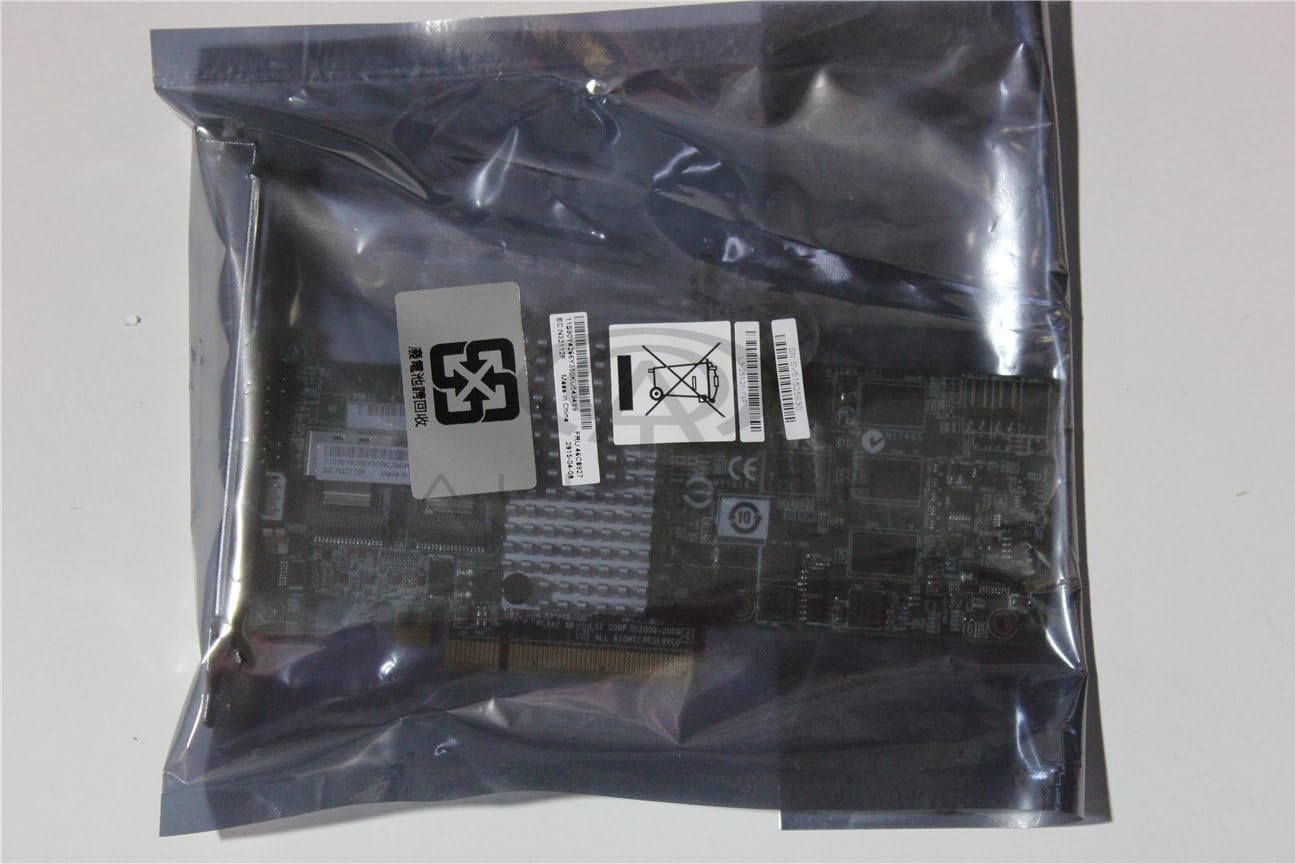
그림 3: The IBM ServeRAID M5015 controller packaged in an anti-static bag, emphasizing the importance of ESD protection during handling.

그림 4: 클로즈업 view of the labels on the anti-static bag, showing product identifiers such as L3-25121-79F, SV51525630, 그리고 11S90Y4266Y350KU549489, along with a 'Do Not Dispose' symbol for electronic waste.
4.2 하드웨어 설치
- 서버를 준비하세요: Power down the server, disconnect all power cables, and open the server chassis.
- PCIe 슬롯 찾기: Identify an available x8 or larger PCI Express 2.0 slot on the server motherboard.
- 컨트롤러 설치: Carefully align the ServeRAID M5015 card with the chosen PCIe slot and press down firmly until it is securely seated. Secure the card with the retention clip or screw provided by the server chassis.
- SAS/SATA 드라이브 연결: Connect your SAS or SATA drives to the Mini-SAS (SFF-8087) connectors on the controller using appropriate cables. Ensure proper cable routing for optimal airflow.
- 서버를 종료하세요: Replace the server chassis cover and reconnect power cables.

그림 5: 자세한 view of the two Mini-SAS (SFF-8087) internal connectors on the IBM ServeRAID M5015, labeled 'PORTS 0-3' and 'PORTS 4-7', indicating where SAS/SATA drives are connected. The label L3-25121-79F 또한 보입니다.
5. Operating Instructions (Configuration)
After hardware installation, the ServeRAID M5015 requires configuration through its BIOS utility or a software management tool. Refer to your server's documentation for accessing the RAID controller's BIOS during boot-up.
5.1 Accessing the RAID BIOS Utility
- During server boot, watch for a prompt (e.g., "Press Ctrl+H to enter WebBIOS" or similar) to access the RAID controller's configuration utility.
- Follow the on-screen instructions to navigate the utility.
5.2 Creating a RAID Array
- From the main menu, select an option to 구성 or Create New Array.
- Choose the desired RAID level (e.g., RAID 0, 1, 5, 10, 50) based on your performance and redundancy requirements.
- Select the physical drives to be included in the array. Ensure that you do not mix SAS and SATA drives within the same array.
- Define the array parameters, such as stripe size and cache policy.
- Confirm the configuration and initialize the array. This process may take some time depending on the size and number of drives.
5.3 운영 체제 설치
Once the RAID array is created, you can proceed with installing your operating system onto the logical volume presented by the RAID controller.
6. 유지관리
Regular maintenance ensures the longevity and optimal performance of your ServeRAID M5015 controller and associated storage.
- 펌웨어 업데이트: Periodically check the IBM support website for updated firmware for the ServeRAID M5015. Firmware updates can provide performance improvements, bug fixes, and enhanced compatibility.
- 드라이버 업데이트 : Ensure your operating system has the latest drivers for the ServeRAID M5015.
- 배터리 백업 장치(BBU): Monitor the health of the BBU. If the BBU fails or shows signs of degradation, replace it promptly to maintain data integrity during power outag에스.
- 물리적 검사: During server maintenance, visually inspect the card for any signs of damage, dust accumulation, or loose connections. Clean any dust using compressed air.
- 스마트 모니터링: Utilize S.M.A.R.T. (Self-Monitoring, Analysis, and Reporting Technology) tools to monitor the health of your connected drives and proactively replace failing drives.
7. 문제 해결
This section provides solutions to common issues encountered with the ServeRAID M5015 controller.
7.1 Controller Not Detected
- 좌석 확인: 카드가 PCIe 슬롯에 완전히 장착되었는지 확인하십시오.
- 다른 시간대를 선택해 보세요: Test the card in a different PCIe slot if available.
- BIOS 설정 : Verify that the PCIe slot is enabled in the server's BIOS/UEFI settings.
- 힘: Confirm the server has adequate power supply for all installed components.
7.2 Drives Not Detected
- 케이블 연결: Ensure all SAS/SATA cables are securely connected to both the controller and the drives.
- 구동력: Verify that the drives are receiving power.
- 드라이브 호환성: Confirm that the drives are functional and compatible with the controller.
- RAID BIOS: Check the RAID controller's BIOS utility to see if the drives are visible there.
7.3 RAID Array Performance Issues
- 드라이버/펌웨어: 최신 드라이버와 펌웨어가 설치되어 있는지 확인하십시오.
- Cache Policy: Review the cache policy settings in the RAID BIOS.
- 건강 운전하기: Check S.M.A.R.T. data for any failing drives.
- RAID 레벨: Confirm the chosen RAID level is appropriate for your performance needs. RAID 50 generally offers better performance than RAID 5 for large arrays.
8. 보증 및 지원
For warranty information and technical support regarding your IBM ServeRAID M5015 controller, please refer to the documentation provided with your server system or contact your vendor. You may also visit the official IBM support website for product-specific resources, drivers, and firmware updates.