
플루언스 RT81
Fluance RT81 Elite 고음질 바이닐 턴테이블 레코드 플레이어 사용 설명서
모델: RT81 | 브랜드: Fluance
소개
This manual provides detailed instructions for the setup, operation, maintenance, and troubleshooting of your Fluance RT81 Elite High Fidelity Vinyl Turntable. Please read this manual thoroughly before using your turntable to ensure proper function and longevity.
The Fluance RT81 is designed to deliver a pure analog listening experience with premium components, including an Audio Technica AT95E cartridge, a belt-drive system, and a high-mass MDF wood plinth for superior vibration isolation.
무엇이 포함됩니까?
모든 구성품이 포장에 들어 있는지 확인하세요.
- RT81 턴테이블 유닛
- 더스트 커버
- 45 어댑터
- 고무 플래터 매트
- 3ft RCA Cable with Ground Wire
- 100V - 240V (50/60Hz) AC Power Adapter
- 빠른 시작 가이드
- Audio Technica AT95E Cartridge (pre-installed on headshell)
- 균형추
- 힌지(x2)
- 고무 벨트

Image: All components included with the Fluance RT81 turntable, including the plinth, aluminum platter, platter mat, headshell & AT95E cartridge, dust cover, hinges, RCA cable, 45 adapter, counterweight, 5ft power adapter, and rubber belt.
설정
1. 풀기 및 배치
포장에서 모든 구성품을 조심스럽게 꺼내십시오. 턴테이블을 직사광선, 열원 및 과도한 진동을 피해 안정적이고 평평한 곳에 놓으십시오.
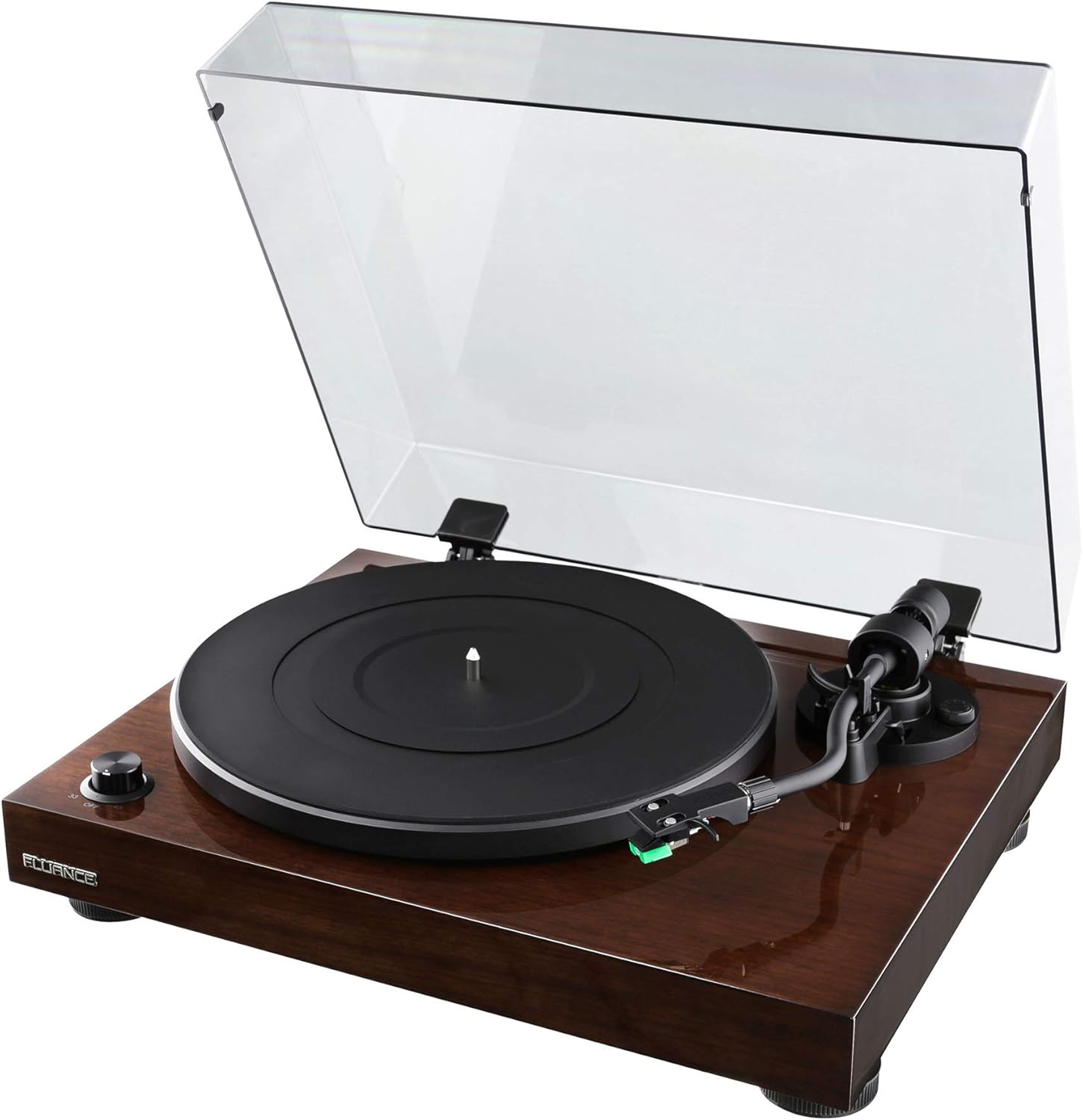
Image: The Fluance RT81 turntable in its walnut finish, with the clear dust cover open, showcasin플래터와 톤암을 살펴보세요.
2. 플래터 및 벨트 설치
- Place the aluminum platter onto the spindle.
- Carefully loop the rubber belt around the motor pulley and the inner rim of the platter. Ensure the belt is not twisted.
- Place the rubber platter mat on top of the aluminum platter.

이미지: 클로즈업 view of the Fluance RT81 turntable's tonearm, highlighting the Audio Technica AT95E cartridge with its green stylus.
3. Tonearm Setup
The Audio Technica AT95E cartridge is pre-installed on the headshell. You will need to balance the tonearm and set the tracking force.
- 토너암 뒤쪽에 균형추를 부착합니다.
- 톤암이 균형을 이루고 수평으로 떠 있을 때까지 카운터웨이트를 조정하십시오.
- Set the tracking force to the recommended 2.0 grams by rotating the counterweight.
- Set the anti-skating control to '2' to match the tracking force.
4. 오디오 시스템 연결
The RT81 features a built-in Texas Instruments preamp, offering flexibility in connection options.
- Using Built-in Preamp: Set the PHONO/LINE switch on the back of the turntable to 선. Connect the RCA cables from the turntable's AUDIO OUTPUT to any available line-level input (e.g., AUX, CD) on your amplifier or powered speakers. The ground wire is not needed in this configuration.
- Using External Preamp: Set the PHONO/LINE switch on the back of the turntable to 포노. Connect the RCA cables from the turntable's AUDIO OUTPUT to the PHONO input on your external preamp or receiver. Connect the ground wire from the turntable's ground post to the ground terminal on your external preamp/수화기.

Image: Rear panel of the Fluance RT81 turntable, displaying the RCA audio output jacks, ground terminal, PHONO/LINE switch, AUTO STOP switch, and DC 12V power input.
5. 전원 연결
Connect the AC power adapter to the DC 12V input on the back of the turntable, then plug it into a wall outlet.
작동 지침
1. 레코드 재생
- Place a record on the platter mat. For 7-inch singles, use the included 45 adapter.
- Select the appropriate speed (33 or 45 RPM) using the selector dial on the front left.
- 큐잉 레버를 사용하여 톤암을 들어 올리십시오.
- 원하는 레코드 시작 홈에 톤암을 수동으로 위치시키십시오.
- 큐잉 레버를 사용하여 톤암을 천천히 내리십시오. 레코드가 재생되기 시작합니다.
2. 자동 정지 기능
The RT81 features an auto-stop function. When enabled (AUTO STOP switch set to ON), the platter will automatically stop spinning once the tonearm reaches the end of the record. If disabled (AUTO STOP switch set to OFF), the platter will continue to spin until manually stopped.
Video: A demonstration of the Fluance RT81 turntable in operation, showcasing the automatic stop feature at the end of a record. This video is provided by Shoptronics, a seller of the product.
3. 재생 중지
- 큐잉 레버를 사용하여 톤암을 들어 올리십시오.
- 톤암을 제자리로 돌려놓으십시오.
- Turn the speed selector dial to "OFF" to stop the platter.
유지
1. 턴테이블 청소
Regular cleaning will help maintain the performance and appearance of your RT81.
- Use a soft, dry cloth to wipe the plinth and dust cover. Avoid abrasive cleaners.
- Gently brush the stylus with a soft brush in a back-to-front motion to remove dust.
- Clean records regularly with a carbon fiber brush or record cleaning solution to prevent dust buildup and improve sound quality.
2. 벨트 교체
The drive belt may need replacement over time due to wear. Refer to the "What's Included" section for the location of the belt and instructions for re-installation.
문제 해결
| 문제 | 가능한 원인 | 해결책 |
|---|---|---|
| 소리가 나지 않습니다 | Incorrect PHONO/LINE switch setting; loose RCA connections; amplifier/speaker issues. | Ensure PHONO/LINE switch is set correctly (LINE for built-in preamp, PHONO for external). Check all cable connections. Verify amp수신기/스피커의 전원이 켜져 있고 올바른 입력으로 설정되어 있습니다. |
| 왜곡된 소리 | Incorrect tracking force; dirty stylus; damaged record. | Re-balance tonearm and set tracking force to 2.0g. Clean the stylus. Inspect record for damage. |
| 접시가 회전하지 않음 | Power not connected; belt dislodged; AUTO STOP engaged and tonearm not moved. | Check power connection. Re-seat the drive belt. Move tonearm over platter or disable AUTO STOP. |
| 윙윙거리는 소음 | Ground wire not connected (if using external preamp); interference. | Ensure ground wire is securely connected (if PHONO mode). Move turntable away from other electronic devices. |
명세서
- 모델: RT81 Elite
- 상표: 플루언스
- 치수(길이 x 너비 x 높이): 13.75 x 16.5 x 5.5 인치
- 품목 무게: 14.1파운드
- Plinth Material: MDF 우드
- 플래터: 알류미늄
- 탄약통: Audio Technica AT95E (Elliptical Stylus)
- 구동 시스템: 벨트 드라이브
- 속도: 33 1/3, 45RPM
- 사전amp: Built-in Texas Instruments Preamp (switchable PHONO/LINE)
- 연결성: Wired RCA Output with Ground Terminal
- 자동 정지: Yes (switchable ON/OFF)
- 색상: 호두

이미지: 오버헤드 view of the Fluance RT81 turntable with a record spinning, demonstrating its operational state.
보증 및 지원
Fluance RT81 턴테이블에는 다음이 포함됩니다. 2년 제조사 보증. For warranty claims or technical support, please contact Fluance customer service directly.
평생 고객 지원 is also provided by Fluance to assist with any questions or issues you may encounter with your turntable.
For additional resources, including detailed setup videos and FAQs, please visit the official Fluance web해당 웹사이트를 방문하거나 동봉된 빠른 시작 가이드를 참조하십시오.

Image: The Fluance company logo, "FLUANCE. Serious Performance."
Ask a question about this manual
Ask about setup, troubleshooting, compatibility, parts, safety, or missing instructions. Manuals+ will review the question and use this page’s manual context to help answer it.