
소개
구매해주셔서 감사합니다asing the Andoer AD-980II i-TTL GN58 Flash Speedlite. This powerful and versatile flash unit is designed to provide enhanced lighting for your photography, compatible with Nikon cameras. It features a high guide number of 58 (ISO 100, 180mm), multiple operating modes including i-TTL, Manual, Multi, Master, and Slave, as well as High-Speed Sync (HSS) up to 1/8000s. Please read this manual thoroughly to understand the product's functions and ensure safe and optimal operation.
안전 예방 조치
- 플래시 장치를 분해하거나 개조하지 마십시오. 고음량tage components are present inside.
- 플래시 장치를 건조한 상태로 유지하십시오. 비, 습기 또는 높은 습도에 노출시키지 마십시오.
- 특히 가까운 거리에서 플래시 불빛에 눈이 직접 노출되지 않도록 하십시오. 시력이 손상될 수 있습니다.
- 어린이의 손이 닿지 않는 곳에 보관하세요.
- Use only recommended batteries. Do not mix old and new batteries or different types of batteries.
- If the flash unit overheats, allow it to cool down before further use.
제품 끝view
구성 요소

그림 1: 전면 view of the Andoer AD-980II Flash Speedlite, showing the flash head and infrared sensor.

그림 2: 후면 view of the flash, highlighting the LCD display and control buttons (Mode, Fn, Clear, Zoom, On/Off, Directional Pad, Lock).
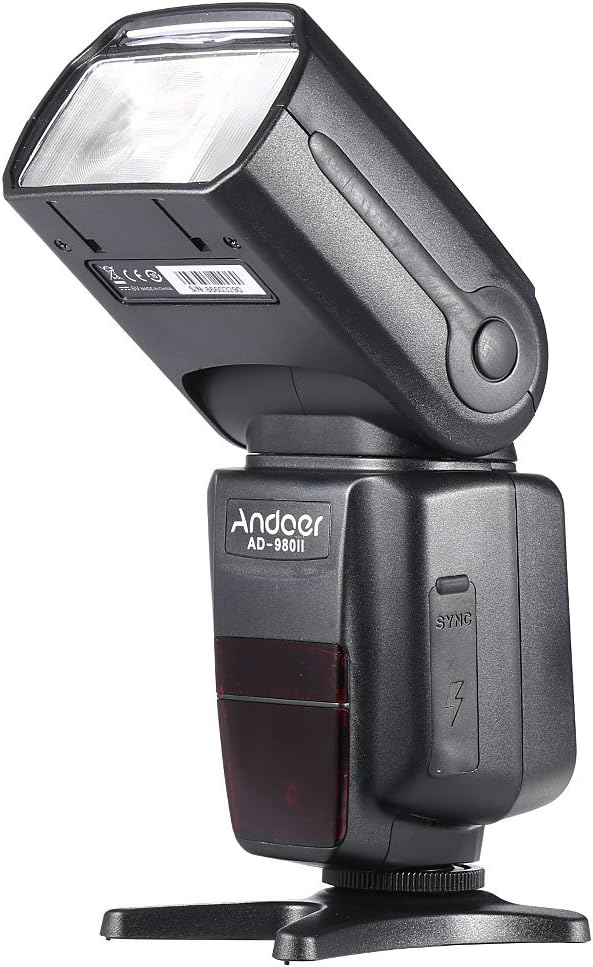
그림 3: 측면 view of the flash, illustrating the PC sync port and external power interface cover.

그림 4: 폭발 view showing key components: built-in diffuser and reflector, PC port & external power interface, battery compartment, and fast transmission contacts on the hot shoe.
제어판 및 디스플레이
The rear of the flash unit features an LCD display and several control buttons for adjusting settings and selecting modes.
- MODE 버튼: Cycles through i-TTL, Manual (M), Multi, and Slave modes.
- Fn 버튼: Accesses function settings.
- 지우기 버튼: Used to clear settings or confirm selections.
- 줌 버튼: Adjusts the flash head's zoom position (Auto/Manual).
- 켜기/끄기 버튼: 장치의 전원을 켜거나 끕니다.
- 방향 패드: 메뉴를 탐색하고 값을 조정합니다.
- LOCK 스위치: 플래시를 카메라 핫슈에 고정합니다.
설정
1. 배터리 설치
- Open the battery compartment cover located on the side of the flash unit (refer to Figure 4).
- 배터리 칸 내부에 표시된 극성(+/-)을 확인하여 AA 사이즈 배터리 4개를 삽입하십시오.
- 배터리 덮개를 단단히 닫으세요.
메모: For optimal performance and recycle times, use high-quality alkaline or Ni-MH rechargeable batteries.
2. 플래시를 카메라에 장착하기
- 플래시 장치의 핫슈를 카메라의 핫슈 마운트에 끼우세요.
- Rotate the LOCK switch clockwise until it is firmly secured. Do not overtighten.
- To remove the flash, rotate the LOCK switch counter-clockwise and slide the flash off the hot shoe.
작동 모드
를 누르세요 방법 버튼을 눌러 사용 가능한 플래시 모드를 순환할 수 있습니다.
1. i-TTL Mode (Automatic Flash)
In i-TTL mode, the flash automatically determines the optimal flash output based on the camera's metering system. This mode is ideal for quick and convenient shooting.
- Attach the flash to your Nikon camera's hot shoe.
- Turn on the flash and the camera.
- Select i-TTL mode using the MODE button.
- The flash will communicate with the camera to set the appropriate exposure.
2. 수동(M) 모드
Manual mode allows you to set the flash output power manually, from 1/1 (full power) to 1/128 power, in 1/3 stop increments. This provides precise control over lighting.
- Select M mode using the MODE button.
- Use the directional pad to adjust the flash output power.
- Take a test shot and adjust power as needed.
3. Multi (Stroboscopic) Mode
Multi mode fires the flash repeatedly during a single exposure, creating a stroboscopic effect. You can set the flash frequency (Hz), number of flashes, and flash output.
- Select Multi mode using the MODE button.
- Use the directional pad and Fn button to set the frequency, number of flashes, and power.
4. Master/Slave Modes (Wireless Flash)
The AD-980II can function as a master unit to control other slave flashes or as a slave unit triggered by a master flash or camera's built-in flash. It supports 4 channels in 3 groups.
- 마스터 모드 : Set the flash to Master mode (often indicated by a specific icon or 'M' with wireless symbol). Use the Fn button to set channels and groups.
- Slave Mode (C/N, S1, S2):
- C/N Slave Mode: Optical slave mode compatible with Nikon's wireless flash system.
- S1 모드: Optical slave mode that triggers the flash upon detecting the first flash from a master unit. Suitable for manual flash.
- S2 모드: Optical slave mode that ignores the pre-flash from a master unit and triggers on the main flash. Suitable for i-TTL flash.
To use slave modes, ensure the flash's optical sensor is facing the master flash or camera's built-in flash.
고급 기능
1. 고속 동기화(HSS)
The AD-980II supports High-Speed Sync (HSS) up to 1/8000s, allowing you to use flash at shutter speeds faster than your camera's maximum flash sync speed. This is useful for freezing fast motion or using wide apertures in bright conditions.
- 카메라가 HSS를 지원하는지 확인하십시오.
- Activate HSS on the flash unit (usually via the Fn button or a dedicated HSS icon on the display).
- Set your camera's shutter speed above its normal sync speed.
2. Rear-Curtain Sync
Rear-curtain sync fires the flash just before the second curtain closes, creating a natural-looking trail of light behind moving subjects when using slow shutter speeds.
- Activate Rear-curtain sync through the flash's custom functions or camera settings.
3. Auto/Manual Zoom
The flash head's zoom position can be adjusted automatically to match the lens focal length or manually set from 18mm to 180mm.
- 를 누르세요 줌 button to cycle between Auto and Manual zoom settings.
- In Manual zoom, use the directional pad to adjust the focal length.
4. Sound Prompt
The flash unit includes a sound prompt feature to indicate when the flash is fully recycled and ready to fire. This can be enabled or disabled via the function settings.
5. Over-Heat Protection
To prevent damage from continuous high-power firing, the flash unit has an over-heat protection system. If the unit becomes too hot, it will temporarily disable firing until it cools down.
유지
- 청소: 플래시 유닛은 부드럽고 마른 천으로 닦으십시오. 잘 지워지지 않는 얼룩은 약간 거친 천으로 닦아내십시오.amp cloth and then dry thoroughly. Do not use organic solvents or strong cleaning agents.
- 저장: When not in use for extended periods, remove the batteries to prevent leakage. Store the flash in a cool, dry place away from direct sunlight and extreme temperatures.
- 배터리 관리 : Replace all batteries at the same time. Do not mix battery types.
문제 해결
| 문제 | 가능한 원인 | 해결책 |
|---|---|---|
| 플래시 전원이 켜지지 않습니다. | 배터리가 소진되었거나 잘못 삽입되었습니다. | 배터리를 교체하거나 극성을 확인하세요. |
| 플래시가 터지지 않습니다. | Flash not securely mounted; camera settings incorrect; flash in sleep mode; flash overheated. | Ensure flash is locked onto hot shoe; check camera flash settings; press shutter button halfway to wake flash; allow flash to cool down. |
| 플래시 출력이 너무 약하거나 강합니다. | 플래시 노출 보정(FEC)이 잘못되었거나 수동 출력 설정이 잘못되었습니다. | Adjust FEC on camera or flash; adjust manual power setting in M mode. |
| Wireless slave mode not working. | Optical sensor blocked; incorrect channel/group settings; master flash not firing. | Ensure clear line of sight to optical sensor; verify channel/group settings match master; check master flash operation. |
명세서
| 모델 번호 | AD-980II |
| 가이드 번호 | GN58(ISO 100, 180mm) |
| 플래시 커버리지 | 18-180mm (자동/수동 줌) |
| 플래시 모드 | i-TTL, M, Multi, Master, Slave (C/N, S1, S2) |
| 고속동기화(HSS) | 최대 1/8000초 |
| 재활용 시간 | 약 2.9초 (최대 출력) |
| 수직 회전 각도 | -7 ~ 90도 |
| 수평 회전 각도 | 0~360도 |
| 무선 통신 | Optical Pulse (4 channels, 3 groups) |
| 전원 | AA 사이즈 배터리 4개 |
| 치수 | 19.56 x 5.08 x 7.62cm |
| 무게 | 616.89g |
| 한국어: | 743022313320 |
보증 및 지원
보증 정보 및 기술 지원에 대한 자세한 내용은 구매 시 제공된 설명서를 참조하거나 판매점에 문의하십시오. 보증 청구를 위해 구매 증빙 자료를 보관하십시오.
You can also visit the official Andoer web추가 지원 및 제품 업데이트는 해당 사이트를 참조하십시오.