
1. 서론
This manual provides detailed instructions for the assembly, installation, operation, and maintenance of your BONTEC Table Top Desk Pedestal TV Stand Mount. Please read this manual thoroughly before installation to ensure correct setup and safe operation. Keep this manual for future reference.
2. 안전 정보
- 중량 용량: Do not exceed the maximum weight capacity of 50kg (110 lbs). This stand is designed for TVs between 32 and 60 inches.
- VESA 호환성: Ensure your TV's VESA mounting pattern is compatible with this stand (refer to specifications).
- 안전한 설치: Always ensure all screws and bolts are securely tightened before placing the TV on the stand.
- 표면 안정성: Place the stand on a stable, level, and sturdy surface that can support the combined weight of the stand and your television.
- 어린이와 애완동물: 어린이와 애완동물이 조립 구역에 접근하지 못하도록 하세요. 작은 부품은 질식 위험을 초래할 수 있습니다.
- 전문가의 도움: 설치 과정 중 확실하지 않은 부분이 있으면 자격을 갖춘 전문가에게 문의하십시오.
3. 패키지 내용
Please verify that all components are present and undamaged before assembly. If any parts are missing or damaged, contact BONTEC customer support.
- 베이스 플레이트
- Upright Support Column
- TV 벽걸이 브래킷 (2개)
- Hardware Kit (various screws, washers, spacers, Allen wrench, spanner)
- 미끄럼 방지 패드
4. 설치 및 조립
TV 스탠드를 조립하려면 다음 단계를 주의 깊게 따르십시오.
Step 4.1: Attach Anti-slip Pads to the Base
Peel and stick the provided anti-slip pads to the bottom of the base plate. This prevents scratching your furniture and provides stability.
Step 4.2: Assemble the Upright Support Column to the Base
Secure the upright support column to the base plate using the designated screws and tools from the hardware kit. Ensure it is firmly attached and stable.
Step 4.3: Attach TV Mounting Brackets to Your TV
Identify the VESA mounting holes on the back of your television. Select the appropriate screws, washers, and spacers from the hardware kit that fit your TV's specific VESA pattern. Attach the two TV mounting brackets to the back of your TV. Ensure they are level and securely fastened.

그림 4.3.1: This image illustrates the VESA compatibility (50x50mm to 800x400mm) and screen size range (22-65 inches) supported by the stand, with a maximum capacity of 50kg. It helps in selecting the correct mounting hardware for your TV.

그림 4.3.2: This image displays two installation options for the TV mounting brackets: one for larger TVs (Max VESA: 800x400mm) and another for smaller TVs (Max VESA: 400x200mm). It also provides detailed dimensions of the stand, including height and width, to aid in proper setup.
4.4단계: TV를 스탠드에 장착합니다.
Carefully lift your TV with the attached brackets and hook them onto the upright support column. Ensure the brackets are properly seated and secured. The stand offers multiple height adjustment levels.

그림 4.4.1: This image demonstrates the three adjustable height levels of the TV stand: Maximum (700mm), Mid (640mm), and Minimum (580mm). This allows users to customize the TV's view잉 높이.
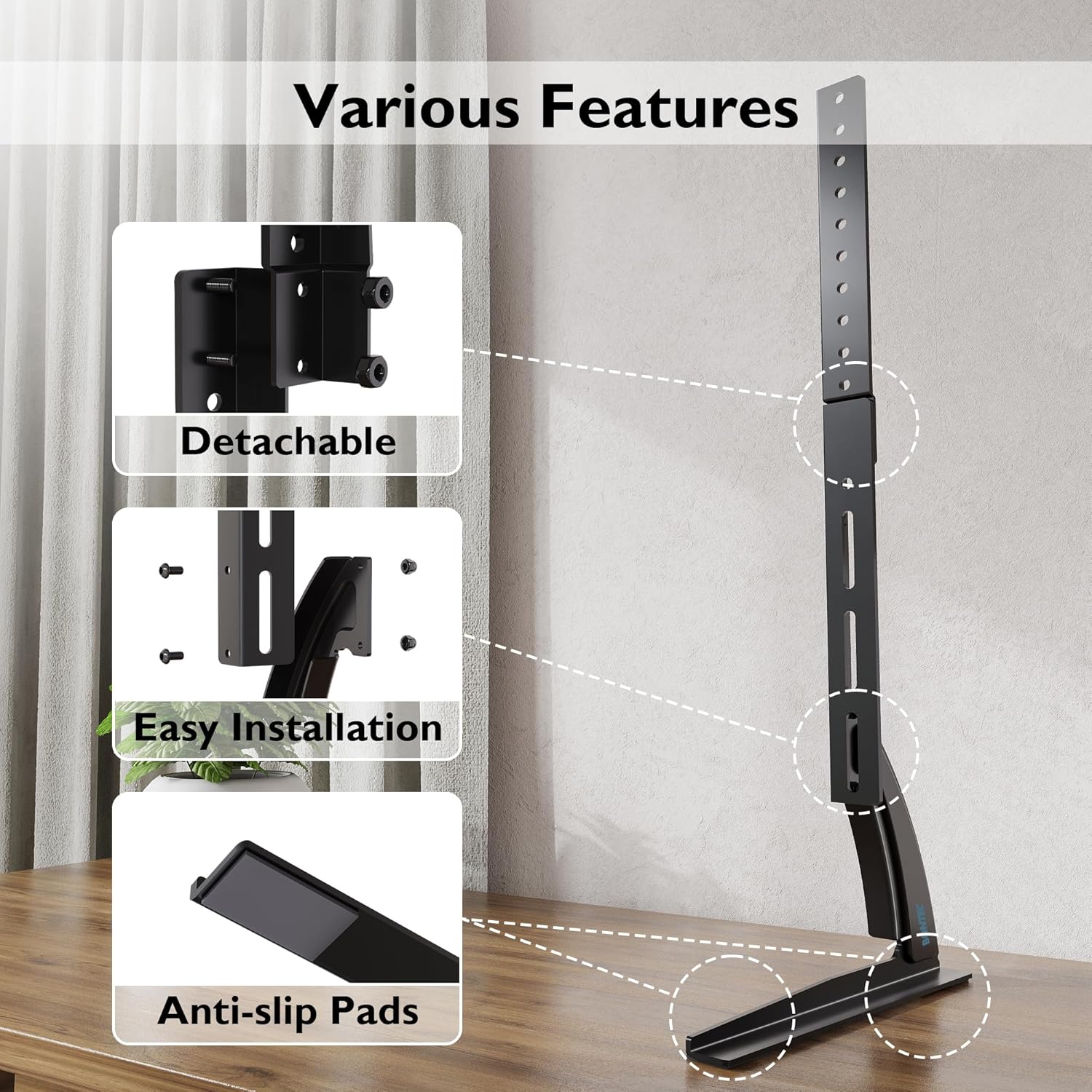
그림 4.4.2: This image compares the stability of the BONTEC stand, showing a TV securely upright, against another stand that appears unstable. It highlights the design's focus on keeping your TV safely in position.

그림 4.4.3: This image details key features of the stand, including its detachable components for easier assembly, the straightforward installation process, and the inclusion of anti-slip pads on the base for enhanced stability and surface protection.
5. 사용 설명서
Once assembled, the BONTEC TV stand is designed for fixed placement. The primary operation involves adjusting the TV's height during initial setup.
5.1 높이 조정
The stand offers three distinct height levels. To adjust the height:
- Carefully remove the TV from the mounting brackets.
- Adjust the position of the mounting brackets on the upright support column to your desired height level (Max, Mid, or Min).
- Re-mount the TV onto the adjusted brackets, ensuring it is securely locked in place.
Always ensure the TV is balanced and stable after any height adjustment.
6. 유지관리
Regular maintenance ensures the longevity and safety of your TV stand.
- 청소: 부드럽고 마른 천으로 스탠드를 닦으십시오. 마감재를 손상시킬 수 있는 연마성 세척제나 용제 사용은 피하십시오.
- 연결 확인: 모든 나사와 볼트가 단단히 조여져 있는지 정기적으로 점검하세요. 필요하면 다시 조이세요.
- 손상 여부 검사: Regularly inspect the stand for any signs of wear, damage, or instability. If damage is found, discontinue use and contact customer support.
7. 문제 해결
TV 스탠드에 문제가 발생하면 다음의 일반적인 문제와 해결 방법을 참조하세요.
| 문제 | 가능한 원인 | 해결책 |
|---|---|---|
| TV가 불안정하거나 흔들립니다. | Loose screws; uneven surface; TV too heavy; incorrect assembly | Ensure all screws are tightened. Place stand on a level surface. Verify TV weight is within limits. Review 조립 단계. |
| TV does not fit the stand | Incorrect VESA pattern; TV size outside range | Check your TV's VESA pattern against the stand's specifications. Confirm TV size is between 32-60 inches. |
| 부품이 누락되었습니다 | 포장 오류 | Contact BONTEC customer support with your purchase details. |
8. 사양
- 상표: 본텍
- 모델: B01ESPNXJW
- 장착 유형: 탁상 마운트
- 이동 유형: Fixed (Height adjustable during assembly)
- 호환 장치: 텔레비전
- Minimum Supported Screen Size: 32 인치
- Maximum Supported Screen Size: 60 Inches (Note: Some users report compatibility with up to 65 inches, but official specification is 60 inches)
- 최대 중량 용량: 50kg(110파운드)
- 품목 무게: 1.9 킬로그램
- VESA 호환성: 50x50mm, 75x75mm, 100x100mm, 200x100mm, 200x200mm, 300x200mm, 300x300mm, 400x200mm, 400x300mm, 400x400mm, 600x400mm, 800x400mm
- 조정 가능한 높이 수준: 3 levels (Max 700mm, Mid 640mm, Min 580mm from base to top of bracket)
9. 보증 및 지원
BONTEC products are manufactured to high-quality standards. For warranty information, technical support, or to report missing/damaged parts, please contact BONTEC customer service through the retailer where the product was purchased or visit the official BONTEC website. Please have your model number (B01ESPNXJW) and purchase date ready.