
1. 서론
This manual provides essential information for the proper installation, operation, and maintenance of your Comelit EX-7000H Secondary Mini Handsfree Color Monitor. Please read this manual thoroughly before using the device to ensure safe and efficient operation.
The Comelit EX-7000H is a secondary mini handsfree color monitor designed for door-entry systems. It features an electronic call function, a conversation button on the base, call volume control, privacy function, and a door open button. It also includes a supplementary button for additional services.
2. 안전 정보
- Ensure all electrical connections are made by qualified personnel and comply with local regulations.
- Do not expose the monitor to moisture, rain, or extreme temperatures.
- 열원 근처나 직사광선에 장치를 두지 마십시오.
- Do not attempt to open or repair the unit yourself. Refer all servicing to authorized Comelit service centers.
- Clean the monitor with a soft, dry cloth. Do not use abrasive cleaners or solvents.
3. 패키지 내용
모든 품목이 들어 있는지 확인하려면 패키지 내용물을 확인하세요.
- Comelit EX-7000H Secondary Mini Handsfree Color Monitor
- 마운팅 브래킷
- 장착 나사 및 벽면 플러그
- 취급 설명서(본 문서)
4. 제품 오버view
The Comelit EX-7000H monitor is designed for ease of use and integration into existing Comelit door-entry systems. Below is an image of the product and a description of its key features.
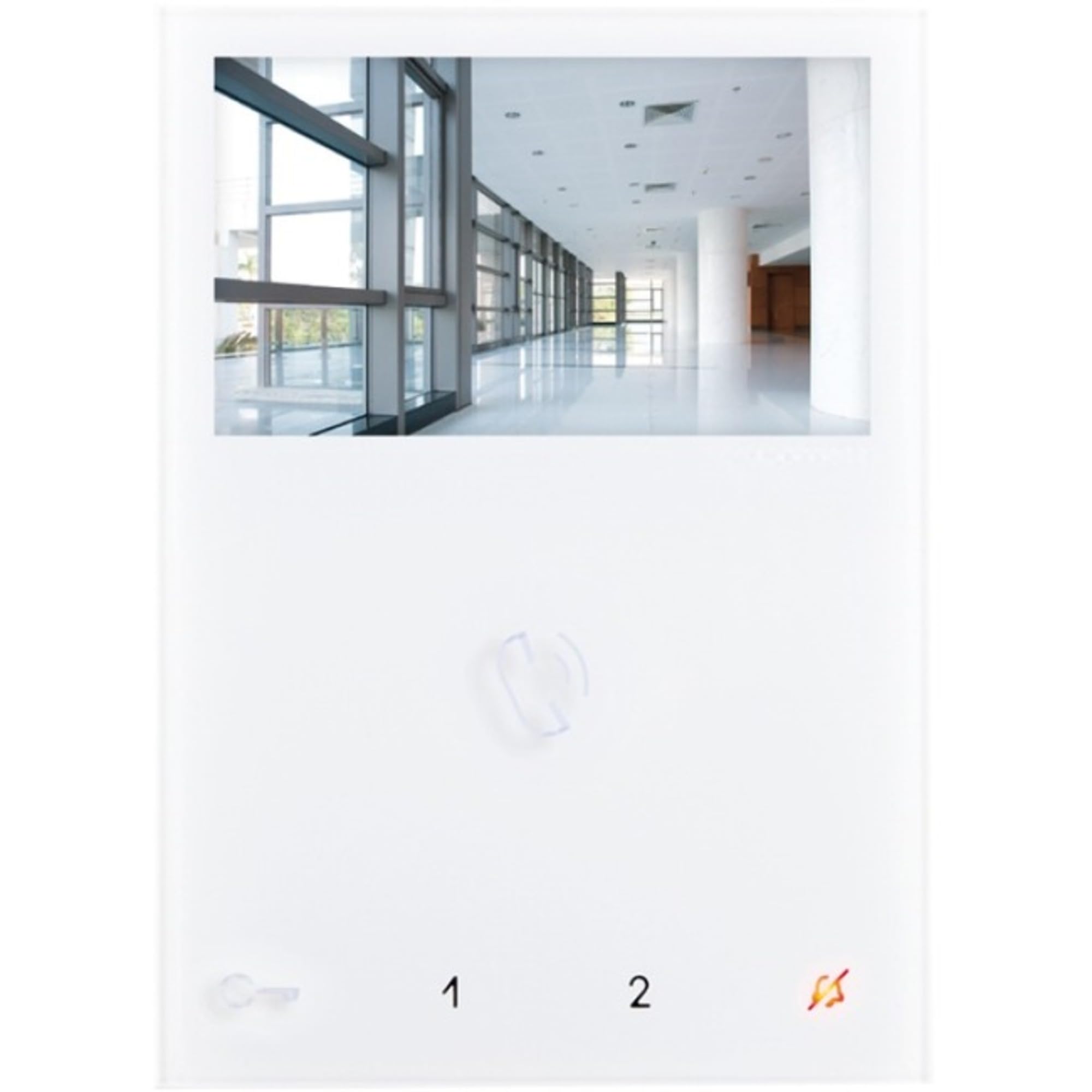
Image: Comelit EX-7000H Secondary Mini Handsfree Color Monitor. This image displays the front view of the monitor, showing the screen, buttons, and handset-free design.
- Handsfree Operation: Allows communication without lifting a handset.
- Electronic Call Function: Signals incoming calls from the door station.
- Conversation Button: Activates and deactivates audio communication.
- Call Volume Control: Adjusts the volume of the incoming call signal.
- Privacy Function: Disables audio and video for privacy.
- 문 열림 버튼: Activates the electric door lock.
- Supplementary Button: Provides an additional function, such as activating a secondary gate or light.
5. 설정 및 설치
Installation should be performed by a qualified technician. Ensure power to the system is disconnected before beginning installation.
- 장착 위치: Choose a suitable indoor location, away from direct sunlight, heat sources, and moisture. The monitor should be mounted at an ergonomic height for view잉 및 운영.
- 장착 브래킷 : 제공된 나사와 벽 플러그를 사용하여 장착 브래킷을 벽에 고정하십시오. 수평이 맞는지, 단단히 고정되었는지 확인하십시오.
- 배선: Connect the system wiring to the monitor's terminals according to the wiring diagram provided with your main door-entry system unit. Pay close attention to polarity and terminal designations.
- 모니터 연결: Carefully attach the Comelit EX-7000H monitor to the mounted bracket, ensuring it clicks securely into place.
- 전원 켜기: Restore power to the door-entry system. The monitor should power on and display the standby screen.
- 시스템 테스트: Perform a full system test to verify communication with the door station and proper functioning of all buttons (call, conversation, door open, supplementary).
6. 사용 설명서
전화 받기
- When a visitor presses the call button at the door station, the monitor will emit an electronic call tone and display the visitor's image.
- 를 누르세요 대화 버튼 (typically indicated by a microphone icon) to establish two-way audio communication with the visitor.
- 대화를 끝내려면 대화 버튼 again. The monitor will return to standby mode.
문을 여는 것
- During a conversation, or when viewing the door station, press the 도어 열림 버튼 (typically indicated by a key icon) to activate the electric door lock.
- The door will unlock for a preset duration.
Using the Supplementary Button
- 그만큼 Supplementary Button can be configured to activate an additional service, such as a secondary gate, an auxiliary light, or another connected device.
- Press this button to activate the assigned function. Refer to your system installer for specific configuration details.
통화 볼륨 조정
- 사용하세요 통화 볼륨 조절 (usually a slider or button on the side/bottom) to adjust the loudness of the incoming call tone.
프라이버시 기능
- 활성화 프라이버시 기능 (if available and configured) to temporarily disable incoming calls and video from the door station. This is useful when you do not wish to be disturbed.
- Deactivate the function to resume normal operation.
7. 유지관리
- 청소: Use a soft, dry, lint-free cloth to clean the monitor's screen and casing. Do not use liquid cleaners, aerosols, or abrasive materials, as these can damage the surface.
- 점검: Periodically check the monitor and its connections for any signs of damage or wear.
- 사용자가 수리할 수 없는 부품: The Comelit EX-7000H contains no user-serviceable parts. Any internal issues require professional servicing.
8. 문제 해결
| 문제 | 가능한 원인 | 해결책 |
|---|---|---|
| 화면이 나오지 않거나 검은 화면만 표시됩니다. | No power to the monitor; loose wiring connection; system fault. | Check power supply to the entire door-entry system. Verify all wiring connections are secure. If problem persists, contact a qualified technician. |
| No audio during conversation | Conversation button not activated; audio wiring issue; privacy function active. | Ensure the conversation button is pressed. Check system wiring. Deactivate privacy function if it is enabled. |
| Door open button not working | Wiring to door lock faulty; door lock mechanism issue; system configuration error. | Verify wiring to the door lock. Test the door lock independently if possible. Contact a technician for system configuration check. |
| Call tone too loud/quiet | Call volume not adjusted. | Adjust the call volume control on the monitor. |
If you encounter problems not listed here or if the suggested solutions do not resolve the issue, please contact Comelit technical support or a qualified installer.
9. 사양
| 모델 번호 | EX-7000H |
| 제품 치수 | 4.52 x 0.83 x 6.29인치 (95 x 215 x 58 mm) |
| 품목 무게 | 1.31파운드 |
| ASIN | B01EAXVDTO |
| 제조업체 | 코릿 |
| 유형 | Secondary Mini Handsfree Color Monitor |
| 특징 | Electronic call function, conversation button, call volume control, privacy function, door open button, supplementary button. |
10. 보증 및 지원
For warranty information and technical support, please refer to the official Comelit website or contact your local Comelit distributor. Keep your purchase receipt as proof of purchase for warranty claims.
You can find more information and contact details on the official Comelit web대지: www.comelitgroup.com