
HTC HTC 10
HTC 10 사용자 설명서
Model: HTC 10
1. 서론
This manual provides essential information for the safe and efficient use of your HTC 10 smartphone. Please read it thoroughly before operating your device.

Figure 1: HTC 10 Front View. This image shows the front of the HTC 10 smartphone, highlighting its 5.2-inch display, front camera, and capacitive buttons. The screen displays the current time, date, and weather information.
2. 상자 안에 무엇이 들어있나요?
제품 포장에 모든 품목이 들어 있는지 확인하세요.
- HTC 10 스마트폰
- USB 케이블
- Charger (may be foreign, a FREE US adapter will be included if so)
- 문서 (사용자 설명서, 안전 지침서)
3. 설정
3.1. SIM 카드 및 microSD 카드 삽입
Locate the SIM card tray on the side of the device. Use the provided SIM ejector tool to open the tray. Insert your Nano-SIM card and, if desired, a microSD card into their respective slots on the tray. Ensure the cards are correctly oriented before reinserting the tray into the phone.
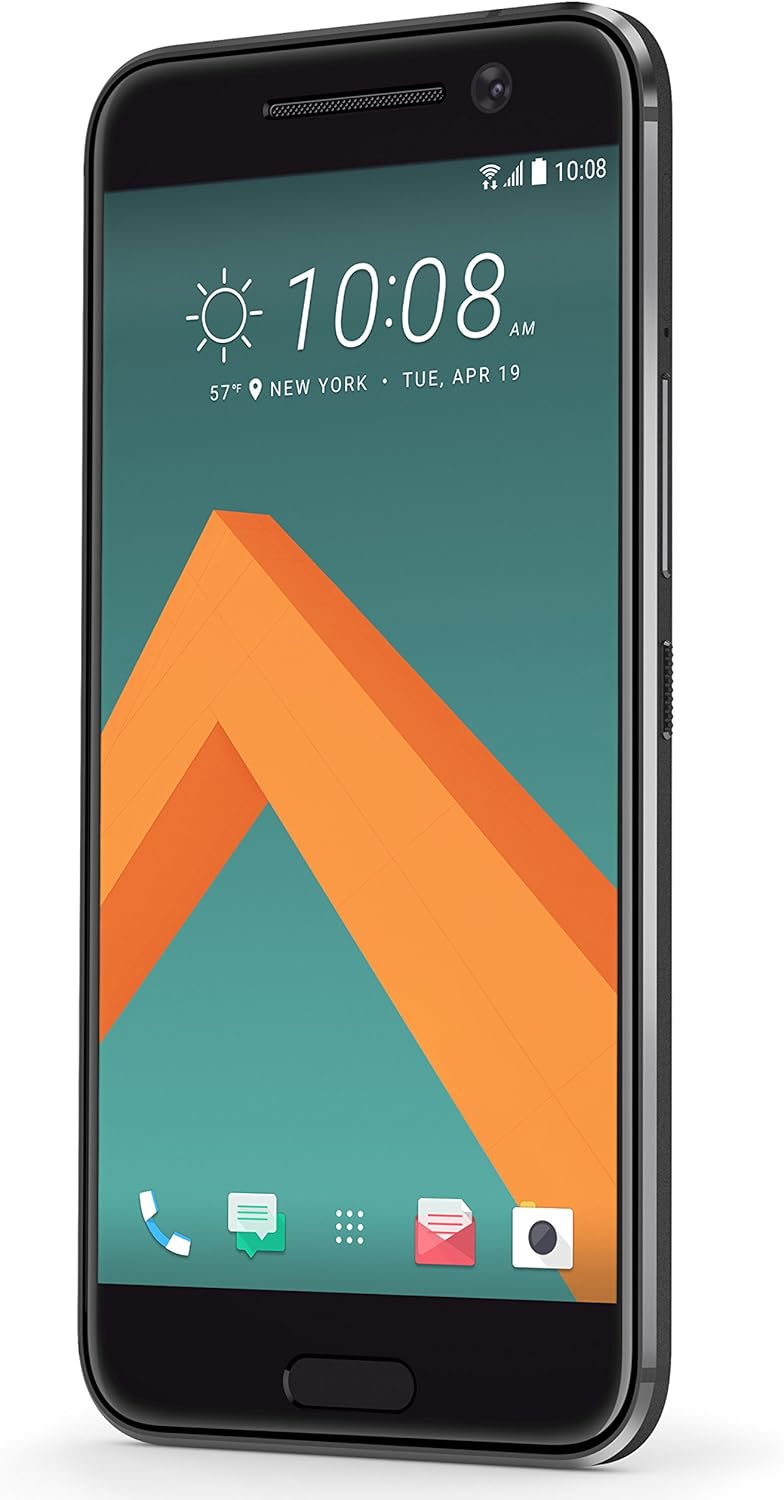
Figure 2: HTC 10 Side View. This image displays the right side of the HTC 10, where the power button and volume rocker are located. The SIM/microSD card tray is typically on the opposite side or top/bottom, but this view helps visualize the phone's profile.
3.2. 초기 전원 켜기 및 설정 마법사
Press and hold the power button located on the right side of the device until the HTC logo appears. Follow the on-screen instructions to complete the initial setup, including language selection, Wi-Fi connection, Google account sign-in, and security settings.
4. Operating Your HTC 10
4.1. 디스플레이 및 탐색
The HTC 10 features a 5.2-inch Super LCD5 capacitive touchscreen. Navigation is primarily touch-based. Use gestures such as tap, swipe, pinch-to-zoom, and long-press. The device includes capacitive navigation buttons below the screen for Back, Home, and Recent Apps.
4.2. 카메라 작동
Your HTC 10 is equipped with a 12 MP main camera (f/1.8, 26mm, OIS, laser autofocus, dual-LED flash) and a 5 MP front camera. To open the camera app, tap the camera icon on the home screen or lock screen. Tap the screen to focus, and press the shutter button to capture photos. Swipe left or right to switch between photo and video modes.

Figure 3: HTC 10 Rear View. This image shows the back panel of the HTC 10, featuring the prominent main camera lens, dual-LED flash, and the HTC brand logo.
4.3. 연결성
The HTC 10 supports various connectivity options:
- 와이파이: 인터넷 접속을 위해 무선 네트워크에 연결하세요.
- 블루투스: 헤드폰이나 스피커 등 무선 액세서리와 함께 사용하세요.
- USB: 데이터 전송 또는 충전을 위해 컴퓨터에 연결하세요.
- GSM Cellular: Compatible with GSM carriers such as AT&T and T-Mobile. Note: This is an international model and may not support LTE in the USA.
5. 유지관리
5.1. 기기 청소
Use a soft, lint-free cloth to clean the screen and body of your HTC 10. Avoid using abrasive cleaners or solvents, as they may damage the device's finish. For stubborn smudges, slightly damp천에 물을 적셔요.
5.2. 배터리 관리
The HTC 10 contains a non-removable Lithium Ion battery. To prolong battery life, avoid exposing the device to extreme temperatures. Charge the device using only the provided charger and USB cable. Avoid completely draining the battery frequently.
5.3. 소프트웨어 업데이트
Regularly check for and install software updates to ensure optimal performance and security. Updates can be found in the device's settings menu under "About phone" or "System updates."
6. 문제 해결
| 문제 | 가능한 해결책 |
|---|---|
| 장치 전원이 켜지지 않음 | 배터리가 충전되었는지 확인하세요. 충전기를 연결하고 몇 분 정도 기다린 후 다시 전원을 켜보세요. |
| 네트워크 신호가 약하거나 서비스가 제공되지 않습니다. | Check if your SIM card is properly inserted. Verify that your cellular carrier supports the bands for this international model. Restart the device. |
| 애플리케이션이 충돌하거나 정지됨 | Close and reopen the application. Clear the app's cache in settings. If the issue persists, restart the phone. |
| 배터리가 빨리 소모됩니다 | 화면 밝기를 줄이고, Wi-Fi나 블루투스처럼 사용하지 않는 기능을 끄고, 백그라운드에서 실행되는 앱을 종료하세요. |
7. 사양
- 모델: 에이치티씨 10
- 운영 체제: 안드로이드 6.0.1 마시멜로
- 표시하다: 5.2 inches Super LCD5 capacitive touchscreen, 1440 x 2560 resolution
- 프로세서: Dual-core 2.15 GHz & Dual-core 1.6 GHz, Qualcomm MSM8996 Snapdragon 820 CPU
- 숫양: 4GB (XNUMX기가바이트)
- 내부 저장소: 32GB (XNUMX기가바이트)
- 메인 카메라: 12 MP, f/1.8, 26mm, OIS, laser autofocus, dual-LED (dual tone) flash
- 전면 카메라: 5 MP
- 배터리: 1 Lithium Ion battery (included), Phone Talk Time: 27 Hours
- 치수: 7.64 x 5.91 x 0.14 인치
- 무게: 14.8온스(0.42킬로그램)
- 연결성: GSM, HSDPA, LTE (international bands), Wi-Fi, Bluetooth, USB, GPS
8. 보증 및 지원
This device is an international version. Please note that it may not include a US warranty, as some manufacturers do not honor warranties for international items. For specific warranty information and support, please contact the seller from whom you purchased the device.
For general product information and support resources, you may visit the official HTC website or the HTC Store on Amazon: HTC Store.
Ask a question about this manual
Ask about setup, troubleshooting, compatibility, parts, safety, or missing instructions. Manuals+ will review the question and use this page’s manual context to help answer it.