
1. 서론
This manual provides essential information for the safe and efficient operation of your KitchenAid 5KMT223GER 2-Slot Automatic Toaster. Please read all instructions carefully before first use and retain for future reference.

이미지 1.1: 앞면 view of the KitchenAid 5KMT223GER 2-Slot Automatic Toaster.
2. 중요 안전 지침
전기 제품을 사용할 때는 다음을 포함한 기본적인 안전 예방 조치를 반드시 따라야 합니다.
- 모든 지침을 읽으세요.
- 뜨거운 표면을 만지지 마십시오. 손잡이나 손잡이를 사용하십시오.
- 감전을 예방하려면 코드, 플러그 또는 토스터를 물이나 다른 액체에 담그지 마십시오.
- 어린이가 가전제품을 사용하거나 어린이 근처에서 사용할 때는 면밀한 감독이 필요합니다.
- 사용하지 않을 때와 세척하기 전에는 콘센트에서 플러그를 뽑으세요. 부품을 끼우거나 떼기 전에 식히세요.
- 전원 코드나 플러그가 손상된 경우, 또는 제품이 오작동하거나 떨어뜨리거나 어떤 식으로든 손상된 경우에는 제품을 작동하지 마십시오. 가까운 공인 서비스 센터에 제품을 가져가 점검, 수리 또는 조정을 받으십시오.
- 가전제품 제조업체가 권장하지 않는 부속품을 사용하면 부상을 입을 수 있습니다.
- 옥외에서는 사용하지 마십시오.
- 코드가 테이블이나 카운터 가장자리에 걸려 있거나 뜨거운 표면에 닿지 않도록 하세요.
- 뜨거운 가스나 전기 버너 근처 또는 가열된 오븐에 두지 마십시오.
- 연결을 끊으려면 모든 제어 장치를 "끄기"로 돌린 다음 벽면 콘센트에서 플러그를 뽑으세요.
- 본 제품을 본래 용도 외에는 사용하지 마십시오.
- 크기가 큰 음식이나 금속 호일 포장, 또는 주방용품을 토스터에 넣으면 화재나 감전의 위험이 있으므로 넣지 마세요.
- 토스터가 작동 중일 때 커튼, 휘장, 벽 등의 가연성 물질에 덮여 있거나 닿아 있으면 화재가 발생할 수 있습니다.
- 토스터의 전원이 꽂혀 있는 상태에서 음식을 꺼내려고 하지 마세요.
- 무인으로 조작하지 마십시오.
- Always remove the crumb tray for cleaning. Do not operate the toaster without the crumb tray in place.
3. 부품 및 특징
Familiarize yourself with the components of your KitchenAid 2-Slot Automatic Toaster:
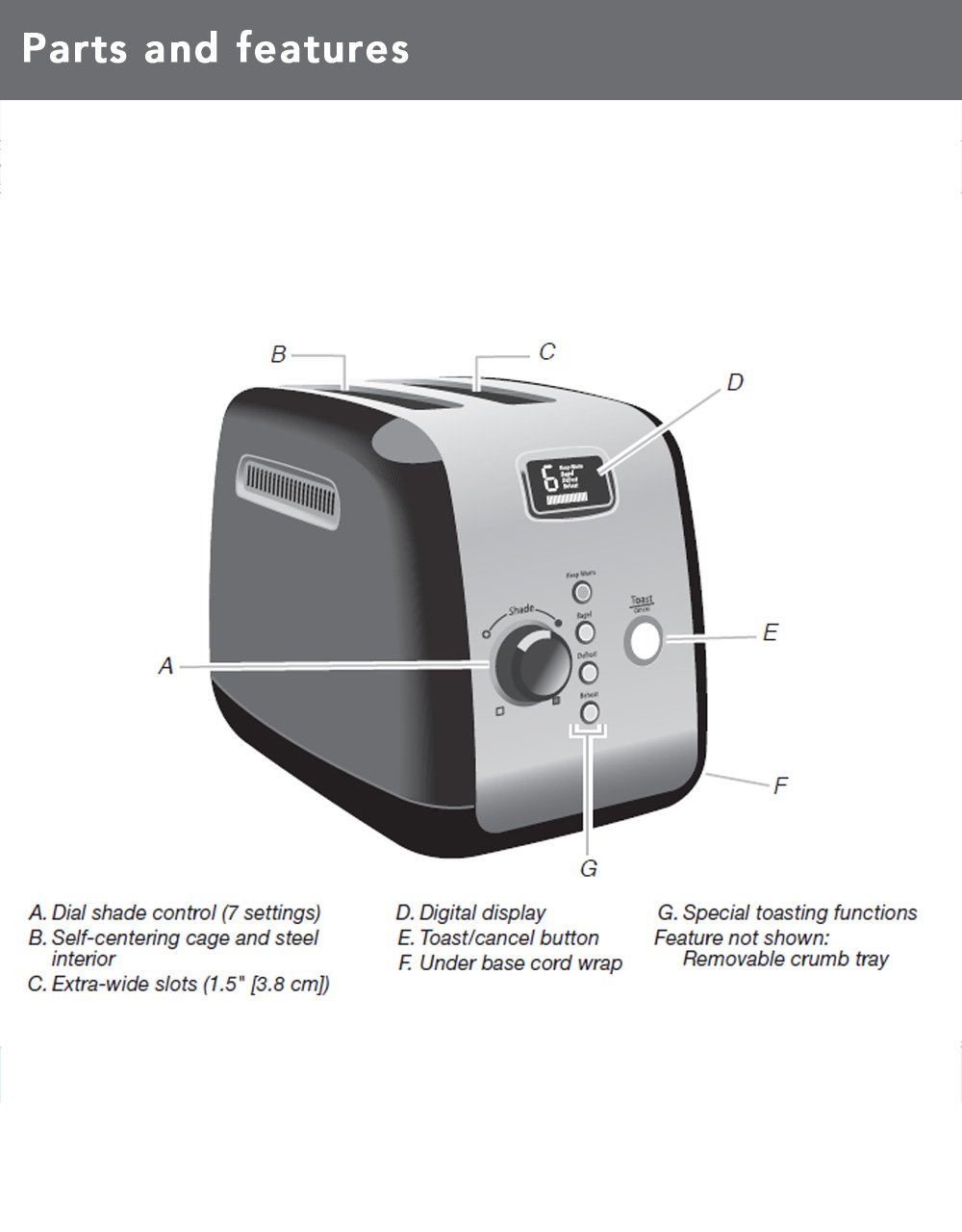
Image 3.1: Diagram illustrating the main parts and features of the toaster.
- Shade Control Dial (A): Adjusts the browning level with 7 settings.
- Self-Centering Bread Racks (B): Automatically centers bread for even toasting.
- Extra-Wide Slots (C): 3.8 cm (1.5 inches) wide slots accommodate various bread types.
- Digital Display (D): Shows selected shade setting and a countdown timer for toasting progress.
- Toast/Cancel Button (E): Initiates or cancels the toasting cycle. Features motorized lift.
- Under Base Cord Wrap (F): 편리한 코드 보관을 위해.
- Special Toasting Functions (G): Includes Keep Warm, Bagel, Defrost, and Reheat buttons.
- 이동식 부스러기 트레이: Located at the back for easy cleaning (not shown in diagram).
4. 설정
Before using your toaster for the first time:
- 토스터의 포장을 풀고 모든 포장재를 제거하세요.
- 토스터 외부를 광고로 닦으세요.amp 천으로 닦아주세요. 전원을 꽂기 전에 완전히 말려주세요.
- 토스터를 안정적이고 평평하며 내열성이 있는 표면에 놓고, 인화성 물질로부터 멀리 떨어진 곳에 두십시오.
- Ensure the crumb tray is properly inserted at the back of the toaster.
- For the first use, operate the toaster without bread on the highest shade setting (7) to burn off any manufacturing residues. A slight odor or smoke may be present; this is normal. Allow the toaster to cool completely.
5. 사용 설명서
Follow these steps to toast bread and use the special functions:

Image 5.1: Bread slices inserted into the toaster's extra-wide slots.
5.1 기본 토스트
- 토스터기를 접지된 콘센트에 꽂으세요.
- Place bread slices into the toasting slots. The self-centering racks will automatically adjust.
- 켜다 그늘 조절 다이얼 to select your desired browning level (1 for lightest, 7 for darkest). The digital display will show the selected shade.
- 를 누르세요 토스트/취소 버튼. The motorized lift will lower the bread into the slots, and the toasting cycle will begin. The digital display will show a countdown.
- Once the cycle is complete, the toaster will automatically raise the toasted bread.
- 언제든지 토스트 주기를 중지하려면 다음을 누르세요. 토스트/취소 버튼. The bread will be raised.
5.2 특수 기능
Your toaster includes dedicated buttons for specialized toasting needs:
- 따뜻하게 지내세요: Press this button after a toasting cycle to keep toasted food warm for up to one minute. The toaster will gently lower and raise the bread after the warming period.
- BAGEL : This function toasts the cut-side of a bagel while gently warming the outer surfaces. Insert bagels with the cut side facing inwards. Select your desired shade, then press the 베이글 버튼을 누른 후 토스트/취소 버튼.
- 해동 : Use this function to defrost and toast frozen food. Select your desired shade, then press the 해동 버튼을 누른 후 토스트/취소 버튼. The toaster will automatically adjust the toasting time.
- 재가열 : This function quickly reheats previously toasted food without further browning. Press the 재가열 버튼을 누른 후 토스트/취소 버튼.
6. 청소 및 유지 관리
정기적으로 청소하면 토스터의 성능을 최적화하고 수명을 연장할 수 있습니다.
6.1 부스러기 트레이

Image 6.1: The removable crumb tray for easy cleaning.
- 토스터를 청소하기 전에는 항상 플러그를 뽑고 완전히 식히십시오.
- Pull out the removable crumb tray located at the back of the toaster.
- Discard crumbs. The crumb tray can be washed in the top rack of a dishwasher or by hand with warm, soapy water. Rinse thoroughly and dry completely before reinserting.
- Never operate the toaster without the crumb tray properly inserted.
6.2 외관
- 토스터 외부를 광고로 닦으세요.amp 천으로 닦아서 완전히 말리세요.
- 표면이 긁힐 수 있으므로 연마성 세척제나 연마 패드를 사용하지 마십시오.
- 토스터를 물이나 다른 액체에 담그지 마십시오.
7. 문제 해결
If you experience issues with your toaster, refer to the following table for common problems and solutions:
| 문제 | 가능한 원인 | 해결책 |
|---|---|---|
| 토스터가 켜지지 않습니다. | 플러그가 꽂혀 있지 않음; 전원이 꺼짐tage; 회로 차단기가 작동했습니다. | 토스터가 정상적으로 작동하는 콘센트에 단단히 꽂혀 있는지 확인하세요. 가정용 회로 차단기를 확인하세요. |
| Bread does not lower or raise. | Toaster not powered; Toast/Cancel button not pressed; food jammed. | Ensure power is on. Press Toast/Cancel button. Unplug toaster and carefully remove any jammed food. |
| 토스트가 고르지 않음. | 빵 두께가 일정하지 않고, 빵 부스러기가 쌓입니다. | Ensure bread slices are of similar thickness. Clean crumb tray regularly. |
| 연기나 타는 냄새. | Food jammed; crumb buildup; high shade setting. | Immediately press Cancel. Unplug and allow to cool. Remove jammed food or clean crumb tray. Reduce shade setting for next use. |
If the problem persists after attempting these solutions, please contact KitchenAid customer support.
8. 사양
| 특징 | 세부 사항 |
|---|---|
| 모델 번호 | 5KMT223GER |
| 왓tage | 1100 와트 |
| 권tage | 220 볼트 |
| Slot Count | 2 |
| 음영 설정 | 7 |
| 특수 기능 | Keep Warm, Bagel, Defrost, Reheat, Cancel |
| 재료 | 금속 |
| 제품 크기(D x W x H) | 25D x 34W x 25.5H 센티미터 |
| 품목 무게 | 2200그램 |
| 포함된 구성 요소 | Pop-up Toaster, Removable Crumb Tray |
9. 보증 및 지원
Your KitchenAid 5KMT223GER 2-Slot Automatic Toaster is covered by a 2년 한정 보증 구매일로부터. 본 보증은 일반적인 가정용 사용 시 발생하는 재료 및 제조상의 결함을 보장합니다.
For warranty service, technical support, or to order replacement parts, please contact KitchenAid customer service. Keep your purchase receipt as proof of purchase for warranty claims.