
Vivolink VL120007
Vivolink HDBaseT VL120007 70m 4K HDMI Extender Kit User Manual
모델: VL120007
1. 서론
This user manual provides detailed instructions for the installation, operation, and maintenance of the Vivolink HDBaseT VL120007 70m 4K HDMI Extender Kit. This kit is designed to extend 4K HDMI signals up to 70 meters over a single Cat5e/6 cable, supporting bi-directional IR and CEC.
The Vivolink VL120007 is a premium quality product, ensuring reliable and high-performance signal transmission for various professional and home theater applications.
2. 제품 오버view
The Vivolink VL120007 kit consists of a Transmitter unit and a Receiver unit. Both units are compact and designed for easy integration into existing setups.
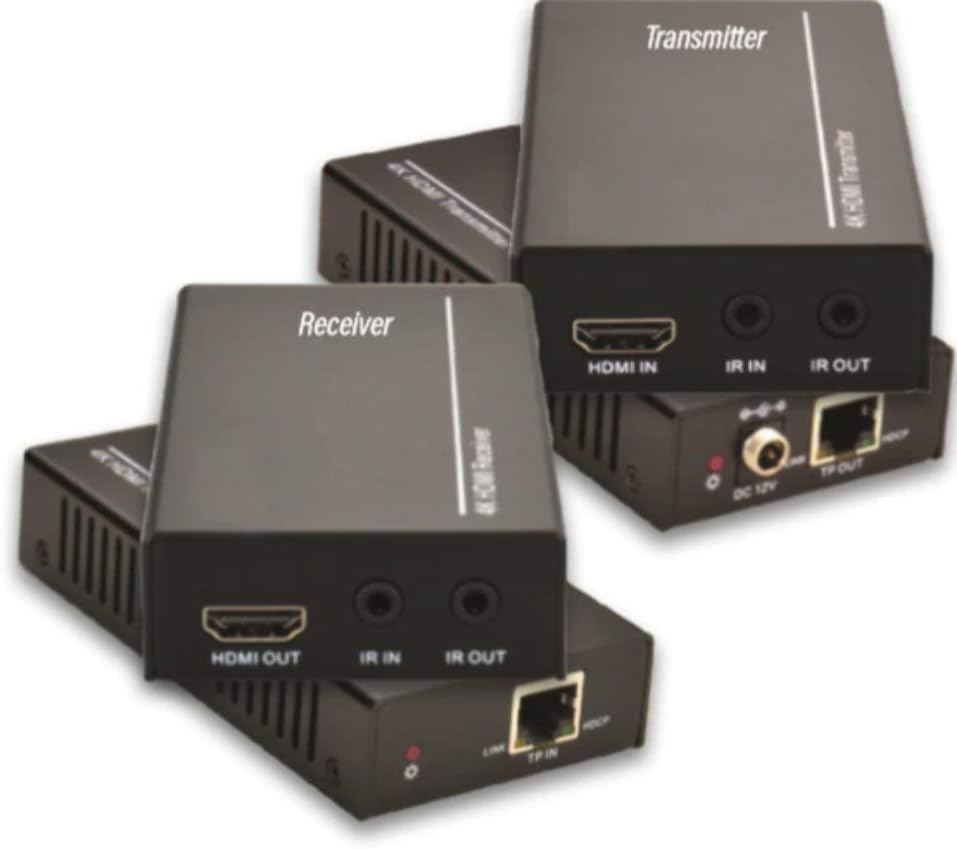
Figure 2.1: Vivolink HDBaseT VL120007 Transmitter (top) and Receiver (bottom) units. The Transmitter unit features HDMI IN, IR IN, IR OUT, DC 12V power input, and TP-OUT (HDBaseT) ports. The Receiver unit features HDMI OUT, IR IN, IR OUT, and TP-IN (HDBaseT) ports.
2.1. 주요 특징
- Extends 4K HDMI signals up to 70 meters (230 feet) over a single Cat5e/6 cable.
- Supports HDMI 1.4 and HDCP 2.2 compliant.
- Bi-directional IR pass-through for controlling source or display devices.
- Supports CEC (Consumer Electronics Control) functionality.
- 간편한 설치를 위한 컴팩트한 디자인.
- Includes one Power Supply Unit (PSU).
3. 패키지 내용
Please verify that all items are present and in good condition upon opening the package. If any items are missing or damaged, please contact your vendor.
- 1x Vivolink HDBaseT Transmitter Unit (VL120007-TX)
- 1x Vivolink HDBaseT Receiver Unit (VL120007-RX)
- 1x 12V DC Power Supply Unit
- 1x IR 블래스터 케이블
- 1x IR 수신기 케이블
- 1x 사용자 매뉴얼(이 문서)
4. 설정 및 설치
Before beginning installation, ensure all devices are powered off and disconnected from their power sources.
4.1. 연결 다이어그램
The following diagram illustrates a typical connection setup for the Vivolink VL120007 extender kit.
(A detailed connection diagram would typically be placed here. For illustration, imagine a diagram showing Source -> Transmitter -> Cat Cable -> Receiver -> Display.)
4.2. 설치 단계
- Connect an HDMI cable from your source device (e.g., Blu-ray player, media streamer) to the HDMI 입력 항구에 송신기 단위.
- Connect a single Cat5e/6 cable (recommended Cat6 for optimal performance) from the TP-OUT 항구에 송신기 단위에 TP-IN 항구에 수화기 unit. Ensure the cable is properly terminated with RJ45 connectors following TIA/EIA-568B wiring standards.
- HDMI 케이블을 연결하세요 HDMI 출력 항구에 수화기 unit to your display device (e.g., TV, projector).
- For IR control, connect the IR Blaster cable to the IR 아웃 port on the unit that will send the IR signal (e.g., Transmitter for controlling source, Receiver for controlling display). Position the IR emitter head directly over the IR sensor of the device to be controlled.
- IR 수신기 케이블을 연결하세요 IR로 port on the unit that will receive the IR signal. Position the IR receiver head in a location where it can receive signals from your remote control.
- Connect the included 12V DC Power Supply Unit to the 직류 12V port on either the Transmitter or Receiver unit. The system supports Power over Cable (PoC), meaning only one power supply is needed for both units.
- Power on all connected devices (source, display, and extender units).
5. 사용 설명서
Once all connections are made and power is supplied, the Vivolink VL120007 extender kit should automatically establish a connection and transmit the HDMI signal.
5.1. LED 표시기
Both the Transmitter and Receiver units feature LED indicators to show their status:
- 전원 LED: 전원이 공급되면 표시등이 켜집니다.
- 링크 LED : Illuminates when a stable HDBaseT link is established between the Transmitter and Receiver units.
- 데이터 LED: May flash to indicate active HDMI data transmission.
5.2. IR 제어
The bi-directional IR pass-through allows you to control your source device from the display location or your display device from the source location. Ensure the IR Blaster and IR Receiver cables are correctly positioned.
5.3. CEC 기능
The extender kit supports CEC (Consumer Electronics Control), allowing compatible devices to communicate and control each other over the HDMI connection. This feature typically works automatically if supported by your source and display devices.
6. 유지관리
The Vivolink VL120007 extender kit requires minimal maintenance.
- 제품을 서늘하고 건조한 곳에 보관하고 직사광선, 열원 및 과도한 습기를 피하십시오.
- Clean the units with a soft, dry cloth. Do not use liquid or aerosol cleaners.
- 과열을 방지하기 위해 장치 주변의 적절한 환기를 확보하세요.
- 정기적으로 케이블 연결을 점검하여 안전한지 확인하세요.
7. 문제 해결
If you encounter issues with your Vivolink VL120007 extender kit, please refer to the following common troubleshooting steps:
| 문제 | 가능한 원인 | 해결책 |
|---|---|---|
| 영상/음성 출력이 없습니다. |
|
|
| IR 제어가 작동하지 않습니다. |
|
|
| 신호가 간헐적으로 깜빡이거나 점멸합니다. |
|
|
If the problem persists after trying these steps, please contact Vivolink customer support for further assistance.
8. 사양
| 특징 | 세부 사항 |
|---|---|
| 모델 번호 | VL120007 |
| 상표 | 비볼링크 |
| HDMI 준수 | HDMI 1.4 |
| HDCP 준수 | 한국어: HDCP 2.2 |
| 최대 해상도 지원 | 4K(UHD) |
| 전송 거리 | Up to 70 meters (230 feet) for 4K over Cat5e/6 |
| 케이블 요구 사항 | Single Cat5e/6/7 cable |
| IR 통과 | 양방향 |
| CEC 지원 | 예 |
| 전원 공급 장치 | 12V DC (PoC supported) |
| 품목 무게 | 1.21킬로그램(약 2.67파운드) |
| 제조업체 | 비볼링크 |
9. 보증 정보
Specific warranty details are not provided in the product information. Please refer to the warranty card included with your product or contact your point of purchase for detailed warranty terms and conditions.
10. 고객 지원
For technical support, troubleshooting assistance beyond this manual, or warranty inquiries, please contact Vivolink customer support or your authorized dealer.
Please have your model number (VL120007) and purchase information ready when contacting support.
Ask a question about this manual
Ask about setup, troubleshooting, compatibility, parts, safety, or missing instructions. Manuals+ will review the question and use this page’s manual context to help answer it.