
Ampire DVX104
AMPIRE DVX104 DVD Player with USB Interface User Manual
Model: DVX104 | Brand: Amp분노
1. 서론
선택해주셔서 감사합니다 AMPIRE DVX104 DVD Player with USB Interface. This compact 3/4 DIN unit is designed to provide versatile media playback in various installations, supporting a wide range of audio and video formats. This manual provides essential information for proper installation, operation, and maintenance of your device. Please read it thoroughly before use.
2. 안전 정보
- Ensure the device is installed by a qualified professional to prevent damage or injury.
- 제품을 습기, 비 또는 극한 온도에 노출시키지 마십시오.
- 유지관리나 설치를 수행하기 전에 전원을 분리하세요.
- 지정된 전원(12V DC)만 사용하십시오.
- 환기구를 막지 마십시오.
- 어린이의 손이 닿지 않는 곳에 보관하세요.
3. 패키지 내용
패키지에 모든 품목이 들어 있는지 확인하세요.
- AMPIRE DVX104 DVD Player Unit
- IR 원격 제어
- 외부 IR 수신기
- 장착 브래킷 및 나사
- 사용 설명서 (본 문서)

Image: Included mounting brackets and various screws for installation.
4. 제품 오버view
4.1 전면 패널

이미지: AMPIRE DVX104 DVD player, showing the disc slot, USB port, and control buttons with blue illumination.
The front panel features the disc slot, a USB port, and essential control buttons for power, play/pause, stop, source selection, track navigation, and disc eject. The buttons are illuminated with a blue night design.
4.2 리모컨
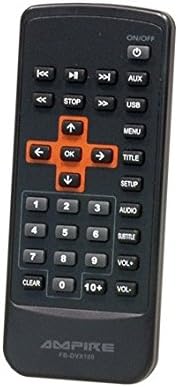
Image: The infrared remote control for the DVX104, featuring navigation, playback, volume, and menu buttons.
The included IR remote control provides full functionality, allowing you to control playback, navigate menus, adjust volume, and select input sources from a distance. Ensure the external IR receiver is positioned correctly for optimal signal reception.
5. 설정 및 설치
The DVX104 is designed for flexible installation, supporting both vertical and horizontal mounting positions. It is a 3/4 DIN size unit, suitable for various integration scenarios, including automotive or home entertainment systems.

이미지: 전ample installation of the DVX104 unit discreetly integrated into a vehicle's center console.
5.1 장착
- Choose a suitable location for installation, considering ventilation and accessibility for disc insertion/removal.
- Use the provided mounting brackets and screws to secure the unit. The unit can be mounted vertically or horizontally.
- Ensure the mounting surface is stable and can support the unit's weight (approx. 1.6 kg).
5.2 배선 연결
- 전원 연결: Connect the unit to a 12V DC power source. The maximum power consumption is 15W. The unit consumes 0W when the ignition is off.
- AV 출력 : Connect the 1 AV output to your display device (e.g., television, monitor) using appropriate cables. The video signal is 1Vp-p, and the audio signal is 6Vss (2.1V RMS).
- 외부 IR 수신기: Plug in the external IR receiver and position it where it has a clear line of sight to your remote control.
6. 사용 설명서
6.1 디스크 재생
- Insert a compatible disc (DVD, SVCD, MVCD, MSVCD, VCD1.0/2.0, CD-DA) into the disc slot. The unit will automatically begin playback.
- Use the remote control or front panel buttons for Play/Pause, Stop, and track navigation.
- The unit features a "last position memory" function for disc operation, allowing you to resume playback from where you left off (not applicable for MPEG4 file에스).
6.2 USB 미디어 재생
- Insert a USB stick (up to 8GB) or a 2.5-inch hard drive (up to 80GB, FAT32 formatted) into the USB port.
- If the hard drive is not recognized, it may require an external power supply.
- Use the "SRC" (Source) button on the front panel or remote to switch to USB input.
- 미디어 탐색 files (MPEG4, WMA, MP3, JPEG) using the remote control.
6.3 온스크린 디스플레이(OSD) 메뉴
The unit features a German on-screen operating menu. Use the remote control's navigation buttons to access and adjust settings such as audio output, video settings, and system preferences.
6.4 지원되는 형식
- 동영상: DVD, SVCD, MVCD, MSVCD, VCD1.0, VCD2.0, MPEG4 (Video encoding: MPEG-2)
- 오디오: WMA, CD-DA, MP3, Dolby Digital Audio format
- 이미지: 제이피
7. 유지관리
- Clean the unit's exterior with a soft, dry cloth. Do not use abrasive cleaners or solvents.
- Keep the disc slot free from dust and debris.
- 과열을 방지하려면 장치 주변에 적절한 환기가 이루어지도록 하십시오.
8. 문제 해결
| 문제 | 가능한 원인 | 해결책 |
|---|---|---|
| 전원이 없습니다 | Incorrect power connection; Blown fuse | Check 12V DC power supply and connections. Verify fuse. |
| 디스크 재생이 안됨 | 디스크가 더럽거나 긁혔습니다. 디스크 형식이 호환되지 않습니다. | Clean the disc. Ensure the disc format is supported (DVD, VCD, CD-DA). |
| USB 장치가 인식되지 않습니다 | Incorrect format (not FAT32); Device requires external power; USB device capacity too large | Ensure USB device is FAT32 formatted. For HDDs, try with external power. Check capacity limits (8GB for sticks, 80GB for HDDs). |
| 리모컨 응답 없음 | Batteries are dead; IR receiver blocked or misplaced | Replace remote control batteries. Ensure IR receiver has a clear line of sight to the remote. |
| 비디오 출력이 없습니다 | AV cable not connected properly; Incorrect input selected on display device | Check AV cable connections. Select the correct AV input on your television/monitor. |
9. 사양
| 특징 | 세부 사항 |
|---|---|
| 모델 | DVX104 |
| 치수(폭 x 높이) | 159 x 43mm |
| 설치 깊이 | 164mm (XNUMXmm) |
| 무게 | 1.6kg |
| 운영 볼륨tage | 12V 직류 |
| 최대 전력 소비량 | 15와트 |
| Power Consumption (Ignition Off) | 0W(0.0 Amp오히려) |
| 비디오 신호 | 1Vp-p |
| 오디오 신호 | 6Vss (2.1V RMS) |
| 오디오 출력 모드 | 서라운드(2.0 채널) |
| USB 지원 | USB sticks up to 8GB, 2.5" HDDs up to 80GB (FAT32) |
| 지원되는 디스크 형식 | DVD, SVCD, MVCD, MSVCD, VCD1.0, VCD2.0, CD-DA |
| 지원되는 미디어 형식 | MPEG4, WMA, MP3, JPEG |
| 규정 준수 | RoHS compliant, E8 10R-03 1242 |
10. 보증 및 지원
This product is licensed and approved. For warranty information and technical support, please refer to the documentation provided with your purchase or contact your local Ampire dealer. Keep your proof of purchase for warranty claims.
Ask a question about this manual
Ask about setup, troubleshooting, compatibility, parts, safety, or missing instructions. Manuals+ will review the question and use this page’s manual context to help answer it.