
1. 서론
구매해주셔서 감사합니다asing the Axess 2.1 HiFi Bluetooth Speaker SPBT1038BK. This portable speaker system is designed to provide clear audio and robust bass, suitable for various environments. It features Bluetooth connectivity, USB and SD card support, and a line-in function for versatile audio playback. This manual provides essential information for the safe and efficient use of your speaker.
주요 특징은 다음과 같습니다.
- 2.1 outdoor passive HIFI Bluetooth speaker with 3-inch subwoofer.
- Secure and simple Bluetooth pairing with an operating range of up to 32 feet (10 meters).
- Support for USB drives, SD cards, and a line-in function for compatibility with various audio devices.
- Integrated slide panel control for volume adjustment.
- Durable leather handle for convenient portability.
- Built-in 1000mAh Lithium rechargeable battery.
2. 안전 정보
본 제품을 사용하기 전에 모든 안전 지침을 주의 깊게 읽어 주십시오. 이 지침을 따르지 않을 경우 감전, 화재 또는 기타 위험이 발생할 수 있습니다.
- 스피커를 극한의 온도, 직사광선 또는 높은 습도에 노출시키지 마세요.
- 스피커를 떨어뜨리거나 강한 충격을 주지 마십시오.
- Do not disassemble, repair, or modify the unit. Refer all servicing to qualified personnel.
- 스피커를 물이나 기타 액체로부터 멀리 두십시오.
- 제공된 충전 케이블이나 인증된 동등 제품만 사용하세요.
- 스피커를 작동할 때는 적절한 환기를 확보하세요.
- 배터리는 해당 지역 규정에 따라 폐기하십시오. 배터리를 과도한 열에 노출시키지 마십시오.
3. 패키지 내용
패키지에 모든 품목이 들어 있는지 확인하세요.
- Axess SPBT1038BK Bluetooth Speaker
- USB 충전 케이블
- 3.5mm Audio (AUX) Cable
- 사용자 설명서
4. 제품 오버view
스피커의 구성 요소와 제어 장치에 대해 알아보세요.
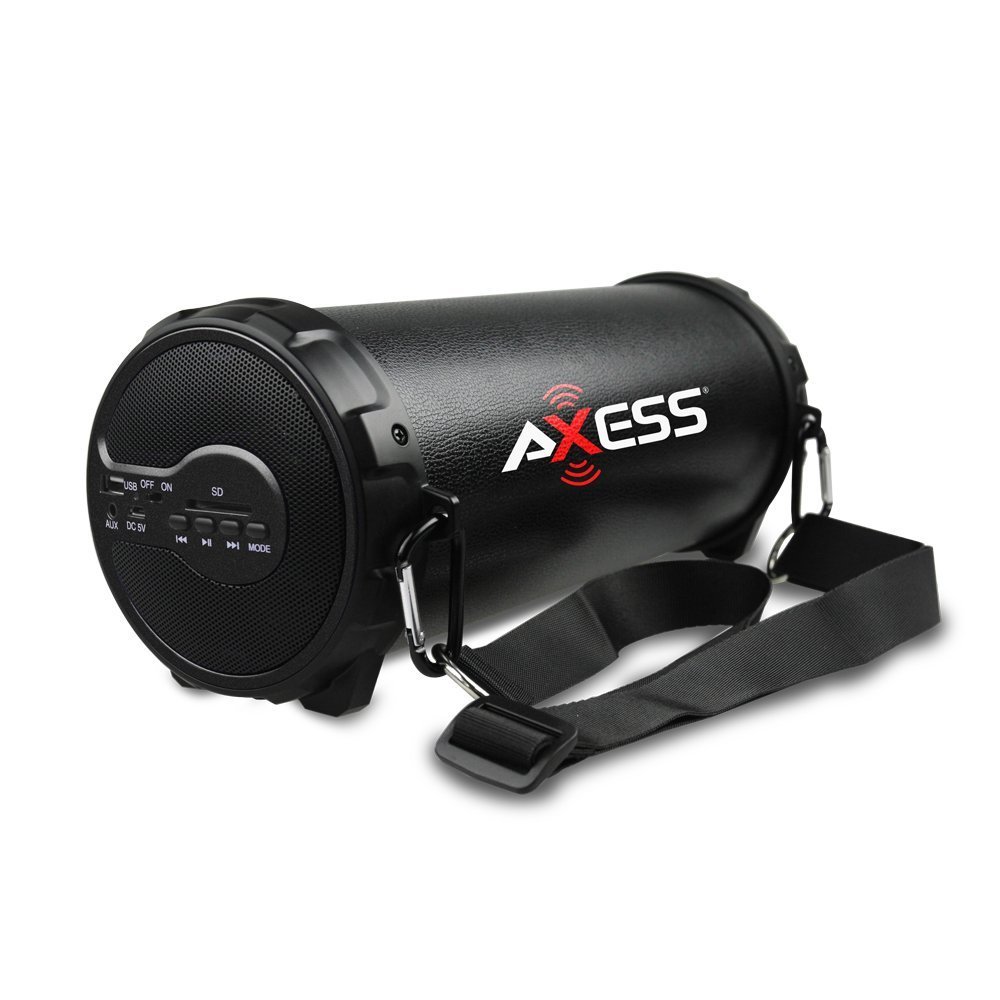
그림 1: 전면 view of the Axess SPBT1038BK Bluetooth Speaker, showcasing the speaker grille and overall design.

그림 2: 측면 view of the Axess SPBT1038BK, illustrating the control panel and input ports.
Controls and Ports (Typical Layout)
- 전원 버튼: 길게 눌러 스피커를 켜거나 끌 수 있습니다.
- 모드 버튼: Short press to switch between Bluetooth, AUX, USB, and SD card modes.
- 볼륨 슬라이더 : Slide to adjust the master volume level.
- 재생/일시 정지 버튼: In Bluetooth/USB/SD mode, press to play or pause audio.
- 이전/다음 트랙 버튼: In Bluetooth/USB/SD mode, press to skip tracks.
- USB 포트: 오디오 재생을 위해 USB 플래시 드라이브를 연결하는 데 사용합니다.
- SD 카드 슬롯: 오디오 재생을 위해 SD 메모리 카드를 삽입하세요.
- AUX 입력(3.5mm): 3.5mm 오디오 케이블을 통해 외부 오디오 장치를 연결하는 데 사용합니다.
- DC 5V 충전 포트: For connecting the USB charging cable to recharge the battery.
5. 설정
5.1 배터리 충전
- Connect the small end of the USB charging cable to the DC 5V charging port on the speaker.
- USB 충전 케이블의 큰 쪽 끝을 USB 전원 어댑터(포함되지 않음)나 컴퓨터의 USB 포트에 연결합니다.
- 충전 표시등(있는 경우)은 충전 중에 켜지며, 일반적으로 빨간색입니다.
- Once fully charged, the indicator light may change color (e.g., turn off or turn blue/green). A full charge takes approximately 3-4 hours.
참고: 최적의 배터리 수명을 위해, 처음 사용하기 전에 스피커를 완전히 충전하세요.
5.2 전원 켜기/끄기
- To turn ON: Press and hold the 전원 버튼 음성 안내가 들리거나 표시등이 켜질 때까지 몇 초간 기다려 주세요.
- 전원을 끄려면: 버튼을 길게 누르세요 전원 버튼 다시 몇 초 동안.
5.3 블루투스 페어링
- Ensure the speaker is powered ON and in Bluetooth mode. If not, press the 모드 버튼 until you hear a Bluetooth pairing prompt. The Bluetooth indicator light will typically flash.
- 모바일 기기(스마트폰, 태블릿 등)에서 Bluetooth를 활성화하세요.
- 검색 available Bluetooth devices. You should see "SPBT1038BK" or a similar name in the list.
- Select "SPBT1038BK" to connect. Once paired, you will hear a confirmation tone, and the Bluetooth indicator light will stop flashing and remain solid.
- 이제 스피커를 통해 기기의 오디오를 재생할 수 있습니다.
참고: 스피커는 전원을 켜면 마지막으로 페어링된 장치에 자동으로 다시 연결을 시도합니다.
5.4 Connecting via AUX Input
- 3.5mm 오디오 케이블의 한쪽 끝을 스피커의 AUX 입력 포트에 연결하십시오.
- Connect the other end of the 3.5mm audio cable to the headphone jack or audio output of your external device (e.g., MP3 player, computer, TV).
- 를 누르세요 모드 버튼 on the speaker until it enters AUX mode.
- 외부 장치에서 오디오를 재생합니다.
5.5 USB/SD 카드 사용
- USB 플래시 드라이브를 삽입하세요 USB 포트 또는 SD 카드를 SD 카드 슬롯. Ensure the card is inserted correctly.
- The speaker should automatically switch to USB or SD card mode and begin playing audio files. 그렇지 않은 경우 다음을 누릅니다. 모드 버튼 올바른 모드를 선택하세요.
- 재생/일시 정지 및 이전/다음 트랙 버튼을 사용하여 재생을 제어합니다.
6. 스피커 작동
6.1 볼륨 조절
Adjust the overall volume by sliding the 볼륨 슬라이더 on the speaker. You can also control the volume from your connected Bluetooth device or external audio source.
6.2 재생 제어
- 재생/일시 중지: 를 누르세요 재생/일시정지 버튼 to toggle between playing and pausing audio.
- 다음 트랙: 를 누르세요 다음 트랙 버튼 다음 노래로 건너뜁니다.
- 이전 트랙 : 를 누르세요 이전 트랙 버튼 to go back to the beginning of the current song or to the previous song.
Note: Playback controls are primarily functional in Bluetooth, USB, and SD card modes. For AUX mode, control playback directly from your connected device.
7. 유지관리
7.1 청소
- 청소하기 전에는 항상 스피커 전원을 끄십시오.
- 부드럽고 마른 천으로 외부 표면을 닦으세요.
- 연마성 세척제, 왁스, 용제를 사용하지 마세요.
- 어떠한 구멍에도 습기가 들어가지 않도록 주의하세요.
7.2 보관
- 스피커는 직사광선과 극한의 온도를 피해 시원하고 건조한 곳에 보관하세요.
- 장기간 보관할 경우, 배터리 수명 유지를 위해 몇 달에 한 번씩 배터리를 약 50%까지 충전하십시오.
7.3 배터리 관리
- 배터리를 과충전하지 마십시오. 배터리가 완전히 충전되면 충전기를 분리하십시오.
- 배터리를 자주 완전히 방전시키지 마십시오. 배터리 수명이 단축될 수 있습니다.
8. 문제 해결
스피커에 문제가 발생하면 다음의 일반적인 문제와 해결 방법을 참조하세요.
| 문제 | 가능한 원인 | 해결책 |
|---|---|---|
| 스피커의 전원이 켜지지 않습니다. | 배터리가 소진되었습니다. | 제공된 USB 케이블을 사용하여 스피커를 충전하세요. |
| 소리가 나지 않습니다. | 볼륨이 너무 낮습니다. 잘못된 모드를 선택했습니다. 장치가 제대로 연결되지 않았습니다. | Increase speaker volume and device volume. Ensure the correct mode (Bluetooth, AUX, USB, SD) is selected. Reconnect the device. |
| 블루투스 페어링에 실패했습니다. | 스피커가 페어링 모드가 아닙니다. 기기의 Bluetooth가 꺼져 있습니다. 스피커와의 거리가 너무 멀습니다. | Ensure speaker is in Bluetooth pairing mode. Turn device Bluetooth ON. Move device closer to speaker (within 32 feet). Forget previous pairings on your device and try again. |
| USB/SD 카드가 재생되지 않습니다. | 잘못된 모드입니다. 지원되지 않습니다. file 형식 오류; 손상된 미디어. | Ensure speaker is in USB or SD mode. Check if audio files are in a supported format (e.g., MP3). Try a different USB drive or SD card. |
| 오디오 품질이 좋지 않습니다. | Low battery; device too far (Bluetooth); interference. | Charge the speaker. Move the Bluetooth device closer. Avoid sources of wireless interference. |
9. 사양
| 특징 | 사양 |
|---|---|
| 모델 | SPBT1038BK |
| 스피커 유형 | 2.1 HiFi Outdoor Passive Bluetooth Speaker with 3-inch Subwoofer |
| 연결 기술 | 블루투스 |
| 블루투스 작동 범위 | 최대 32피트(10미터) |
| 전원 | 배터리 구동 |
| 배터리 유형 | 리튬 이온 |
| 배터리 용량 | 1000mAh |
| 품목 무게 | 1.16kg(2.56파운드) |
| 제품 크기(L x W x H) | 29.21 x 11.43 x 11.43cm(11.5 x 4.5 x 4.5인치) |
| 특별 기능 | Portable, USB/SD Card Support, Line-in Function |
10. 보증 및 지원
This product is covered by a limited warranty. For specific warranty terms and conditions, please refer to the documentation provided with your purchase or contact Axess customer support.
For technical assistance, troubleshooting not covered in this manual, or general inquiries, please visit the official Axess web사이트 또는 고객 서비스 부서에 문의하세요. 연락처 정보는 일반적으로 제품 포장이나 제조업체의 web대지.